> ## Documentation Index
> Fetch the complete documentation index at: https://docs.didit.me/llms.txt
> Use this file to discover all available pages before exploring further.
# Blocklist users
> Auto-decline fraudulent verifications by blocklisting documents, faces, phone numbers, and emails. Stop identity fraud, multi-accounting, and repeat offenders.
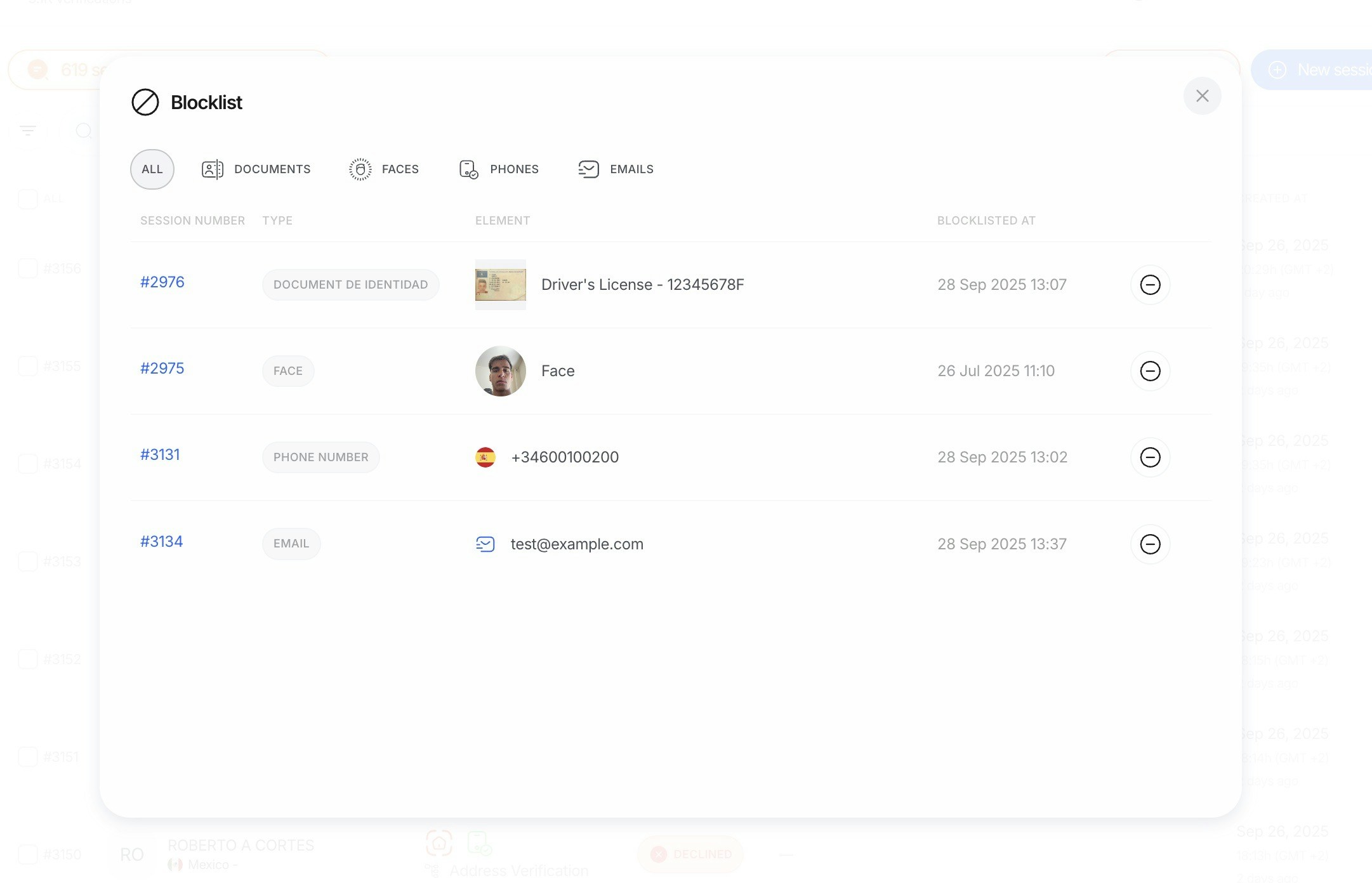
The blocklist feature automatically declines verification sessions that match previously identified documents, faces, phone numbers, or emails that should be rejected. This helps prevent fraud and ensures the integrity of your verification process.
 ***
## Overview
The blocklist operates on four entity types:
Prevents reuse of specific documents identified as fraudulent, stolen, or otherwise problematic.
Prevents users whose biometric data matches previously blocklisted faces from passing verification.
Prevents verifications using phone numbers that have been blocklisted.
Prevents verifications using email addresses that have been blocklisted.
When a blocklisted entity is detected during verification, the session is automatically declined with the corresponding warning: `ID_DOCUMENT_IN_BLOCKLIST`, `FACE_IN_BLOCKLIST`, `PHONE_NUMBER_IN_BLOCKLIST`, `EMAIL_IN_BLOCKLIST`, `IP_ADDRESS_IN_BLOCKLIST`, or `DEVICE_FINGERPRINT_IN_BLOCKLIST`.
***
## How blocklisting works
### Document blocklisting
When a document is added to the blocklist, the system stores secure fingerprints of the document's unique identifiers (document number, MRZ data, etc.). During future verification sessions, if a document matches these fingerprints, the session is automatically declined.
Useful for:
* Preventing reuse of known fraudulent documents
* Blocking documents reported as stolen
* Preventing multiple accounts using the same document
### Face blocklisting
When a face is added to the blocklist, the system stores biometric templates derived from facial features. These templates are compared against faces in new verification sessions.
Useful for:
* Preventing users who have attempted fraud from creating new accounts
* Enforcing platform bans across new registration attempts
* Implementing regulatory exclusion requirements
### Phone number blocklisting
When a phone number is added to the blocklist, the system evaluates new verification sessions against the blocklisted numbers (including normalized E.164 formats).
Useful for:
* Blocking numbers associated with repeat abuse or policy violations
* Preventing re-registration attempts using the same phone number
* Enforcing regional compliance requirements
### Email blocklisting
When an email address is added to the blocklist, the system checks new verification sessions against blocklisted addresses (case-insensitive, normalized).
Useful for:
* Preventing repeat fraud or spam attempts from the same email address
* Enforcing bans across multiple accounts tied to the same email
* Meeting compliance requirements for account creation
***
## Transaction blocklists
In addition to verification blocklists, the following entity types are checked during **transaction monitoring**. If any match is found, the transaction is **immediately declined** before rules are evaluated:
| Blocklist | Entity checked |
| -------------------------------- | --------------------------------------------------------------------- |
| **Wallet Address Blocklist** | The `account_id` of crypto wallet payment methods |
| **Bank Account Blocklist** | The `account_id` of bank transfer payment methods |
| **IP Address Blocklist** | IP address from the transaction party's device (supports CIDR ranges) |
| **Device Fingerprint Blocklist** | Device fingerprint from the transaction party |
| **User Blocklist** | The applicant's `vendor_data` identifier |
| **Business Blocklist** | The business's `vendor_data` identifier |
Transaction blocklist checks are separate from verification blocklist checks. Both use the same underlying lists, so an entity blocklisted for verification is also blocklisted for transactions.
***
## Managing the blocklist
Items can be added to the blocklist through:
* **The Didit Console** — navigate to the blocklist section and add items manually.
* **The Lists API** — programmatically manage blocklist entries. See the [Lists API reference](/management-api/lists/overview).
For API-based blocklist management, see the [Create entry](/management-api/lists/create-entry), [Delete entry](/management-api/lists/delete-entry), and [List entries](/management-api/lists/list-entries) endpoints.
***
## Overview
The blocklist operates on four entity types:
Prevents reuse of specific documents identified as fraudulent, stolen, or otherwise problematic.
Prevents users whose biometric data matches previously blocklisted faces from passing verification.
Prevents verifications using phone numbers that have been blocklisted.
Prevents verifications using email addresses that have been blocklisted.
When a blocklisted entity is detected during verification, the session is automatically declined with the corresponding warning: `ID_DOCUMENT_IN_BLOCKLIST`, `FACE_IN_BLOCKLIST`, `PHONE_NUMBER_IN_BLOCKLIST`, `EMAIL_IN_BLOCKLIST`, `IP_ADDRESS_IN_BLOCKLIST`, or `DEVICE_FINGERPRINT_IN_BLOCKLIST`.
***
## How blocklisting works
### Document blocklisting
When a document is added to the blocklist, the system stores secure fingerprints of the document's unique identifiers (document number, MRZ data, etc.). During future verification sessions, if a document matches these fingerprints, the session is automatically declined.
Useful for:
* Preventing reuse of known fraudulent documents
* Blocking documents reported as stolen
* Preventing multiple accounts using the same document
### Face blocklisting
When a face is added to the blocklist, the system stores biometric templates derived from facial features. These templates are compared against faces in new verification sessions.
Useful for:
* Preventing users who have attempted fraud from creating new accounts
* Enforcing platform bans across new registration attempts
* Implementing regulatory exclusion requirements
### Phone number blocklisting
When a phone number is added to the blocklist, the system evaluates new verification sessions against the blocklisted numbers (including normalized E.164 formats).
Useful for:
* Blocking numbers associated with repeat abuse or policy violations
* Preventing re-registration attempts using the same phone number
* Enforcing regional compliance requirements
### Email blocklisting
When an email address is added to the blocklist, the system checks new verification sessions against blocklisted addresses (case-insensitive, normalized).
Useful for:
* Preventing repeat fraud or spam attempts from the same email address
* Enforcing bans across multiple accounts tied to the same email
* Meeting compliance requirements for account creation
***
## Transaction blocklists
In addition to verification blocklists, the following entity types are checked during **transaction monitoring**. If any match is found, the transaction is **immediately declined** before rules are evaluated:
| Blocklist | Entity checked |
| -------------------------------- | --------------------------------------------------------------------- |
| **Wallet Address Blocklist** | The `account_id` of crypto wallet payment methods |
| **Bank Account Blocklist** | The `account_id` of bank transfer payment methods |
| **IP Address Blocklist** | IP address from the transaction party's device (supports CIDR ranges) |
| **Device Fingerprint Blocklist** | Device fingerprint from the transaction party |
| **User Blocklist** | The applicant's `vendor_data` identifier |
| **Business Blocklist** | The business's `vendor_data` identifier |
Transaction blocklist checks are separate from verification blocklist checks. Both use the same underlying lists, so an entity blocklisted for verification is also blocklisted for transactions.
***
## Managing the blocklist
Items can be added to the blocklist through:
* **The Didit Console** — navigate to the blocklist section and add items manually.
* **The Lists API** — programmatically manage blocklist entries. See the [Lists API reference](/management-api/lists/overview).
For API-based blocklist management, see the [Create entry](/management-api/lists/create-entry), [Delete entry](/management-api/lists/delete-entry), and [List entries](/management-api/lists/list-entries) endpoints.