> ## Documentation Index
> Fetch the complete documentation index at: https://docs.didit.me/llms.txt
> Use this file to discover all available pages before exploring further.
# Session chats
> Collaborate on verification reviews with in-session chats. Mention teammates, document compliance decisions, and get real-time notifications via WebSocket.
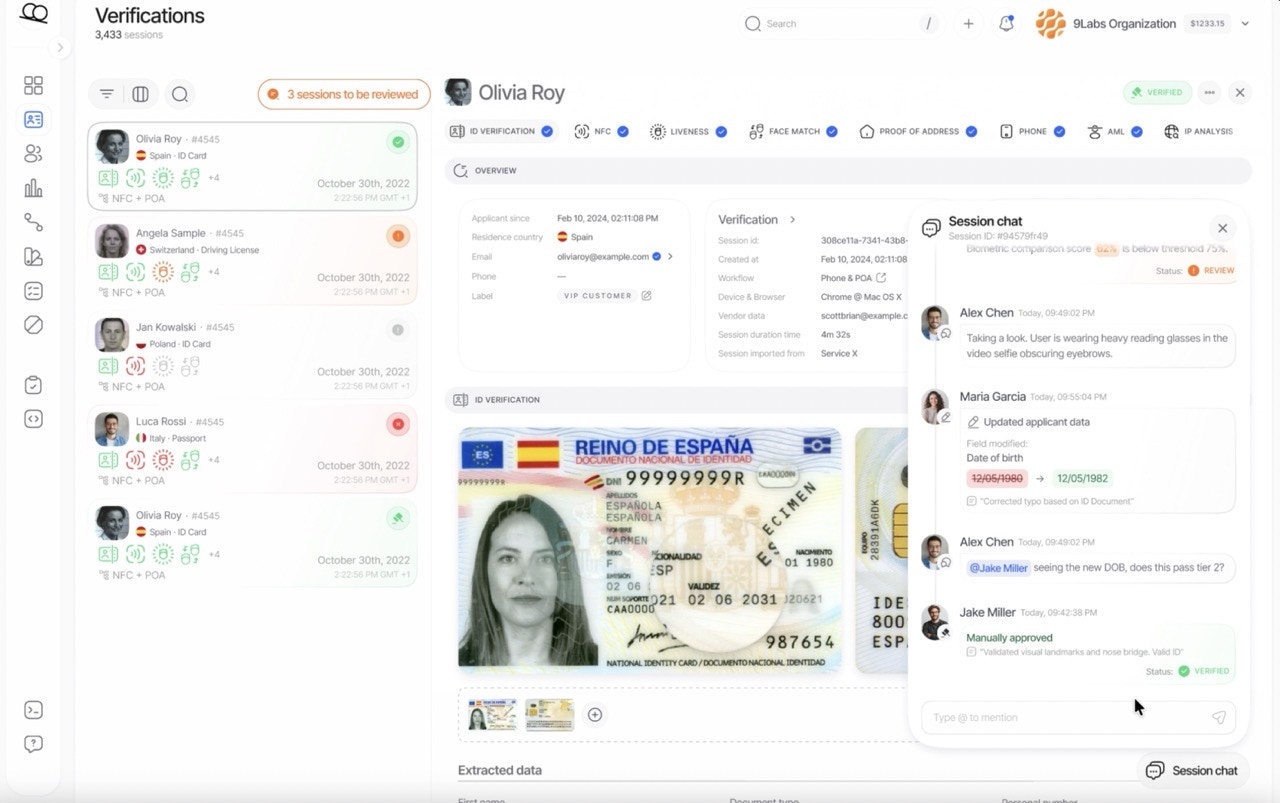
Session Chats enable compliance teams to collaborate directly within verification sessions. Leave comments, mention colleagues with `@email`, and receive real-time notifications — all within the Didit Console.
This feature transforms the manual review process from an isolated task into a collaborative workflow, ensuring your team can efficiently discuss edge cases, escalate concerns, and document decisions without leaving the platform.
 ***
## Why session chats?
| Challenge | Solution |
| ------------------------------- | ------------------------------------------------ |
| Context switching between tools | All discussion happens directly on the session |
| Lost audit trails | Every comment and activity is permanently logged |
| Delayed responses | Real-time notifications via WebSocket and email |
| Unclear ownership | @mentions notify specific team members instantly |
| Scattered documentation | Comments create a searchable history per session |
***
## Core features
### Comments and mentions
Add comments to any verification session to discuss findings, request clarifications, or document decisions. Use `@email` syntax to mention specific team members.
```text theme={null}
"I've reviewed the document and the address doesn't match.
@maria@company.com can you verify with the customer?"
```
When you mention a colleague:
* They receive an **instant notification** in the Console
* The notification includes a direct link to the session
***
## Notification types
| Type | Trigger | Description |
| ------------ | ----------------------------------------- | ------------------------------------------------------------------- |
| **Mention** | `@email` in comment | You were directly mentioned in a comment |
| **Comment** | New comment on a session you've reviewed | Someone added a comment to a session you previously interacted with |
| **Activity** | Any activity on a session you've reviewed | Status change, file upload, tag change, etc. |
***
## Best practices
When you need a specific person's attention, use `@email` to ensure they're notified immediately.
Create an audit trail by explaining why you approved, rejected, or escalated a session.
Add a tag like `needs-review` and leave a comment explaining what needs attention.
***
## Why session chats?
| Challenge | Solution |
| ------------------------------- | ------------------------------------------------ |
| Context switching between tools | All discussion happens directly on the session |
| Lost audit trails | Every comment and activity is permanently logged |
| Delayed responses | Real-time notifications via WebSocket and email |
| Unclear ownership | @mentions notify specific team members instantly |
| Scattered documentation | Comments create a searchable history per session |
***
## Core features
### Comments and mentions
Add comments to any verification session to discuss findings, request clarifications, or document decisions. Use `@email` syntax to mention specific team members.
```text theme={null}
"I've reviewed the document and the address doesn't match.
@maria@company.com can you verify with the customer?"
```
When you mention a colleague:
* They receive an **instant notification** in the Console
* The notification includes a direct link to the session
***
## Notification types
| Type | Trigger | Description |
| ------------ | ----------------------------------------- | ------------------------------------------------------------------- |
| **Mention** | `@email` in comment | You were directly mentioned in a comment |
| **Comment** | New comment on a session you've reviewed | Someone added a comment to a session you previously interacted with |
| **Activity** | Any activity on a session you've reviewed | Status change, file upload, tag change, etc. |
***
## Best practices
When you need a specific person's attention, use `@email` to ensure they're notified immediately.
Create an audit trail by explaining why you approved, rejected, or escalated a session.
Add a tag like `needs-review` and leave a comment explaining what needs attention.