> ## Documentation Index
> Fetch the complete documentation index at: https://docs.didit.me/llms.txt
> Use this file to discover all available pages before exploring further.
# White Label
> Fully white-label the Didit verification UI with your colors, logo, typography, and custom domain. Deliver a seamless branded KYC experience to your users.
export const VideoEmbed = ({src, title = "Video", type = "iframe"}) =>
{type === "iframe" ? : }
;
White-label the verification flow to match your brand identity, creating a seamless experience for your users.
## Customization
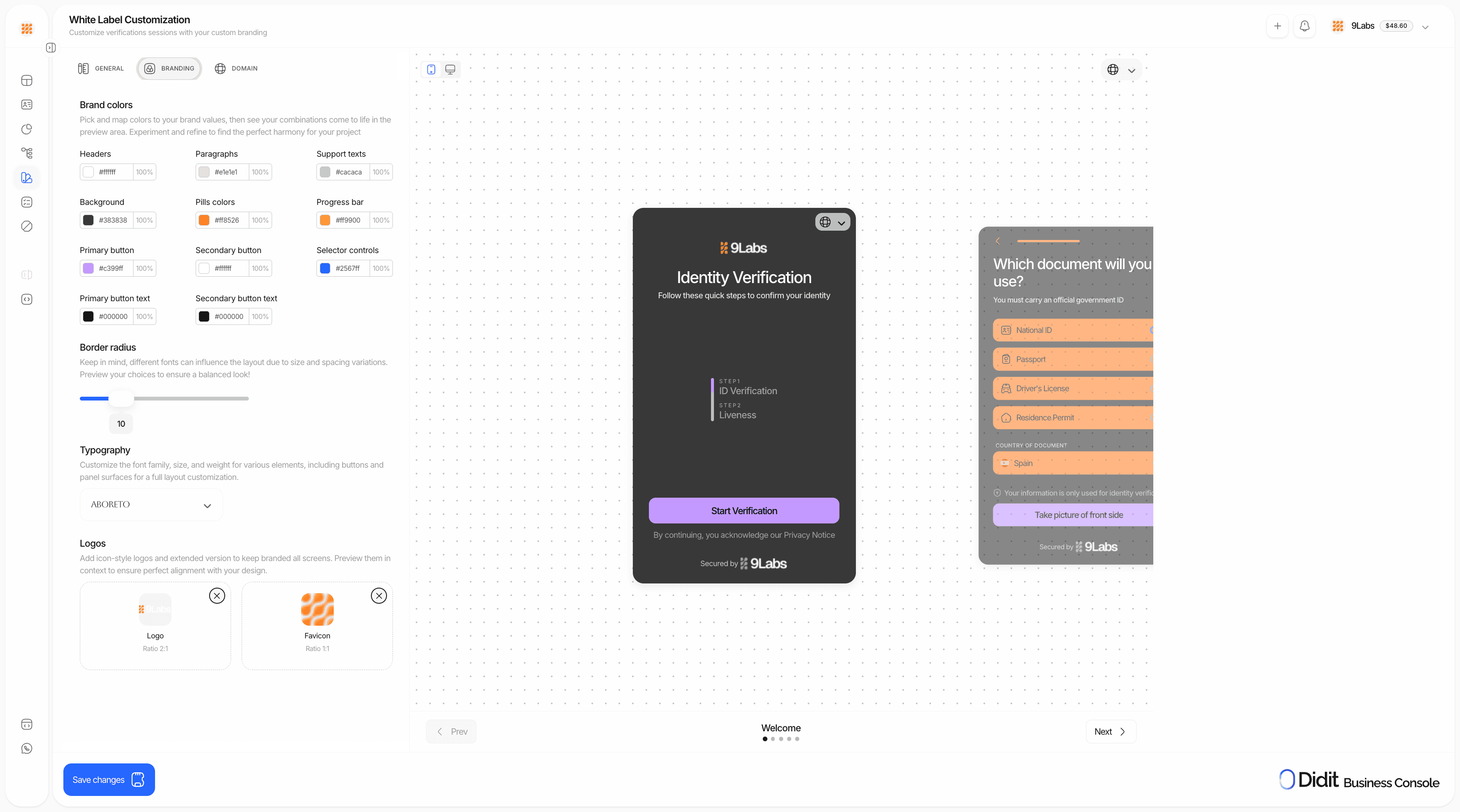
In the Style Editor you can customize **everything** in the verification UI:
| Category | What you can customize |
| ----------------- | -------------------------------------------------------- |
| **Colors** | Buttons, text, panels, backgrounds — every color element |
| **Typography** | Fonts that match your brand |
| **Logos** | Square and rectangular logo uploads |
| **Layout** | Border radius for panels and buttons |
| **Login screen** | Show or skip the login screen |
| **Custom domain** | Host on your own domain instead of `verify.didit.me` |
 ## Activate custom style in your workflow
After configuring your custom style, you must **enable it per workflow** for it to apply:
1. Go to **Workflows** in the sidebar
2. Open the workflow you want to brand
3. Click **Settings** (or the gear icon)
4. Under **Options**, find **Include custom style**
5. **Enable** the toggle
Custom styles only apply to workflows where **Include custom style** is enabled. If you don't enable it, the workflow will use the default Didit branding.
## Setup
Navigate to **Console → White Label → Style Editor**.
* Select your brand colors using the color picker
* Upload logos in both square and rectangular formats
* Adjust typography and border radius settings
* Add your domain in the White Label settings
* Configure DNS settings as instructed
* Verify domain ownership
For each workflow that should use your branding: **Workflow → Settings → Options → Include custom style** → enable.
Use the live preview to see changes in real-time. Test the full verification flow before going live.
## Compliance responsibilities in white-label flows
White-labeling changes the **branding** of the verification flow. It does **not** remove your obligations as the controller of that user journey.
Before you launch a white-label flow, make sure you:
1. Tell the end user that **your company** is requesting the verification and that **Didit** powers the verification workflow.
2. Link to **your own privacy notice** and any controller-side legal terms that apply to the journey.
3. Link to Didit's [Verification Privacy Notice](https://didit.me/terms/verification-privacy-notice) and [End User Terms for Identity Verification](https://didit.me/terms/identity-verification).
4. Collect **explicit affirmative consent** before document capture, selfie capture, liveness, or biometric processing whenever the applicable law or your legal position requires it.
5. Keep any proof of notice or consent that your legal team requires in your own systems.
Using a custom domain or removing visible Didit branding does not eliminate Didit's role as the verification provider. If you use a custom UI or an API-driven flow, you must surface the required disclosures in your own interface.
## Activate custom style in your workflow
After configuring your custom style, you must **enable it per workflow** for it to apply:
1. Go to **Workflows** in the sidebar
2. Open the workflow you want to brand
3. Click **Settings** (or the gear icon)
4. Under **Options**, find **Include custom style**
5. **Enable** the toggle
Custom styles only apply to workflows where **Include custom style** is enabled. If you don't enable it, the workflow will use the default Didit branding.
## Setup
Navigate to **Console → White Label → Style Editor**.
* Select your brand colors using the color picker
* Upload logos in both square and rectangular formats
* Adjust typography and border radius settings
* Add your domain in the White Label settings
* Configure DNS settings as instructed
* Verify domain ownership
For each workflow that should use your branding: **Workflow → Settings → Options → Include custom style** → enable.
Use the live preview to see changes in real-time. Test the full verification flow before going live.
## Compliance responsibilities in white-label flows
White-labeling changes the **branding** of the verification flow. It does **not** remove your obligations as the controller of that user journey.
Before you launch a white-label flow, make sure you:
1. Tell the end user that **your company** is requesting the verification and that **Didit** powers the verification workflow.
2. Link to **your own privacy notice** and any controller-side legal terms that apply to the journey.
3. Link to Didit's [Verification Privacy Notice](https://didit.me/terms/verification-privacy-notice) and [End User Terms for Identity Verification](https://didit.me/terms/identity-verification).
4. Collect **explicit affirmative consent** before document capture, selfie capture, liveness, or biometric processing whenever the applicable law or your legal position requires it.
5. Keep any proof of notice or consent that your legal team requires in your own systems.
Using a custom domain or removing visible Didit branding does not eliminate Didit's role as the verification provider. If you use a custom UI or an API-driven flow, you must surface the required disclosures in your own interface.