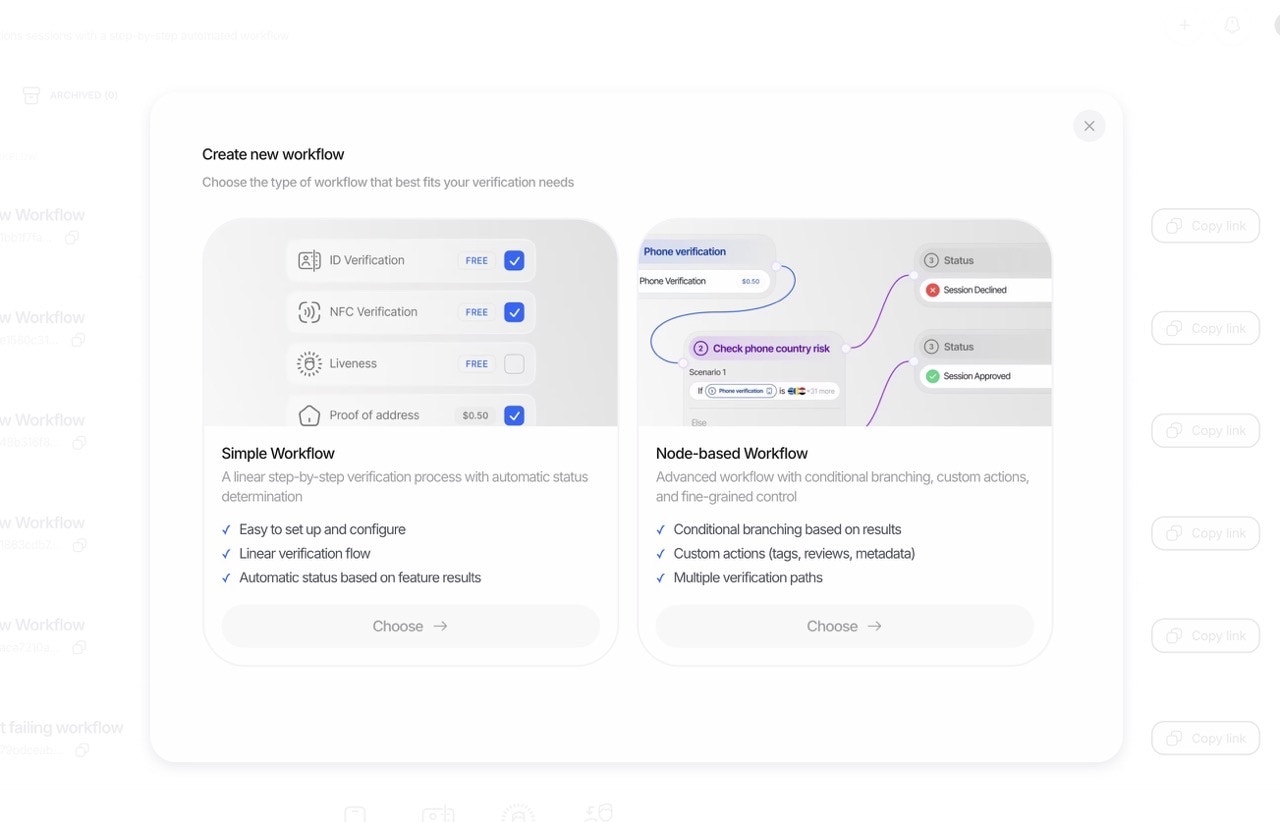
 ### 1. Simple Mode: Template-Based Builder
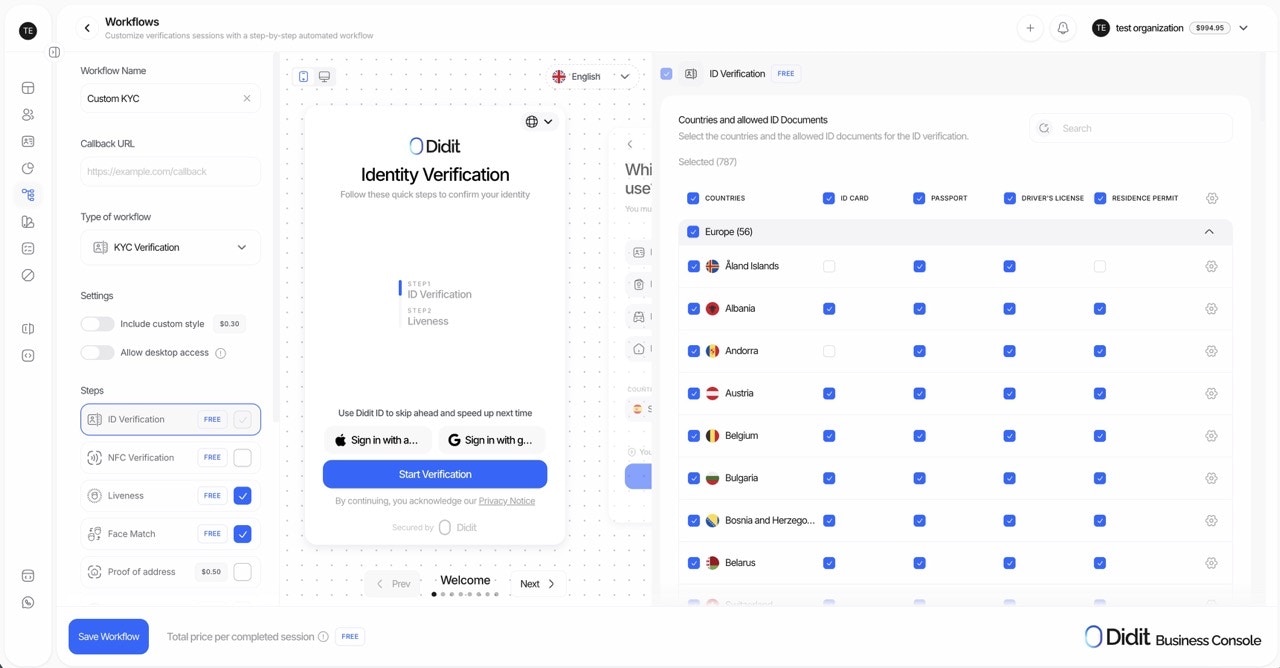
The **Simple Mode** is perfect for getting started quickly. Select a pre-built template, toggle the features you need on or off, and you're ready to go.
### 1. Simple Mode: Template-Based Builder
The **Simple Mode** is perfect for getting started quickly. Select a pre-built template, toggle the features you need on or off, and you're ready to go.
 **Best for:**
* Quick setup and deployment
* Standard verification flows
* Teams new to identity verification
* Use cases that fit common patterns
**How it works:**
1. Choose a workflow template (KYC, Age Verification, etc.)
2. Toggle features on/off (Liveness, Face Match, AML, etc.)
3. Configure basic settings for each feature
4. Publish and start verifying
***
### 2. Advanced Mode: Visual Graph Builder
The **Advanced Mode** unlocks the full power of Didit's orchestration engine. Build complex, conditional verification flows using our visual graph editor with drag-and-drop nodes, branches, and custom logic.
**Best for:**
* Quick setup and deployment
* Standard verification flows
* Teams new to identity verification
* Use cases that fit common patterns
**How it works:**
1. Choose a workflow template (KYC, Age Verification, etc.)
2. Toggle features on/off (Liveness, Face Match, AML, etc.)
3. Configure basic settings for each feature
4. Publish and start verifying
***
### 2. Advanced Mode: Visual Graph Builder
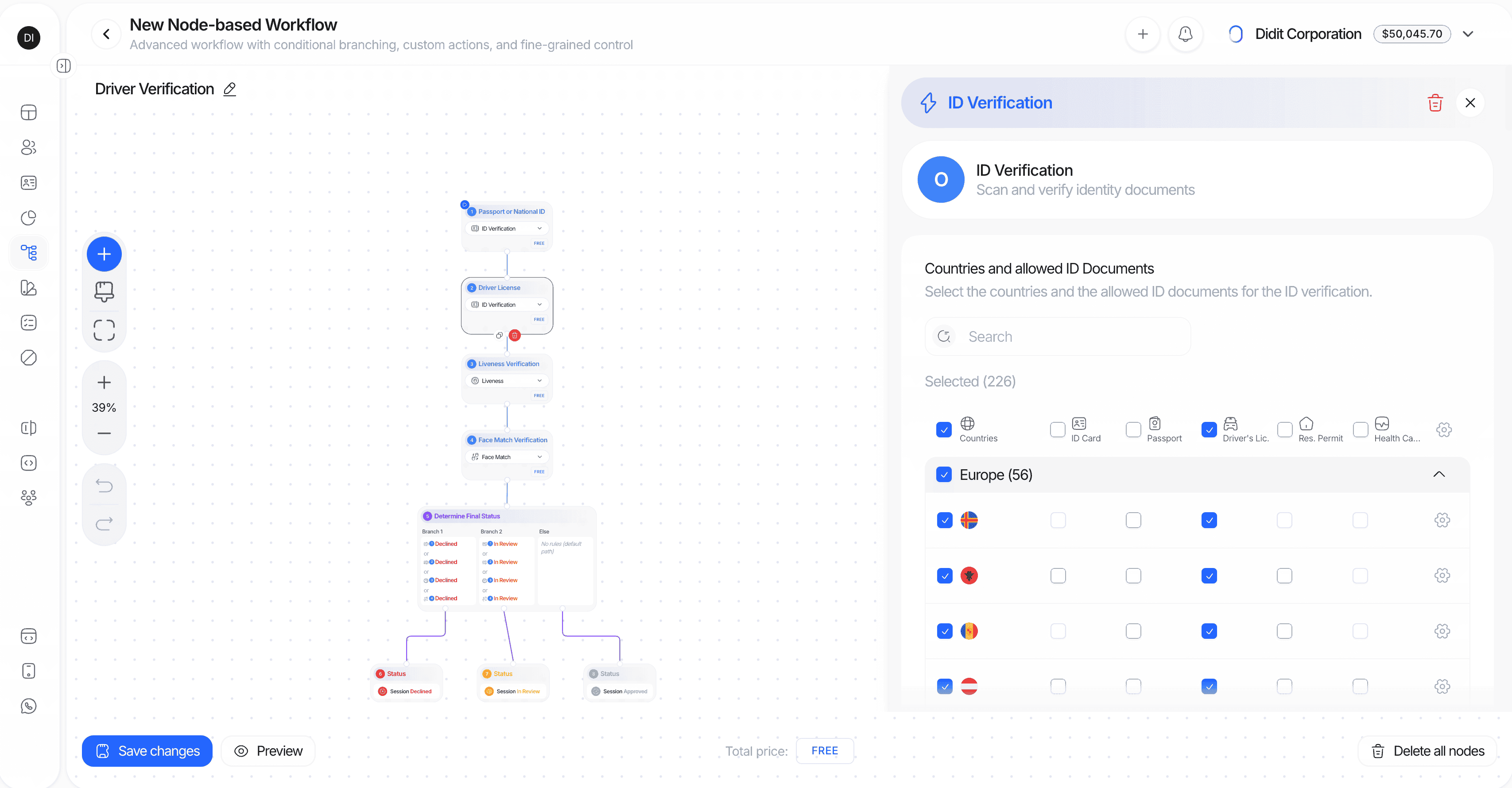
The **Advanced Mode** unlocks the full power of Didit's orchestration engine. Build complex, conditional verification flows using our visual graph editor with drag-and-drop nodes, branches, and custom logic.
 **Best for:**
* Complex, multi-path verification journeys
* Conditional logic based on user data or verification results
* Custom business rules and branching
* Enterprise-grade compliance requirements
**Key capabilities:**
* **Visual node editor**: Drag, drop, and connect nodes on an infinite canvas
* **Smart connections**: Drag from a node handle to empty space to instantly create and connect a new node
* **Conditional branches**: Route users based on extracted data, verification status, country, document type, date of issue, age, webhook JSON response paths, or custom rules
* **Action automation**: Add tags, set metadata, or route to manual review based on flow outcomes
* **Keyboard shortcuts**: Undo (Ctrl/Cmd+Z), Redo (Ctrl/Cmd+Shift+Z), Delete (Delete/Backspace)
* **Zoom and pan**: Navigate complex flows with scroll-to-zoom and drag-to-pan
#### Graph Builder Node Types
| Node Type | Icon Color | Description | Examples |
| ----------------- | --------------- | ---------------------------------------------------- | ---------------------------------------------------------------------------------------------------------------------------------------------------------------------------------------- |
| **Feature Nodes** | Blue | Verification checks that process user data | ID Verification (OCR), Liveness, Face Match, NFC, AML, Phone/Email Verification, Questionnaire, Proof of Address, Document AI, Database Validation, Device & IP Analysis, Age Estimation |
| **Branch Nodes** | Purple | Conditional routing based on data or results | Route by country, risk score, document type, age, date of issue, months since issue, verification status |
| **Action Nodes** | Amber | Automation triggers that modify session or user data | Add tag, Remove tag, Set metadata, Add review note |
| **Webhook Nodes** | Cyan | HTTP requests that can feed data into later branches | Send session data to your server, parse JSON responses, branch on paths such as `category`, `status`, or `tags.0` |
| **Status Nodes** | Green/Red/Amber | Final outcomes that end the verification flow | Approved, Declined, In Review |
#### Feature Node Categories
**User-Interactive Features** (can start a workflow):
* ID Verification (OCR)
* Liveness Detection
* Face Match
* Age Estimation
* Phone Verification
* Email Verification
* Questionnaire
* Proof of Address
* Document AI
* NFC / ePassport
**Backend-Only Features** (run automatically, no user interaction):
* AML Screening (requires OCR first)
* Database Validation (requires OCR first)
* Device & IP Analysis
> **Note:** Backend-only features are marked with a special indicator in the builder and execute automatically without user interaction once their dependencies are met.
***
## Workflow Templates: Your Starting Point
Think of templates not as rigid types, but as **smart, pre-configured starting points** designed for common use cases. In Simple Mode, these are ready to use. In Advanced Mode, they provide a foundation you can customize extensively.
**Best for:**
* Complex, multi-path verification journeys
* Conditional logic based on user data or verification results
* Custom business rules and branching
* Enterprise-grade compliance requirements
**Key capabilities:**
* **Visual node editor**: Drag, drop, and connect nodes on an infinite canvas
* **Smart connections**: Drag from a node handle to empty space to instantly create and connect a new node
* **Conditional branches**: Route users based on extracted data, verification status, country, document type, date of issue, age, webhook JSON response paths, or custom rules
* **Action automation**: Add tags, set metadata, or route to manual review based on flow outcomes
* **Keyboard shortcuts**: Undo (Ctrl/Cmd+Z), Redo (Ctrl/Cmd+Shift+Z), Delete (Delete/Backspace)
* **Zoom and pan**: Navigate complex flows with scroll-to-zoom and drag-to-pan
#### Graph Builder Node Types
| Node Type | Icon Color | Description | Examples |
| ----------------- | --------------- | ---------------------------------------------------- | ---------------------------------------------------------------------------------------------------------------------------------------------------------------------------------------- |
| **Feature Nodes** | Blue | Verification checks that process user data | ID Verification (OCR), Liveness, Face Match, NFC, AML, Phone/Email Verification, Questionnaire, Proof of Address, Document AI, Database Validation, Device & IP Analysis, Age Estimation |
| **Branch Nodes** | Purple | Conditional routing based on data or results | Route by country, risk score, document type, age, date of issue, months since issue, verification status |
| **Action Nodes** | Amber | Automation triggers that modify session or user data | Add tag, Remove tag, Set metadata, Add review note |
| **Webhook Nodes** | Cyan | HTTP requests that can feed data into later branches | Send session data to your server, parse JSON responses, branch on paths such as `category`, `status`, or `tags.0` |
| **Status Nodes** | Green/Red/Amber | Final outcomes that end the verification flow | Approved, Declined, In Review |
#### Feature Node Categories
**User-Interactive Features** (can start a workflow):
* ID Verification (OCR)
* Liveness Detection
* Face Match
* Age Estimation
* Phone Verification
* Email Verification
* Questionnaire
* Proof of Address
* Document AI
* NFC / ePassport
**Backend-Only Features** (run automatically, no user interaction):
* AML Screening (requires OCR first)
* Database Validation (requires OCR first)
* Device & IP Analysis
> **Note:** Backend-only features are marked with a special indicator in the builder and execute automatically without user interaction once their dependencies are met.
***
## Workflow Templates: Your Starting Point
Think of templates not as rigid types, but as **smart, pre-configured starting points** designed for common use cases. In Simple Mode, these are ready to use. In Advanced Mode, they provide a foundation you can customize extensively.
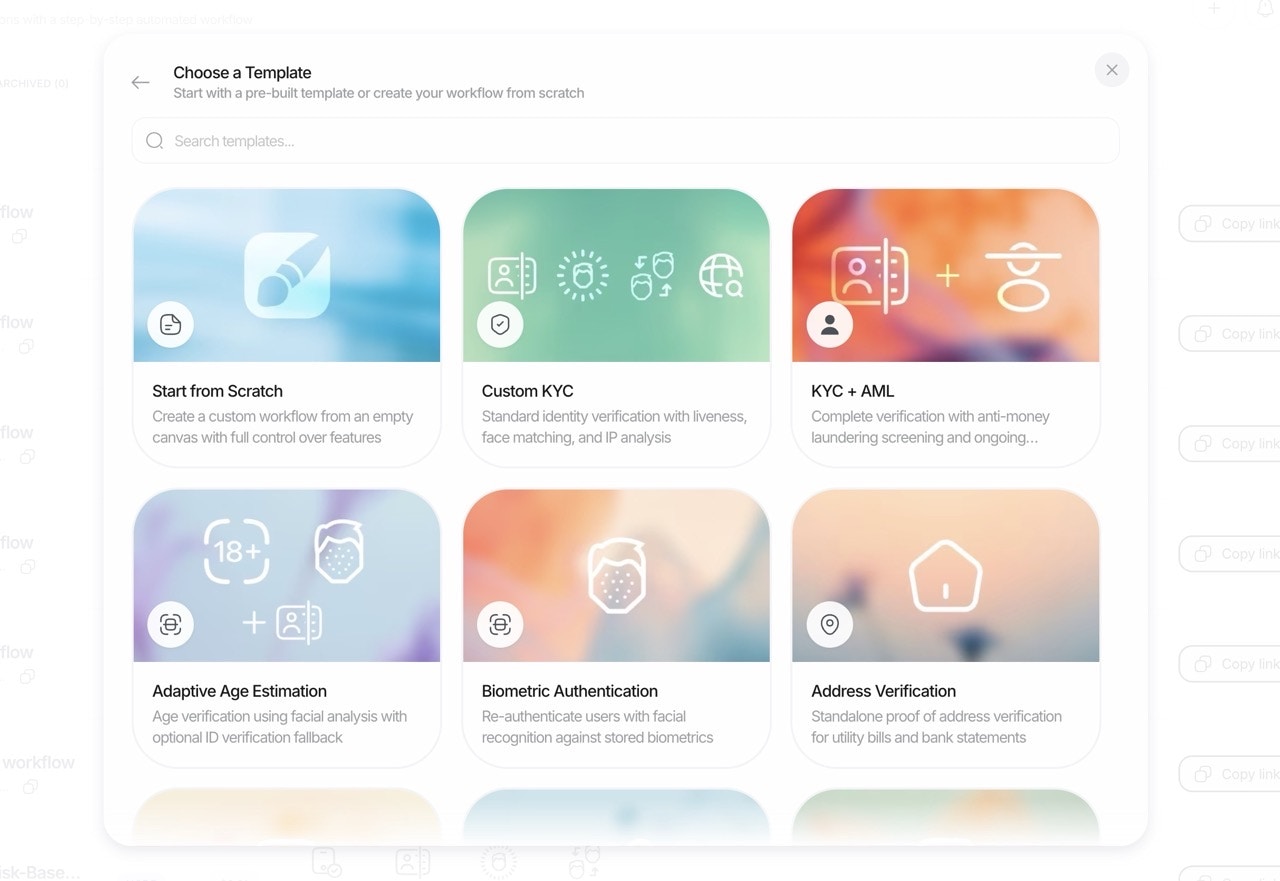 ### Available Templates
#### **1. KYC Workflow**
The comprehensive solution for onboarding new users and meeting full Know Your Customer (KYC) compliance.
* **Starts with:** Core ID Document Verification.
* **Commonly Added Features:**
* `[+]` **Liveness Detection:** Ensure the user is physically present and prevent spoofing.
* `[+]` **Face Match 1:1:** Biometrically match the user's selfie to their ID photo.
* `[+]` **AML Screening:** Check users against global sanctions, PEP, and adverse media lists.
* `[+]` **NFC Verification:** Add a layer of government-grade security by reading e-passport/e-ID chips.
* `[+]` **Proof of Address (PoA):** Verify the user's residential address.
* `[+]` **Phone Verification:** Validate phone number ownership as an additional factor.
* `[+]` **Email Verification:** Validate email address ownership as an additional factor.
* `[+]` **Database Validation:** Validate against official government and credit databases.
* `[+]` **Questionnaire:** Collect structured attestations and supporting documents via customizable forms.
* `[+]` **Device & IP Analysis:** Analyze location and connection risk.
***
#### **2. Adaptive Age Verification Workflow**
A low-friction, privacy-preserving flow for age-gated services.
* **Starts with:** Selfie-based Age Estimation.
* **Key Logic:**
* If the estimated age is clearly above your threshold (e.g., estimated 25+ for an 18+ service), the user passes instantly.
* If the estimate is below or within a "buffer zone" (e.g., estimated 16-20), you can configure the workflow to automatically trigger a **fallback to full ID Verification** to confirm the exact date of birth.
* **Commonly Added Features:**
* `[+]` **Device & IP Analysis:** Restrict access based on geographic location.
***
#### **3. Biometric Authentication Workflow**
A fast and secure way to re-verify returning users without asking for their documents again.
* **Starts with:** A Liveness Detection check to confirm the user is present.
* **Core Logic:**
* The system performs a Face Match between the new live selfie and the trusted biometric template from the user's initial, approved KYC verification.
* You must pass the `portrait_image` (the trusted reference image URL from the initial verification) when creating the session.
* **Commonly Added Features:**
* `[+]` **Phone Verification:** Link the address to a verified phone number.
* `[+]` **Email Verification:** Validate email address ownership as an additional factor.
* `[+]` **Device & IP Analysis:** Flag suspicious login attempts from new locations.
***
#### **4. Address Verification Workflow**
A dedicated flow for when Proof of Address (PoA) is the primary requirement.
* **Starts with:** The user submitting a Proof of Address document (e.g., utility bill, bank statement).
* **Core Logic:** Our AI extracts and validates the name and address from the document.
* **Commonly Added Features:**
* `[+]` **Phone Verification:** Link the address to a verified phone number.
* `[+]` **Email Verification:** Validate email address ownership as an additional factor.
* `[+]` **Device & IP Analysis:** Compare the document address to the user's current geo-location for added assurance.
***
#### **5. Questionnaire Verification Workflow**
A focused flow when your primary goal is to collect structured attestations and supporting documents via customizable forms.
* **Starts with:** Questionnaire.
* **Core Logic:** The system presents your configured questionnaire (sections, translated content, required fields, uploads).
* **Commonly Added Features:**
* `[+]` **Device & IP Analysis:** Add location and connection context to your questionnaire submissions.
> **Full Customization**
> Each feature within a workflow can be further customized with specific parameters to meet your exact requirements. Explore the settings for each check in the builder.
***
## Simple vs Advanced Mode Comparison
| Capability | Simple Mode | Advanced Mode |
| ---------------------------------- | ----------- | -------------- |
| Template selection | ✅ | ✅ |
| Toggle features on/off | ✅ | ✅ |
| Basic feature configuration | ✅ | ✅ |
| Visual graph editor | ❌ | ✅ |
| Conditional branching | ❌ | ✅ |
| Action automation (tags, metadata) | ❌ | ✅ |
| Parallel verification paths | ❌ | ✅ |
| Risk-based decisions | Limited | ✅ Full control |
| Undo/Redo support | ❌ | ✅ |
| Keyboard shortcuts | ❌ | ✅ |
***
## Integration Flow
Integrating an Orchestrated Workflow is straightforward. Your server creates a session with Didit, receives a unique URL, and redirects your user to that URL. Didit handles the rest and notifies your server of the results via webhooks.
```mermaid theme={null}
sequenceDiagram
participant Customer
participant Client
participant Server
participant Didit
Customer->>Client: Go to verification page
Client->>Server: POST /create-verification-session
Server->>Didit: POST /v3/session/
Didit-->>Server: Return new verification session
Server-->>Client: Return verification session's url
Client->>Customer: Redirect customer to url
Customer->>Didit: Complete verification steps
Didit->>Server: Send status updates
Server->>Customer: Notify of status changes
Customer->>Customer: Return to callback URL
```
***
## Common Use Cases
### Available Templates
#### **1. KYC Workflow**
The comprehensive solution for onboarding new users and meeting full Know Your Customer (KYC) compliance.
* **Starts with:** Core ID Document Verification.
* **Commonly Added Features:**
* `[+]` **Liveness Detection:** Ensure the user is physically present and prevent spoofing.
* `[+]` **Face Match 1:1:** Biometrically match the user's selfie to their ID photo.
* `[+]` **AML Screening:** Check users against global sanctions, PEP, and adverse media lists.
* `[+]` **NFC Verification:** Add a layer of government-grade security by reading e-passport/e-ID chips.
* `[+]` **Proof of Address (PoA):** Verify the user's residential address.
* `[+]` **Phone Verification:** Validate phone number ownership as an additional factor.
* `[+]` **Email Verification:** Validate email address ownership as an additional factor.
* `[+]` **Database Validation:** Validate against official government and credit databases.
* `[+]` **Questionnaire:** Collect structured attestations and supporting documents via customizable forms.
* `[+]` **Device & IP Analysis:** Analyze location and connection risk.
***
#### **2. Adaptive Age Verification Workflow**
A low-friction, privacy-preserving flow for age-gated services.
* **Starts with:** Selfie-based Age Estimation.
* **Key Logic:**
* If the estimated age is clearly above your threshold (e.g., estimated 25+ for an 18+ service), the user passes instantly.
* If the estimate is below or within a "buffer zone" (e.g., estimated 16-20), you can configure the workflow to automatically trigger a **fallback to full ID Verification** to confirm the exact date of birth.
* **Commonly Added Features:**
* `[+]` **Device & IP Analysis:** Restrict access based on geographic location.
***
#### **3. Biometric Authentication Workflow**
A fast and secure way to re-verify returning users without asking for their documents again.
* **Starts with:** A Liveness Detection check to confirm the user is present.
* **Core Logic:**
* The system performs a Face Match between the new live selfie and the trusted biometric template from the user's initial, approved KYC verification.
* You must pass the `portrait_image` (the trusted reference image URL from the initial verification) when creating the session.
* **Commonly Added Features:**
* `[+]` **Phone Verification:** Link the address to a verified phone number.
* `[+]` **Email Verification:** Validate email address ownership as an additional factor.
* `[+]` **Device & IP Analysis:** Flag suspicious login attempts from new locations.
***
#### **4. Address Verification Workflow**
A dedicated flow for when Proof of Address (PoA) is the primary requirement.
* **Starts with:** The user submitting a Proof of Address document (e.g., utility bill, bank statement).
* **Core Logic:** Our AI extracts and validates the name and address from the document.
* **Commonly Added Features:**
* `[+]` **Phone Verification:** Link the address to a verified phone number.
* `[+]` **Email Verification:** Validate email address ownership as an additional factor.
* `[+]` **Device & IP Analysis:** Compare the document address to the user's current geo-location for added assurance.
***
#### **5. Questionnaire Verification Workflow**
A focused flow when your primary goal is to collect structured attestations and supporting documents via customizable forms.
* **Starts with:** Questionnaire.
* **Core Logic:** The system presents your configured questionnaire (sections, translated content, required fields, uploads).
* **Commonly Added Features:**
* `[+]` **Device & IP Analysis:** Add location and connection context to your questionnaire submissions.
> **Full Customization**
> Each feature within a workflow can be further customized with specific parameters to meet your exact requirements. Explore the settings for each check in the builder.
***
## Simple vs Advanced Mode Comparison
| Capability | Simple Mode | Advanced Mode |
| ---------------------------------- | ----------- | -------------- |
| Template selection | ✅ | ✅ |
| Toggle features on/off | ✅ | ✅ |
| Basic feature configuration | ✅ | ✅ |
| Visual graph editor | ❌ | ✅ |
| Conditional branching | ❌ | ✅ |
| Action automation (tags, metadata) | ❌ | ✅ |
| Parallel verification paths | ❌ | ✅ |
| Risk-based decisions | Limited | ✅ Full control |
| Undo/Redo support | ❌ | ✅ |
| Keyboard shortcuts | ❌ | ✅ |
***
## Integration Flow
Integrating an Orchestrated Workflow is straightforward. Your server creates a session with Didit, receives a unique URL, and redirects your user to that URL. Didit handles the rest and notifies your server of the results via webhooks.
```mermaid theme={null}
sequenceDiagram
participant Customer
participant Client
participant Server
participant Didit
Customer->>Client: Go to verification page
Client->>Server: POST /create-verification-session
Server->>Didit: POST /v3/session/
Didit-->>Server: Return new verification session
Server-->>Client: Return verification session's url
Client->>Customer: Redirect customer to url
Customer->>Didit: Complete verification steps
Didit->>Server: Send status updates
Server->>Customer: Notify of status changes
Customer->>Customer: Return to callback URL
```
***
## Common Use Cases
| Use Case | Recommended Template | Recommended Mode | Suggested Features |
|---|---|---|---|
| Basic identity verification | KYC | Simple | Liveness, Face Match |
| High-security onboarding | KYC | Advanced | NFC, Liveness, Face Match, AML, Phone Verification |
| Age-gated content/services | Adaptive Age Verification | Simple | ID Verification fallback |
| Returning user authentication | Biometric Authentication | Simple | Device & IP Analysis |
| Address verification | Proof of Address | Simple | Phone Verification |
| Financial services onboarding | KYC | Advanced | Liveness, Face Match, Proof of Address, AML, Database Validation |
| Region-specific compliance | KYC | Advanced | Conditional routing by country, different checks per region |
| Risk-based verification | KYC | Advanced | Conditional branches based on risk scores, escalation paths |