> ## Documentation Index
> Fetch the complete documentation index at: https://docs.didit.me/llms.txt
> Use this file to discover all available pages before exploring further.

# Age Estimation Overview

> Verify user age from selfies with AI facial analysis. Pay-per-call $0.10, ±3.5 year accuracy, configurable ID-verification fallback for edge cases.

export const AgentPromptAccordion = ({prompt, title = "AI Agent Integration Prompt"}) => {
  const [copied, setCopied] = React.useState(false);
  const handleCopy = e => {
    e.stopPropagation();
    if (!prompt) return;
    navigator.clipboard.writeText(prompt.trim()).then(() => {
      setCopied(true);
      setTimeout(() => setCopied(false), 2000);
    });
  };
  const agents = ["Claude Code", "Codex", "Cursor", "Devin", "Windsurf", "GitHub Copilot"];
  return <div className="didit-agent-card">
      {}
      <div className="didit-agent-titlebar">
        <div className="didit-agent-dots" aria-hidden="true">
          <span className="didit-agent-dot didit-agent-dot-red"></span>
          <span className="didit-agent-dot didit-agent-dot-yellow"></span>
          <span className="didit-agent-dot didit-agent-dot-green"></span>
        </div>
        <span className="didit-agent-filename">{title}</span>
        <button type="button" className={`didit-agent-copy ${copied ? "didit-agent-copy-copied" : ""}`} onClick={handleCopy} title="Copy prompt to clipboard" aria-label={copied ? "Copied!" : "Copy prompt to clipboard"}>
          {copied ? <>
              <svg width="13" height="13" viewBox="0 0 16 16" fill="none">
                <path d="M3 8.5l3.5 3.5L13 4" stroke="currentColor" strokeWidth="2" strokeLinecap="round" strokeLinejoin="round" />
              </svg>
              <span>Copied</span>
            </> : <>
              <svg width="13" height="13" viewBox="0 0 16 16" fill="none">
                <rect x="5" y="5" width="9" height="9" rx="1.5" stroke="currentColor" strokeWidth="1.5" />
                <path d="M11 5V3.5A1.5 1.5 0 0 0 9.5 2h-6A1.5 1.5 0 0 0 2 3.5v6A1.5 1.5 0 0 0 3.5 11H5" stroke="currentColor" strokeWidth="1.5" />
              </svg>
              <span>Copy</span>
            </>}
        </button>
      </div>

      {}
      <pre className="didit-agent-body"><code>{prompt.trim()}</code></pre>

      {}
      <div className="didit-agent-footer">
        <span className="didit-agent-footer-label">Paste into</span>
        <div className="didit-agent-chips">
          {agents.map(name => <span key={name} className="didit-agent-chip">{name}</span>)}
        </div>
      </div>
    </div>;
};

export const VideoEmbed = ({src, title = "Video", type = "iframe"}) => <div className={type === "iframe" ? "didit-video-embed" : "didit-video-embed didit-video-native"}>
    {type === "iframe" ? <iframe src={src} title={title} style={{
  width: "100%",
  height: "100%",
  border: 0,
  borderRadius: "12px"
}} allow="accelerometer; autoplay; clipboard-write; encrypted-media; gyroscope; picture-in-picture" allowFullScreen /> : <video controls autoPlay muted loop playsInline src={src} title={title} style={{
  width: "100%",
  height: "auto",
  display: "block",
  borderRadius: "12px"
}} />}
  </div>;

Didit's Age Estimation technology provides enterprise-grade age verification through advanced facial analysis and machine learning. Our system delivers high accuracy with typical estimation within ±3.5 years for most age ranges.

<AgentPromptAccordion
  title="Age Estimation Integration Prompt"
  prompt={`# Goal
Integrate Didit Age Estimation (selfie-based age gating, includes passive liveness) into your app. Pick ONE mode.

# Mode A — Session-based (embedded in Liveness)
In hosted Didit flows, age estimation is **embedded inside the Liveness step** — there is no separate "age_estimation" workflow feature. Enable age estimation on the Liveness node in the Business Console.

1. Configure the workflow's LIVENESS feature with age estimation enabled and set age_estimation_decline_threshold (default 18).
2. Create a session — POST /v3/session/ with { workflow_id, vendor_data, callback }. See /sessions-api/create-session.
3. Open session.url for the user (or mount the Web/Mobile SDK).
4. Fetch the decision — GET /v3/session/{sessionId}/decision/.

Decision surface: the result lives at \`liveness_checks[].age_estimation\` on each Liveness entry (not in a top-level age_estimations[] array).

# Mode B — Standalone API (server-to-server, age + liveness in one call)
Use when you already have a selfie and need a one-shot age gate.

POST https://verification.didit.me/v3/age-estimation/
multipart/form-data — x-api-key: YOUR_API_KEY

curl example:
\`\`\`bash
curl -X POST 'https://verification.didit.me/v3/age-estimation/' \\
-H 'x-api-key: YOUR_API_KEY' \\
-F 'user_image=@./selfie.jpg' \\
-F 'age_estimation_decline_threshold=18' \\
-F 'save_api_request=true' \\
-F 'vendor_data=user-1234'
\`\`\`
Returns: { request_id, age_estimation: { status, method: "PASSIVE", age_estimation (float, years), score (passive-liveness 0-100), user_image: {entities}, warnings: [...] } }.

Required: \`user_image\` (jpg/jpeg/png/tiff/webp, max 5 MB; PDFs not accepted). The largest face wins when multiple are present.

# Decision logic
status="Declined" when ANY of the following is true:
- passive-liveness score ≤ face_liveness_score_decline_threshold (default 30)
- predicted age < age_estimation_decline_threshold (default 18)
- no face detected
- liveness model flagged a presentation attack

# Status enum
"Not Started" | "In Progress" | "Approved" | "In Review" | "Declined" | "Abandoned" | "Kyc Expired"

# Warnings
warnings[] risk codes include:
AGE_BELOW_MINIMUM, AGE_NOT_DETECTED, LOW_LIVENESS_SCORE, NO_FACE_DETECTED, LIVENESS_FACE_ATTACK, MULTIPLE_FACES_DETECTED.
Full catalogue: /core-technology/age-estimation/warnings-age-estimation.

# Failure modes to handle
- HTTP 400 — missing or oversized user_image, unsupported extension.
- HTTP 403 — out of credits.
- status="Declined" with AGE_BELOW_MINIMUM — user is below the configured age; reject.
- status="Declined" with LOW_LIVENESS_SCORE / LIVENESS_FACE_ATTACK — presentation attack suspected; reject.
- AGE_NOT_DETECTED — the model could not extract age (poor image quality); request a retake.

# See also
- Canonical schema: /reference/data-models#age-estimation
- Per-feature report: /core-technology/age-estimation/report-age-estimation
- Risk catalogue: /core-technology/age-estimation/warnings-age-estimation
- Full integration playbook: /integration/integration-prompt`}
/>

<VideoEmbed src="https://www.youtube.com/embed/h0i9Q0-izcw?start=160&rel=0&playsinline=1" title="Face Scan & Passive Liveness" />

## Age Estimation Methods

Our platform implements age estimation in conjunction with different liveness verification technologies:

<table class="comparison-table">
  <thead>
    <tr>
      <th style={{ width: '20%' }}>Method</th>
      <th style={{ width: '65%'}}>Description</th>
      <th style={{ width: '5%' }}>Security Level</th>
      <th style={{ width: '15%' }}>Best For</th>
    </tr>
  </thead>

  <tbody>
    <tr>
      <td>**`3D Action & Flash`**</td>

      <td style={{ textAlign: 'left' }}>
        • Combines multi-factor biometric verification with a **randomized action sequence** and **dynamic light pattern analysis**.<br />
        • At the start, the user is prompted to perform a simple action—like **blinking** or **nodding**—ensuring real-time interaction.<br />
        • Simultaneously, the system projects a sequence of light patterns onto the face, analyzing the **reflections** to confirm the face's three-dimensional structure.<br />
        • **Deep learning algorithms** examine micro-expressions and the light reflection responses to verify the presence of a live person.<br />
        • Offers the **highest security** by integrating behavioral (action) and physical (light-based depth) cues, making it nearly impossible to spoof with static images, videos, or even advanced masks.
      </td>

      <td>Highest</td>
      <td>Banking, healthcare, government applications</td>
    </tr>

    <tr>
      <td>**`3D Flash`**</td>

      <td style={{ textAlign: 'left' }}>
        • Uses **dynamic light pattern analysis** to validate facial topology without requiring user interaction.<br />
        • Projects a series of light patterns onto the face at over **30 frames per second**, analyzing the reflections to create a **depth map**.<br />
        • This depth map confirms the face's three-dimensional structure, distinguishing it from flat images or 2D spoofs.<br />
        • Provides a **seamless experience** while maintaining **high security** against presentation attacks like photos or screens.<br />
      </td>

      <td>High</td>
      <td>Financial services, account access, identity verification</td>
    </tr>

    <tr>
      <td>**`Passive Liveness`**</td>

      <td style={{ textAlign: 'left' }}>
        • Relies on **single-frame deep learning analysis** to detect signs of liveness.<br />
        • For privacy, the user's face appears blurry in the interface, assuring them that their image is being analyzed for age estimation only, not for identification.<br />
        • Examines the image for **artifacts**, **texture patterns**, and other subtle indicators that differentiate a real face from a spoof.<br />
        • A **convolutional neural network (CNN)** validates facial features and identifies anomalies, such as those from printed photos or digital screens.<br />
        • Offers **fast and convenient** verification but provides **standard security**, suitable for low-risk use cases.<br />
      </td>

      <td>Standard</td>
      <td>Low-friction scenarios, consumer applications</td>
    </tr>
  </tbody>
</table>

Each method generates a precise age estimate along with confidence scores and supplementary gender estimation data.

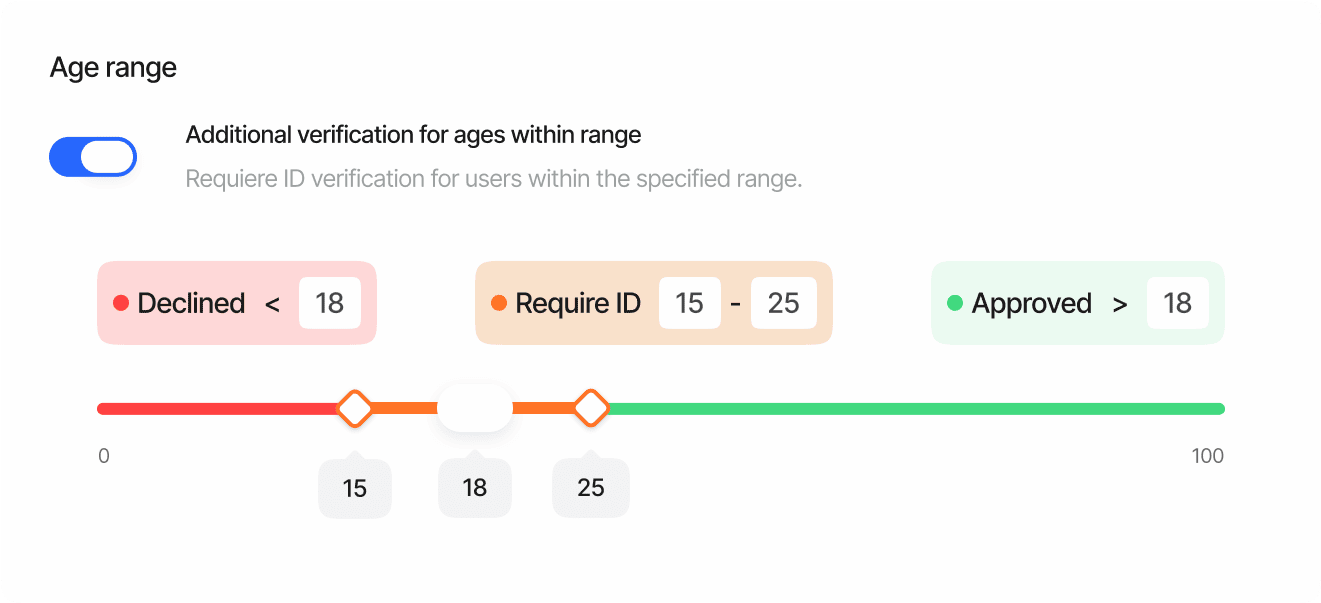
### Configurable Thresholds

You can customize security levels by setting different thresholds for age estimation. For example:

<Frame>
  <img src="https://mintcdn.com/didit-0f962782/z6T2GHM4Zh-iSj-K/images/age-estimation-thresholds.png?fit=max&auto=format&n=z6T2GHM4Zh-iSj-K&q=85&s=11ffd7baa63b7193970c6b67386279f8" alt="Didit age estimation threshold configuration for age gating policies" width="1321" height="603" data-path="images/age-estimation-thresholds.png" />
</Frame>

<Note>
  These thresholds can be adjusted based on your risk tolerance and security requirements.
</Note>

### Per-Country Age Restrictions

Age restrictions can be configured on a **per-country basis**, reflecting the fact that the legal age of majority varies across jurisdictions. Instead of setting a single global minimum or maximum age, you can define specific age limits for each country -- and even for individual states or regions within a country.

#### How It Works

* **Country-level configuration**: Set a minimum and/or maximum age for each country (identified by the document's issuing state). For example, you might require a minimum age of 18 in the United States, 19 in South Korea, and 21 in the United Arab Emirates.
* **State/Region overrides**: For countries with sub-national variation (such as the United States or Mexico), you can configure overrides per state. For example, Mississippi may require a minimum age of 21 while the US default is 18. The system matches the state using the region extracted from the document by OCR.
* **Age of majority defaults**: The console provides a one-click "Apply age of majority" button that auto-populates each country's minimum age based on the known legal age of majority worldwide. You can then customize individual countries or states as needed.
* **Configurable actions**: When a user's age falls below the minimum or exceeds the maximum for their document's country, you can choose the action to take: **Decline** or **Review**.

#### Example Configuration

| Country | Min Age | Max Age | State Overrides              |
| ------- | ------- | ------- | ---------------------------- |
| USA     | 18      | --      | Mississippi: 21, Alabama: 19 |
| KOR     | 19      | --      | --                           |
| GBR     | 18      | 65      | --                           |
| ARE     | 21      | --      | --                           |

<Note>
  Per-country age restrictions are available in both standard KYC workflows and Adaptive Age Verification workflows. In adaptive workflows, when ID verification is triggered for borderline cases, the age check uses the per-country settings configured in the ID Verification step.
</Note>

## How It Works

<Steps>
  <Step title="Image or Video Capture" icon="camera">
    The user provides a clear facial image through API upload or completes a liveness verification process.

    | Check                     | Description                                    |
    | ------------------------- | ---------------------------------------------- |
    | **Image quality**         | Validates lighting, positioning, and clarity   |
    | **Liveness verification** | Ensures the subject is present and not a spoof |
    | **Multi-frame analysis**  | Selects the optimal frame for best accuracy    |
    | **Adaptive capture**      | Adjusts to various device capabilities         |
  </Step>

  <Step title="Facial Feature Analysis" icon="face-viewfinder">
    Advanced computer vision isolates the face and maps key facial landmarks.

    * **80+ reference points** mapped across the face
    * Deep learning algorithms analyze facial morphology, proportions, and texture
    * Demographic-specific features identified with precise pixel mapping
    * Facial regions segmented for specialized analysis (eye region, jawline, skin texture)
  </Step>

  <Step title="Neural Network Processing" icon="microchip-ai">
    Convolutional neural networks (CNNs) process the extracted features through multiple layers.

    * Model trained on **millions of diverse faces** across age ranges, ethnicities, and genders
    * Feature vectors compared against age-correlated datasets with demographic calibration
    * Multiple sub-models employed for different age brackets to enhance accuracy
    * Cross-validation against complementary models for robust estimation
  </Step>

  <Step title="Decision & Supplementary Analysis" icon="chart-simple">
    The system generates a comprehensive result:

    | Output                    | Description                                  |
    | ------------------------- | -------------------------------------------- |
    | **Age estimate**          | Primary estimate with confidence scoring     |
    | **Gender estimation**     | Supplementary demographic context (optional) |
    | **Confidence metrics**    | Overall reliability assessment               |
    | **Environmental factors** | Impact assessment on estimation quality      |
  </Step>

  <Step title="Rule Application" icon="gavel">
    Your configured business rules are applied to the estimation results.

    * Age estimate compared against your **configured thresholds** (min/max per country)
    * Confidence scores checked against your minimum requirements
    * **Borderline cases** can trigger ID verification fallback (Adaptive mode)
    * Results documented with detailed **audit trail** for compliance
  </Step>
</Steps>

## Adaptive Age Estimation

For scenarios where precise age verification is critical, our platform offers adaptive age estimation with ID verification fallback. This approach provides a balance between user convenience and regulatory compliance.

### How Adaptive Age Estimation Works

<Steps>
  <Step title="Initial Age Estimation" icon="camera">
    The system first attempts to estimate the user's age using facial analysis. A confidence score is generated alongside the age estimate.
  </Step>

  <Step title="Threshold Evaluation" icon="scale-balanced">
    The estimated age is compared against your configured thresholds. Three outcomes:

    | Outcome        | Description                                                         |
    | -------------- | ------------------------------------------------------------------- |
    | **Clear Pass** | User is clearly above your required age threshold                   |
    | **Clear Fail** | User is clearly below your required age threshold                   |
    | **Borderline** | Estimated age falls within an uncertain range or has low confidence |
  </Step>

  <Step title="Intelligent Fallback" icon="code-branch">
    * **Clear pass/fail**: Verification completes immediately with the appropriate result
    * **Borderline cases**: System automatically initiates an **ID verification flow**
    * This ensures regulatory compliance while minimizing friction for most users
  </Step>

  <Step title="Document Verification (when needed)" icon="id-card">
    For borderline cases, the user provides a government-issued ID document:

    * Document authenticity and age information are verified
    * **Per-country age restrictions** from the ID Verification step are applied
    * The system checks date of birth against the minimum/maximum age for the document's issuing country and region
  </Step>
</Steps>

<Note>
  Adaptive age estimation can be configured using [Adaptive Age Verification](/console/workflows) workflows type. You can define the borderline age thresholds that determine when ID verification is triggered. The final age-based approval or decline for borderline cases is then governed by the per-country age restrictions configured in the ID Verification step.
</Note>

### Benefits of Adaptive Age Estimation

* **Reduced Friction**: Most users complete verification with just a selfie
* **Enhanced Compliance**: Uncertain cases receive thorough document verification with country-specific age rules
* **Cost Efficiency**: ID verification is only used when necessary
* **Customizable Risk Tolerance**: Adjust thresholds based on your regulatory requirements
* **Jurisdiction-Aware**: Automatically applies the correct age of majority based on the user's document issuing country and region

This approach is particularly valuable for age-gated services like online gaming, alcohol delivery, and adult content platforms where balancing user experience with regulatory compliance is essential.

## Model Performance and Statistics

Our age estimation technology is built on advanced deep learning models that deliver industry-leading accuracy. Below are key performance metrics based on extensive validation across diverse datasets.

### Accuracy Metrics

<table class="comparison-table">
  <thead>
    <tr>
      <th>Metric</th>
      <th>Value</th>
      <th>Description</th>
    </tr>
  </thead>

  <tbody>
    <tr>
      <td>**Mean Absolute Error (MAE)**</td>
      <td>3.5 years</td>
      <td>Average difference between estimated and actual age across all age ranges</td>
    </tr>

    <tr>
      <td>**Standard Deviation**</td>
      <td>1.2 years</td>
      <td>Variation in estimation error across the dataset</td>
    </tr>

    <tr>
      <td>**Accuracy within ±5 years**</td>
      <td>89%</td>
      <td>Percentage of estimations within 5 years of actual age</td>
    </tr>

    <tr>
      <td>**Accuracy within ±3 years**</td>
      <td>76%</td>
      <td>Percentage of estimations within 3 years of actual age</td>
    </tr>
  </tbody>
</table>

### Performance Across Demographics

Our models are trained on diverse datasets to ensure consistent performance across different demographic groups.

<table class="comparison-table">
  <thead>
    <tr>
      <th>Demographic Group</th>
      <th>MAE (years)</th>
      <th>Confidence Score</th>
    </tr>
  </thead>

  <tbody>
    <tr>
      <td>-18 age range</td>
      <td>1.5</td>
      <td>High</td>
    </tr>

    <tr>
      <td>18-25 age range</td>
      <td>2.8</td>
      <td>High</td>
    </tr>

    <tr>
      <td>26-40 age range</td>
      <td>3.2</td>
      <td>High</td>
    </tr>

    <tr>
      <td>41-60 age range</td>
      <td>3.9</td>
      <td>Medium-High</td>
    </tr>

    <tr>
      <td>60+ age range</td>
      <td>4.5</td>
      <td>Medium</td>
    </tr>
  </tbody>
</table>

<Note>
  Our models are regularly retrained and validated to ensure consistent performance across changing visual conditions and demographic representation.
</Note>