> ## Documentation Index
> Fetch the complete documentation index at: https://docs.didit.me/llms.txt
> Use this file to discover all available pages before exploring further.
# Biometric Authentication Report
> Parse Biometric Authentication responses with liveness and optional face match against a stored portrait, returned via liveness_checks and face_matches.
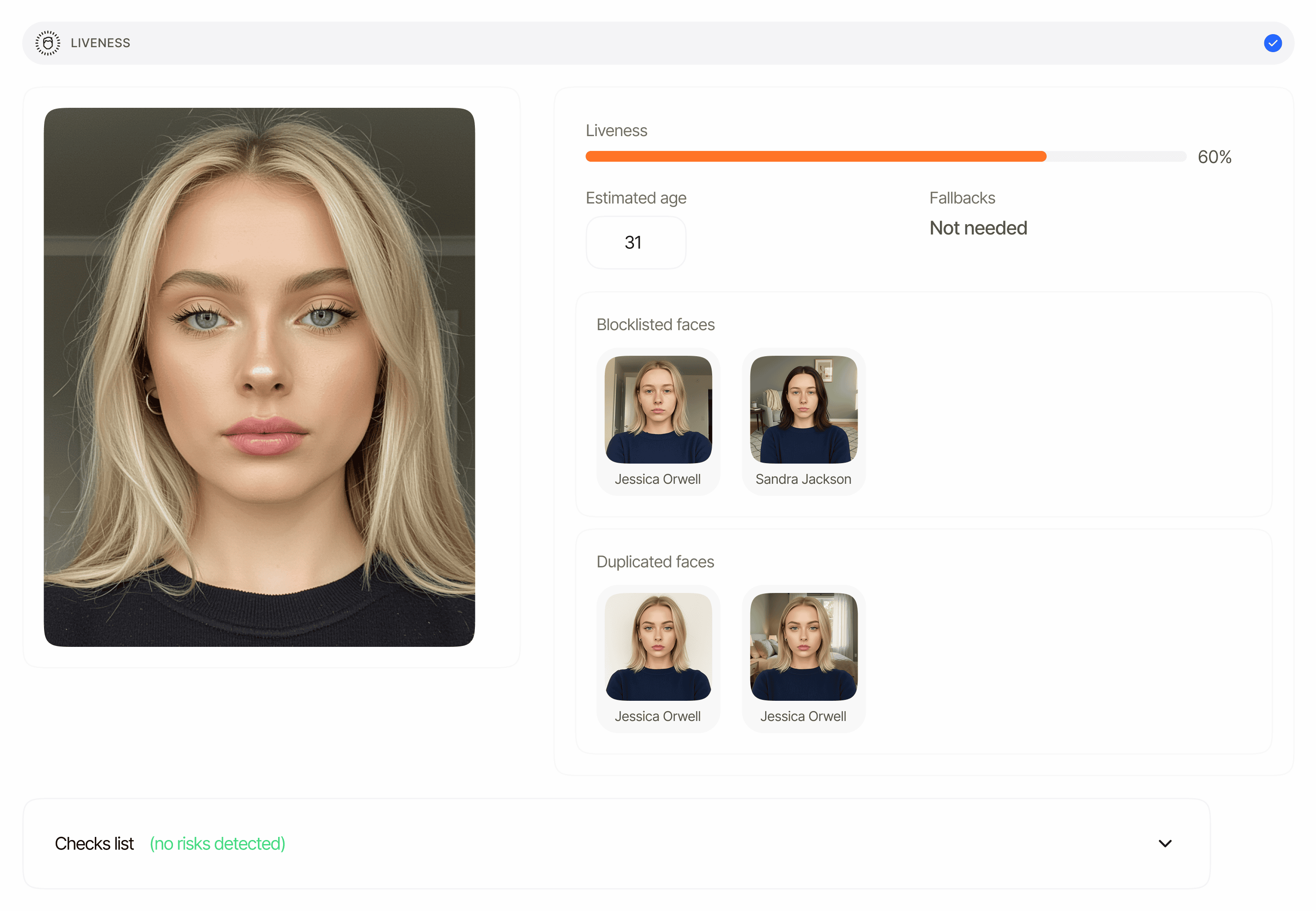
The Biometric Authentication report is how Didit reports back a returning-user re-verification. The workflow runs a fresh liveness check and, when Face Match is enabled in the workflow, a 1:1 face match against the `portrait_image` you supplied at session creation. Both checks appear as standard feature items in the V3 session decision response.
 ## Overview
Biometric Authentication is a workflow type (`workflow_type: "biometric_authentication"`), not a separate response object. When the workflow runs it emits:
* One **liveness check** that captures a live selfie and scores it for spoofing.
* One **face match** comparing the captured face against the `portrait_image` you passed at session creation (only when Face Match is enabled in the workflow).
`portrait_image` is a base64-encoded image, and it is **required** at session creation whenever the workflow includes Face Match — creating the session without it returns `400`. Didit stores the portrait under the new session, so the face-match item's `source_image_session_id` is set to that session's own `session_id` (it tells you the reference came from the session's stored portrait rather than from a document portrait, which would leave the field `null`).
## Where it appears
| Decision response key | Plural | Item schema |
| --------------------- | ----------------------------------------------------------- | ------------------------------------------------------------------- |
| `liveness_checks[]` | One per liveness step (usually 1 in biometric auth) | [data-models#liveness-check](/reference/data-models#liveness-check) |
| `face_matches[]` | One per face-match step (`null` in liveness-only workflows) | [data-models#face-match](/reference/data-models#face-match) |
Both arrays are returned by [`GET /v3/session/{sessionId}/decision/`](/sessions-api/retrieve-session) for sessions whose workflow type is `biometric_authentication`. They are always arrays — never singular objects — and each is `null` until its step has produced data. Each item carries a `node_id` so that multi-instance workflows can disambiguate steps.
## Schema reference
The full field list is defined once on the data-models page so every report that surfaces these features shares one source of truth:
* [Liveness item schema](/reference/data-models#liveness-check) — `status`, `method`, `score`, `reference_image`, `video_url`, `age_estimation`, `matches[]`, `face_quality`, `face_luminance`, `warnings[]`, `node_id`.
* [Face match item schema](/reference/data-models#face-match) — `status`, `score`, `source_image_session_id`, `source_image`, `target_image`, `warnings[]`, `node_id`.
* [Warning entry shape](/reference/data-models#warning-object) — `feature`, `risk`, `additional_data`, `log_type`, `short_description`, `long_description`, `node_id`.
## Status values
Both `liveness_checks[].status` and `face_matches[].status` use the shared feature lifecycle ([feature-level statuses](/reference/data-models#feature-level-statuses)):
| Status | Meaning |
| ----------------- | --------------------------------------------------------------------------------------------------------------------------------------------------------------------------- |
| `Not Finished` | The step has not produced a final result yet (user has not completed it, or dropped off). Before a step starts at all, its array is simply `null` in the decision response. |
| `Approved` | The check passed all configured thresholds. |
| `In Review` | The score fell in the review band, or a configurable warning was set to review. |
| `Declined` | The score fell at or below the decline threshold, or an auto-decline warning fired (face attack, no face detected, face blocklisted, no reference image for face match). |
| `Resub Requested` | A reviewer asked the user to retry this step. |
The overall session `status` aggregates both items: any feature in `Declined` declines the session, any in `In Review` puts the session in `In Review`, otherwise `Approved` (after every feature finishes).
For threshold behavior and the full list of warning codes, see [Biometric Authentication warnings](/core-technology/biometric-auth/warnings-biometric-authentication).
## Example — liveness + face match (approved)
Examples are abridged: the full decision envelope also carries `session_url`, `metadata`, `callback`, `reviews`, `contact_details`, `expected_details`, `environment`, `created_at`, and `expires_at`.
```json theme={null}
{
"session_id": "11111111-2222-3333-4444-555555555555",
"session_kind": "user",
"session_number": 1234,
"status": "Approved",
"workflow_id": "018e7b2c-5555-7777-9999-aaaaaaaaaaaa",
"features": ["LIVENESS", "FACE_MATCH"],
"vendor_data": "user-123",
"liveness_checks": [
{
"node_id": "feature_liveness",
"status": "Approved",
"method": "PASSIVE",
"score": 89.92,
"reference_image": "https:///.../reference.jpg",
"video_url": "https:///.../video.mp4",
"age_estimation": null,
"matches": [],
"face_quality": 92.4,
"face_luminance": 58.1,
"warnings": []
}
],
"face_matches": [
{
"node_id": "feature_face_match",
"status": "Approved",
"score": 88.47,
"source_image_session_id": "11111111-2222-3333-4444-555555555555",
"source_image": "https:///.../source.jpg",
"target_image": "https:///.../target.jpg",
"warnings": []
}
],
"id_verifications": null,
"nfc_verifications": null,
"poa_verifications": null,
"phone_verifications": null,
"email_verifications": null,
"aml_screenings": null
}
```
## Example — liveness-only (Face Match disabled in the workflow)
```json theme={null}
{
"session_id": "22222222-3333-4444-5555-666666666666",
"session_kind": "user",
"status": "Approved",
"workflow_id": "018e7b2c-6666-7777-9999-bbbbbbbbbbbb",
"features": ["LIVENESS"],
"vendor_data": "user-456",
"liveness_checks": [
{
"node_id": "feature_liveness",
"status": "Approved",
"method": "ACTIVE_3D",
"score": 96.10,
"reference_image": "https:///.../reference.jpg",
"video_url": "https:///.../video.mp4",
"age_estimation": null,
"matches": [],
"face_quality": null,
"face_luminance": null,
"warnings": []
}
],
"face_matches": null
}
```
Liveness-only mode is a workflow configuration: when Face Match is disabled, `portrait_image` is not required at session creation and `face_matches` stays `null`. When Face Match **is** enabled, omitting `portrait_image` does not fall back to liveness-only — session creation fails with `400`.
## Example — face-match declined on low similarity
```json theme={null}
{
"session_id": "33333333-4444-5555-6666-777777777777",
"status": "Declined",
"workflow_id": "018e7b2c-5555-7777-9999-aaaaaaaaaaaa",
"liveness_checks": [
{
"node_id": "feature_liveness",
"status": "Approved",
"method": "PASSIVE",
"score": 91.20,
"reference_image": "https:///.../reference.jpg",
"video_url": "https:///.../video.mp4",
"age_estimation": null,
"matches": [],
"face_quality": 90.15,
"face_luminance": 55.30,
"warnings": []
}
],
"face_matches": [
{
"node_id": "feature_face_match",
"status": "Declined",
"score": 41.18,
"source_image_session_id": "33333333-4444-5555-6666-777777777777",
"source_image": "https:///.../source.jpg",
"target_image": "https:///.../target.jpg",
"warnings": [
{
"feature": "FACEMATCH",
"risk": "LOW_FACE_MATCH_SIMILARITY",
"additional_data": null,
"log_type": "error",
"short_description": "Low face match similarity",
"long_description": "The facial features of the provided image don't closely match the reference image, suggesting a potential identity mismatch.",
"node_id": "feature_face_match"
}
]
}
]
}
```
## Security note
`reference_image`, `video_url`, `source_image`, and `target_image` are signed URLs that expire after a limited validity window (4 hours by default). They point at biometric data — do not cache or surface them publicly. Store the verification result (status, score, `source_image_session_id`) on your side; re-fetch the decision endpoint if you need fresh URLs.
## Related
Warning codes, thresholds, and automatic decline conditions.
Full field reference for `liveness_checks[]` items.
Full field reference for `face_matches[]` items.
## Overview
Biometric Authentication is a workflow type (`workflow_type: "biometric_authentication"`), not a separate response object. When the workflow runs it emits:
* One **liveness check** that captures a live selfie and scores it for spoofing.
* One **face match** comparing the captured face against the `portrait_image` you passed at session creation (only when Face Match is enabled in the workflow).
`portrait_image` is a base64-encoded image, and it is **required** at session creation whenever the workflow includes Face Match — creating the session without it returns `400`. Didit stores the portrait under the new session, so the face-match item's `source_image_session_id` is set to that session's own `session_id` (it tells you the reference came from the session's stored portrait rather than from a document portrait, which would leave the field `null`).
## Where it appears
| Decision response key | Plural | Item schema |
| --------------------- | ----------------------------------------------------------- | ------------------------------------------------------------------- |
| `liveness_checks[]` | One per liveness step (usually 1 in biometric auth) | [data-models#liveness-check](/reference/data-models#liveness-check) |
| `face_matches[]` | One per face-match step (`null` in liveness-only workflows) | [data-models#face-match](/reference/data-models#face-match) |
Both arrays are returned by [`GET /v3/session/{sessionId}/decision/`](/sessions-api/retrieve-session) for sessions whose workflow type is `biometric_authentication`. They are always arrays — never singular objects — and each is `null` until its step has produced data. Each item carries a `node_id` so that multi-instance workflows can disambiguate steps.
## Schema reference
The full field list is defined once on the data-models page so every report that surfaces these features shares one source of truth:
* [Liveness item schema](/reference/data-models#liveness-check) — `status`, `method`, `score`, `reference_image`, `video_url`, `age_estimation`, `matches[]`, `face_quality`, `face_luminance`, `warnings[]`, `node_id`.
* [Face match item schema](/reference/data-models#face-match) — `status`, `score`, `source_image_session_id`, `source_image`, `target_image`, `warnings[]`, `node_id`.
* [Warning entry shape](/reference/data-models#warning-object) — `feature`, `risk`, `additional_data`, `log_type`, `short_description`, `long_description`, `node_id`.
## Status values
Both `liveness_checks[].status` and `face_matches[].status` use the shared feature lifecycle ([feature-level statuses](/reference/data-models#feature-level-statuses)):
| Status | Meaning |
| ----------------- | --------------------------------------------------------------------------------------------------------------------------------------------------------------------------- |
| `Not Finished` | The step has not produced a final result yet (user has not completed it, or dropped off). Before a step starts at all, its array is simply `null` in the decision response. |
| `Approved` | The check passed all configured thresholds. |
| `In Review` | The score fell in the review band, or a configurable warning was set to review. |
| `Declined` | The score fell at or below the decline threshold, or an auto-decline warning fired (face attack, no face detected, face blocklisted, no reference image for face match). |
| `Resub Requested` | A reviewer asked the user to retry this step. |
The overall session `status` aggregates both items: any feature in `Declined` declines the session, any in `In Review` puts the session in `In Review`, otherwise `Approved` (after every feature finishes).
For threshold behavior and the full list of warning codes, see [Biometric Authentication warnings](/core-technology/biometric-auth/warnings-biometric-authentication).
## Example — liveness + face match (approved)
Examples are abridged: the full decision envelope also carries `session_url`, `metadata`, `callback`, `reviews`, `contact_details`, `expected_details`, `environment`, `created_at`, and `expires_at`.
```json theme={null}
{
"session_id": "11111111-2222-3333-4444-555555555555",
"session_kind": "user",
"session_number": 1234,
"status": "Approved",
"workflow_id": "018e7b2c-5555-7777-9999-aaaaaaaaaaaa",
"features": ["LIVENESS", "FACE_MATCH"],
"vendor_data": "user-123",
"liveness_checks": [
{
"node_id": "feature_liveness",
"status": "Approved",
"method": "PASSIVE",
"score": 89.92,
"reference_image": "https:///.../reference.jpg",
"video_url": "https:///.../video.mp4",
"age_estimation": null,
"matches": [],
"face_quality": 92.4,
"face_luminance": 58.1,
"warnings": []
}
],
"face_matches": [
{
"node_id": "feature_face_match",
"status": "Approved",
"score": 88.47,
"source_image_session_id": "11111111-2222-3333-4444-555555555555",
"source_image": "https:///.../source.jpg",
"target_image": "https:///.../target.jpg",
"warnings": []
}
],
"id_verifications": null,
"nfc_verifications": null,
"poa_verifications": null,
"phone_verifications": null,
"email_verifications": null,
"aml_screenings": null
}
```
## Example — liveness-only (Face Match disabled in the workflow)
```json theme={null}
{
"session_id": "22222222-3333-4444-5555-666666666666",
"session_kind": "user",
"status": "Approved",
"workflow_id": "018e7b2c-6666-7777-9999-bbbbbbbbbbbb",
"features": ["LIVENESS"],
"vendor_data": "user-456",
"liveness_checks": [
{
"node_id": "feature_liveness",
"status": "Approved",
"method": "ACTIVE_3D",
"score": 96.10,
"reference_image": "https:///.../reference.jpg",
"video_url": "https:///.../video.mp4",
"age_estimation": null,
"matches": [],
"face_quality": null,
"face_luminance": null,
"warnings": []
}
],
"face_matches": null
}
```
Liveness-only mode is a workflow configuration: when Face Match is disabled, `portrait_image` is not required at session creation and `face_matches` stays `null`. When Face Match **is** enabled, omitting `portrait_image` does not fall back to liveness-only — session creation fails with `400`.
## Example — face-match declined on low similarity
```json theme={null}
{
"session_id": "33333333-4444-5555-6666-777777777777",
"status": "Declined",
"workflow_id": "018e7b2c-5555-7777-9999-aaaaaaaaaaaa",
"liveness_checks": [
{
"node_id": "feature_liveness",
"status": "Approved",
"method": "PASSIVE",
"score": 91.20,
"reference_image": "https:///.../reference.jpg",
"video_url": "https:///.../video.mp4",
"age_estimation": null,
"matches": [],
"face_quality": 90.15,
"face_luminance": 55.30,
"warnings": []
}
],
"face_matches": [
{
"node_id": "feature_face_match",
"status": "Declined",
"score": 41.18,
"source_image_session_id": "33333333-4444-5555-6666-777777777777",
"source_image": "https:///.../source.jpg",
"target_image": "https:///.../target.jpg",
"warnings": [
{
"feature": "FACEMATCH",
"risk": "LOW_FACE_MATCH_SIMILARITY",
"additional_data": null,
"log_type": "error",
"short_description": "Low face match similarity",
"long_description": "The facial features of the provided image don't closely match the reference image, suggesting a potential identity mismatch.",
"node_id": "feature_face_match"
}
]
}
]
}
```
## Security note
`reference_image`, `video_url`, `source_image`, and `target_image` are signed URLs that expire after a limited validity window (4 hours by default). They point at biometric data — do not cache or surface them publicly. Store the verification result (status, score, `source_image_session_id`) on your side; re-fetch the decision endpoint if you need fresh URLs.
## Related
Warning codes, thresholds, and automatic decline conditions.
Full field reference for `liveness_checks[]` items.
Full field reference for `face_matches[]` items.