> ## Documentation Index
> Fetch the complete documentation index at: https://docs.didit.me/llms.txt
> Use this file to discover all available pages before exploring further.
# Database Validation Report
> Parse Database Validation responses: per-service match outcomes, registry source data, biometric face-match scores, and warning codes. Pay-per-call from $0.05.
Didit's [Database Validation](/core-technology/database-validation/overview) feature cross-references each user's identity data against the authoritative source for that country — RENAPER (Argentina), Receita Federal (Brazil), Tribunal Electoral (Panama, with biometric face-match), Junta Central Electoral (Dominican Republic), and more — billed per successful query with no monthly minimums.
Each entry in `database_validations[]` is one full Database Validation report — one run of a Database Validation node against one issuing state. The per-service registry outcomes live inside that entry's `validations[]` sub-array. This page documents the JSON shape so you can parse match outcomes, registry source data, and biometric scores returned by each service.
 ## Overview
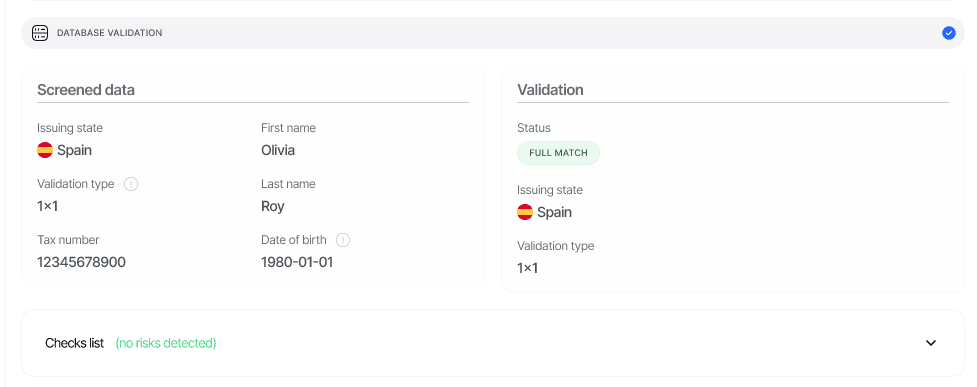
A Database Validation report is produced every time a workflow node runs the Database Validation feature. Each entry in the `database_validations[]` array represents **one node run** against **one issuing state**; if the node runs multiple services for that country (for example CPF + CNH in Brazil), each service appears as a separate item inside the entry's `validations[]` sub-array. Each report contains:
* The overall feature `status` — a [`FeatureStatusChoices`](/reference/data-models#status-enum-reference) value (`Not Finished`, `Approved`, `Declined`, `In Review`).
* A roll-up `match_type` (`full_match`, `partial_match`, `no_match`, or `null` when no service returned a usable result) aggregated across services via the [matching method](/core-technology/database-validation/database-validation-matching-methods).
* The `issuing_state` (ISO 3166-1 alpha-3) and the derived `validation_type` (`one_by_one`, `two_by_two`, or `not_enabled` — never `null`).
* The `screened_data` block — the user-provided data that was sent to the registry.
* A `validations[]` array — one entry per service that produced a result, with the catalog `service_id`/`service_name`, the vendor-neutral `outcome_code`, an optional `outcome_detail`, the per-field `validation` map and the cleaned `source_data` lifted from the registry response.
* An `errors[]` array — per-service errors when a lookup failed or was skipped; the key is **omitted entirely** when there are no errors.
* A `warnings[]` array — risk events emitted during the validation (see [Database Validation warnings](/core-technology/database-validation/database-validation-warnings)).
* A `node_id` that identifies which workflow graph node produced the report (V3 sessions only).
## Where it appears in API responses
The report appears as **`database_validations[]`** in `GET /v3/session/{sessionId}/decision/` — always a JSON array, never a singular object. The array contains one entry per Database Validation node in the workflow graph; in turn, each entry's `validations[]` sub-array contains one item per registry service that produced a result.
```json theme={null}
{
"session_id": "11111111-1111-1111-1111-111111111111",
"status": "Approved",
"database_validations": [
{ "node_id": "feature_db_validation_1", "status": "Approved", "...": "..." }
]
}
```
A `null` value means no Database Validation step has run yet.
## Schema
The canonical field-by-field schema lives on the [Data models](/reference/data-models#database-validation) page. It is produced by `DatabaseValidationV3Serializer`.
```typescript theme={null}
interface DatabaseValidation {
node_id: string | null;
status: "Not Finished" | "Approved" | "Declined" | "In Review"; // FeatureStatusChoices
issuing_state: string | null; // ISO 3166-1 alpha-3, e.g. "ARG"
validation_type: "one_by_one" | "two_by_two" | "not_enabled"; // derived, never null
match_type: "full_match" | "partial_match" | "no_match" | null; // null when no service returned a usable result
screened_data: { // What we sent to the registry (varies by country/service)
tax_number?: string;
personal_number?: string;
document_number?: string;
first_name?: string;
last_name?: string;
date_of_birth?: string; // YYYY-MM-DD
selfie?: string; // Presigned URL (biometric services)
cnh_qr_code_image?: string; // Presigned URL (Brazil CNH QR + face match)
document_image?: string; // Presigned URL (services that take a document image)
gender?: string; // Biometric registry services (e.g. Argentina RENAPER)
};
validations: Array<{
// Catalog metadata
service_id?: string; // e.g. "arg_renaper"
service_name?: string; // e.g. "Argentina - DNI verification (RENAPER)"
// Per-field match outcome — keys vary by service
// (full_name, first_name, last_name, date_of_birth, identification_number, address, …)
validation?: Record;
outcome_code?: string; // Vendor-neutral outcome, see below
outcome_detail?: string; // Raw upstream status detail backing the outcome code
source_data?: { // Cleaned registry record
identification_number?: string;
first_name?: string;
last_name?: string;
full_name?: string;
date_of_birth?: string;
place_of_birth?: string;
gender?: string;
nationality?: string;
issue_date?: string;
expiration_date?: string;
photo?: string; // Pre-signed JPEG URL
signature?: string; // Pre-signed JPEG URL
face_match_score?: number; // Biometric services only (0-100)
};
}>;
errors?: Array<{ // Omitted entirely when empty
service_id: string;
code?: string; // e.g. "invalid_screened_data", "empty_provider_response"
message?: string;
missing_required_fields?: string[];
invalid_format_fields?: string[];
field_reasons?: Record;
}>;
warnings: Warning[]; // See /reference/data-models#warning-object
}
```
### Status values
`status` uses the standard feature-level enum (see [Status enums](/reference/data-models#status-enums)) — see the [Status enum reference](/reference/data-models#status-enum-reference). The enum also defines `Resub Requested`, which is not produced by Database Validation in practice.
| Status | Meaning |
| -------------- | -------------------------------------------------------------------------------------------------------------------------------------------------------------------------- |
| `Not Finished` | The validation has not produced a result yet (initial state; also recorded when a standalone call fails across all services). |
| `Approved` | No risk fired, or the only fired risks are configured `NO_ACTION` (the partial-match default). |
| `Declined` | A no-match or partial-match outcome whose configured action is `DECLINE`. |
| `In Review` | A no-match or partial-match outcome whose configured action is `REVIEW`, or the validation could not run at all (`COULD_NOT_PERFORM_DATABASE_VALIDATION` — always review). |
Custom per-node status rules are applied on top of this base status. See [Database Validation warnings](/core-technology/database-validation/database-validation-warnings) for the configurable actions and their defaults.
### Outcome codes
Each entry in `validations[]` carries a vendor-neutral `outcome_code` — one of `MATCH`, `PARTIAL_MATCH`, `NO_MATCH`, `DOCUMENT_NOT_FOUND`, `INVALID_DOCUMENT_FORMAT`, `INVALID_INPUT`, `MINOR_BLOCKED`, `DECEASED`, `BIOMETRIC_NO_MATCH`, `BIOMETRIC_IMAGE_UNUSABLE`, `INCONCLUSIVE`, `REGISTRY_UNAVAILABLE`, `REGISTRY_ERROR`. Note the distinctions: `NO_MATCH` means the registry definitively did not confirm the data, `INCONCLUSIVE` means the registry could not determine either way (route to review, not decline), and `BIOMETRIC_IMAGE_UNUSABLE` is a technical selfie problem (retake) — unlike the definitive `BIOMETRIC_NO_MATCH`. See the full taxonomy and recommended handling on the [Outcome codes](/core-technology/database-validation/database-validation-outcome-codes) page.
### One entry per service
The `validations[]` array contains **one item for each service that produced a result payload** (a `validation` map, `source_data`, `outcome_code`, or `outcome_detail`). If your workflow runs multiple services for the same country (for example Brazil CPF + Brazil CNH), each one appears separately with its own `service_id`, `outcome_code`, and `source_data`. The roll-up `match_type` aggregates across all services (any full match → `full_match`; else any partial → `partial_match`; else `no_match`), and `validation_type` is derived from how many distinct services full-matched — see [Matching methods](/core-technology/database-validation/database-validation-matching-methods).
### Pre-signed image URLs
Image fields in `source_data` (`photo`, `signature`) and `screened_data` (`selfie`, `cnh_qr_code_image`, `document_image`) are returned as **pre-signed URLs** that expire — refresh by re-calling the decision endpoint. The raw upstream payload is intentionally not exposed via the API.
## Examples
### Approved — Brazil CPF status check (Receita Federal)
```json theme={null}
{
"node_id": "feature_db_validation_1",
"status": "Approved",
"issuing_state": "BRA",
"validation_type": "one_by_one",
"match_type": "full_match",
"screened_data": {
"tax_number": "12345678900",
"first_name": "John",
"last_name": "Doe",
"date_of_birth": "1980-01-01"
},
"validations": [
{
"service_id": "bra_cpf",
"service_name": "Brazil - CPF status check",
"outcome_code": "MATCH",
"outcome_detail": "200",
"validation": {
"full_name": "full_match",
"date_of_birth": "full_match",
"identification_number": "full_match"
},
"source_data": {
"identification_number": "12345678900",
"first_name": "JOHN",
"last_name": "DOE",
"date_of_birth": "1980-01-01",
"lgpd_minor": false,
"minor_under_16": false,
"minor_under_18": false
}
}
],
"warnings": []
}
```
### Approved — Argentina DNI biometric (RENAPER)
For Argentina, the validation uses RENAPER with a biometric face-match. The response includes a `face_match_score` and additional identity fields returned by the registry.
```json theme={null}
{
"node_id": "feature_db_validation_1",
"status": "Approved",
"issuing_state": "ARG",
"validation_type": "one_by_one",
"match_type": "full_match",
"screened_data": {
"document_number": "12345678",
"selfie": "https:///sessions//selfie.jpg?X-Amz-Signature=...",
"gender": "M",
"first_name": "John",
"last_name": "Doe"
},
"validations": [
{
"service_id": "arg_renaper",
"service_name": "Argentina - DNI verification (RENAPER)",
"outcome_code": "MATCH",
"validation": {
"full_name": "full_match",
"identification_number": "full_match"
},
"source_data": {
"identification_number": "12345678",
"first_name": "John",
"last_name": "Doe",
"full_name": "John Doe",
"date_of_birth": "1990-01-01",
"tax_id": "20000000019",
"tax_id_type": "CUIT",
"face_match_score": 97
}
}
],
"warnings": []
}
```
### In Review — registry could not run
When no service returns a usable result — required fields missing or malformed, or the registry unreachable — `match_type` stays `null`, `validation_type` is `not_enabled`, a `COULD_NOT_PERFORM_DATABASE_VALIDATION` warning is emitted, and the feature moves to `In Review` until the data is corrected. **No charge** is applied for skipped services.
```json theme={null}
{
"node_id": "feature_db_validation_1",
"status": "In Review",
"issuing_state": "PAN",
"validation_type": "not_enabled",
"match_type": null,
"screened_data": {
"first_name": "John",
"last_name": "Doe",
"date_of_birth": "1990-01-01",
"selfie": "https:///sessions//selfie.jpg?X-Amz-Signature=..."
},
"validations": [],
"errors": [
{
"code": "invalid_screened_data",
"message": "Database validation was skipped before calling the provider because the screened data has missing required fields: personal_number.",
"missing_required_fields": ["personal_number"],
"service_id": "pan_cedula_sib_plus"
}
],
"warnings": [
{
"feature": "DATABASE_VALIDATION",
"risk": "COULD_NOT_PERFORM_DATABASE_VALIDATION",
"additional_data": {
"reason": "Database validation was skipped before any provider request because the screened data is incomplete or invalid.",
"database_validation_errors": [
{
"code": "invalid_screened_data",
"message": "Database validation was skipped before calling the provider because the screened data has missing required fields: personal_number.",
"missing_required_fields": ["personal_number"],
"service_id": "pan_cedula_sib_plus"
}
],
"missing_required_fields_by_service": { "pan_cedula_sib_plus": ["personal_number"] },
"invalid_format_fields_by_service": {},
"field_reasons_by_service": {}
},
"log_type": "warning",
"short_description": "Could not perform database validation",
"long_description": "The system couldn't perform the database validation, please fill the required fields for this country to automatically proceed with database validation.",
"node_id": "feature_db_validation_1"
}
]
}
```
Fill the missing field from the session detail page in the Console — saving it re-triggers the check automatically and clears the warning on success.
## Related
* [Database Validation overview](/core-technology/database-validation/overview) — how the API works end-to-end and supported registries.
* [Matching methods](/core-technology/database-validation/database-validation-matching-methods) — how 1×1 / 2×2 outcomes (`validation_type: one_by_one` / `two_by_two`) are derived.
* [Outcome codes](/core-technology/database-validation/database-validation-outcome-codes) — full per-result taxonomy with country-specific detail codes.
* [Supported countries & services](/core-technology/database-validation/database-validation-supported-countries) — every live registry, required fields and per-call price.
* [Database Validation warnings](/core-technology/database-validation/database-validation-warnings) — what we surface when a service can't run.
* [Data models — database validation](/reference/data-models#database-validation) — canonical field-by-field schema.
## Overview
A Database Validation report is produced every time a workflow node runs the Database Validation feature. Each entry in the `database_validations[]` array represents **one node run** against **one issuing state**; if the node runs multiple services for that country (for example CPF + CNH in Brazil), each service appears as a separate item inside the entry's `validations[]` sub-array. Each report contains:
* The overall feature `status` — a [`FeatureStatusChoices`](/reference/data-models#status-enum-reference) value (`Not Finished`, `Approved`, `Declined`, `In Review`).
* A roll-up `match_type` (`full_match`, `partial_match`, `no_match`, or `null` when no service returned a usable result) aggregated across services via the [matching method](/core-technology/database-validation/database-validation-matching-methods).
* The `issuing_state` (ISO 3166-1 alpha-3) and the derived `validation_type` (`one_by_one`, `two_by_two`, or `not_enabled` — never `null`).
* The `screened_data` block — the user-provided data that was sent to the registry.
* A `validations[]` array — one entry per service that produced a result, with the catalog `service_id`/`service_name`, the vendor-neutral `outcome_code`, an optional `outcome_detail`, the per-field `validation` map and the cleaned `source_data` lifted from the registry response.
* An `errors[]` array — per-service errors when a lookup failed or was skipped; the key is **omitted entirely** when there are no errors.
* A `warnings[]` array — risk events emitted during the validation (see [Database Validation warnings](/core-technology/database-validation/database-validation-warnings)).
* A `node_id` that identifies which workflow graph node produced the report (V3 sessions only).
## Where it appears in API responses
The report appears as **`database_validations[]`** in `GET /v3/session/{sessionId}/decision/` — always a JSON array, never a singular object. The array contains one entry per Database Validation node in the workflow graph; in turn, each entry's `validations[]` sub-array contains one item per registry service that produced a result.
```json theme={null}
{
"session_id": "11111111-1111-1111-1111-111111111111",
"status": "Approved",
"database_validations": [
{ "node_id": "feature_db_validation_1", "status": "Approved", "...": "..." }
]
}
```
A `null` value means no Database Validation step has run yet.
## Schema
The canonical field-by-field schema lives on the [Data models](/reference/data-models#database-validation) page. It is produced by `DatabaseValidationV3Serializer`.
```typescript theme={null}
interface DatabaseValidation {
node_id: string | null;
status: "Not Finished" | "Approved" | "Declined" | "In Review"; // FeatureStatusChoices
issuing_state: string | null; // ISO 3166-1 alpha-3, e.g. "ARG"
validation_type: "one_by_one" | "two_by_two" | "not_enabled"; // derived, never null
match_type: "full_match" | "partial_match" | "no_match" | null; // null when no service returned a usable result
screened_data: { // What we sent to the registry (varies by country/service)
tax_number?: string;
personal_number?: string;
document_number?: string;
first_name?: string;
last_name?: string;
date_of_birth?: string; // YYYY-MM-DD
selfie?: string; // Presigned URL (biometric services)
cnh_qr_code_image?: string; // Presigned URL (Brazil CNH QR + face match)
document_image?: string; // Presigned URL (services that take a document image)
gender?: string; // Biometric registry services (e.g. Argentina RENAPER)
};
validations: Array<{
// Catalog metadata
service_id?: string; // e.g. "arg_renaper"
service_name?: string; // e.g. "Argentina - DNI verification (RENAPER)"
// Per-field match outcome — keys vary by service
// (full_name, first_name, last_name, date_of_birth, identification_number, address, …)
validation?: Record;
outcome_code?: string; // Vendor-neutral outcome, see below
outcome_detail?: string; // Raw upstream status detail backing the outcome code
source_data?: { // Cleaned registry record
identification_number?: string;
first_name?: string;
last_name?: string;
full_name?: string;
date_of_birth?: string;
place_of_birth?: string;
gender?: string;
nationality?: string;
issue_date?: string;
expiration_date?: string;
photo?: string; // Pre-signed JPEG URL
signature?: string; // Pre-signed JPEG URL
face_match_score?: number; // Biometric services only (0-100)
};
}>;
errors?: Array<{ // Omitted entirely when empty
service_id: string;
code?: string; // e.g. "invalid_screened_data", "empty_provider_response"
message?: string;
missing_required_fields?: string[];
invalid_format_fields?: string[];
field_reasons?: Record;
}>;
warnings: Warning[]; // See /reference/data-models#warning-object
}
```
### Status values
`status` uses the standard feature-level enum (see [Status enums](/reference/data-models#status-enums)) — see the [Status enum reference](/reference/data-models#status-enum-reference). The enum also defines `Resub Requested`, which is not produced by Database Validation in practice.
| Status | Meaning |
| -------------- | -------------------------------------------------------------------------------------------------------------------------------------------------------------------------- |
| `Not Finished` | The validation has not produced a result yet (initial state; also recorded when a standalone call fails across all services). |
| `Approved` | No risk fired, or the only fired risks are configured `NO_ACTION` (the partial-match default). |
| `Declined` | A no-match or partial-match outcome whose configured action is `DECLINE`. |
| `In Review` | A no-match or partial-match outcome whose configured action is `REVIEW`, or the validation could not run at all (`COULD_NOT_PERFORM_DATABASE_VALIDATION` — always review). |
Custom per-node status rules are applied on top of this base status. See [Database Validation warnings](/core-technology/database-validation/database-validation-warnings) for the configurable actions and their defaults.
### Outcome codes
Each entry in `validations[]` carries a vendor-neutral `outcome_code` — one of `MATCH`, `PARTIAL_MATCH`, `NO_MATCH`, `DOCUMENT_NOT_FOUND`, `INVALID_DOCUMENT_FORMAT`, `INVALID_INPUT`, `MINOR_BLOCKED`, `DECEASED`, `BIOMETRIC_NO_MATCH`, `BIOMETRIC_IMAGE_UNUSABLE`, `INCONCLUSIVE`, `REGISTRY_UNAVAILABLE`, `REGISTRY_ERROR`. Note the distinctions: `NO_MATCH` means the registry definitively did not confirm the data, `INCONCLUSIVE` means the registry could not determine either way (route to review, not decline), and `BIOMETRIC_IMAGE_UNUSABLE` is a technical selfie problem (retake) — unlike the definitive `BIOMETRIC_NO_MATCH`. See the full taxonomy and recommended handling on the [Outcome codes](/core-technology/database-validation/database-validation-outcome-codes) page.
### One entry per service
The `validations[]` array contains **one item for each service that produced a result payload** (a `validation` map, `source_data`, `outcome_code`, or `outcome_detail`). If your workflow runs multiple services for the same country (for example Brazil CPF + Brazil CNH), each one appears separately with its own `service_id`, `outcome_code`, and `source_data`. The roll-up `match_type` aggregates across all services (any full match → `full_match`; else any partial → `partial_match`; else `no_match`), and `validation_type` is derived from how many distinct services full-matched — see [Matching methods](/core-technology/database-validation/database-validation-matching-methods).
### Pre-signed image URLs
Image fields in `source_data` (`photo`, `signature`) and `screened_data` (`selfie`, `cnh_qr_code_image`, `document_image`) are returned as **pre-signed URLs** that expire — refresh by re-calling the decision endpoint. The raw upstream payload is intentionally not exposed via the API.
## Examples
### Approved — Brazil CPF status check (Receita Federal)
```json theme={null}
{
"node_id": "feature_db_validation_1",
"status": "Approved",
"issuing_state": "BRA",
"validation_type": "one_by_one",
"match_type": "full_match",
"screened_data": {
"tax_number": "12345678900",
"first_name": "John",
"last_name": "Doe",
"date_of_birth": "1980-01-01"
},
"validations": [
{
"service_id": "bra_cpf",
"service_name": "Brazil - CPF status check",
"outcome_code": "MATCH",
"outcome_detail": "200",
"validation": {
"full_name": "full_match",
"date_of_birth": "full_match",
"identification_number": "full_match"
},
"source_data": {
"identification_number": "12345678900",
"first_name": "JOHN",
"last_name": "DOE",
"date_of_birth": "1980-01-01",
"lgpd_minor": false,
"minor_under_16": false,
"minor_under_18": false
}
}
],
"warnings": []
}
```
### Approved — Argentina DNI biometric (RENAPER)
For Argentina, the validation uses RENAPER with a biometric face-match. The response includes a `face_match_score` and additional identity fields returned by the registry.
```json theme={null}
{
"node_id": "feature_db_validation_1",
"status": "Approved",
"issuing_state": "ARG",
"validation_type": "one_by_one",
"match_type": "full_match",
"screened_data": {
"document_number": "12345678",
"selfie": "https:///sessions//selfie.jpg?X-Amz-Signature=...",
"gender": "M",
"first_name": "John",
"last_name": "Doe"
},
"validations": [
{
"service_id": "arg_renaper",
"service_name": "Argentina - DNI verification (RENAPER)",
"outcome_code": "MATCH",
"validation": {
"full_name": "full_match",
"identification_number": "full_match"
},
"source_data": {
"identification_number": "12345678",
"first_name": "John",
"last_name": "Doe",
"full_name": "John Doe",
"date_of_birth": "1990-01-01",
"tax_id": "20000000019",
"tax_id_type": "CUIT",
"face_match_score": 97
}
}
],
"warnings": []
}
```
### In Review — registry could not run
When no service returns a usable result — required fields missing or malformed, or the registry unreachable — `match_type` stays `null`, `validation_type` is `not_enabled`, a `COULD_NOT_PERFORM_DATABASE_VALIDATION` warning is emitted, and the feature moves to `In Review` until the data is corrected. **No charge** is applied for skipped services.
```json theme={null}
{
"node_id": "feature_db_validation_1",
"status": "In Review",
"issuing_state": "PAN",
"validation_type": "not_enabled",
"match_type": null,
"screened_data": {
"first_name": "John",
"last_name": "Doe",
"date_of_birth": "1990-01-01",
"selfie": "https:///sessions//selfie.jpg?X-Amz-Signature=..."
},
"validations": [],
"errors": [
{
"code": "invalid_screened_data",
"message": "Database validation was skipped before calling the provider because the screened data has missing required fields: personal_number.",
"missing_required_fields": ["personal_number"],
"service_id": "pan_cedula_sib_plus"
}
],
"warnings": [
{
"feature": "DATABASE_VALIDATION",
"risk": "COULD_NOT_PERFORM_DATABASE_VALIDATION",
"additional_data": {
"reason": "Database validation was skipped before any provider request because the screened data is incomplete or invalid.",
"database_validation_errors": [
{
"code": "invalid_screened_data",
"message": "Database validation was skipped before calling the provider because the screened data has missing required fields: personal_number.",
"missing_required_fields": ["personal_number"],
"service_id": "pan_cedula_sib_plus"
}
],
"missing_required_fields_by_service": { "pan_cedula_sib_plus": ["personal_number"] },
"invalid_format_fields_by_service": {},
"field_reasons_by_service": {}
},
"log_type": "warning",
"short_description": "Could not perform database validation",
"long_description": "The system couldn't perform the database validation, please fill the required fields for this country to automatically proceed with database validation.",
"node_id": "feature_db_validation_1"
}
]
}
```
Fill the missing field from the session detail page in the Console — saving it re-triggers the check automatically and clears the warning on success.
## Related
* [Database Validation overview](/core-technology/database-validation/overview) — how the API works end-to-end and supported registries.
* [Matching methods](/core-technology/database-validation/database-validation-matching-methods) — how 1×1 / 2×2 outcomes (`validation_type: one_by_one` / `two_by_two`) are derived.
* [Outcome codes](/core-technology/database-validation/database-validation-outcome-codes) — full per-result taxonomy with country-specific detail codes.
* [Supported countries & services](/core-technology/database-validation/database-validation-supported-countries) — every live registry, required fields and per-call price.
* [Database Validation warnings](/core-technology/database-validation/database-validation-warnings) — what we surface when a service can't run.
* [Data models — database validation](/reference/data-models#database-validation) — canonical field-by-field schema.