> ## Documentation Index
> Fetch the complete documentation index at: https://docs.didit.me/llms.txt
> Use this file to discover all available pages before exploring further.

# Email Verification Overview

> Verify emails with OTP and risk assessment. Detect breached, disposable, and undeliverable addresses. Pay-per-call $0.03, no monthly minimums.

export const AgentPromptAccordion = ({prompt, title = "AI Agent Integration Prompt"}) => {
  const [copied, setCopied] = React.useState(false);
  const handleCopy = e => {
    e.stopPropagation();
    if (!prompt) return;
    navigator.clipboard.writeText(prompt.trim()).then(() => {
      setCopied(true);
      setTimeout(() => setCopied(false), 2000);
    });
  };
  const agents = ["Claude Code", "Codex", "Cursor", "Devin", "Windsurf", "GitHub Copilot"];
  return <div className="didit-agent-card">
      {}
      <div className="didit-agent-titlebar">
        <div className="didit-agent-dots" aria-hidden="true">
          <span className="didit-agent-dot didit-agent-dot-red"></span>
          <span className="didit-agent-dot didit-agent-dot-yellow"></span>
          <span className="didit-agent-dot didit-agent-dot-green"></span>
        </div>
        <span className="didit-agent-filename">{title}</span>
        <button type="button" className={`didit-agent-copy ${copied ? "didit-agent-copy-copied" : ""}`} onClick={handleCopy} title="Copy prompt to clipboard" aria-label={copied ? "Copied!" : "Copy prompt to clipboard"}>
          {copied ? <>
              <svg width="13" height="13" viewBox="0 0 16 16" fill="none">
                <path d="M3 8.5l3.5 3.5L13 4" stroke="currentColor" strokeWidth="2" strokeLinecap="round" strokeLinejoin="round" />
              </svg>
              <span>Copied</span>
            </> : <>
              <svg width="13" height="13" viewBox="0 0 16 16" fill="none">
                <rect x="5" y="5" width="9" height="9" rx="1.5" stroke="currentColor" strokeWidth="1.5" />
                <path d="M11 5V3.5A1.5 1.5 0 0 0 9.5 2h-6A1.5 1.5 0 0 0 2 3.5v6A1.5 1.5 0 0 0 3.5 11H5" stroke="currentColor" strokeWidth="1.5" />
              </svg>
              <span>Copy</span>
            </>}
        </button>
      </div>

      {}
      <pre className="didit-agent-body"><code>{prompt.trim()}</code></pre>

      {}
      <div className="didit-agent-footer">
        <span className="didit-agent-footer-label">Paste into</span>
        <div className="didit-agent-chips">
          {agents.map(name => <span key={name} className="didit-agent-chip">{name}</span>)}
        </div>
      </div>
    </div>;
};

export const VideoEmbed = ({src, title = "Video", type = "iframe"}) => <div className={type === "iframe" ? "didit-video-embed" : "didit-video-embed didit-video-native"}>
    {type === "iframe" ? <iframe src={src} title={title} style={{
  width: "100%",
  height: "100%",
  border: 0,
  borderRadius: "12px"
}} allow="accelerometer; autoplay; clipboard-write; encrypted-media; gyroscope; picture-in-picture" allowFullScreen /> : <video controls autoPlay muted loop playsInline src={src} title={title} style={{
  width: "100%",
  height: "auto",
  display: "block",
  borderRadius: "12px"
}} />}
  </div>;

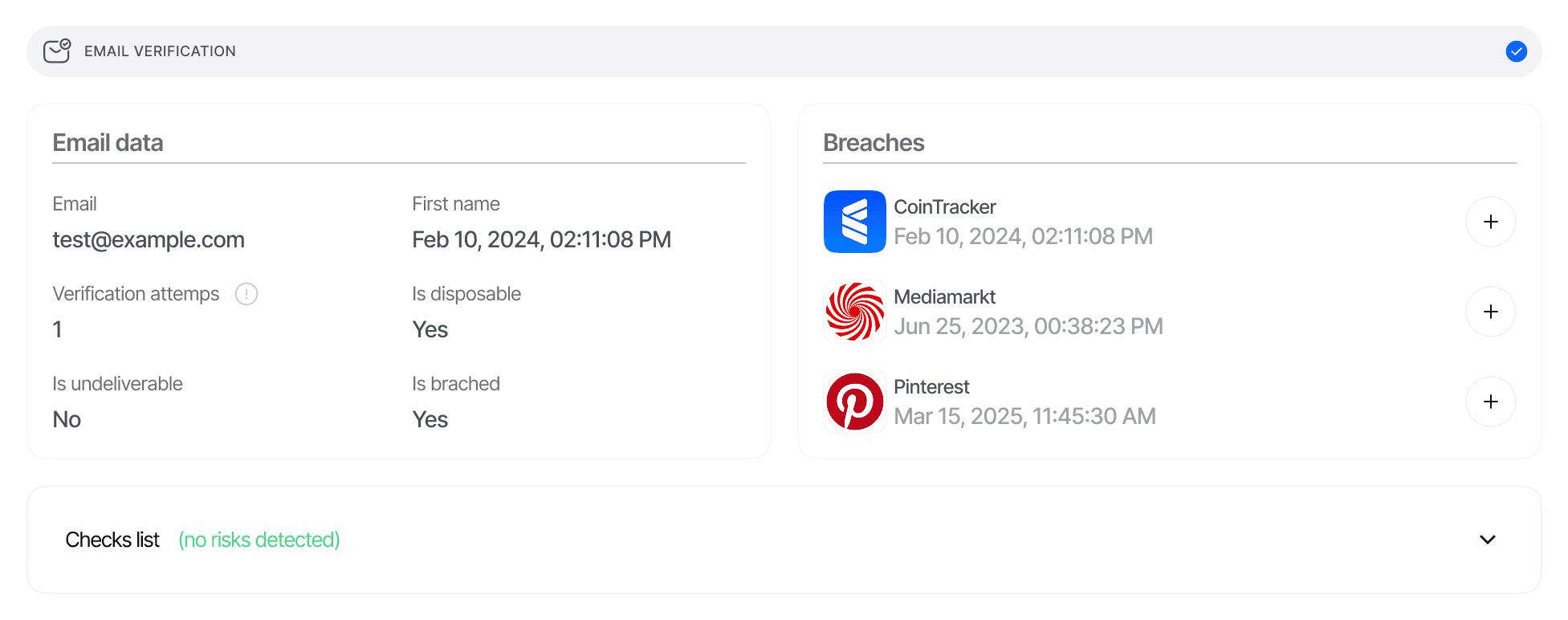
Didit's Email Verification provides a reliable method to verify user email addresses through one-time passcodes (OTP) and advanced risk assessment. This feature helps ensure valid, reachable contact information while protecting against high-risk and compromised emails.

<AgentPromptAccordion
  title="Email Verification Integration Prompt"
  prompt={`# Goal
Integrate Didit Email Verification (OTP send + check + deliverability / breach / disposable lookup) into your app. Pick ONE mode.

# Mode A — Session-based
Use this when the user completes verification through a hosted Didit flow.

1. Add the EMAIL feature to the workflow (Business Console or POST /v3/workflows/). Configure risk actions: duplicated_email_action, breached_email_action, disposable_email_action.
2. Create a session — POST /v3/session/ with { workflow_id, vendor_data, callback }. See /sessions-api/create-session.
3. Open session.url for the user (or mount the Web/Mobile SDK).
4. Fetch the decision — GET /v3/session/{sessionId}/decision/ or subscribe to session.status.updated.

Decision surface: \`email_verifications[]\` array on the decision payload.

# Mode B — Standalone API (server-to-server, OTP pair)
Two endpoints paired by email address.

Step 1 — send the code:
\`\`\`bash
curl -X POST 'https://verification.didit.me/v3/email/send/' \\
-H "x-api-key: $DIDIT_API_KEY" \\
-H "Content-Type: application/json" \\
-d '{
"email": "alice@example.com",
"options": { "code_size": 6, "locale": "en", "use_white_label_customization": false },
"vendor_data": "user-1234"
}'
\`\`\`
Default: 6 numeric digits and Didit-branded delivery. Set \`options.alphanumeric_code: true\` for letters+digits (check is case-insensitive). Set \`options.use_white_label_customization: true\` to use your application's configured white-label sender and branding for this standalone OTP email; the default is \`false\`. \`options.code_size\` 4–8. Codes expire in **5 minutes**; one free retry per email within the window.

Step 2 — check the code (user types it into your UI):
\`\`\`bash
curl -X POST 'https://verification.didit.me/v3/email/check/' \\
-H "x-api-key: $DIDIT_API_KEY" \\
-H "Content-Type: application/json" \\
-d '{
"email": "alice@example.com",
"code": "123456",
"disposable_email_action": "DECLINE"
}'
\`\`\`
Each session accepts **up to 3** code-entry attempts. The check response always includes the full email metadata (breaches[], disposable flag, deliverable flag).

# Status enum (per email_verifications[].status / email.status)
"Not Started" | "In Progress" | "Approved" | "Declined" | "Failed" | "Undeliverable" | "Expired or Not Found" | "Abandoned" | "Kyc Expired"

# Warnings (LogWarningChoices.EMAIL)
warnings[] risk codes include:
DUPLICATED_EMAIL, BREACHED_EMAIL, DISPOSABLE_EMAIL, UNDELIVERABLE_EMAIL, INVALID_EMAIL, OTP_MAX_ATTEMPTS_REACHED, OTP_EXPIRED.
Full catalogue: /core-technology/email-verification/warnings-email-verification.

# Failure modes to handle
- send response status="Undeliverable" — bounce/invalid domain; no charge, surface to the user.
- check response status="Failed" — wrong code, attempts remaining; re-prompt.
- check response status="Declined" — third failed attempt; restart with /v3/email/send/.
- check response status="Expired or Not Found" — outside the 5-minute window; restart.
- BREACHED_EMAIL warning — the address appears in known breaches; route to review per policy.

# See also
- Canonical schema: /reference/data-models#email-verification
- Per-feature report: /core-technology/email-verification/report-email-verification
- Risk catalogue: /core-technology/email-verification/warnings-email-verification
- Full integration playbook: /integration/integration-prompt`}
/>

<VideoEmbed src="https://www.youtube.com/embed/h0i9Q0-izcw?start=46&rel=0&playsinline=1" title="User Journey & Verification Flow" />

<Frame>
  <img src="https://mintcdn.com/didit-0f962782/z6T2GHM4Zh-iSj-K/images/email-verification-flow.png?fit=max&auto=format&n=z6T2GHM4Zh-iSj-K&q=85&s=23d035a261faa2063d6d941290ecf752" alt="Email verification flow diagram" width="1953" height="772" data-path="images/email-verification-flow.png" />
</Frame>

## How it works

Our Email Verification solution combines OTP verification with intelligence signals such as breach exposure, deliverability, and provider reputation.

<Steps>
  <Step title="Email Collection" icon="envelope">
    The system securely collects:

    | Input                  | Description                                                                                                                                                   |
    | ---------------------- | ------------------------------------------------------------------------------------------------------------------------------------------------------------- |
    | **Email Address**      | If not provided during session creation, the user enters their email address. If provided during session creation, the user must verify the pre-filled email. |
    | **Preferred Language** | Used for localized communications when applicable.                                                                                                            |
  </Step>

  <Step title="OTP Generation & Delivery" icon="key">
    Our verification system:

    * Generates a secure, time-limited one-time passcode
    * Delivers the code via email to the provided address
    * Implements deliverability best practices to maximize inbox placement
    * Provides resend flows with safeguards to prevent abuse
  </Step>

  <Step title="Code Validation" icon="circle-check">
    The user completes verification by:

    * Entering the received code into the verification interface
    * Submitting within the configured timeframe (5 minutes)
    * Requesting a new code if needed (with appropriate rate limiting)
  </Step>

  <Step title="Risk Assessment" icon="shield-halved">
    Our system performs advanced checks:

    | Check                             | Description                                                               |
    | --------------------------------- | ------------------------------------------------------------------------- |
    | **Breach Exposure**               | Looks up the email across known data breaches and lists exposed services. |
    | **Disposable Provider Detection** | Flags emails from temporary/disposable providers.                         |
    | **Deliverability Checks**         | Detects undeliverable or syntactically invalid addresses.                 |
    | **Reputation Signals**            | Identifies potentially high-risk email patterns.                          |
    | **Duplicate Use**                 | Cross-references with historical verification data.                       |
  </Step>

  <Step title="Result Delivery" icon="paper-plane">
    Access verification results through multiple channels:

    | Channel       | Description                                                   |
    | ------------- | ------------------------------------------------------------- |
    | **Dashboard** | Real-time dashboard updates.                                  |
    | **Webhooks**  | Webhook notifications.                                        |
    | **API**       | RESTful API responses.                                        |
    | **Reports**   | Comprehensive reports with detailed verification information. |
  </Step>
</Steps>

## Verification Features

Our Email Verification service offers several key features to enhance your verification process:

#### OTP Verification

* **Secure Code Generation**: Random, time-bound one-time passcodes
* **Email Delivery**: Reliable and localized email delivery
* **Configurable Timeouts**: Set expiration times based on your security requirements
* **Retry Options**: Allow users to request new codes with appropriate limits

#### Email Analysis

* **Syntax Validation**: Ensure the email address follows RFC-compliant format
* **Provider Checks**: Identify disposable/temporary providers
* **Deliverability Insight**: Detect undeliverable addresses
* **Breach Intelligence**: Surface known breach records with details

#### Risk Assessment

* **Exposure Detection**: Identify if the email appears in known breaches
* **Disposable Detection**: Flag temporary or throwaway emails
* **Activity Monitoring**: Track suspicious patterns across attempts
* **Blocklist Checking**: Check against internal lists of previously misused emails