> ## Documentation Index
> Fetch the complete documentation index at: https://docs.didit.me/llms.txt
> Use this file to discover all available pages before exploring further.

# Face Match 1:1

> Compare live selfies against ID document photos with AI facial recognition. Pay-per-call $0.05, 500 free/month, sub-2-second response.

export const AgentPromptAccordion = ({prompt, title = "AI Agent Integration Prompt"}) => {
  const [copied, setCopied] = React.useState(false);
  const handleCopy = e => {
    e.stopPropagation();
    if (!prompt) return;
    navigator.clipboard.writeText(prompt.trim()).then(() => {
      setCopied(true);
      setTimeout(() => setCopied(false), 2000);
    });
  };
  const agents = ["Claude Code", "Codex", "Cursor", "Devin", "Windsurf", "GitHub Copilot"];
  return <div className="didit-agent-card">
      {}
      <div className="didit-agent-titlebar">
        <div className="didit-agent-dots" aria-hidden="true">
          <span className="didit-agent-dot didit-agent-dot-red"></span>
          <span className="didit-agent-dot didit-agent-dot-yellow"></span>
          <span className="didit-agent-dot didit-agent-dot-green"></span>
        </div>
        <span className="didit-agent-filename">{title}</span>
        <button type="button" className={`didit-agent-copy ${copied ? "didit-agent-copy-copied" : ""}`} onClick={handleCopy} title="Copy prompt to clipboard" aria-label={copied ? "Copied!" : "Copy prompt to clipboard"}>
          {copied ? <>
              <svg width="13" height="13" viewBox="0 0 16 16" fill="none">
                <path d="M3 8.5l3.5 3.5L13 4" stroke="currentColor" strokeWidth="2" strokeLinecap="round" strokeLinejoin="round" />
              </svg>
              <span>Copied</span>
            </> : <>
              <svg width="13" height="13" viewBox="0 0 16 16" fill="none">
                <rect x="5" y="5" width="9" height="9" rx="1.5" stroke="currentColor" strokeWidth="1.5" />
                <path d="M11 5V3.5A1.5 1.5 0 0 0 9.5 2h-6A1.5 1.5 0 0 0 2 3.5v6A1.5 1.5 0 0 0 3.5 11H5" stroke="currentColor" strokeWidth="1.5" />
              </svg>
              <span>Copy</span>
            </>}
        </button>
      </div>

      {}
      <pre className="didit-agent-body"><code>{prompt.trim()}</code></pre>

      {}
      <div className="didit-agent-footer">
        <span className="didit-agent-footer-label">Paste into</span>
        <div className="didit-agent-chips">
          {agents.map(name => <span key={name} className="didit-agent-chip">{name}</span>)}
        </div>
      </div>
    </div>;
};

export const VideoEmbed = ({src, title = "Video", type = "iframe"}) => <div className={type === "iframe" ? "didit-video-embed" : "didit-video-embed didit-video-native"}>
    {type === "iframe" ? <iframe src={src} title={title} style={{
  width: "100%",
  height: "100%",
  border: 0,
  borderRadius: "12px"
}} allow="accelerometer; autoplay; clipboard-write; encrypted-media; gyroscope; picture-in-picture" allowFullScreen /> : <video controls autoPlay muted loop playsInline src={src} title={title} style={{
  width: "100%",
  height: "auto",
  display: "block",
  borderRadius: "12px"
}} />}
  </div>;

<VideoEmbed src="https://www.youtube.com/embed/h0i9Q0-izcw?start=604&rel=0&playsinline=1" title="Face Matching & Advanced Blocklisting" />

Powered by cutting-edge AI, computer vision, and biometric technology, our solution ensures fast, accurate, and secure identity verification at scale. Designed to combat fraud, simplify compliance, and enhance user experience, Didit provides a robust and trustworthy platform that meets the highest industry standards.

<AgentPromptAccordion
  title="Face Match Integration Prompt"
  prompt={`# Goal
Integrate Didit Face Match (1:1 — compare two faces) into your app. Pick ONE mode.

# Mode A — Session-based
Use this when the user goes through a hosted Didit flow. Face Match runs alongside ID Verification (uses the document portrait as ref) and Liveness (uses the live selfie as user_image).

1. Add the FACE_MATCH feature to a workflow that also runs ID_VERIFICATION + LIVENESS (Business Console or POST /v3/workflows/).
2. Create a session — POST /v3/session/ with { workflow_id, vendor_data, callback }. See /sessions-api/create-session.
3. Open session.url for the user (or mount the Web/Mobile SDK).
4. Fetch the decision — GET /v3/session/{sessionId}/decision/ or subscribe to session.status.updated.

Decision surface: \`face_matches[]\` array on the decision payload.

# Mode B — Standalone API (server-to-server)
Use when you already have two images and want a one-shot 1:1 similarity score.

POST https://verification.didit.me/v3/face-match/
multipart/form-data — x-api-key: YOUR_API_KEY

Required: \`user_image\` (live capture) and \`ref_image\` (reference portrait). JPEG/PNG/WebP/TIFF, max 5 MB each.

curl example:
\`\`\`bash
curl -X POST 'https://verification.didit.me/v3/face-match/' \\
-H 'x-api-key: YOUR_API_KEY' \\
-F 'user_image=@./selfie.jpg' \\
-F 'ref_image=@./id_portrait.jpg' \\
-F 'save_api_request=true' \\
-F 'vendor_data=user-123'
\`\`\`
Returns: { request_id, face_match: { status, score (0-100), user_image: {entities}, ref_image: {entities}, warnings: [...] } }. \`status\` is "Approved" when score > face_match_score_decline_threshold (default 30), else "Declined".

# Status enum (per face_matches[].status / face_match.status)
"Not Started" | "In Progress" | "Approved" | "In Review" | "Declined" | "Abandoned" | "Kyc Expired"

# Warnings (LogWarningChoices.FACEMATCH)
warnings[] risk codes include:
LOW_FACE_MATCH_SIMILARITY, NO_REFERENCE_IMAGE, NO_FACE_DETECTED, MULTIPLE_FACES_DETECTED.
Full catalogue: /core-technology/face-match/warnings-face-match.

# Failure modes to handle
- HTTP 403 — out of credits.
- HTTP 400 — missing user_image or ref_image, file too large, unsupported extension.
- status="Declined" with LOW_FACE_MATCH_SIMILARITY — the two faces do not match; do not approve.
- NO_REFERENCE_IMAGE / NO_FACE_DETECTED — capture problems; ask the user to retry.

# See also
- Canonical schema: /reference/data-models#face-match
- Per-feature report: /core-technology/face-match/report-face-match
- Risk catalogue: /core-technology/face-match/warnings-face-match
- Full integration playbook: /integration/integration-prompt`}
/>

<Frame>
  <img src="https://mintcdn.com/didit-0f962782/z6T2GHM4Zh-iSj-K/images/id-verification-steps.png?fit=max&auto=format&n=z6T2GHM4Zh-iSj-K&q=85&s=42c64546f3495000d7ea3b10c4b5fa50" alt="ID verification steps overview" width="4780" height="2276" data-path="images/id-verification-steps.png" />
</Frame>

## Retries & actionable feedback

In a Didit session, a face match that fails for a **fixable capture reason** (the selfie is too dark, blurry, off-center, or the similarity is borderline) does not immediately decline. The user is asked to **retry with guidance**, up to a configurable number of attempts — the same model used for [Liveness](/core-technology/liveness/overview).

* **Attempt budget** — `face_match_max_attempts` controls the total number of face-match submissions per session. Default **3** (one initial attempt plus two retries), configurable per workflow node (range 1–3).

* **Retry feedback** — while attempts remain, a retryable failure keeps the user on the step and returns `feedback_codes` (the Web and Mobile SDKs surface these as coaching messages automatically):

  ```json theme={null}
  {
    "detail": "Make sure your face matches your document photo, improve lighting and try again.",
    "error": "LOW_FACE_MATCH_SIMILARITY",
    "feedback_codes": ["LOW_FACE_MATCH_SIMILARITY"],
    "attempts_used": 1,
    "max_attempts": 3
  }
  ```

* **Exhaustion** — once the budget is exhausted the computed status is applied (`Declined` or `In Review`).
<Note>
  Retries apply to the **session flow** only. The standalone `POST /v3/face-match/` endpoint is stateless and single-shot — it returns the similarity score directly with no retry budget.
</Note>

## How It Works

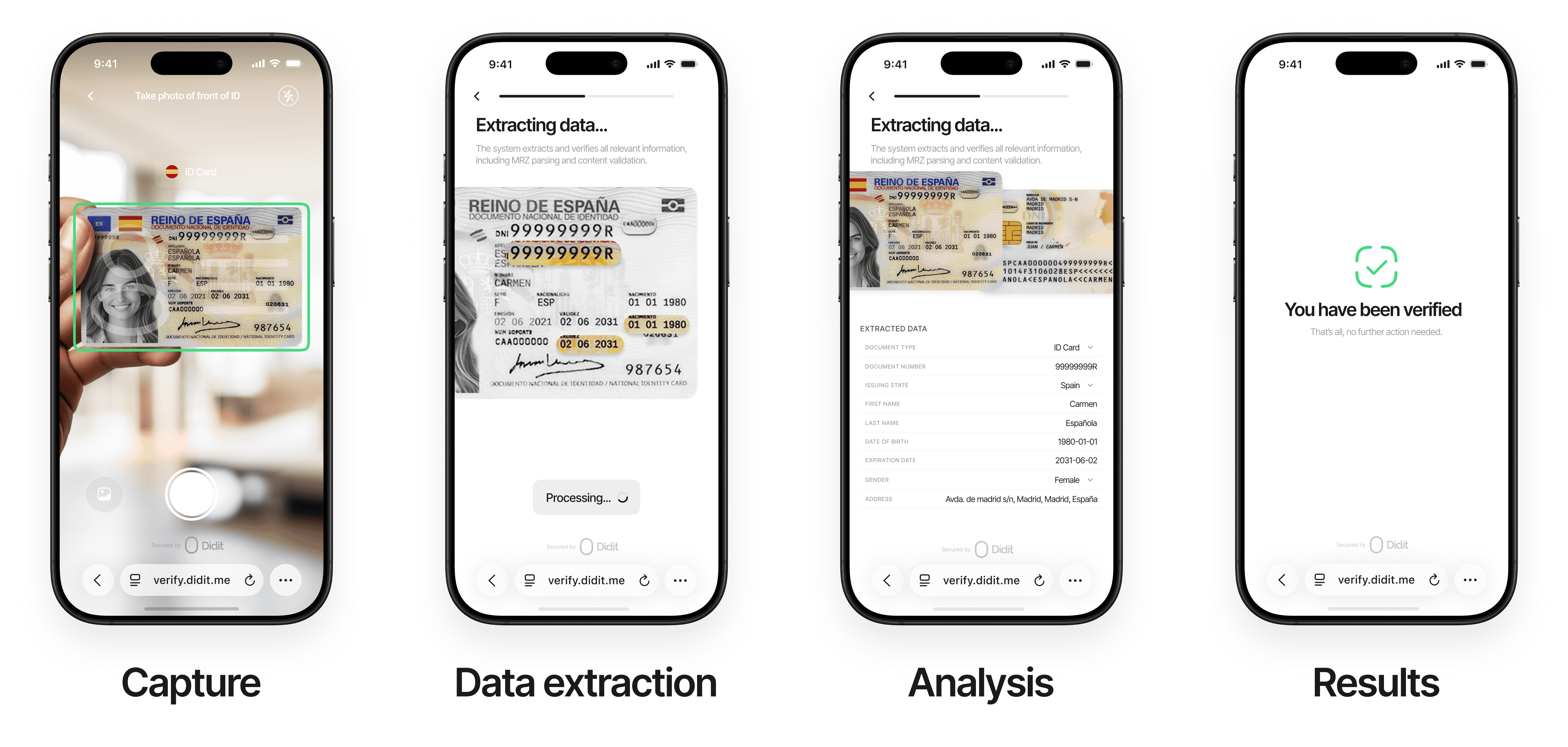
<Steps>
  <Step title="Intelligent Capture" icon="camera">
    Effortlessly begin the verification process with our intuitive, AI-driven capture system.

    Users upload or photograph their ID documents with real-time assistance:

    | Feature                | Description                                                            |
    | ---------------------- | ---------------------------------------------------------------------- |
    | **Auto-detection**     | Identifies document type and issuing country automatically             |
    | **Real-time guidance** | Visual cues for optimal positioning, lighting, and focus               |
    | **Smart capture**      | Automatic capture when conditions are ideal — no manual retries needed |
    | **Broad support**      | Passports, driver's licenses, national ID cards, and residence permits |

    <Note>
      *Why it matters*: Our intelligent capture reduces user friction and ensures high-quality submissions on the first attempt, boosting conversion rates and trust.
    </Note>
  </Step>

  <Step title="Advanced Data Processing" icon="gears">
    Extract and validate identity data with unmatched precision.

    **Data Extraction** — State-of-the-art technology processes all key fields:

    | Capability           | Details                                                                              |
    | -------------------- | ------------------------------------------------------------------------------------ |
    | **Field extraction** | Full name, date of birth, document number, issue/expiry dates, nationality, and more |
    | **OCR**              | High-precision optical character recognition for text                                |
    | **MRZ parsing**      | Machine-Readable Zone parsing and barcode decoding                                   |

    **Data Validation**:

    * Cross-references data between visual zones, MRZ, and barcodes for consistency
    * Format and pattern matching to detect anomalies
    * Real-time queries against government databases (where permitted) for authoritative verification

    <Note>
      *Why it matters*: Comprehensive data processing ensures accuracy and eliminates errors, giving you confidence in every verification.
    </Note>
  </Step>

  <Step title="Advanced Analysis" icon="shield-check">
    Our AI-powered system performs comprehensive checks:

    * Document authenticity verification
    * Tamper detection and image integrity analysis
    * Security feature validation (holograms, watermarks, etc.)
    * Template matching against certified database

    **Document liveness detection** prevents fraud from:

    | Attack type           | Description                                         |
    | --------------------- | --------------------------------------------------- |
    | **Screen captures**   | Digital documents photographed from a screen        |
    | **Screen replay**     | Photos of documents displayed on screens            |
    | **Printed copies**    | Physical reproductions of original documents        |
    | **Altered portraits** | Manipulated documents with swapped or edited photos |
  </Step>

  <Step title="Seamless Results & Integration" icon="plug">
    Get actionable insights instantly with flexible delivery options.

    **Real-Time Results**:

    | Channel       | Description                                           |
    | ------------- | ----------------------------------------------------- |
    | **Dashboard** | Immediate updates via an intuitive dashboard          |
    | **Webhooks**  | Instant webhook notifications for automated workflows |
    | **REST API**  | Seamless integration into your existing systems       |

    **Comprehensive Reporting**:

    * Detailed PDF reports with verification outcomes and evidence
    * Audit trails for compliance and record-keeping
    * Customizable options to align with your operational needs

    <Note>
      *Why it matters*: Fast, accessible results empower your team to act quickly while maintaining a secure, auditable process.
    </Note>
  </Step>
</Steps>

***

## Document Requirements

For optimal verification success, documents must meet these standards:

#### General Requirements

* Government-issued and valid within its configured validity period
* Physically intact (no damage, scratches, or stains obscuring details)
* All critical information (full name, date of birth, MRZ, etc.) clearly legible
* Consistent data across all submitted documents

#### Image Requirements

* Original, real-time photo (no screenshots, scans, or digital copies)
* Supported formats: JPG, JPEG, PNG, PDF
* Maximum file size: 5MB
* Full-color image with all document corners visible
* Free from glare, shadows, digital editing, or manipulation
* Physical documents required (digital IDs supported only in select regions where officially recognized)

## Additional Settings by Country & Document Type

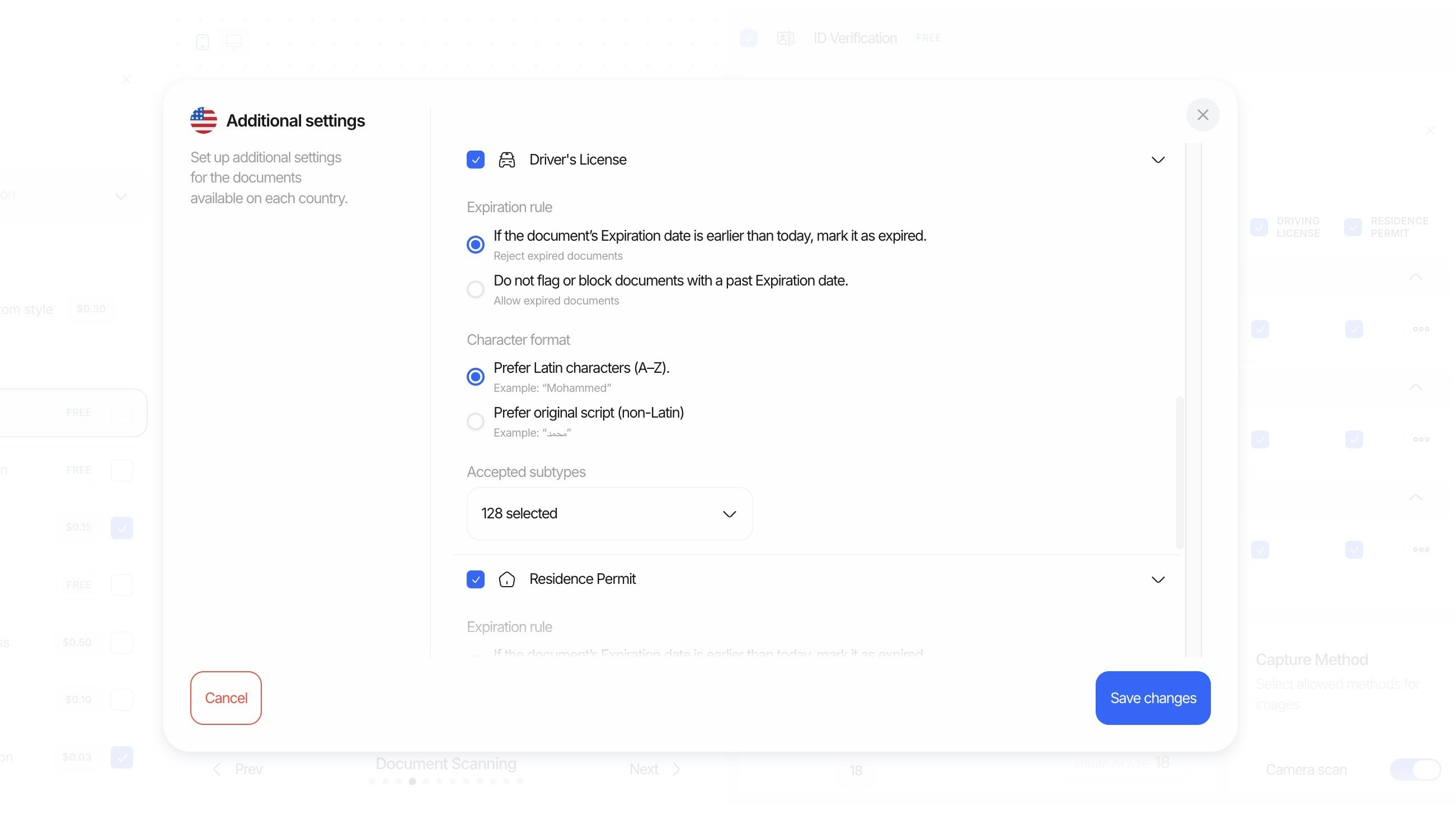
Configure fine-grained rules per country and document type directly from the console. These controls let you tailor acceptance criteria and transcription preferences to your compliance needs.

<Frame>
  <img src="https://mintcdn.com/didit-0f962782/z6T2GHM4Zh-iSj-K/images/id-additional-settings.jpeg?fit=max&auto=format&n=z6T2GHM4Zh-iSj-K&q=85&s=4238b10a404795a61926fbdf1a3adc20" alt="Didit face match advanced settings panel for similarity thresholds and acceptance rules" width="2602" height="1472" data-path="images/id-additional-settings.jpeg" />
</Frame>

* **Expiration mode**: Choose how to handle documents with past expiration dates.
  * **Reject expired**: If the document's expiration date is earlier than today, mark it as expired and reject.
  * **Allow expired**: Do not flag or block documents with a past expiration date.
* **Preferred character format**: Select how extracted names and fields should be normalized.
  * **Prefer Latin characters (A–Z)**: Example: "Mohammed"
  * **Prefer original script (non‑Latin)**: Example: "محمد"
* **Regional support & subtypes**: Enable documents by region and specify acceptable subtypes when a document type contains many variations.
  * Example: For United States driver's licenses, select the exact subtypes you accept (e.g., Arizona Commercial Driver License, Indiana Operator License (REAL ID), New York Enhanced Driver License, etc.).
  * Use the "Accepted subtypes" control to quickly include/exclude many variants (e.g., "128 selected").

> Tip: These settings apply per country and document type, so you can be strict in some markets while more permissive in others.
