> ## Documentation Index
> Fetch the complete documentation index at: https://docs.didit.me/llms.txt
> Use this file to discover all available pages before exploring further.

# Face Search 1:N

> Search faces across all verified users to spot duplicates and blocklisted fraudsters. Free with Didit identity verification, sub-2-second response.

export const AgentPromptAccordion = ({prompt, title = "AI Agent Integration Prompt"}) => {
  const [copied, setCopied] = React.useState(false);
  const handleCopy = e => {
    e.stopPropagation();
    if (!prompt) return;
    navigator.clipboard.writeText(prompt.trim()).then(() => {
      setCopied(true);
      setTimeout(() => setCopied(false), 2000);
    });
  };
  const agents = ["Claude Code", "Codex", "Cursor", "Devin", "Windsurf", "GitHub Copilot"];
  return <div className="didit-agent-card">
      {}
      <div className="didit-agent-titlebar">
        <div className="didit-agent-dots" aria-hidden="true">
          <span className="didit-agent-dot didit-agent-dot-red"></span>
          <span className="didit-agent-dot didit-agent-dot-yellow"></span>
          <span className="didit-agent-dot didit-agent-dot-green"></span>
        </div>
        <span className="didit-agent-filename">{title}</span>
        <button type="button" className={`didit-agent-copy ${copied ? "didit-agent-copy-copied" : ""}`} onClick={handleCopy} title="Copy prompt to clipboard" aria-label={copied ? "Copied!" : "Copy prompt to clipboard"}>
          {copied ? <>
              <svg width="13" height="13" viewBox="0 0 16 16" fill="none">
                <path d="M3 8.5l3.5 3.5L13 4" stroke="currentColor" strokeWidth="2" strokeLinecap="round" strokeLinejoin="round" />
              </svg>
              <span>Copied</span>
            </> : <>
              <svg width="13" height="13" viewBox="0 0 16 16" fill="none">
                <rect x="5" y="5" width="9" height="9" rx="1.5" stroke="currentColor" strokeWidth="1.5" />
                <path d="M11 5V3.5A1.5 1.5 0 0 0 9.5 2h-6A1.5 1.5 0 0 0 2 3.5v6A1.5 1.5 0 0 0 3.5 11H5" stroke="currentColor" strokeWidth="1.5" />
              </svg>
              <span>Copy</span>
            </>}
        </button>
      </div>

      {}
      <pre className="didit-agent-body"><code>{prompt.trim()}</code></pre>

      {}
      <div className="didit-agent-footer">
        <span className="didit-agent-footer-label">Paste into</span>
        <div className="didit-agent-chips">
          {agents.map(name => <span key={name} className="didit-agent-chip">{name}</span>)}
        </div>
      </div>
    </div>;
};

export const VideoEmbed = ({src, title = "Video", type = "iframe"}) => <div className={type === "iframe" ? "didit-video-embed" : "didit-video-embed didit-video-native"}>
    {type === "iframe" ? <iframe src={src} title={title} style={{
  width: "100%",
  height: "100%",
  border: 0,
  borderRadius: "12px"
}} allow="accelerometer; autoplay; clipboard-write; encrypted-media; gyroscope; picture-in-picture" allowFullScreen /> : <video controls autoPlay muted loop playsInline src={src} title={title} style={{
  width: "100%",
  height: "auto",
  display: "block",
  borderRadius: "12px"
}} />}
  </div>;

Face Search is a powerful feature that allows you to search for a specific face across all your approved identity verification sessions. This capability helps identify duplicate accounts, prevent fraud, and enhance your security measures.

<AgentPromptAccordion
  title="Face Search Integration Prompt"
  prompt={`# Goal
Integrate Didit Face Search (1:N — search a face across your enrolled users + blocklist) into your app.

# Delivery mode
Face Search is a **standalone API**. It runs against the face index your application has enrolled through prior verifications (sessions with save_api_request=true or Passive Liveness with save_api_request=true). There is no separate Face Search workflow feature.

POST https://verification.didit.me/v3/face-search/
multipart/form-data — x-api-key: YOUR_API_KEY

Required: \`user_image\` (jpg/jpeg/png/tiff/webp, max 5 MB; PDFs not accepted). The image must contain at least one detectable face (largest bbox wins when multiple).

Optional: \`search_type\` = "most_similar" (default — dedupe / returning-user) | "blocklisted_or_approved" (blocklist screening).

curl example:
\`\`\`bash
curl -X POST 'https://verification.didit.me/v3/face-search/' \\
-H 'x-api-key: YOUR_API_KEY' \\
-F 'user_image=@./selfie.jpg' \\
-F 'search_type=most_similar' \\
-F 'save_api_request=true' \\
-F 'vendor_data=user-123'
\`\`\`

# Response shape (singular)
Unlike most features, Face Search returns a **singular** \`face_search\` object — not a plural array:
{ request_id, face_search: { status, total_matches, matches: [{ session_id, session_number, similarity_percentage, vendor_data, verification_date, user_details, match_image_url, status, is_blocklisted }], user_image: {entities}, warnings: [...] } }

\`status\` is "Declined" only when at least one blocklist match is found. Pure duplicate matches return "Approved" (informational) — apply your own dedupe policy in app logic.

# Warnings
Face Search emits risk codes from the LogWarningChoices.FACEMATCH bucket plus blocklist/duplicate semantics:
FACE_IN_BLOCKLIST, POSSIBLE_FACE_IN_BLOCKLIST, DUPLICATED_FACE, POSSIBLE_DUPLICATED_FACE, MULTIPLE_FACES_DETECTED.
Full catalogue: /core-technology/face-search/warnings-face-search.

# Failure modes to handle
- HTTP 400 — no face detected in user_image. Ask the user to retake.
- HTTP 403 — out of credits.
- status="Declined" with FACE_IN_BLOCKLIST — definitive blocklist hit; reject.
- POSSIBLE_FACE_IN_BLOCKLIST — borderline match below the hard threshold; route to manual review.
- DUPLICATED_FACE — user already verified under a different vendor_data; merge or block according to policy.

# See also
- Canonical schema: /reference/data-models#face-search
- Per-feature report: /core-technology/face-search/report-face-search
- Risk catalogue: /core-technology/face-search/warnings-face-search
- Full integration playbook: /integration/integration-prompt`}
/>

<VideoEmbed src="https://www.youtube.com/embed/h0i9Q0-izcw?start=604&rel=0&playsinline=1" title="Face Matching & Advanced Blocklisting" />

<Frame>
  <img src="https://mintcdn.com/didit-0f962782/z6T2GHM4Zh-iSj-K/images/face-search-liveness.png?fit=max&auto=format&n=z6T2GHM4Zh-iSj-K&q=85&s=0cb5738f8ceaae7891cf13631485c400" alt="Didit face search 1:N flow integrated with liveness for duplicate and blocklist detection" width="1953" height="1304" data-path="images/face-search-liveness.png" />
</Frame>

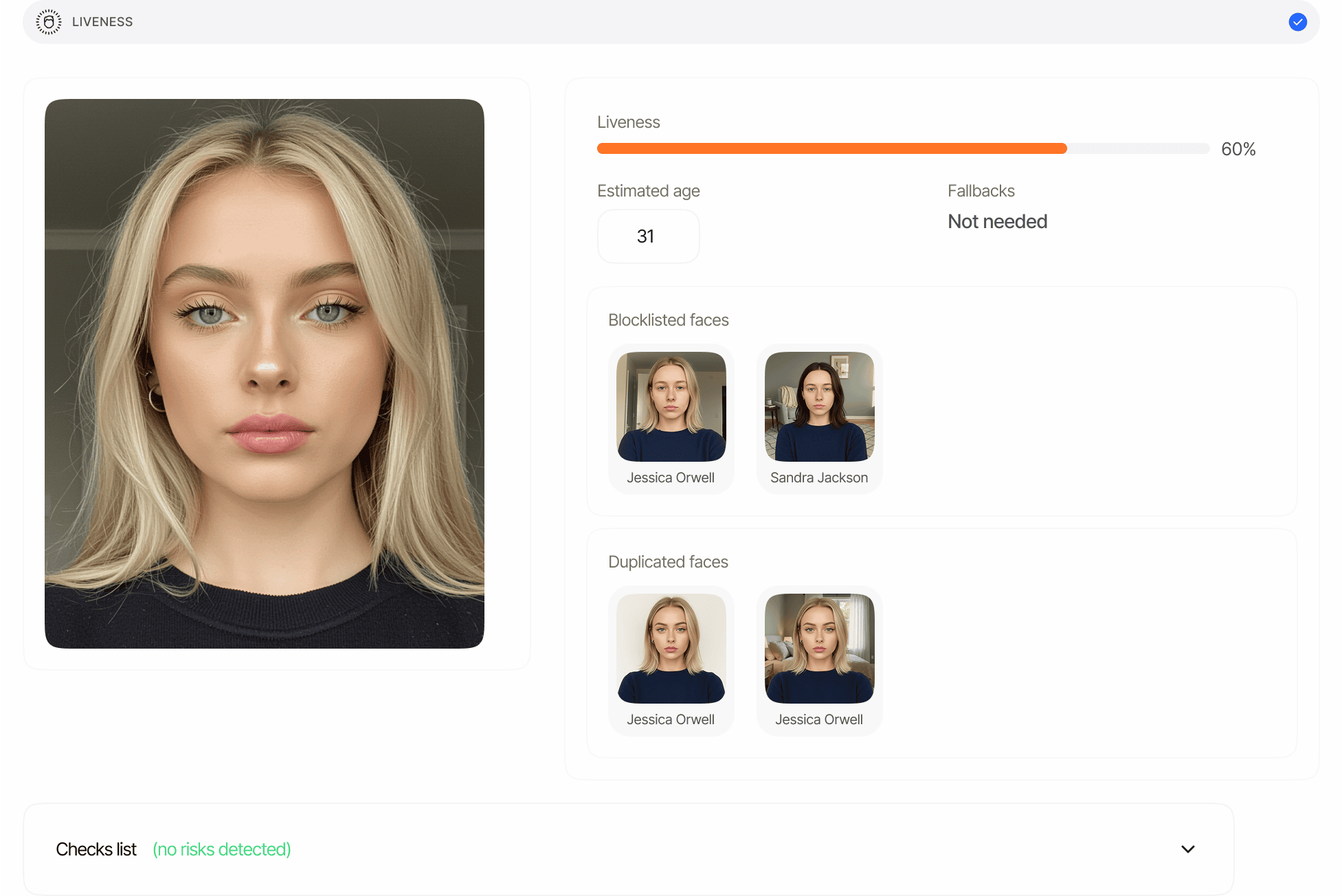
## Automatic Face Search Integration

> Face Search is automatically performed during liveness checks in verification sessions to detect duplicate users and check against blocklisted faces.

### Automatic Duplicate Detection

When a user completes a liveness check during identity verification:

* Their facial biometrics are automatically compared against all previously verified users
* The system identifies potential duplicate accounts based on facial similarity
* Matches are flagged according to your configured similarity thresholds
* You can review and take action on potential duplicate users

### Blocklist Integration

Face Search seamlessly integrates with the [blocklist feature](/management-api/lists/overview):

* During verification, faces are automatically checked against your blocklist
* If a match to a blocklisted face is found, the verification is automatically declined
* This prevents previously identified problematic users from creating new accounts
* Helps maintain the integrity of your verification process

### API Access

Face Search functionality is also available through our [API](/standalone-apis/face-search), allowing you to:

* Programmatically submit face searches
* Integrate face matching capabilities into your own applications
* Build custom fraud detection workflows
* Create automated systems for duplicate detection

## Key Features

* **High Accuracy**: Advanced biometric algorithms provide reliable match results
* **Configurable Thresholds**: Customize match sensitivity based on your risk tolerance
* **Comprehensive Scanning**: Search across all your verified users
* **Rapid Results**: Process searches quickly even with large user databases
* **Privacy-Focused**: All processing happens within your secure environment

### Configurable Thresholds

You can customize search sensitivity by setting different thresholds for similarity scores:

<Note>
  These thresholds can be adjusted based on your risk tolerance and security requirements.
</Note>

## How It Works

<Steps>
  <Step title="Face Extraction" icon="face-viewfinder">
    When a search is initiated, the system processes the reference image:

    | Process                | Description                                              |
    | ---------------------- | -------------------------------------------------------- |
    | **Feature extraction** | Isolates facial features from the reference image        |
    | **Normalization**      | Standardizes facial data for consistent comparison       |
    | **Quality validation** | Checks image quality and facial clarity                  |
    | **Vector encoding**    | Creates a mathematical vector representation of the face |
  </Step>

  <Step title="Comparison Algorithm" icon="magnifying-glass">
    The system searches across your entire database of verified sessions:

    * Compares the reference facial vector against **all stored vectors**
    * Employs advanced neural network architecture optimized for speed and accuracy
    * Supports two search modes: **most similar** (ranked list) and **blocklisted or approved** (status-filtered)
    * Processes large databases rapidly using optimized indexing
  </Step>

  <Step title="Similarity Scoring" icon="percent">
    For each comparison, a similarity percentage is generated:

    |  Score Range  | Interpretation                             |
    | :-----------: | ------------------------------------------ |
    |    **90%+**   | Strong match — very likely the same person |
    |   **70–89%**  | Possible match — may require manual review |
    | **Below 70%** | Likely different individuals               |

    Your configured match thresholds determine which results are flagged.
  </Step>

  <Step title="Results Delivery" icon="file-export">
    The system returns a comprehensive result set:

    * **Ranked list** of potential matches sorted by similarity score
    * **Match details** including session ID, verification date, and vendor data
    * **Similarity percentage** for each match
    * **Match images** available for visual review
    * **Blocklist status** indicating if the matched face is blocklisted
  </Step>
</Steps>

## Similarity Percentage

The similarity percentage is the core metric used to determine potential matches:

* **High percentage (typically 90% and above)**: Indicates a strong likelihood that the faces belong to the same person.
* **Medium percentage (70-89%)**: Suggests possible matches that may require further review.
* **Low percentage (below 70%)**: Likely indicates different individuals.

The exact threshold for what constitutes a "match" can be configured based on your security requirements. Increasing the threshold reduces false positives but may increase false negatives.

## Use Cases

* **Fraud Prevention**: Identify users attempting to create multiple accounts
* **Enhanced KYC**: Add an additional layer of verification to your KYC process
* **Regulatory Compliance**: Meet requirements for detecting duplicate accounts
* **Access Control**: Verify user authenticity for high-security areas
* **Law Enforcement**: Assist authorized agencies in identifying persons of interest
