> ## Documentation Index
> Fetch the complete documentation index at: https://docs.didit.me/llms.txt
> Use this file to discover all available pages before exploring further.
# Document Geolocation
> Validate addresses with Didit's Document Geolocation: AI address extraction, Google Maps cross-checks, and fictitious-address detection in real time.
Didit's Document Address Geolocation verification offers a comprehensive solution to validate user addresses efficiently and accurately. Our system leverages advanced AI technology and external data sources to ensure the authenticity and validity of address information.
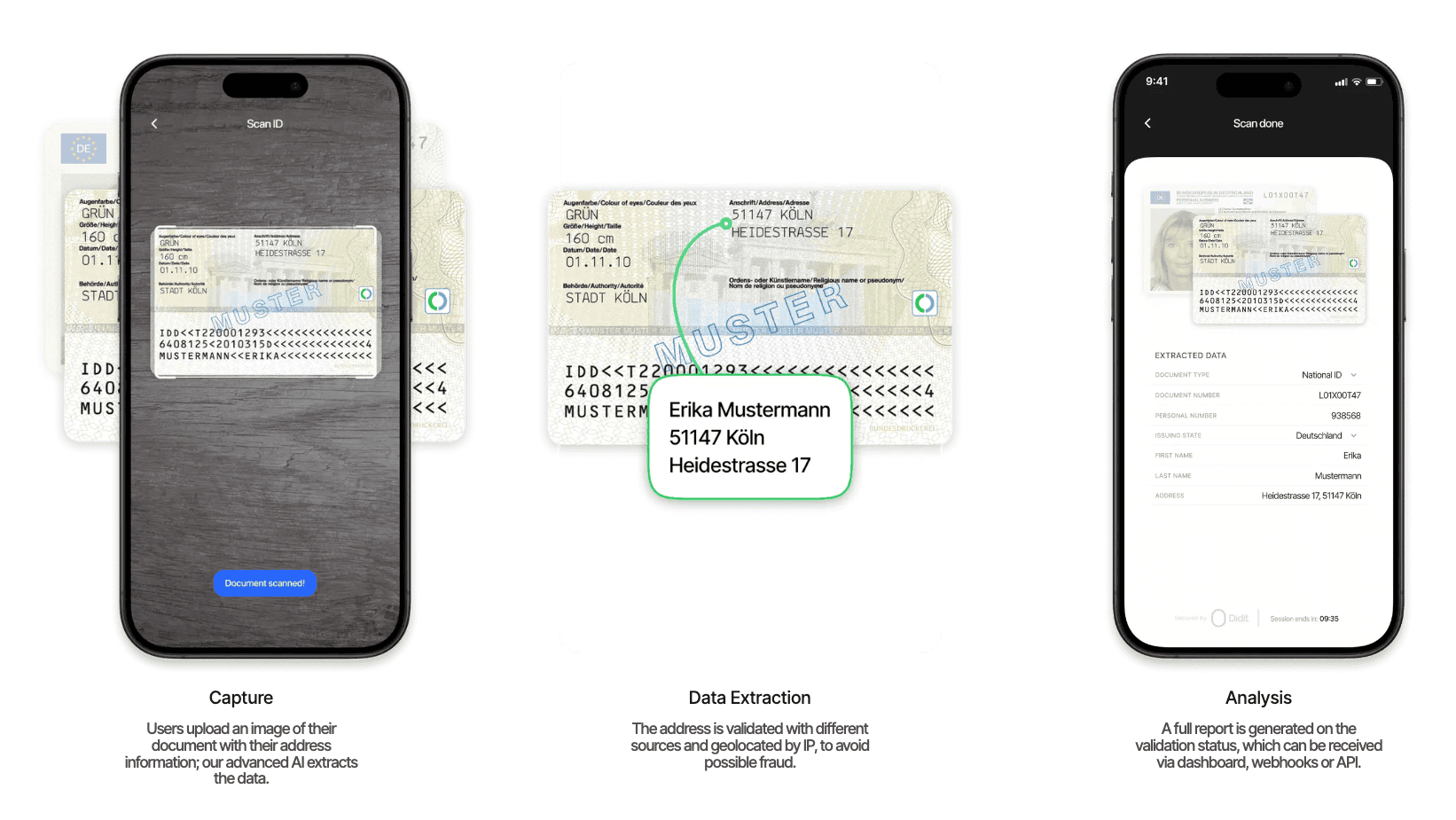 Users upload an image of their document containing address information. Our advanced AI handles the rest.
| Capability | Description |
| -------------------- | ---------------------------------------------------- |
| **Document types** | Passports, IDs, residence permits, and more |
| **Language support** | Multi-language and multi-format recognition |
| **AI extraction** | Automatic data extraction from the uploaded document |
The extracted address is validated against multiple sources and geolocated by IP.
| Capability | Description |
| ------------------------ | ----------------------------------------------------------- |
| **Map integration** | Google Maps and OpenStreetMap cross-referencing |
| **Component validation** | Street, city, region, and postal code verified individually |
| **Fraud detection** | Fictitious address detection to prevent possible fraud |
A full report is generated on the validation status with standardized outputs.
| Capability | Description |
| ------------------------- | ------------------------------------------------ |
| **Verification results** | Detailed results with standardized output format |
| **Comprehensive reports** | Full verification reports for every submission |
| **Delivery options** | Results via dashboard, webhooks, or API |
Users upload an image of their document containing address information. Our advanced AI handles the rest.
| Capability | Description |
| -------------------- | ---------------------------------------------------- |
| **Document types** | Passports, IDs, residence permits, and more |
| **Language support** | Multi-language and multi-format recognition |
| **AI extraction** | Automatic data extraction from the uploaded document |
The extracted address is validated against multiple sources and geolocated by IP.
| Capability | Description |
| ------------------------ | ----------------------------------------------------------- |
| **Map integration** | Google Maps and OpenStreetMap cross-referencing |
| **Component validation** | Street, city, region, and postal code verified individually |
| **Fraud detection** | Fictitious address detection to prevent possible fraud |
A full report is generated on the validation status with standardized outputs.
| Capability | Description |
| ------------------------- | ------------------------------------------------ |
| **Verification results** | Detailed results with standardized output format |
| **Comprehensive reports** | Full verification reports for every submission |
| **Delivery options** | Results via dashboard, webhooks, or API |
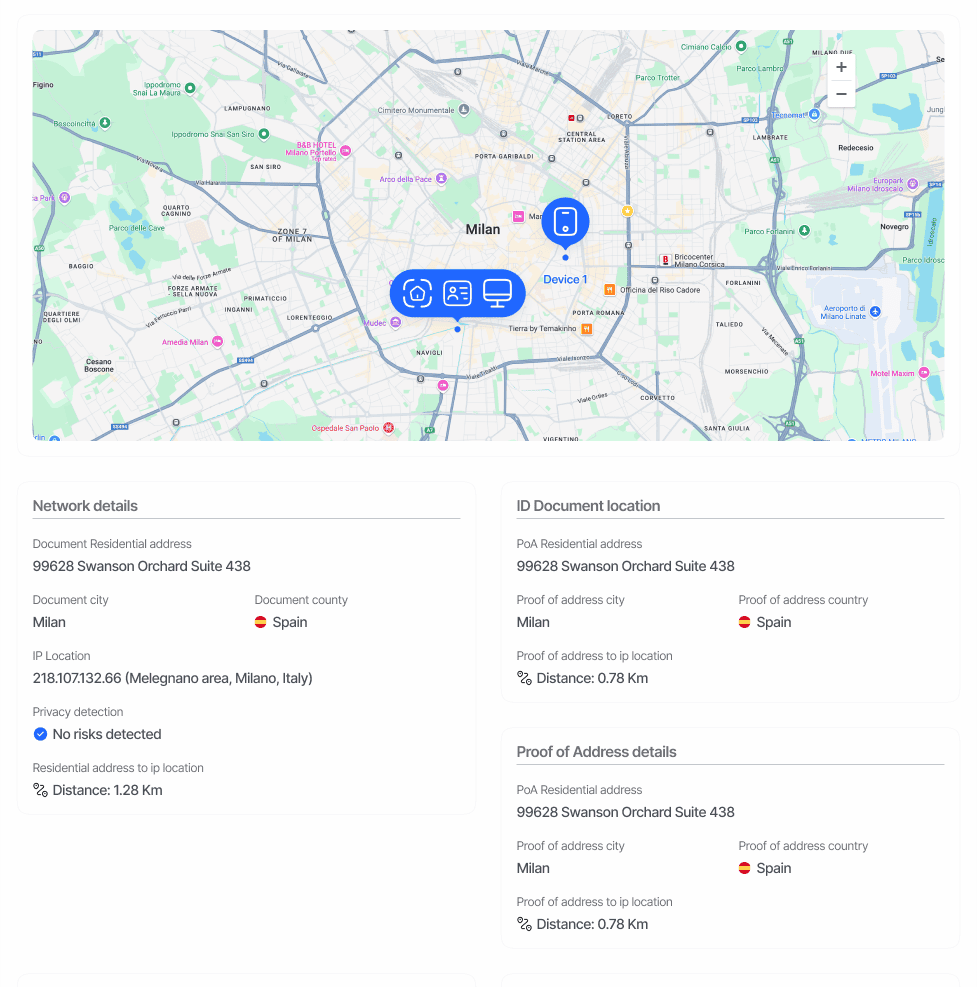 Our system supports global address formats and provides standardized outputs regardless of the input document type or region.
### Report Structure
The Document Geolocation report returns a JSON object with a root-level `address` field containing all verification results.
#### Core Response Fields
```typescript theme={null}
interface DocumentGeolocationResponse {
address: string;
parsed_address: {
id: string;
label: string;
street_1: string;
street_2: string | null;
city: string;
region: string;
postal_code: string;
raw_results: {
geometry: {
location: {
lat: number;
lng: number;
};
location_type: string;
viewport: {
northeast: {
lat: number;
lng: number;
};
southwest: {
lat: number;
lng: number;
};
};
};
formatted_address: string;
};
};
}
```
### Response Fields
#### Address Information
* `address`: Complete address as extracted from document
* `parsed_address.street_1`: Primary street information
* `parsed_address.street_2`: Secondary street information
* `parsed_address.city`: City name
* `parsed_address.region`: State or region
* `parsed_address.postal_code`: ZIP or postal code
#### Geolocation Data
* `raw_results.geometry.location`: Precise coordinates
* `raw_results.location_type`: Accuracy level of geolocation
* `raw_results.viewport`: Coordinate boundaries
* `raw_results.formatted_address`: Standardized address format
### Sample JSON Response
```json theme={null}
{
"address": "123 Sample Street",
"parsed_address": {
"id": "7c6280a2-fb6a-4258-93d5-2ac987cbc6ba",
"city": "Madrid",
"label": "Spain ID Card Address",
"region": "Madrid",
"street_1": "Avda de Madrid 34",
"street_2": null,
"postal_code": "28822",
"raw_results": {
"geometry": {
"location": {
"lat": 37.4222804,
"lng": -122.0843428
},
"location_type": "ROOFTOP",
"viewport": {
"northeast": {
"lat": 37.4237349802915,
"lng": -122.083183169709
},
"southwest": {
"lat": 37.4210370197085,
"lng": -122.085881130292
}
}
},
"formatted_address": "Avda de Madrid 34, Madrid, Madrid 28822, Spain"
}
}
}
```
For a complete list of possible properties and their values, please refer to our [*API Reference*](/sessions-api/retrieve-session).
### Security and Privacy Considerations
Address information extracted from documents should be handled with appropriate security measures and in compliance with relevant data protection regulations. Implement proper access controls and data retention policies for this sensitive information.
Our system supports global address formats and provides standardized outputs regardless of the input document type or region.
### Report Structure
The Document Geolocation report returns a JSON object with a root-level `address` field containing all verification results.
#### Core Response Fields
```typescript theme={null}
interface DocumentGeolocationResponse {
address: string;
parsed_address: {
id: string;
label: string;
street_1: string;
street_2: string | null;
city: string;
region: string;
postal_code: string;
raw_results: {
geometry: {
location: {
lat: number;
lng: number;
};
location_type: string;
viewport: {
northeast: {
lat: number;
lng: number;
};
southwest: {
lat: number;
lng: number;
};
};
};
formatted_address: string;
};
};
}
```
### Response Fields
#### Address Information
* `address`: Complete address as extracted from document
* `parsed_address.street_1`: Primary street information
* `parsed_address.street_2`: Secondary street information
* `parsed_address.city`: City name
* `parsed_address.region`: State or region
* `parsed_address.postal_code`: ZIP or postal code
#### Geolocation Data
* `raw_results.geometry.location`: Precise coordinates
* `raw_results.location_type`: Accuracy level of geolocation
* `raw_results.viewport`: Coordinate boundaries
* `raw_results.formatted_address`: Standardized address format
### Sample JSON Response
```json theme={null}
{
"address": "123 Sample Street",
"parsed_address": {
"id": "7c6280a2-fb6a-4258-93d5-2ac987cbc6ba",
"city": "Madrid",
"label": "Spain ID Card Address",
"region": "Madrid",
"street_1": "Avda de Madrid 34",
"street_2": null,
"postal_code": "28822",
"raw_results": {
"geometry": {
"location": {
"lat": 37.4222804,
"lng": -122.0843428
},
"location_type": "ROOFTOP",
"viewport": {
"northeast": {
"lat": 37.4237349802915,
"lng": -122.083183169709
},
"southwest": {
"lat": 37.4210370197085,
"lng": -122.085881130292
}
}
},
"formatted_address": "Avda de Madrid 34, Madrid, Madrid 28822, Spain"
}
}
}
```
For a complete list of possible properties and their values, please refer to our [*API Reference*](/sessions-api/retrieve-session).
### Security and Privacy Considerations
Address information extracted from documents should be handled with appropriate security measures and in compliance with relevant data protection regulations. Implement proper access controls and data retention policies for this sensitive information.