> ## Documentation Index
> Fetch the complete documentation index at: https://docs.didit.me/llms.txt
> Use this file to discover all available pages before exploring further.

# Liveness Detection

> Detect deepfakes, masks, and presentation attacks with passive and active liveness. 99.9% accuracy, iBeta-tested, pay-per-call from $0.10.

export const AgentPromptAccordion = ({prompt, title = "AI Agent Integration Prompt"}) => {
  const [copied, setCopied] = React.useState(false);
  const handleCopy = e => {
    e.stopPropagation();
    if (!prompt) return;
    navigator.clipboard.writeText(prompt.trim()).then(() => {
      setCopied(true);
      setTimeout(() => setCopied(false), 2000);
    });
  };
  const agents = ["Claude Code", "Codex", "Cursor", "Devin", "Windsurf", "GitHub Copilot"];
  return <div className="didit-agent-card">
      {}
      <div className="didit-agent-titlebar">
        <div className="didit-agent-dots" aria-hidden="true">
          <span className="didit-agent-dot didit-agent-dot-red"></span>
          <span className="didit-agent-dot didit-agent-dot-yellow"></span>
          <span className="didit-agent-dot didit-agent-dot-green"></span>
        </div>
        <span className="didit-agent-filename">{title}</span>
        <button type="button" className={`didit-agent-copy ${copied ? "didit-agent-copy-copied" : ""}`} onClick={handleCopy} title="Copy prompt to clipboard" aria-label={copied ? "Copied!" : "Copy prompt to clipboard"}>
          {copied ? <>
              <svg width="13" height="13" viewBox="0 0 16 16" fill="none">
                <path d="M3 8.5l3.5 3.5L13 4" stroke="currentColor" strokeWidth="2" strokeLinecap="round" strokeLinejoin="round" />
              </svg>
              <span>Copied</span>
            </> : <>
              <svg width="13" height="13" viewBox="0 0 16 16" fill="none">
                <rect x="5" y="5" width="9" height="9" rx="1.5" stroke="currentColor" strokeWidth="1.5" />
                <path d="M11 5V3.5A1.5 1.5 0 0 0 9.5 2h-6A1.5 1.5 0 0 0 2 3.5v6A1.5 1.5 0 0 0 3.5 11H5" stroke="currentColor" strokeWidth="1.5" />
              </svg>
              <span>Copy</span>
            </>}
        </button>
      </div>

      {}
      <pre className="didit-agent-body"><code>{prompt.trim()}</code></pre>

      {}
      <div className="didit-agent-footer">
        <span className="didit-agent-footer-label">Paste into</span>
        <div className="didit-agent-chips">
          {agents.map(name => <span key={name} className="didit-agent-chip">{name}</span>)}
        </div>
      </div>
    </div>;
};

export const VideoEmbed = ({src, title = "Video", type = "iframe"}) => <div className={type === "iframe" ? "didit-video-embed" : "didit-video-embed didit-video-native"}>
    {type === "iframe" ? <iframe src={src} title={title} style={{
  width: "100%",
  height: "100%",
  border: 0,
  borderRadius: "12px"
}} allow="accelerometer; autoplay; clipboard-write; encrypted-media; gyroscope; picture-in-picture" allowFullScreen /> : <video controls autoPlay muted loop playsInline src={src} title={title} style={{
  width: "100%",
  height: "auto",
  display: "block",
  borderRadius: "12px"
}} />}
  </div>;

Didit's Liveness Detection solution provides enterprise-grade biometric verification through advanced computer vision and machine learning algorithms. Our system achieves **99.9% accuracy** with a false acceptance rate (FAR) of less than **0.1%**, ensuring robust protection against spoofing attacks.

<AgentPromptAccordion
  title="Liveness Integration Prompt"
  prompt={`# Goal
Integrate Didit Liveness Detection (passive / 3D-action / flashing) into your app. Pick ONE mode.

# Mode A — Session-based
Use this when the user goes through a hosted Didit flow (SDK or session.url). The workflow's LIVENESS feature controls which method runs.

1. Configure the workflow's liveness method — \`face_liveness_method\`: "PASSIVE" | "ACTIVE_3D" | "FLASHING" (Business Console or POST /v3/workflows/).
2. Create a session — POST /v3/session/ with { workflow_id, vendor_data, callback }. See /sessions-api/create-session.
3. Open session.url for the user (or mount the Web/Mobile SDK).
4. Fetch the decision — GET /v3/session/{sessionId}/decision/ or subscribe to session.status.updated.

Decision surface: \`liveness_checks[]\` array on the decision payload (one entry per liveness node).

# Mode B — Standalone API (server-to-server, passive only)
Use when you already have a captured selfie and want a one-shot passive-liveness check.

POST https://verification.didit.me/v3/passive-liveness/
multipart/form-data — x-api-key: YOUR_API_KEY

Required: user_image (jpg/jpeg/png/tiff/webp, max 5 MB; PDFs not accepted).

curl example:
\`\`\`bash
curl -X POST 'https://verification.didit.me/v3/passive-liveness/' \\
-H 'x-api-key: YOUR_API_KEY' \\
-F 'user_image=@./selfie.jpg' \\
-F 'save_api_request=true' \\
-F 'vendor_data=user-123'
\`\`\`
Returns: { request_id, liveness: { status, method: "PASSIVE", score, user_image: { entities, best_angle }, warnings, face_quality, face_luminance } }.

When \`save_api_request=true\` the submitted face is also screened against your blocklist and face index for duplicates — set to \`false\` to skip enrolment.

# Status enum (per liveness_checks[].status or liveness.status)
"Not Started" | "In Progress" | "Approved" | "In Review" | "Declined" | "Abandoned" | "Kyc Expired"

# Warnings (LogWarningChoices.LIVENESS)
warnings[] risk codes include:
LOW_LIVENESS_SCORE, NO_FACE_DETECTED, LIVENESS_FACE_ATTACK, MULTIPLE_FACES_DETECTED, FACE_IN_BLOCKLIST, POSSIBLE_FACE_IN_BLOCKLIST, DUPLICATED_FACE, POSSIBLE_DUPLICATED_FACE.
Full catalogue: /core-technology/liveness/warnings-liveness.

# Failure modes to handle
- HTTP 403 — out of credits.
- HTTP 400 — missing user_image, file too large, unsupported extension.
- status="Declined" with LIVENESS_FACE_ATTACK or LOW_LIVENESS_SCORE — presentation attack suspected; do not approve.
- FACE_IN_BLOCKLIST / DUPLICATED_FACE — block or route to manual review per your policy.
- NO_FACE_DETECTED / MULTIPLE_FACES_DETECTED — ask the user to retry with a single, well-framed face.

# See also
- Canonical schema: /reference/data-models#liveness-check
- Per-feature report: /core-technology/liveness/report-liveness
- Risk catalogue: /core-technology/liveness/warnings-liveness
- Full integration playbook: /integration/integration-prompt`}
/>

<VideoEmbed src="https://www.youtube.com/embed/h0i9Q0-izcw?start=2396&rel=0&playsinline=1" title="Liveness Methods: 3D Action vs. Flashing vs. Passive" />

## Liveness Detection Methods

Our platform implements three distinct anti-spoofing technologies, each tailored to different security needs and user experiences:

<table class="comparison-table">
  <thead>
    <tr>
      <th style={{ width: '20%' }}>Method</th>
      <th style={{ width: '65%'}}>Description</th>
      <th style={{ width: '5%' }}>Security Level</th>
      <th style={{ width: '10%' }}>Best For</th>
    </tr>
  </thead>

  <tbody>
    <tr>
      <td>**`3D Action & Flash`**</td>

      <td style={{ textAlign: 'left' }}>
        • Combines multi-factor biometric verification with a **randomized action sequence** and **dynamic light pattern analysis**.<br />
        • At the start, the user is prompted to perform a simple action—like **blinking** or **nodding**—ensuring real-time interaction.<br />
        • Simultaneously, the system projects a sequence of light patterns onto the face, analyzing the **reflections** to confirm the face's three-dimensional structure.<br />
        • **Deep learning algorithms** examine micro-expressions and the light reflection responses to verify the presence of a live person.<br />
        • Offers the **highest security** by integrating behavioral (action) and physical (light-based depth) cues, making it nearly impossible to spoof with static images, videos, or even advanced masks.
      </td>

      <td>Highest</td>
      <td>Banking, healthcare, government applications</td>
    </tr>

    <tr>
      <td>**`3D Flash`**</td>

      <td style={{ textAlign: 'left' }}>
        • Uses **dynamic light pattern analysis** to validate facial topology without requiring user interaction.<br />
        • Projects a series of light patterns onto the face at over **30 frames per second**, analyzing the reflections to create a **depth map**.<br />
        • This depth map confirms the face's three-dimensional structure, distinguishing it from flat images or 2D spoofs.<br />
        • Provides a **seamless experience** while maintaining **high security** against presentation attacks like photos or screens.<br />
      </td>

      <td>High</td>
      <td>Financial services, account access, identity verification</td>
    </tr>

    <tr>
      <td>**`Passive Liveness`**</td>

      <td style={{ textAlign: 'left' }}>
        • Relies on **single-frame deep learning analysis** to detect signs of liveness.<br />
        • Examines the image for **artifacts**, **texture patterns**, and other subtle indicators that differentiate a real face from a spoof.<br />
        • A **convolutional neural network (CNN)** validates facial features and identifies anomalies, such as those from printed photos or digital screens.<br />
        • Offers **fast and convenient** verification but provides **standard security**, suitable for low-risk use cases.<br />
      </td>

      <td>Standard</td>
      <td>Low-friction scenarios, consumer applications</td>
    </tr>
  </tbody>
</table>

<Note>
  **Advanced Security of 3D Flash and 3D Action & Flash:**

  > * These methods are engineered to defeat **sophisticated spoofing attacks**, such as **high-quality masks**, **deepfakes**, and **video replays**.
  > * By projecting dynamic light patterns and analyzing their reflections, they detect how light interacts with a **real 3D face** versus a flat or artificial surface.
  > * The **3D Action & Flash** method adds an extra layer of security with a randomized action (e.g., blink or nod), requiring **real-time behavioral responses** that pre-recorded media or synthetic identities cannot replicate.
  > * Proven to deliver **high accuracy** and **low false acceptance rates**, these methods are ideal for high-stakes environments.
</Note>

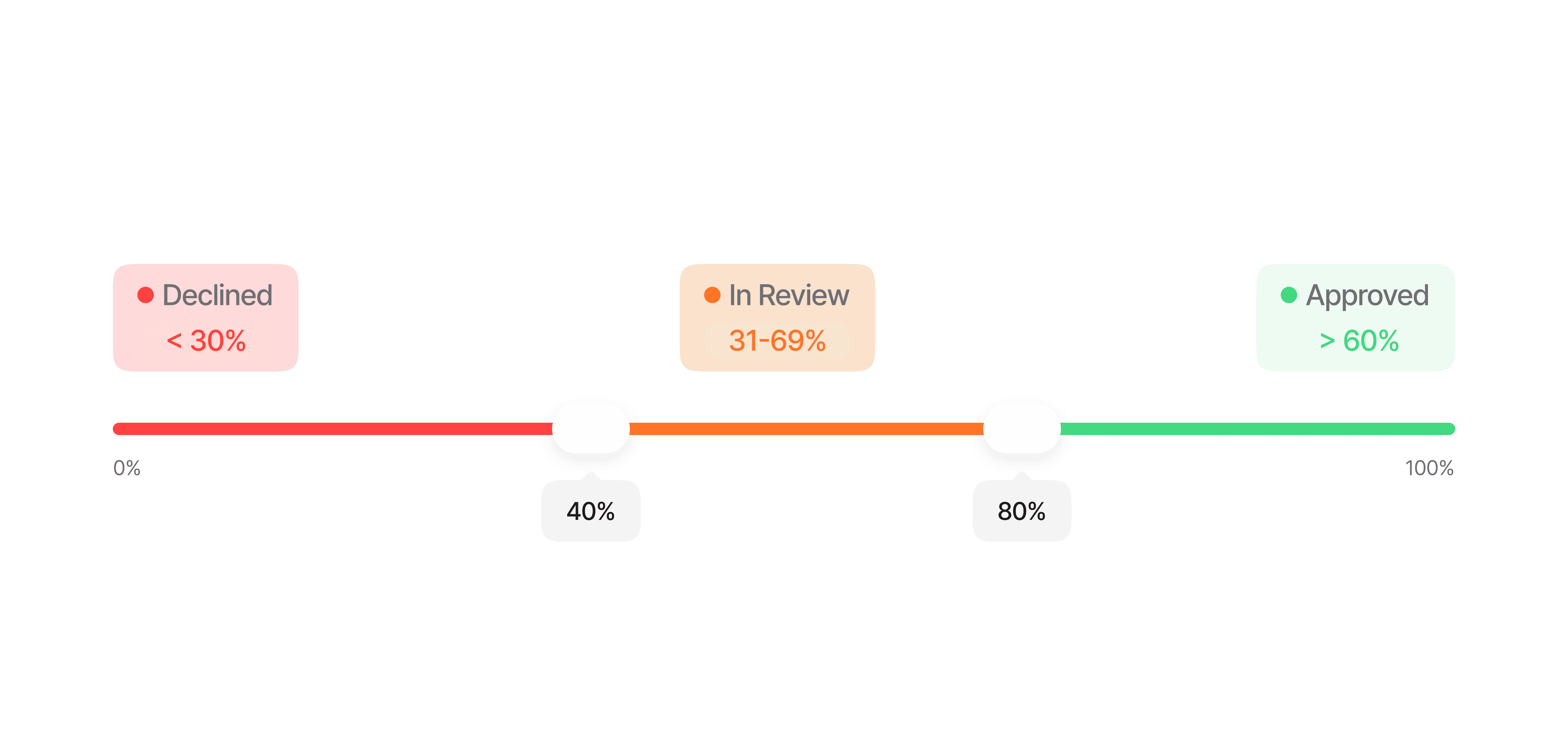
Each method generates a **normalized liveness score (0-100%)** based on our proprietary algorithm, which evaluates multiple security factors in real time.

### Configurable Thresholds

You can customize security levels by setting different thresholds for liveness scores. For example:

<Frame>
  <img src="https://mintcdn.com/didit-0f962782/z6T2GHM4Zh-iSj-K/images/liveness-thresholds.png?fit=max&auto=format&n=z6T2GHM4Zh-iSj-K&q=85&s=fa2854dc24e9594394d1ae284b56c7a3" alt="Didit liveness detection threshold configuration for passive and active anti-spoofing" width="4780" height="2276" data-path="images/liveness-thresholds.png" />
</Frame>

<Note>
  These thresholds can be adjusted based on your **risk tolerance** and **security requirements**, offering flexibility across use cases.
</Note>

## Retries & actionable feedback

In a Didit session, a liveness capture that fails for a **fixable reason** (poor lighting, face not centered, occlusion, a borderline score) does not immediately decline. The user is asked to **retry with specific guidance**, up to a configurable number of attempts.

* **Attempt budget** — `face_liveness_max_attempts` controls the total number of liveness submissions per session. Default **3** (one initial attempt plus two retries), configurable per workflow node (range 1–3).

* **Retry feedback** — while attempts remain, a retryable failure keeps the user on the liveness step and returns a body carrying actionable `feedback_codes` (the Web and Mobile SDKs surface these as coaching messages automatically):

  ```json theme={null}
  {
    "detail": "Move to a brighter, evenly lit place and try again.",
    "error": "LOW_FACE_LUMINANCE",
    "feedback_codes": ["LOW_FACE_LUMINANCE"],
    "attempts_used": 1,
    "max_attempts": 3
  }
  ```

* **Retryable codes** — `LOW_FACE_LUMINANCE` (too dark), `HIGH_FACE_LUMINANCE` (too bright), `NO_FACE_DETECTED`, `LOW_FACE_QUALITY`, `HIGH_FACE_OCCLUSION`, `LOW_LIVENESS_SCORE`, `MULTIPLE_FACES_DETECTED`, `AGE_NOT_DETECTED`.

* **Exhaustion & fraud** — once the budget is exhausted the computed status is applied (`Declined` or `In Review`). Confirmed presentation attacks (`LIVENESS_FACE_ATTACK`), blocklist hits and duplicate faces **decline immediately** and are never retried.

<Note>
  Retries apply to the **session flow** only. The standalone `POST /v3/passive-liveness/` endpoint is stateless and single-shot — it returns the result directly with no retry budget.
</Note>

## How It Works

<Steps>
  <Step title="Video Selfie Capture" icon="camera">
    The user is guided through a **simple, intuitive interface** tailored to the selected liveness method.

    | Check                  | Description                                                          |
    | ---------------------- | -------------------------------------------------------------------- |
    | **Real-time feedback** | Ensures proper lighting, positioning, and framing                    |
    | **Quality checks**     | Monitors for blur, glare, and optimal facial visibility              |
    | **Adaptive capture**   | Adjusts to various device capabilities and network conditions        |
    | **Method guidance**    | Shows method-specific instructions (e.g., "Blink now" for 3D Action) |
  </Step>

  <Step title="Liveness Detection Analysis" icon="microchip-ai">
    Advanced algorithms process the captured media in **real time** to detect spoofing attempts. The analysis differs per method:

    <AccordionGroup>
      <Accordion title="3D Action & Flash" icon="shield-check">
        * Verifies the user's action (e.g., **blink** or **nod**) to confirm it's performed correctly and live
        * Analyzes **light pattern reflections** to validate the face's three-dimensional structure
        * Uses deep learning to assess **micro-expressions** and other behavioral cues
        * Combines behavioral + physical signals for the **strongest spoof resistance**
      </Accordion>

      <Accordion title="3D Flash" icon="bolt">
        * Processes a sequence of **light pattern reflections** at 30+ FPS to build a detailed **depth map**
        * Confirms the face's 3D properties, distinguishing it from flat or 2D spoofs
        * No user interaction required — fully **passive from the user's perspective**
      </Accordion>

      <Accordion title="Passive Liveness" icon="image">
        * Applies **deep learning** to a single frame to detect **texture patterns** and **artifacts**
        * A convolutional neural network (CNN) validates facial features and identifies anomalies
        * Fastest method — works with a **single photo capture**
      </Accordion>
    </AccordionGroup>

    Multi-layered detection identifies **presentation attacks** including photos, screens, masks, and deepfakes.
  </Step>

  <Step title="Result Processing & Verification" icon="chart-simple">
    The system compares the liveness score against your **configured thresholds** and delivers results instantly.

    | Output              | Description                                                            |
    | ------------------- | ---------------------------------------------------------------------- |
    | **Liveness score**  | Normalized 0–100% confidence score                                     |
    | **Decision**        | Approved, Declined, or In Review based on your thresholds              |
    | **Method**          | Which liveness method was used (`passive`, `flash`, `action_flash`)    |
    | **Reference image** | Captured frame used for the liveness check                             |
    | **Warnings**        | Any anomalies detected (e.g., low quality, potential spoof indicators) |

    Results are delivered via **API response**, **webhook**, or viewable in the **Business Console** with detailed audit logs for compliance.
  </Step>
</Steps>

<Tip>
  You can configure which liveness method to use per workflow in the [Business Console](/console/workflows). Different workflows can use different methods depending on your risk requirements.
</Tip>