{prompt.trim()}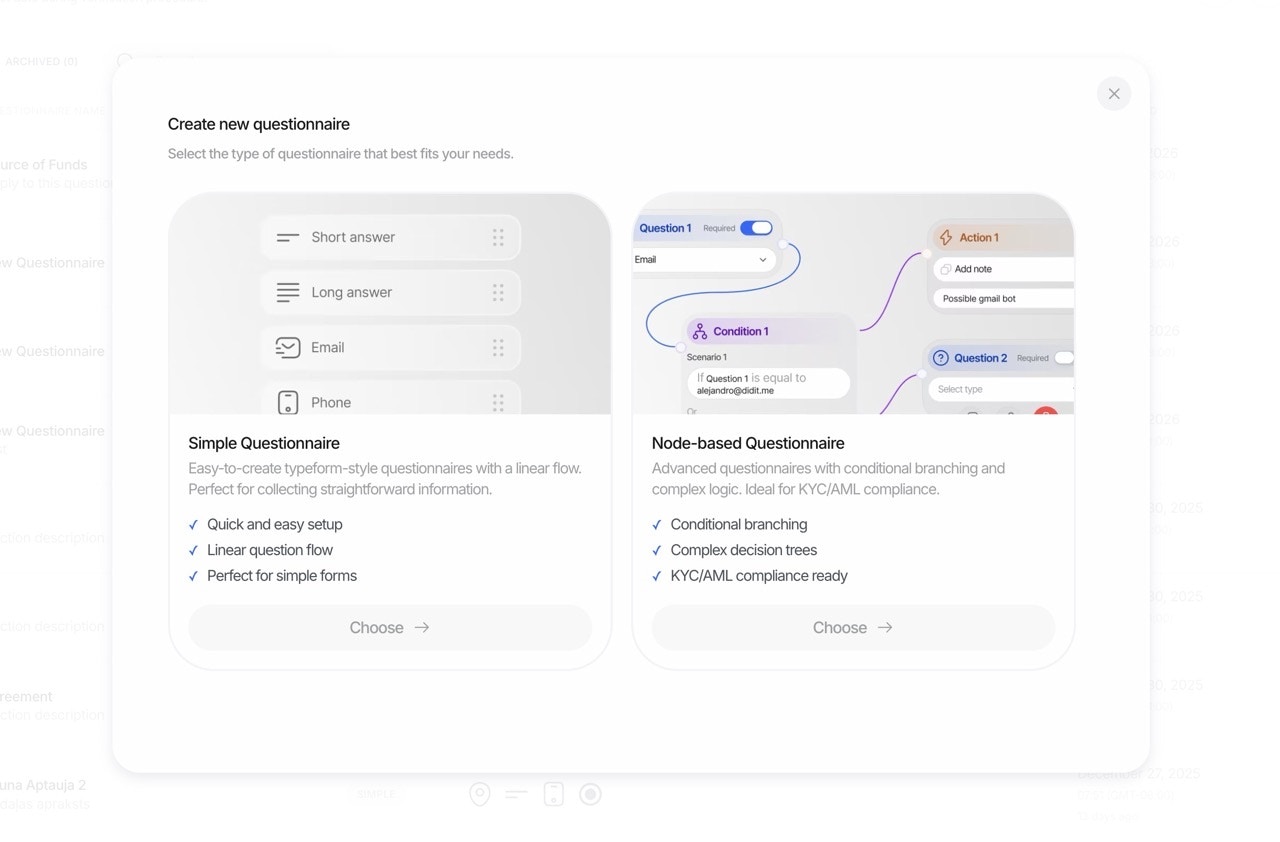 ### 1. Simple Mode: Quick Form Builder
The **Simple Mode** is perfect for creating straightforward forms quickly. Use our intuitive drag-and-drop interface to add elements, set required fields, and publish in minutes.
### 1. Simple Mode: Quick Form Builder
The **Simple Mode** is perfect for creating straightforward forms quickly. Use our intuitive drag-and-drop interface to add elements, set required fields, and publish in minutes.
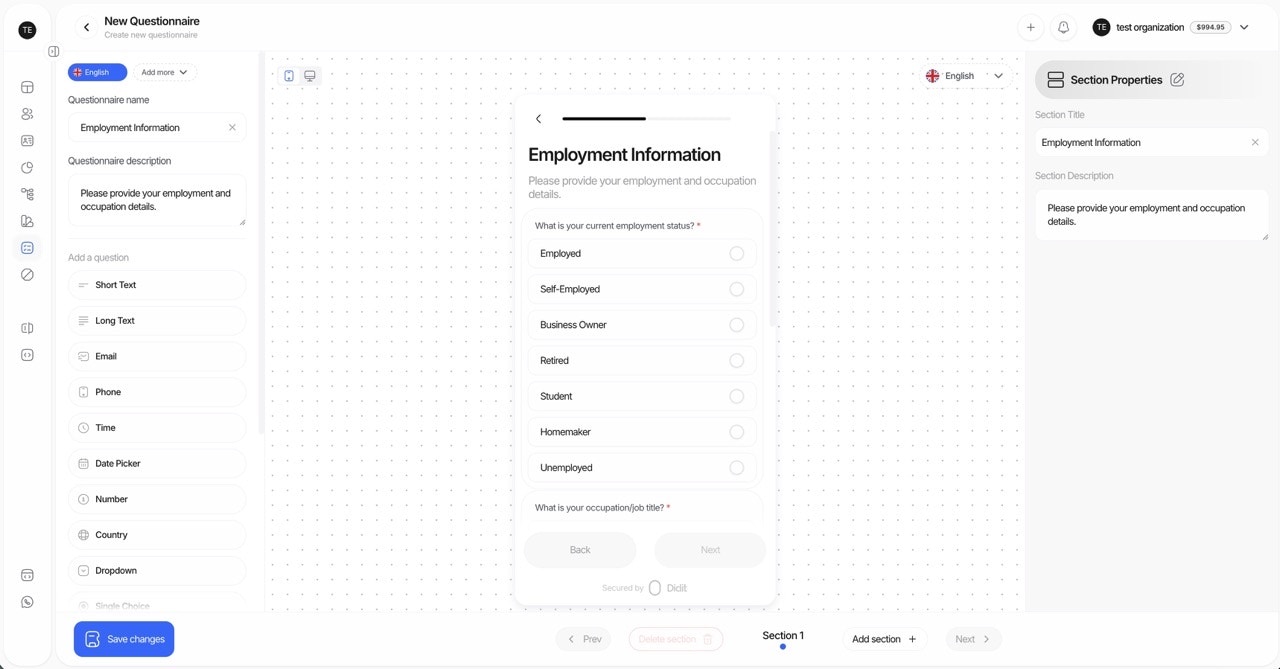 **Best for:**
* Quick data collection forms
* Simple surveys and attestations
* Teams new to form building
* Single-language questionnaires
**How it works:**
1. Open the Questionnaire Builder
2. Drag elements from the palette onto your form
3. Configure each element (label, required, placeholder)
4. Preview and publish
***
### 2. Advanced Mode: Visual Graph Builder
The **Advanced Mode** unlocks powerful features for complex data collection scenarios using a **visual node-based editor**. Build sophisticated questionnaires with conditional logic, branching paths, and full control over flow.
**Best for:**
* Quick data collection forms
* Simple surveys and attestations
* Teams new to form building
* Single-language questionnaires
**How it works:**
1. Open the Questionnaire Builder
2. Drag elements from the palette onto your form
3. Configure each element (label, required, placeholder)
4. Preview and publish
***
### 2. Advanced Mode: Visual Graph Builder
The **Advanced Mode** unlocks powerful features for complex data collection scenarios using a **visual node-based editor**. Build sophisticated questionnaires with conditional logic, branching paths, and full control over flow.
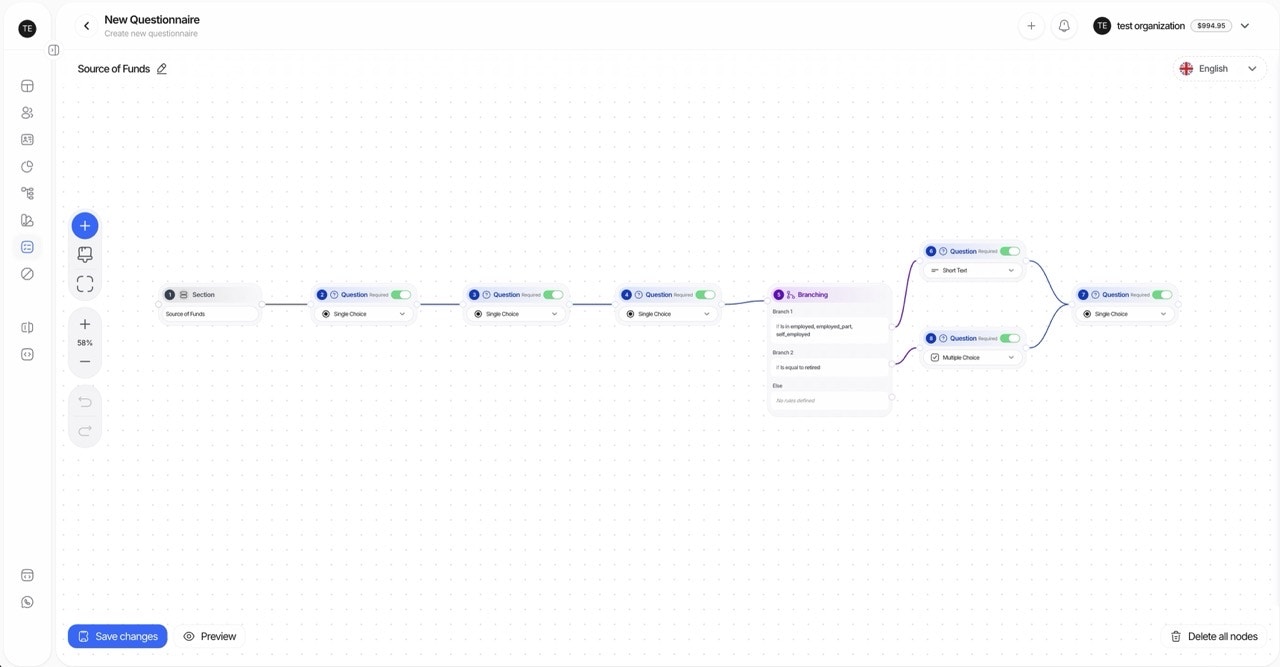 **Best for:**
* Multi-language questionnaires
* Complex forms with conditional branching
* Compliance-driven data collection with different paths
* Forms requiring manual review workflows
**Key capabilities:**
* **Visual node editor**: Drag, drop, and connect nodes on an infinite canvas
* **Smart connections**: Drag from a node handle to empty space to instantly create and connect a new node
* **Conditional branching**: Route users to different questions based on previous answers
* **Multi-language support**: Translate all user-facing content
* **Keyboard shortcuts**: Undo (Ctrl/Cmd+Z), Redo (Ctrl/Cmd+Shift+Z), Delete (Delete/Backspace)
* **Zoom and pan**: Navigate complex forms with scroll-to-zoom and drag-to-pan
#### Graph Builder Node Types
| Node Type | Color | Description | When to Use |
| ------------------- | ------ | ------------------------------------- | ------------------------------------------------- |
| **Question Nodes** | Blue | Input elements that collect user data | Text inputs, dropdowns, file uploads, dates, etc. |
| **Text Nodes** | Green | Read-only content displayed to users | Instructions, explanations, legal text |
| **Branching Nodes** | Orange | Conditional routing based on answers | "If country is US, show tax form" |
| **Section Nodes** | Gray | Visual grouping of related elements | Organize questions into logical sections |
> **Connection Rules:** Section and Text nodes can connect to Questions and other Text nodes, but not directly to Branching nodes. Branching nodes can connect to any node type.
***
## Questionnaire Templates
Templates help you get started quickly with pre-configured forms for common use cases. You can use them as-is or customize them to fit your needs.
**Best for:**
* Multi-language questionnaires
* Complex forms with conditional branching
* Compliance-driven data collection with different paths
* Forms requiring manual review workflows
**Key capabilities:**
* **Visual node editor**: Drag, drop, and connect nodes on an infinite canvas
* **Smart connections**: Drag from a node handle to empty space to instantly create and connect a new node
* **Conditional branching**: Route users to different questions based on previous answers
* **Multi-language support**: Translate all user-facing content
* **Keyboard shortcuts**: Undo (Ctrl/Cmd+Z), Redo (Ctrl/Cmd+Shift+Z), Delete (Delete/Backspace)
* **Zoom and pan**: Navigate complex forms with scroll-to-zoom and drag-to-pan
#### Graph Builder Node Types
| Node Type | Color | Description | When to Use |
| ------------------- | ------ | ------------------------------------- | ------------------------------------------------- |
| **Question Nodes** | Blue | Input elements that collect user data | Text inputs, dropdowns, file uploads, dates, etc. |
| **Text Nodes** | Green | Read-only content displayed to users | Instructions, explanations, legal text |
| **Branching Nodes** | Orange | Conditional routing based on answers | "If country is US, show tax form" |
| **Section Nodes** | Gray | Visual grouping of related elements | Organize questions into logical sections |
> **Connection Rules:** Section and Text nodes can connect to Questions and other Text nodes, but not directly to Branching nodes. Branching nodes can connect to any node type.
***
## Questionnaire Templates
Templates help you get started quickly with pre-configured forms for common use cases. You can use them as-is or customize them to fit your needs.
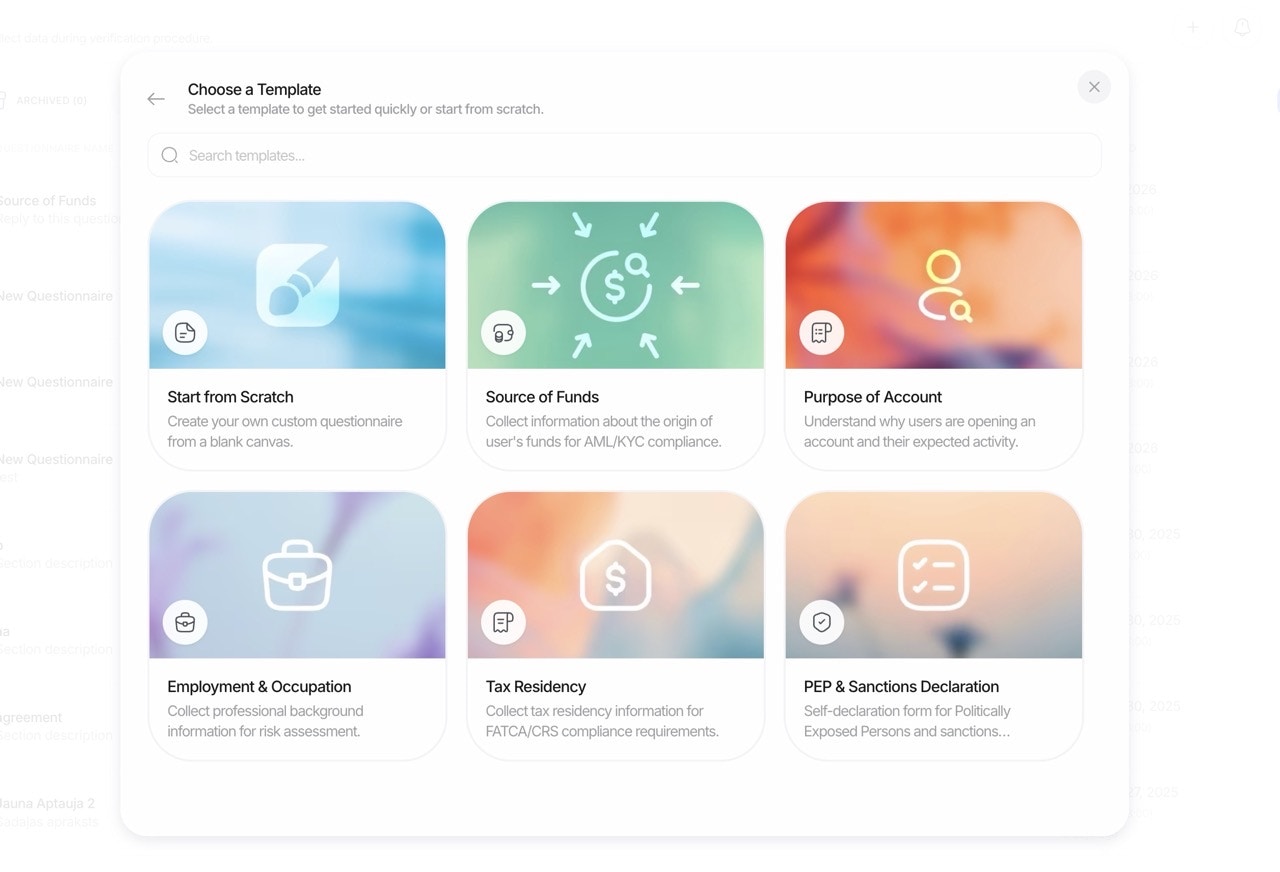 ### Pre-Built Templates
| Template | Description | Typical Elements |
| ------------------------ | --------------------------------------------------- | ----------------------------------------- |
| **Source of Funds** | Capture income sources and supporting documentation | Dropdown, Long Text, File Upload |
| **Employment Details** | Collect job title, employer, income range | Short Text, Dropdown, Number |
| **Purpose of Account** | Understand intended account usage | Single Choice, Multiple Choice, Long Text |
| **Beneficial Ownership** | Identify UBOs and ownership structure | Short Text, Number, File Upload |
| **Tax Residency** | Collect tax-related declarations | Country, Consent, File Upload |
| **Risk Assessment** | Gather risk-relevant information | Multiple Choice, Dropdown, Long Text |
***
## How it works
Our questionnaire workflow is designed for flexibility and auditability:
### 1. Build in the Console (No Code)
* Drag and drop elements to create your questionnaire
* Organize content into multiple sections for clarity
* Mark elements as required or optional
* Configure placeholders and helper descriptions
* Add choices (with optional free-text follow-up) for dropdown and single-choice
* Configure file/image upload limits per element
### 2. Localize Content
* Provide translations for `title`, `description`, `placeholder`, and choices
* Define supported `languages` and a `default_language`
* The end-user sees content automatically in the best available language
### 3. Publish and Collect
* Activate the questionnaire and embed it in your verification flow
* End-users complete the sections and submit answers
* File uploads (documents, images) are stored and linked to the response
### 4. Review and Decide
* Responses are saved with a `status`: `Approved`, `In Review`, or `Not Finished`
* You can force all questionnaire responses to go `In Review`, so a person manually approves them
* Review answers and files in the console, then mark as `Approved`
> Note: Questionnaires do not produce risk warnings. Governance is achieved through required fields, validation, and review workflows.
***
## Key capabilities
| Capability | Simple Mode | Advanced Mode |
| --------------------------- | ----------- | ------------- |
| Drag-and-drop builder | ✅ | ✅ |
| Required/optional fields | ✅ | ✅ |
| Placeholders & descriptions | ✅ | ✅ |
| Multiple sections | ✅ | ✅ |
| File upload limits | ✅ | ✅ |
| Visual graph editor | ❌ | ✅ |
| Conditional branching | ❌ | ✅ |
| Multi-language translations | ❌ | ✅ |
| Choice logic (require text) | ❌ | ✅ |
| Force manual review | ❌ | ✅ |
| Undo/Redo support | ❌ | ✅ |
| Keyboard shortcuts | ❌ | ✅ |
**Full feature list:**
* **Visual Builder**: Create and manage questionnaires with an intuitive drag-and-drop editor
* **Sections**: Group related questions; add headers and separators to guide users
* **Translations**: Localize all user-facing text; select default language; support multiple languages
* **Validation**: Mark fields required; enforce max files per upload element
* **Choice Logic**: For dropdown/single-choice, optionally require additional text per selected option
* **Uploads**: Collect documents and images with file count limits (e.g., up to 3 files)
* **Manual Review**: Optionally force all responses to `In Review` pending human approval
* **Activation Toggle**: Enable or disable the questionnaire per application
* **Workflow Integration**: Add questionnaires to KYC or run them standalone as a Questionnaire Verification workflow
* **APIs & Webhooks**: Read structured results via API and receive updates
***
## Element types
You can add the following element types in the builder (selectable from the console):
### Input Elements
| Element | Description | Configuration Options |
| ---------------- | --------------------------- | --------------------- |
| **SHORT\_TEXT** | Single-line free text | Placeholder, required |
| **LONG\_TEXT** | Multi-line free text | Placeholder, required |
| **NUMBER** | Numeric input | Placeholder, required |
| **EMAIL** | Email input with validation | Placeholder, required |
| **PHONE** | Phone number input | Placeholder, required |
| **ADDRESS** | Address input | Placeholder, required |
| **DATE\_PICKER** | Date selection | Placeholder, required |
| **TIME** | Time input | Placeholder, required |
### Choice Elements
| Element | Description | Configuration Options |
| -------------------- | ---------------------------- | ----------------------------------------- |
| **DROPDOWN** | Single selection from a list | Choices, `requires_text_input` per choice |
| **SINGLE\_CHOICE** | Radio-style single selection | Choices, `requires_text_input` per choice |
| **MULTIPLE\_CHOICE** | Multi-select checklist | Choices |
| **COUNTRY** | Country selector | Required |
| **CONSENT** | Checkbox or acknowledgement | Required, custom label |
### Upload Elements
| Element | Description | Configuration Options |
| ---------------- | --------------- | --------------------------- |
| **IMAGE** | Image upload | `max_files` (1-5), required |
| **FILE\_UPLOAD** | Document upload | `max_files` (1-5), required |
### Layout Elements
| Element | Description | Notes |
| ------------------- | -------------------------- | ---------------------------- |
| **PARAGRAPH** | Read-only explanatory text | Not answerable |
| **SECTION\_HEADER** | Visual section header | Not answerable, not required |
| **SEPARATOR** | Visual divider | Not answerable, not required |
**Behavioral notes:**
* `SECTION_HEADER` and `SEPARATOR` are presentation-only. They ignore required/placeholder/choices/file limits.
* For choice elements, define choices as `{ label, value, requires_text_input? }`.
* For upload elements, set `max_files` (1–5) to control how many files can be attached.
***
## Forcing manual review
Some compliance workflows require human review of every response. From the console, you can set questionnaires to always result in `In Review`. A reviewer then approves or requests changes, after which the response becomes `Approved`.
**When to use manual review:**
* High-risk customer onboarding
* Sensitive data collection (Source of Funds, UBO declarations)
* Regulatory requirements for human oversight
* Quality assurance during initial rollout
***
## Example use cases
### Source of Funds
Capture income sources, amounts, and upload supporting documents (e.g., payslips, statements). Combine dropdowns, long text, and file uploads.
**Typical structure:**
* Section 1: Employment Status (Dropdown)
* Section 2: Income Sources (Multiple Choice + Long Text)
* Section 3: Supporting Documents (File Upload)
* Section 4: Declaration (Consent)
***
### Association or Membership
Record affiliations, roles, and proof of membership; include consent elements for declarations.
**Typical structure:**
* Organization Name (Short Text)
* Role/Position (Dropdown)
* Duration of Membership (Date Picker)
* Membership Proof (File Upload)
* Declaration (Consent)
***
### Purpose of Relationship & Expected Account Activity
Collect intent, expected transaction volumes, countries of activity, and anticipated counterparties. Use single/multiple choice, number inputs, and paragraphs for context.
**Typical structure:**
* Section 1: Account Purpose (Multiple Choice)
* Section 2: Expected Monthly Volume (Number + Dropdown for currency)
* Section 3: Countries of Activity (Country - multiple)
* Section 4: Transaction Types (Multiple Choice)
* Section 5: Additional Information (Long Text)
***
## Simple vs Advanced Mode: When to Use Each
| Scenario | Recommended Mode |
| ----------------------------- | ---------------- |
| Single-language, basic form | Simple |
| Multi-language support needed | Advanced |
| Quick internal survey | Simple |
| Compliance questionnaire | Advanced |
| One-time data collection | Simple |
| Conditional branching paths | Advanced |
| Force manual review | Advanced |
| Complex multi-section forms | Advanced |
***
## Getting Started
1. **New to questionnaires?** Start with **Simple Mode** to learn the builder
2. **Need translations or conditional logic?** Switch to **Advanced Mode** for the visual graph editor
> See how results are structured in the [Questionnaires Report](/core-technology/questionnaires/report-questionnaire) page.
### Pre-Built Templates
| Template | Description | Typical Elements |
| ------------------------ | --------------------------------------------------- | ----------------------------------------- |
| **Source of Funds** | Capture income sources and supporting documentation | Dropdown, Long Text, File Upload |
| **Employment Details** | Collect job title, employer, income range | Short Text, Dropdown, Number |
| **Purpose of Account** | Understand intended account usage | Single Choice, Multiple Choice, Long Text |
| **Beneficial Ownership** | Identify UBOs and ownership structure | Short Text, Number, File Upload |
| **Tax Residency** | Collect tax-related declarations | Country, Consent, File Upload |
| **Risk Assessment** | Gather risk-relevant information | Multiple Choice, Dropdown, Long Text |
***
## How it works
Our questionnaire workflow is designed for flexibility and auditability:
### 1. Build in the Console (No Code)
* Drag and drop elements to create your questionnaire
* Organize content into multiple sections for clarity
* Mark elements as required or optional
* Configure placeholders and helper descriptions
* Add choices (with optional free-text follow-up) for dropdown and single-choice
* Configure file/image upload limits per element
### 2. Localize Content
* Provide translations for `title`, `description`, `placeholder`, and choices
* Define supported `languages` and a `default_language`
* The end-user sees content automatically in the best available language
### 3. Publish and Collect
* Activate the questionnaire and embed it in your verification flow
* End-users complete the sections and submit answers
* File uploads (documents, images) are stored and linked to the response
### 4. Review and Decide
* Responses are saved with a `status`: `Approved`, `In Review`, or `Not Finished`
* You can force all questionnaire responses to go `In Review`, so a person manually approves them
* Review answers and files in the console, then mark as `Approved`
> Note: Questionnaires do not produce risk warnings. Governance is achieved through required fields, validation, and review workflows.
***
## Key capabilities
| Capability | Simple Mode | Advanced Mode |
| --------------------------- | ----------- | ------------- |
| Drag-and-drop builder | ✅ | ✅ |
| Required/optional fields | ✅ | ✅ |
| Placeholders & descriptions | ✅ | ✅ |
| Multiple sections | ✅ | ✅ |
| File upload limits | ✅ | ✅ |
| Visual graph editor | ❌ | ✅ |
| Conditional branching | ❌ | ✅ |
| Multi-language translations | ❌ | ✅ |
| Choice logic (require text) | ❌ | ✅ |
| Force manual review | ❌ | ✅ |
| Undo/Redo support | ❌ | ✅ |
| Keyboard shortcuts | ❌ | ✅ |
**Full feature list:**
* **Visual Builder**: Create and manage questionnaires with an intuitive drag-and-drop editor
* **Sections**: Group related questions; add headers and separators to guide users
* **Translations**: Localize all user-facing text; select default language; support multiple languages
* **Validation**: Mark fields required; enforce max files per upload element
* **Choice Logic**: For dropdown/single-choice, optionally require additional text per selected option
* **Uploads**: Collect documents and images with file count limits (e.g., up to 3 files)
* **Manual Review**: Optionally force all responses to `In Review` pending human approval
* **Activation Toggle**: Enable or disable the questionnaire per application
* **Workflow Integration**: Add questionnaires to KYC or run them standalone as a Questionnaire Verification workflow
* **APIs & Webhooks**: Read structured results via API and receive updates
***
## Element types
You can add the following element types in the builder (selectable from the console):
### Input Elements
| Element | Description | Configuration Options |
| ---------------- | --------------------------- | --------------------- |
| **SHORT\_TEXT** | Single-line free text | Placeholder, required |
| **LONG\_TEXT** | Multi-line free text | Placeholder, required |
| **NUMBER** | Numeric input | Placeholder, required |
| **EMAIL** | Email input with validation | Placeholder, required |
| **PHONE** | Phone number input | Placeholder, required |
| **ADDRESS** | Address input | Placeholder, required |
| **DATE\_PICKER** | Date selection | Placeholder, required |
| **TIME** | Time input | Placeholder, required |
### Choice Elements
| Element | Description | Configuration Options |
| -------------------- | ---------------------------- | ----------------------------------------- |
| **DROPDOWN** | Single selection from a list | Choices, `requires_text_input` per choice |
| **SINGLE\_CHOICE** | Radio-style single selection | Choices, `requires_text_input` per choice |
| **MULTIPLE\_CHOICE** | Multi-select checklist | Choices |
| **COUNTRY** | Country selector | Required |
| **CONSENT** | Checkbox or acknowledgement | Required, custom label |
### Upload Elements
| Element | Description | Configuration Options |
| ---------------- | --------------- | --------------------------- |
| **IMAGE** | Image upload | `max_files` (1-5), required |
| **FILE\_UPLOAD** | Document upload | `max_files` (1-5), required |
### Layout Elements
| Element | Description | Notes |
| ------------------- | -------------------------- | ---------------------------- |
| **PARAGRAPH** | Read-only explanatory text | Not answerable |
| **SECTION\_HEADER** | Visual section header | Not answerable, not required |
| **SEPARATOR** | Visual divider | Not answerable, not required |
**Behavioral notes:**
* `SECTION_HEADER` and `SEPARATOR` are presentation-only. They ignore required/placeholder/choices/file limits.
* For choice elements, define choices as `{ label, value, requires_text_input? }`.
* For upload elements, set `max_files` (1–5) to control how many files can be attached.
***
## Forcing manual review
Some compliance workflows require human review of every response. From the console, you can set questionnaires to always result in `In Review`. A reviewer then approves or requests changes, after which the response becomes `Approved`.
**When to use manual review:**
* High-risk customer onboarding
* Sensitive data collection (Source of Funds, UBO declarations)
* Regulatory requirements for human oversight
* Quality assurance during initial rollout
***
## Example use cases
### Source of Funds
Capture income sources, amounts, and upload supporting documents (e.g., payslips, statements). Combine dropdowns, long text, and file uploads.
**Typical structure:**
* Section 1: Employment Status (Dropdown)
* Section 2: Income Sources (Multiple Choice + Long Text)
* Section 3: Supporting Documents (File Upload)
* Section 4: Declaration (Consent)
***
### Association or Membership
Record affiliations, roles, and proof of membership; include consent elements for declarations.
**Typical structure:**
* Organization Name (Short Text)
* Role/Position (Dropdown)
* Duration of Membership (Date Picker)
* Membership Proof (File Upload)
* Declaration (Consent)
***
### Purpose of Relationship & Expected Account Activity
Collect intent, expected transaction volumes, countries of activity, and anticipated counterparties. Use single/multiple choice, number inputs, and paragraphs for context.
**Typical structure:**
* Section 1: Account Purpose (Multiple Choice)
* Section 2: Expected Monthly Volume (Number + Dropdown for currency)
* Section 3: Countries of Activity (Country - multiple)
* Section 4: Transaction Types (Multiple Choice)
* Section 5: Additional Information (Long Text)
***
## Simple vs Advanced Mode: When to Use Each
| Scenario | Recommended Mode |
| ----------------------------- | ---------------- |
| Single-language, basic form | Simple |
| Multi-language support needed | Advanced |
| Quick internal survey | Simple |
| Compliance questionnaire | Advanced |
| One-time data collection | Simple |
| Conditional branching paths | Advanced |
| Force manual review | Advanced |
| Complex multi-section forms | Advanced |
***
## Getting Started
1. **New to questionnaires?** Start with **Simple Mode** to learn the builder
2. **Need translations or conditional logic?** Switch to **Advanced Mode** for the visual graph editor
> See how results are structured in the [Questionnaires Report](/core-technology/questionnaires/report-questionnaire) page.