> ## Documentation Index
> Fetch the complete documentation index at: https://docs.didit.me/llms.txt
> Use this file to discover all available pages before exploring further.
# Questionnaire Report
> Didit questionnaire report reference covering sections, items, element types, conditional visibility, and per-item answers in V3 decision responses.
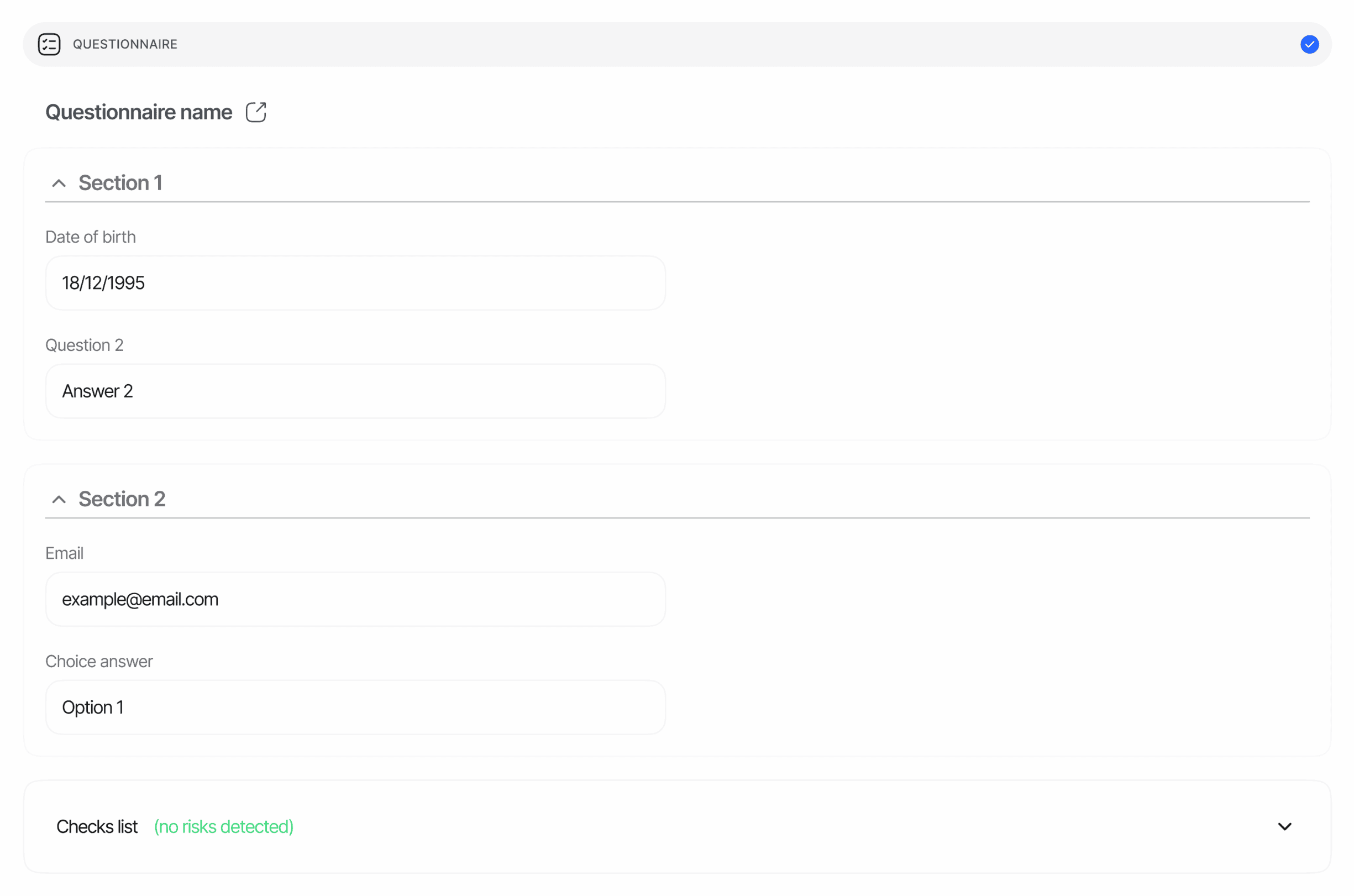
The questionnaire report contains the structured form a user was shown, the path they took through any conditional branches, and the answer for each visible item. It is returned per node, so multi-instance workflows (for example, one questionnaire per UBO) carry one entry per occurrence.
## Overview
Each questionnaire response describes:
* The **questionnaire version** the user saw (title, description, languages, version metadata, sections).
* The **visible items** for the path the user actually took through the form's graph — items hidden by conditional logic are dropped from the response.
* The **answer** for every visible interactive item, in the shape that matches its `element_type`.
* A single **status** for the response as a whole.
Layout elements are reshaped rather than answered: each `SECTION_HEADER` becomes a section boundary (its title and description become the section's `title`/`description`), while `HEADING`, `PARAGRAPH`, and `SEPARATOR` stay in `items[]` without an `answer` key so the report keeps the same visual structure the user saw.
## Where it appears
The questionnaire report appears as the plural array **`questionnaire_responses[]`** in `GET /v3/session/{sessionId}/decision/`, for both KYC and KYB sessions, whenever a questionnaire feature ran. The field is `null` until at least one questionnaire instance has started. Each entry carries a `node_id` so multi-instance workflows can disambiguate which graph step produced it.
```text theme={null}
GET /v3/session/{sessionId}/decision/
──▶ { "questionnaire_responses": [ { node_id, questionnaire_id, title, status, sections, … }, … ] }
```
## Item shape
See [Questionnaire response in the Data Models reference](/reference/data-models#questionnaire-response) for the canonical schema.
```typescript theme={null}
interface QuestionnaireResponse {
questionnaire_id: string; // UUID of the questionnaire version that was answered
title: string; // Questionnaire name, as set in the Console
description: string | null;
languages: string[]; // Supported language codes
default_language: string; // Default language code
is_active: boolean;
is_simple_questionnaire: boolean; // true = flat list, false = branching graph
questionnaire_group_id: string; // UUID shared by all versions of the same questionnaire
version: number; // Version number within the group
published_at: string | null; // ISO 8601 — when this version was published
status: "Approved" | "In Review" | "Not Finished";
sections: Array<{
title: string | null; // From the SECTION_HEADER that opens the section
description: string | null;
items: QuestionnaireItem[];
}>;
node_id: string | null; // Workflow graph node that ran this questionnaire
}
interface QuestionnaireItem {
uuid: string; // Form element UUID
value: string; // Stable node id of the element within the questionnaire graph
element_type:
| "SHORT_TEXT" | "LONG_TEXT"
| "DROPDOWN" | "SINGLE_CHOICE" | "MULTIPLE_CHOICE"
| "NUMBER" | "EMAIL" | "PHONE" | "ADDRESS" | "COUNTRY"
| "DATE_PICKER" | "TIME"
| "CONSENT"
| "FILE_UPLOAD" | "IMAGE"
| "REPEATABLE_GROUP"
| "HEADING" | "PARAGRAPH" | "SEPARATOR"; // layout-only — no answer key
is_required: boolean;
title: string | null; // Localized
description: string | null; // Only populated on HEADING / PARAGRAPH text blocks
placeholder: string | null; // Localized
choices: Array<{ // DROPDOWN / SINGLE_CHOICE / MULTIPLE_CHOICE
label: string; // Localized
value: string; // Stable across languages
requires_text_input?: boolean; // Selecting this option triggers a free-text follow-up
}> | null;
max_files: number | null; // FILE_UPLOAD / IMAGE upload cap (1–5)
required_if: { // Conditional requirement rule, or null
rules: Array<{ field: string; operator: string; value?: unknown }>;
logic: "and" | "or";
} | null;
repeatable_config: { // REPEATABLE_GROUP only, or null
min_items?: number;
max_items?: number;
item_label?: string; // Localized
fields: Array
 ## Overview
Each questionnaire response describes:
* The **questionnaire version** the user saw (title, description, languages, version metadata, sections).
* The **visible items** for the path the user actually took through the form's graph — items hidden by conditional logic are dropped from the response.
* The **answer** for every visible interactive item, in the shape that matches its `element_type`.
* A single **status** for the response as a whole.
Layout elements are reshaped rather than answered: each `SECTION_HEADER` becomes a section boundary (its title and description become the section's `title`/`description`), while `HEADING`, `PARAGRAPH`, and `SEPARATOR` stay in `items[]` without an `answer` key so the report keeps the same visual structure the user saw.
## Where it appears
The questionnaire report appears as the plural array **`questionnaire_responses[]`** in `GET /v3/session/{sessionId}/decision/`, for both KYC and KYB sessions, whenever a questionnaire feature ran. The field is `null` until at least one questionnaire instance has started. Each entry carries a `node_id` so multi-instance workflows can disambiguate which graph step produced it.
```text theme={null}
GET /v3/session/{sessionId}/decision/
──▶ { "questionnaire_responses": [ { node_id, questionnaire_id, title, status, sections, … }, … ] }
```
## Item shape
See [Questionnaire response in the Data Models reference](/reference/data-models#questionnaire-response) for the canonical schema.
```typescript theme={null}
interface QuestionnaireResponse {
questionnaire_id: string; // UUID of the questionnaire version that was answered
title: string; // Questionnaire name, as set in the Console
description: string | null;
languages: string[]; // Supported language codes
default_language: string; // Default language code
is_active: boolean;
is_simple_questionnaire: boolean; // true = flat list, false = branching graph
questionnaire_group_id: string; // UUID shared by all versions of the same questionnaire
version: number; // Version number within the group
published_at: string | null; // ISO 8601 — when this version was published
status: "Approved" | "In Review" | "Not Finished";
sections: Array<{
title: string | null; // From the SECTION_HEADER that opens the section
description: string | null;
items: QuestionnaireItem[];
}>;
node_id: string | null; // Workflow graph node that ran this questionnaire
}
interface QuestionnaireItem {
uuid: string; // Form element UUID
value: string; // Stable node id of the element within the questionnaire graph
element_type:
| "SHORT_TEXT" | "LONG_TEXT"
| "DROPDOWN" | "SINGLE_CHOICE" | "MULTIPLE_CHOICE"
| "NUMBER" | "EMAIL" | "PHONE" | "ADDRESS" | "COUNTRY"
| "DATE_PICKER" | "TIME"
| "CONSENT"
| "FILE_UPLOAD" | "IMAGE"
| "REPEATABLE_GROUP"
| "HEADING" | "PARAGRAPH" | "SEPARATOR"; // layout-only — no answer key
is_required: boolean;
title: string | null; // Localized
description: string | null; // Only populated on HEADING / PARAGRAPH text blocks
placeholder: string | null; // Localized
choices: Array<{ // DROPDOWN / SINGLE_CHOICE / MULTIPLE_CHOICE
label: string; // Localized
value: string; // Stable across languages
requires_text_input?: boolean; // Selecting this option triggers a free-text follow-up
}> | null;
max_files: number | null; // FILE_UPLOAD / IMAGE upload cap (1–5)
required_if: { // Conditional requirement rule, or null
rules: Array<{ field: string; operator: string; value?: unknown }>;
logic: "and" | "or";
} | null;
repeatable_config: { // REPEATABLE_GROUP only, or null
min_items?: number;
max_items?: number;
item_label?: string; // Localized
fields: Array
## Overview
Each questionnaire response describes:
* The **questionnaire version** the user saw (title, description, languages, version metadata, sections).
* The **visible items** for the path the user actually took through the form's graph — items hidden by conditional logic are dropped from the response.
* The **answer** for every visible interactive item, in the shape that matches its `element_type`.
* A single **status** for the response as a whole.
Layout elements are reshaped rather than answered: each `SECTION_HEADER` becomes a section boundary (its title and description become the section's `title`/`description`), while `HEADING`, `PARAGRAPH`, and `SEPARATOR` stay in `items[]` without an `answer` key so the report keeps the same visual structure the user saw.
## Where it appears
The questionnaire report appears as the plural array **`questionnaire_responses[]`** in `GET /v3/session/{sessionId}/decision/`, for both KYC and KYB sessions, whenever a questionnaire feature ran. The field is `null` until at least one questionnaire instance has started. Each entry carries a `node_id` so multi-instance workflows can disambiguate which graph step produced it.
```text theme={null}
GET /v3/session/{sessionId}/decision/
──▶ { "questionnaire_responses": [ { node_id, questionnaire_id, title, status, sections, … }, … ] }
```
## Item shape
See [Questionnaire response in the Data Models reference](/reference/data-models#questionnaire-response) for the canonical schema.
```typescript theme={null}
interface QuestionnaireResponse {
questionnaire_id: string; // UUID of the questionnaire version that was answered
title: string; // Questionnaire name, as set in the Console
description: string | null;
languages: string[]; // Supported language codes
default_language: string; // Default language code
is_active: boolean;
is_simple_questionnaire: boolean; // true = flat list, false = branching graph
questionnaire_group_id: string; // UUID shared by all versions of the same questionnaire
version: number; // Version number within the group
published_at: string | null; // ISO 8601 — when this version was published
status: "Approved" | "In Review" | "Not Finished";
sections: Array<{
title: string | null; // From the SECTION_HEADER that opens the section
description: string | null;
items: QuestionnaireItem[];
}>;
node_id: string | null; // Workflow graph node that ran this questionnaire
}
interface QuestionnaireItem {
uuid: string; // Form element UUID
value: string; // Stable node id of the element within the questionnaire graph
element_type:
| "SHORT_TEXT" | "LONG_TEXT"
| "DROPDOWN" | "SINGLE_CHOICE" | "MULTIPLE_CHOICE"
| "NUMBER" | "EMAIL" | "PHONE" | "ADDRESS" | "COUNTRY"
| "DATE_PICKER" | "TIME"
| "CONSENT"
| "FILE_UPLOAD" | "IMAGE"
| "REPEATABLE_GROUP"
| "HEADING" | "PARAGRAPH" | "SEPARATOR"; // layout-only — no answer key
is_required: boolean;
title: string | null; // Localized
description: string | null; // Only populated on HEADING / PARAGRAPH text blocks
placeholder: string | null; // Localized
choices: Array<{ // DROPDOWN / SINGLE_CHOICE / MULTIPLE_CHOICE
label: string; // Localized
value: string; // Stable across languages
requires_text_input?: boolean; // Selecting this option triggers a free-text follow-up
}> | null;
max_files: number | null; // FILE_UPLOAD / IMAGE upload cap (1–5)
required_if: { // Conditional requirement rule, or null
rules: Array<{ field: string; operator: string; value?: unknown }>;
logic: "and" | "or";
} | null;
repeatable_config: { // REPEATABLE_GROUP only, or null
min_items?: number;
max_items?: number;
item_label?: string; // Localized
fields: Array