> ## Documentation Index
> Fetch the complete documentation index at: https://docs.didit.me/llms.txt
> Use this file to discover all available pages before exploring further.
# Zapier
> Automate identity verification workflows with the Didit Zapier app. Trigger verifications and listen to results in 6,000+ apps. Pay-per-call from $0.30.
export const VideoEmbed = ({src, title = "Video", type = "iframe"}) =>
{type === "iframe" ? : }
;
Connect Didit to **6,000+ apps** through Zapier — no code required. Automatically create verification sessions, react to status changes, and sync results with your CRM, database, or communication tools.
Browse triggers, actions, and ready-made templates on the Zapier marketplace.
***
## What You Get
Trigger verification sessions from form submissions, CRM events, or any Zapier-connected app.
Receive instant status updates (Approved, Declined, In Review, etc.) as Zapier triggers.
Fetch full session details — ID data, liveness scores, AML hits — on demand.
***
## Prerequisites
| Requirement | Where to get it |
| ------------------ | -------------------------------------------------------------------------------------------------------------------- |
| **Didit account** | Sign up at [business.didit.me](https://business.didit.me) — Free KYC plan is enough to test. |
| **API Key** | Console → **API & Webhooks** → copy the production key. The Zapier app authenticates with this key for every action. |
| **Workflow ID** | Console → **Workflows** → pick the workflow you want to launch (or [create one](/console/workflows)). |
| **Zapier account** | Free or paid — [zapier.com](https://zapier.com). The free plan handles 100 tasks / month, enough for small pilots. |
***
## How It Works
In Zapier, search for **Didit** in the app directory (or open the [marketplace listing](https://zapier.com/apps/didit/integrations) directly) and connect your account using the **API Key** from Console → **API & Webhooks**.
Your API Key authenticates all Didit actions in Zapier. You only need to connect once — all your Zaps share the same connection, and rotating the key in Console invalidates the Zapier connection until you reconnect.
Choose what starts your Zap. This can be a **Didit trigger** or any other app:
| Trigger Source | Example |
| ----------------- | --------------------------------------------------- |
| **Didit webhook** | Session status changes to "Approved" |
| **Google Forms** | New form submission → create a verification session |
| **HubSpot** | New contact created → trigger KYC |
| **Stripe** | New customer → verify identity before payout |
| **Typeform** | Onboarding form completed → start verification |
Use one of the available Didit actions (names match the [Zapier marketplace listing](https://zapier.com/apps/didit/integrations)):
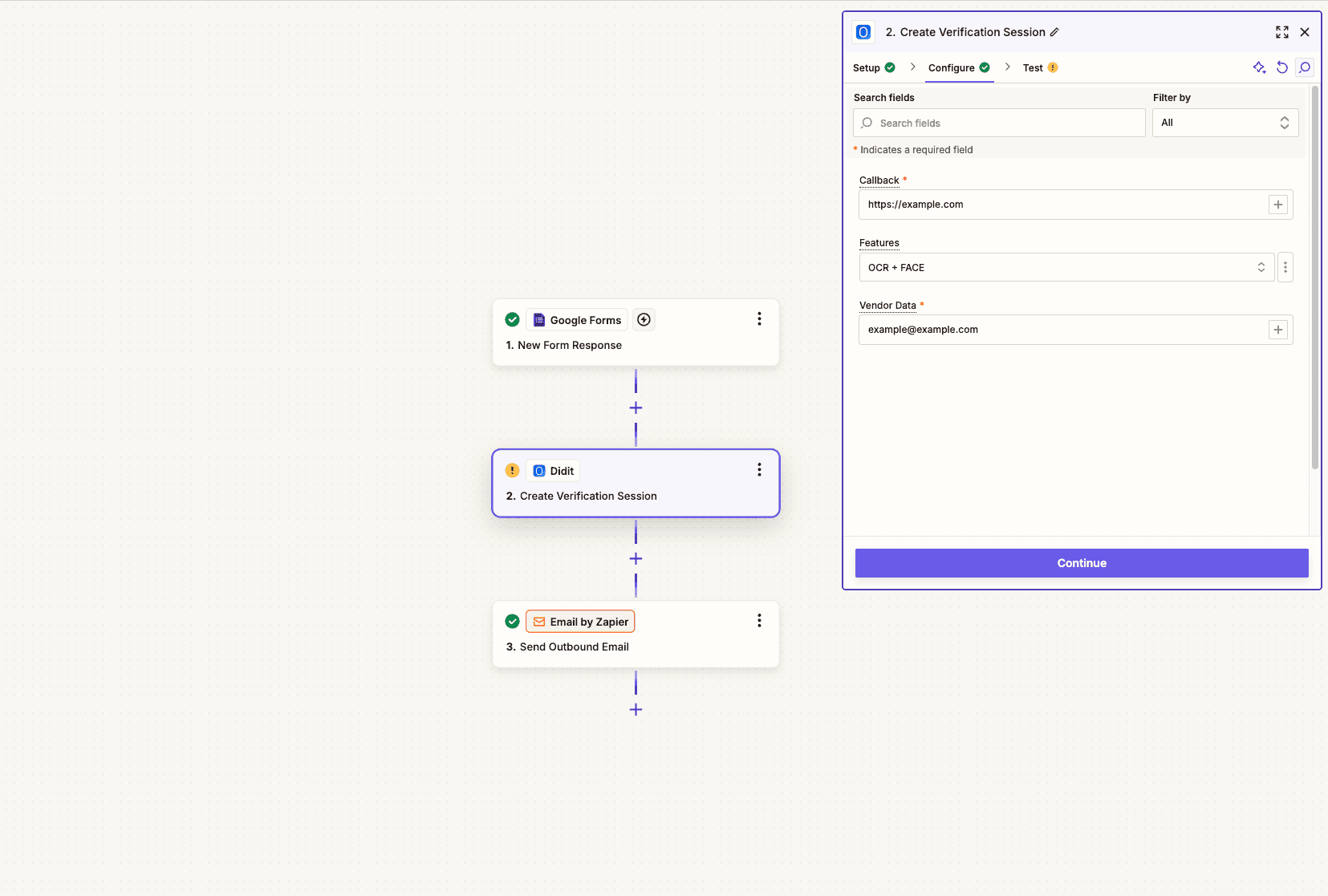
**Create Verification Session** — wraps `POST /v3/session/`
* Provide the **Workflow ID** of the verification flow to execute.
* Optionally set a **Callback URL** for the post-verification redirect.
* Pass **Vendor Data** (e.g. user email or your internal ID) to link the session back to your records.
* The action returns the new `session_id`, the user-facing `url`, and the initial `status` — use the `url` to send the user to the verification flow.
**Retrieve Verification Session** — wraps `GET /v3/session/{sessionId}/decision/`
* Pass a `session_id` to fetch the full verification result.
* Access ID data, liveness scores, AML results, the final `status`, and any uploaded media URLs.
Add downstream actions based on the verification outcome:
| Status | Suggested Action |
| ------------- | --------------------------------------------------------- |
| `"Approved"` | Update CRM, grant platform access, send welcome email |
| `"Declined"` | Flag in database, notify compliance, send rejection email |
| `"In Review"` | Create task for compliance team, send Slack notification |
| `"Abandoned"` | Send reminder email with a fresh verification link |
 ***
## Popular Zap Templates
User fills onboarding form → verification session created → result emailed to user and admin.
New contact → trigger KYC → update contact properties with verification status and ID data.
New customer → verify identity → notify your team on Slack with the result.
Custom trigger → verify user → log session results in Airtable for compliance records.
***
## Available Triggers & Actions
The names below match the current Didit Zapier app on the [marketplace](https://zapier.com/apps/didit/integrations). If you ever see a label that differs slightly inside Zapier itself, trust the Zapier UI — the underlying behavior is the same.
### Triggers (start a Zap)
| Trigger | Underlying event | Description |
| -------------------------- | ------------------------------------------------- | ---------------------------------------------------------------------------------------------------------------------------------------------- |
| **Session Status Updated** | [`status.updated` webhook](/integration/webhooks) | Fires every time a verification session changes status (`Approved`, `Declined`, `In Review`, `Resubmitted`, `Abandoned`, `Kyc Expired`, etc.). |
### Actions (do something)
| Action | Underlying endpoint | Description |
| --------------------------------- | --------------------------------------- | ---------------------------------------------------------------------------------------------------------------------------------- |
| **Create Verification Session** | `POST /v3/session/` | Starts a new session with your workflow, optional callback URL, and `vendor_data`. Returns the session URL to share with the user. |
| **Retrieve Verification Session** | `GET /v3/session/{sessionId}/decision/` | Fetches the full decision payload — ID data, liveness, AML hits, and final status — for a given `session_id`. |
***
## Things to know
The Didit Zapier app is intentionally scoped to the **highest-value automation surface**: launching sessions and reacting to status updates. The following are **not** currently exposed through Zapier and require a direct API call:
* Uploading a document image, video, or POA asset from a Zap step.
* Decision overrides via [`PATCH /v3/session/{sessionId}/update-status/`](/sessions-api/update-status).
* KYB-specific endpoints (registries, key people).
* Webhook event types other than session-level status changes (e.g. `transaction.status.updated`, `user.status.updated`).
If you need any of these from a no-code tool, drop into the [Sessions API](/sessions-api/create-session) via a Zapier **Webhooks by Zapier** step with your API Key.
***
## Tips & Best Practices
Always pass a unique identifier (email, user ID, or UUID) in the **Vendor Data** field when creating sessions. This lets you match verification results back to the correct user in your system.
Build Zap paths (using Zapier's Paths feature) to handle different statuses differently — Approved, Declined, In Review, Resubmitted, Abandoned, and Expired each deserve a tailored response.
Add Zapier Filters to only trigger downstream actions for specific statuses. For example, only send a welcome email when status is `"Approved"`.
Use Zapier's test feature along with Didit's **Try Webhook** button (in Console → API & Webhooks) to validate your Zap end-to-end before processing real users.
***
## Next Steps
Set up your Didit account, create a workflow, and get your API key.
Learn about webhook payloads and signature verification for server-side integrations.
***
## Popular Zap Templates
User fills onboarding form → verification session created → result emailed to user and admin.
New contact → trigger KYC → update contact properties with verification status and ID data.
New customer → verify identity → notify your team on Slack with the result.
Custom trigger → verify user → log session results in Airtable for compliance records.
***
## Available Triggers & Actions
The names below match the current Didit Zapier app on the [marketplace](https://zapier.com/apps/didit/integrations). If you ever see a label that differs slightly inside Zapier itself, trust the Zapier UI — the underlying behavior is the same.
### Triggers (start a Zap)
| Trigger | Underlying event | Description |
| -------------------------- | ------------------------------------------------- | ---------------------------------------------------------------------------------------------------------------------------------------------- |
| **Session Status Updated** | [`status.updated` webhook](/integration/webhooks) | Fires every time a verification session changes status (`Approved`, `Declined`, `In Review`, `Resubmitted`, `Abandoned`, `Kyc Expired`, etc.). |
### Actions (do something)
| Action | Underlying endpoint | Description |
| --------------------------------- | --------------------------------------- | ---------------------------------------------------------------------------------------------------------------------------------- |
| **Create Verification Session** | `POST /v3/session/` | Starts a new session with your workflow, optional callback URL, and `vendor_data`. Returns the session URL to share with the user. |
| **Retrieve Verification Session** | `GET /v3/session/{sessionId}/decision/` | Fetches the full decision payload — ID data, liveness, AML hits, and final status — for a given `session_id`. |
***
## Things to know
The Didit Zapier app is intentionally scoped to the **highest-value automation surface**: launching sessions and reacting to status updates. The following are **not** currently exposed through Zapier and require a direct API call:
* Uploading a document image, video, or POA asset from a Zap step.
* Decision overrides via [`PATCH /v3/session/{sessionId}/update-status/`](/sessions-api/update-status).
* KYB-specific endpoints (registries, key people).
* Webhook event types other than session-level status changes (e.g. `transaction.status.updated`, `user.status.updated`).
If you need any of these from a no-code tool, drop into the [Sessions API](/sessions-api/create-session) via a Zapier **Webhooks by Zapier** step with your API Key.
***
## Tips & Best Practices
Always pass a unique identifier (email, user ID, or UUID) in the **Vendor Data** field when creating sessions. This lets you match verification results back to the correct user in your system.
Build Zap paths (using Zapier's Paths feature) to handle different statuses differently — Approved, Declined, In Review, Resubmitted, Abandoned, and Expired each deserve a tailored response.
Add Zapier Filters to only trigger downstream actions for specific statuses. For example, only send a welcome email when status is `"Approved"`.
Use Zapier's test feature along with Didit's **Try Webhook** button (in Console → API & Webhooks) to validate your Zap end-to-end before processing real users.
***
## Next Steps
Set up your Didit account, create a workflow, and get your API key.
Learn about webhook payloads and signature verification for server-side integrations.