

 Get Started
 Integrate / SDKs
 User Verification
 Business Verification
 Transaction Monitoring
 Changelog
database_validations[] is one full Database Validation report — one run of a Database Validation node against one issuing state. The per-service registry outcomes live inside that entry’s validations[] sub-array. This page documents the JSON shape so you can parse match outcomes, registry source data, and biometric scores returned by each service.
Overview
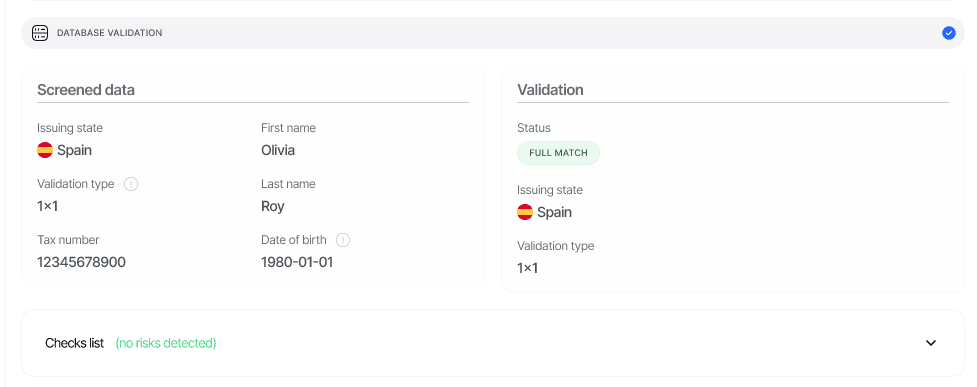
A Database Validation report is produced every time a workflow node runs the Database Validation feature. Each entry in thedatabase_validations[] array represents one node run against one issuing state; if the node runs multiple services for that country (for example CPF + CNH in Brazil), each service appears as a separate item inside the entry’s validations[] sub-array. Each report contains:
- The overall feature
status— aFeatureStatusChoicesvalue (Not Finished,Approved,Declined,In Review). - A roll-up
match_type(full_match,partial_match,no_match, ornullwhen no service returned a usable result) aggregated across services via the matching method. - The
issuing_state(ISO 3166-1 alpha-3) and the derivedvalidation_type(one_by_one,two_by_two, ornot_enabled— nevernull). - The
screened_datablock — the user-provided data that was sent to the registry. - A
validations[]array — one entry per service that produced a result, with the catalogservice_id/service_name, the vendor-neutraloutcome_code, an optionaloutcome_detail, the per-fieldvalidationmap and the cleanedsource_datalifted from the registry response. - An
errors[]array — per-service errors when a lookup failed or was skipped; the key is omitted entirely when there are no errors. - A
warnings[]array — risk events emitted during the validation (see Database Validation warnings). - A
node_idthat identifies which workflow graph node produced the report (V3 sessions only).
Where it appears in API responses
The report appears asdatabase_validations[] in GET /v3/session/{sessionId}/decision/ — always a JSON array, never a singular object. The array contains one entry per Database Validation node in the workflow graph; in turn, each entry’s validations[] sub-array contains one item per registry service that produced a result.
null value means no Database Validation step has run yet.
Schema
The canonical field-by-field schema lives on the Data models page. It is produced byDatabaseValidationV3Serializer.
Status values
status uses the standard feature-level enum (see Status enums) — see the Status enum reference. The enum also defines Resub Requested, which is not produced by Database Validation in practice.
Custom per-node status rules are applied on top of this base status. See Database Validation warnings for the configurable actions and their defaults.
Outcome codes
Each entry invalidations[] carries a vendor-neutral outcome_code — one of MATCH, PARTIAL_MATCH, NO_MATCH, DOCUMENT_NOT_FOUND, INVALID_DOCUMENT_FORMAT, INVALID_INPUT, MINOR_BLOCKED, DECEASED, BIOMETRIC_NO_MATCH, BIOMETRIC_IMAGE_UNUSABLE, INCONCLUSIVE, DOCUMENT_SUPERSEDED, REGISTRY_UNAVAILABLE, REGISTRY_ERROR. Note the distinctions: NO_MATCH means the registry definitively did not confirm the data, INCONCLUSIVE means the registry could not determine either way (route to review, not decline), and BIOMETRIC_IMAGE_UNUSABLE is a technical selfie problem (retake) — unlike the definitive BIOMETRIC_NO_MATCH. See the full taxonomy and recommended handling on the Outcome codes page.
One entry per service
Thevalidations[] array contains one item for each service that produced a result payload (a validation map, source_data, outcome_code, or outcome_detail). If your workflow runs multiple services for the same country (for example Brazil CPF + Brazil CNH), each one appears separately with its own service_id, outcome_code, and source_data. The roll-up match_type aggregates across all services (any full match → full_match; else any partial → partial_match; else no_match), and validation_type is derived from how many distinct services full-matched — see Matching methods.
Pre-signed image URLs
Image fields insource_data (photo, signature) and screened_data (selfie, cnh_qr_code_image, document_image) are returned as pre-signed URLs that expire — refresh by re-calling the decision endpoint. The raw upstream payload is intentionally not exposed via the API.
Examples
Approved — Brazil CPF status check (Receita Federal)
Approved — Argentina DNI biometric (RENAPER)
For Argentina, the validation uses RENAPER with a biometric face-match. The response includes aface_match_score and additional identity fields returned by the registry.
In Review — registry could not run
When no service returns a usable result — required fields missing or malformed, or the registry unreachable —match_type stays null, validation_type is not_enabled, a COULD_NOT_PERFORM_DATABASE_VALIDATION warning is emitted, and the feature moves to In Review until the data is corrected. No charge is applied for skipped services.
Related
- Database Validation overview — how the API works end-to-end and supported registries.
- Matching methods — how 1×1 / 2×2 outcomes (
validation_type: one_by_one/two_by_two) are derived. - Outcome codes — full per-result taxonomy with country-specific detail codes.
- Supported countries & services — every live registry, required fields and per-call price.
- Database Validation warnings — what we surface when a service can’t run.
- Data models — database validation — canonical field-by-field schema.