

 Get Started
 Integrate / SDKs
 User Verification
 Business Verification
 Transaction Monitoring
 Changelog
POST /v3/age-estimation/ endpoint and the embedded age_estimation field on workflow liveness reports.
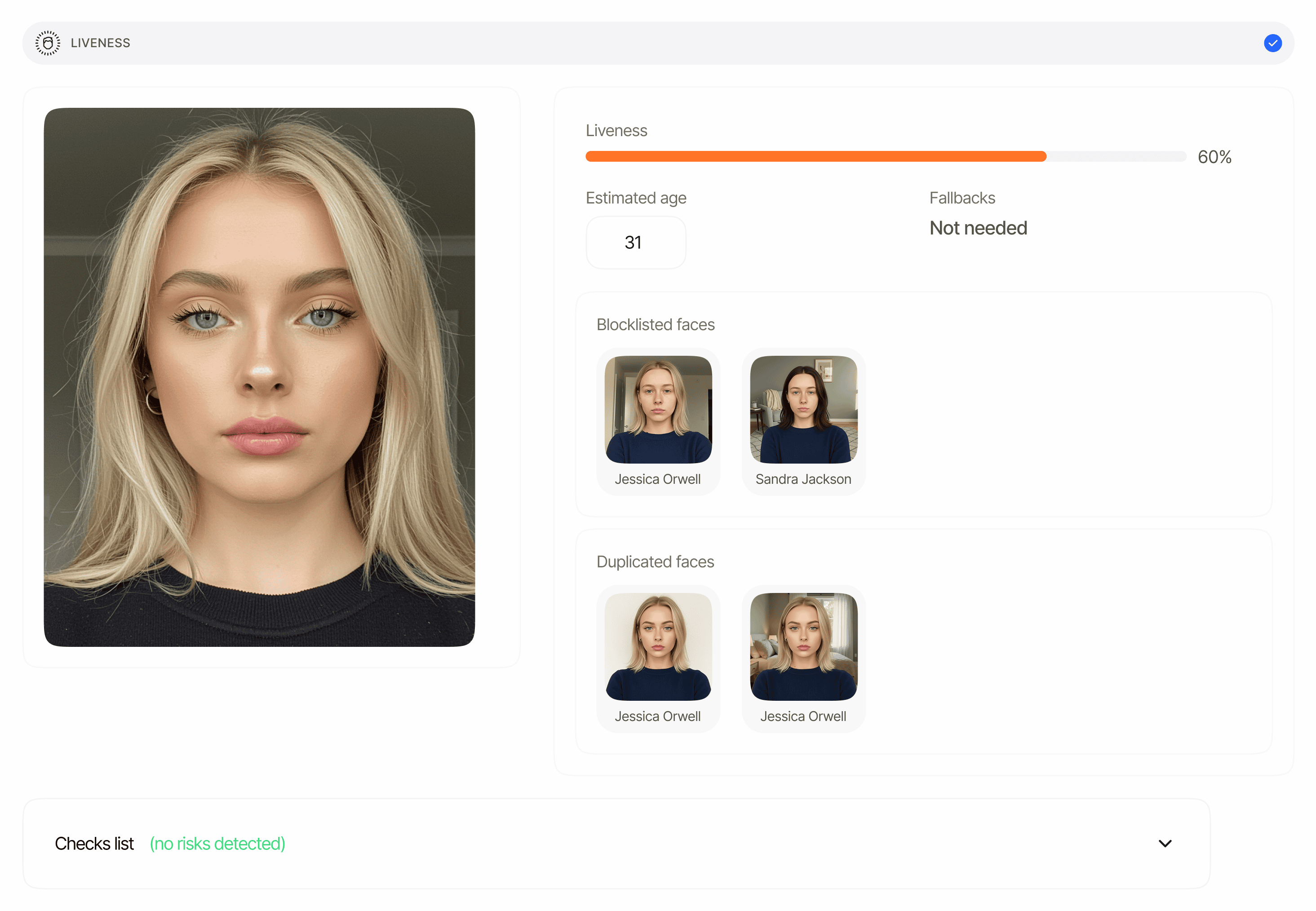
Overview
Age Estimation has two delivery modes:- Standalone API.
POST /v3/age-estimation/accepts a single face image (user_image) and returns the predicted age and passive liveness score synchronously. See the Age Estimation standalone API reference. - Embedded in a workflow. Every workflow liveness report carries the predicted age under
age_estimation— the value is always populated from the largest detected face. Age thresholds are only enforced (raising age warnings) on age-estimation flows: adaptive age verification workflows orAGE_ESTIMATIONworkflow nodes.
- The overall
status(Approved,Declined). - The liveness
method(alwaysPASSIVEon the standalone API;ACTIVE_3D/FLASHING/PASSIVEin workflows). - A liveness
score(0–100; higher is more confident the subject is live;nullis treated as0for threshold checks). - The predicted
age_estimationin years (float — for example27.33;nullwhen no face age could be estimated). - Standalone only: a
user_imageobject with anentities[]array (one entry per detected face —age,bbox,confidence,gender) and thebest_angleorientation. - Workflow only:
reference_image,video_url,matches[], and the passive-liveness quality metricsface_quality(0–100%) andface_luminance(0–100%). The standalone response does not include these fields. - A
warnings[]array — risk events emitted during the check (see Age Estimation warnings).
Declined whenever warnings is non-empty — Approved requires an empty array. Warnings fire when:
- The liveness
scoreis at or belowface_liveness_score_decline_threshold(default30) —LOW_LIVENESS_SCORE. - The predicted age is below
age_estimation_decline_threshold(default18) —AGE_BELOW_MINIMUM. Set the threshold to0to disable the age check. - No face is detected (
NO_FACE_DETECTED) or no face age could be estimated (AGE_NOT_DETECTED). - The liveness model flags a presentation attack (
LIVENESS_FACE_ATTACK).
Where it appears in API responses
Standalone API — POST /v3/age-estimation/
The standalone response wraps the result under a single top-level age_estimation object, alongside request_id and the echoed vendor_data / metadata. When save_api_request=true (the default), request_id is the persisted session id and the result can also be fetched later from the decision endpoint; when false, it is a one-off correlation UUID.
Workflow decision — GET /v3/session/{session_id}/decision/
In a workflow session, the predicted age is embedded inside the liveness report — there is no separate age-estimation array. The V3 decision endpoint returns liveness reports under the plural array key liveness_checks (ReducedSessionV3DecisionSerializer.get_liveness_checks), and each entry carries an age_estimation float — the estimated age of the largest detected face — or null if no age was computed (LivenessV2Serializer.get_age_estimation).
liveness_checks[].age_estimation. Persisted standalone calls (save_api_request=true) appear the same way on the decision endpoint, with features containing AGE_ESTIMATION.
Schema
The canonical field-by-field schema lives on the Data models page. The standalone response shape is documented byAgeEstimationResponseSerializer and assembled in AgeEstimationAPIView; the workflow value is produced by LivenessV3Serializer.
Status values
Status strings come from the shared feature-status enum (see Status enums). The standalone endpoint only ever returns:
In workflow sessions, the liveness check can also resolve to
In Review when a configurable risk fires with a review action (for example POSSIBLE_DUPLICATED_FACE). See the status enum reference.
Examples
Approved — standalone, adult subject
Declined — standalone, predicted age below threshold
Approved — embedded in a workflow liveness report
Security note
All image and video URLs returned in the response are pre-signed links with a limited validity window. Treat these as short-lived references — do not share them publicly, and re-call the decision endpoint to refresh expired URLs. As a best practice, store only the verification status and confidence values on your side rather than the underlying biometric media.Related
- Age Estimation overview — feature behavior, pricing, decision logic.
- Age Estimation warnings — every risk code and decline trigger.
- Standalone API reference —
POST /v3/age-estimation/request and response. - Data models — age estimation — canonical field-by-field schema.
- Passive liveness — the shared liveness model used in age-estimation responses.