

 Get Started
 Integrate / SDKs
 User Verification
 Business Verification
 Transaction Monitoring
 Changelog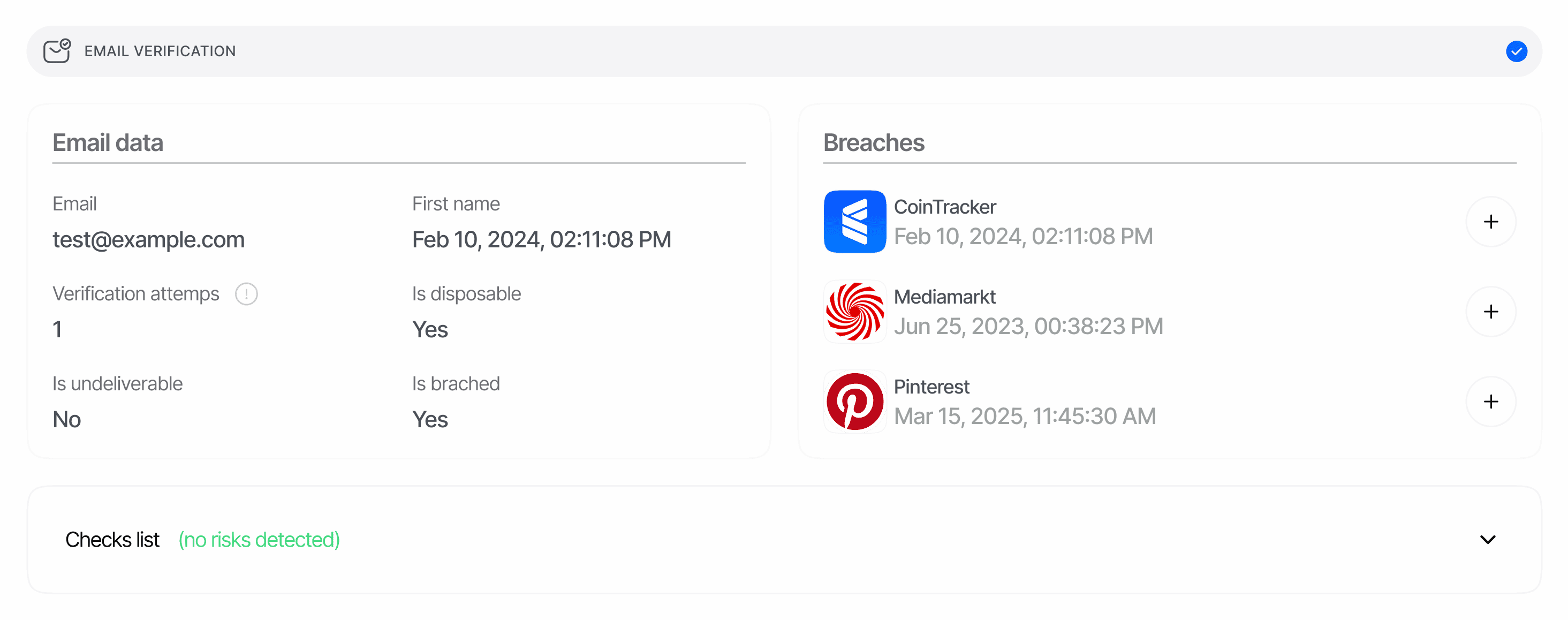
Overview
An email report is produced every time a workflow node runs the Email Verification feature. Each report represents one OTP challenge against one address and contains:- The verified
emailaddress. - Boolean risk flags (
is_breached,is_disposable,is_undeliverable) and the supportingbreaches[]array sourced from a breach-intelligence database. - The count of OTP send attempts (
verification_attempts) and the approval timestamp. - A chronological
lifecycle[]log of every send, retry and code-check attempt. - A
matches[]array surfacing the same address on other approved email verifications or your blocklist. - A
warnings[]array — risk events emitted during the verification (see Email Verification warnings). - A
node_idthat identifies which workflow graph node produced the report (V3 sessions only).
POST /v3/email/send/ delivers the code and POST /v3/email/check/ validates the user’s entry; finalized standalone verifications surface through the same report shape.
Hosted sessions cap the user at 2 wrong code entries (email_max_check_attempts) and 2 OTP sends — the initial send plus one resend (email_max_retries) by default, tunable per workflow node. Exceeding either cap finalizes the step as Declined with EMAIL_CODE_ATTEMPTS_EXCEEDED.
Where it appears in API responses
The decision endpoint (GET /v3/session/{sessionId}/decision/) returns email reports under the plural array key email_verifications. The array contains one entry per Email Verification node in the workflow graph — typically one, but step-up flows may produce several.
null value means no Email Verification step has run yet. Iterate the array (rather than reading email_verifications[0]) when your workflow can collect more than one email address.
Schema
The canonical field-by-field schema lives on the Data models page.Declined with the auto-decline warning UNDELIVERABLE_EMAIL_DETECTED. The only exception: when the user typed the address themselves (it was not pre-filled at session creation), an undeliverable send returns an inline error so they can retry with a different address instead of being declined immediately.
Status values
Lifecycle event types
lifecycle[] is sorted chronologically. Each event has type, timestamp, details and a billable fee (when applicable):
The
details payload depends on the event family:
- Send events (
EMAIL_VERIFICATION_MESSAGE_SENT,EMAIL_VERIFICATION_RETRY_MESSAGE_SENT) —{ status, reason }.statusisSuccess,RetryorUndeliverable;reasonisnullunless the send failed (email_can_not_be_delivered, orunknownfor unrecognized legacy values). - Check events (
VALID_CODE_ENTERED,INVALID_CODE_ENTERED) —{ code_tried, status }withstatusApproved,Failed,Expired or Not FoundorDeclined. - Final status events —
null, exceptEMAIL_VERIFICATION_DECLINED/EMAIL_VERIFICATION_IN_REVIEW, which carry{ "reason": "<risk code>" }(e.g.UNDELIVERABLE_EMAIL_DETECTED).
status Success or Undeliverable record the $0.03 Email Verification fee; Retry sends, check events and status events always carry fee: 0.
Cross-session matches
matches[] records the same address on previously approved email verifications in the same application — across KYC, KYB and standalone API sessions — plus blocklist hits configured in the management-api lists. Verifications sharing the current session’s vendor_data are excluded (the same end-user does not match themselves), the array is capped at 5 entries, ordered oldest-first. When the address is on your blocklist but none of the matched sessions is blocklisted, a synthetic entry with source: "list_entry" (all session fields null) is prepended to the array.
Examples
Approved — clean OTP with one informational breach
Declined — undeliverable address
A pre-filled address that fails syntax or DNS (MX) validation — or whose OTP email cannot be delivered — finalizes immediately asDeclined. No code-check events appear because no code ever reached the user.
Declined — blocklisted disposable mailbox
The user completed the OTP, but the address matched your email blocklist (auto-decline). The disposable flag is also raised — atinformation level here because disposable_email_action is left at its default NO_ACTION.
Related
- Email Verification overview — feature behavior and pricing.
- Email Verification warnings — every risk code, decline triggers and configurable actions.
- Data models — email verification — canonical field-by-field schema.
- Email API — Send OTP and Check OTP — standalone server-to-server endpoints.
- Management API — Lists — manage the email blocklist that feeds
matches[]withsource: list_entry.