

 Get Started
 Integrate / SDKs
 User Verification
 Business Verification
 Transaction Monitoring
 Changelog
Stronger fraud detection
Fraudsters increasingly submit documents and selfies that never came from a real capture. Five new signals catch those submissions before they reach a reviewer.- Catch recycled document images — every upload is scored against a corpus of ID document images already circulating publicly, and a match raises its own warning
- Liveness video forensics — frame count, duplicate-frame ratio, and effective frame rate are analyzed server side, so replayed or synthetic video is flagged rather than trusted
- Covered documents are detected — a partially obscured document is caught at pixel level and returns
DOCUMENT_OCCLUSION_DETECTED, translated into every supported language - Live capture confirmed — Face Match confirms the person in front of the camera, distinguishing a live capture from the portrait printed on the document
- Capture quality gate — every upload is scored for quality before extraction runs, so a poor capture is caught while the user is still in the flow

Age assurance built to ISO/IEC 27566-1
Age-assurance workflows can now return the age decision and nothing else, in line with the international age-assurance standard.- Returned data is locked — a workflow that declares the age-assurance standard cannot return identity attributes alongside the age decision, and only an age-capable workflow may declare it
- Branch on a borderline age — the Age Estimation borderline band is visible to the workflow graph, so an uncertain result can route to a document check instead of a flat pass or fail
- Ready-made templates — start from an age-assurance template in the workflow builder with returned data already restricted
New standalone APIs
Four capabilities that previously required a full verification session are now callable on their own, each priced per call on the pricing page.- Document AI —
POST /v3/document-ai/extracts structured data from any uploaded document, not just identity documents. See Document AI - Contact and network risk —
POST /v3/email/risk/,POST /v3/phone/risk/, andPOST /v3/ip/risk/return risk signals for an email address, phone number, or IP address. See Email risk, Phone risk, and IP risk - Run them as a single check — each is also available from the single-check dialog in the Business Console, without building a workflow
Didit Copilot
The in-console assistant became a floating copilot that cites its sources and can build a working workflow from a description.- Available on every page — a resizable floating panel replaces the docked one, with starting prompts for the page you are on and a fullscreen layout on mobile
- Answers cite their sources — inline citations open the underlying documentation without leaving the panel
- Build a workflow by describing it — the copilot creates the draft, adds and configures steps, adds branches, sets final-status rules, and validates before publishing
- Configure Database Validation by conversation — the copilot creates a configured Database Validation step for any supported country
- Build a questionnaire from a spreadsheet — attach a CSV or Excel file and the copilot turns it into a questionnaire, including very long answer lists
- Works in your language — the console language travels with every turn, voice and typed input are both supported, and you can download the transcript
Support in the Business Console
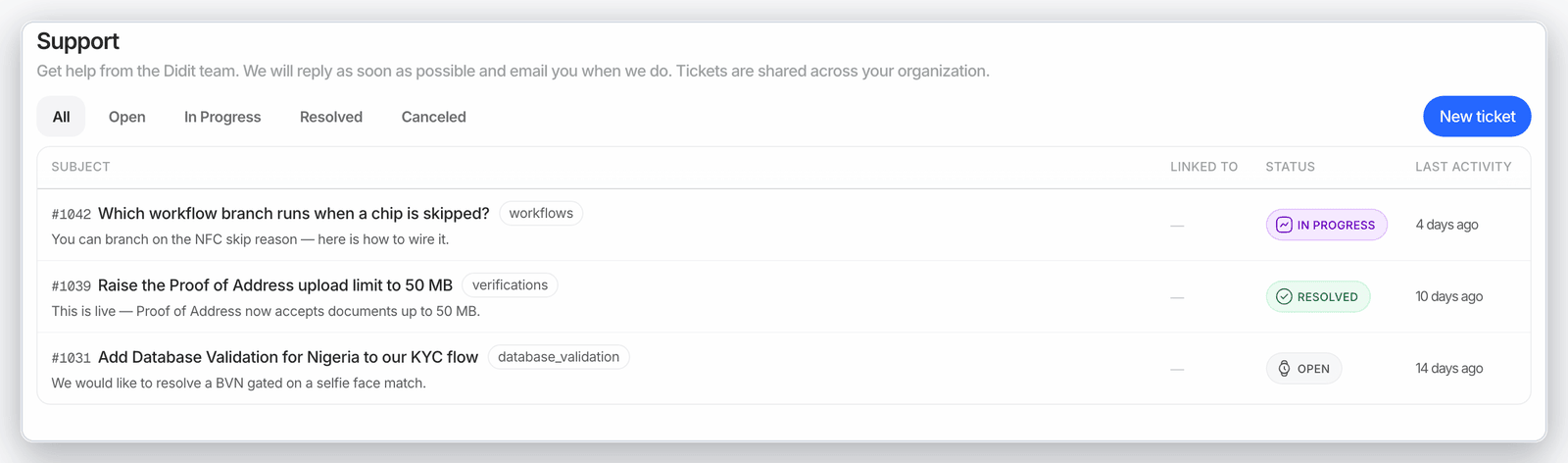
Support moved into the product, so you can raise and follow an issue without leaving the Business Console.- A Support section — organization-scoped tickets with live status and a standard tickets table
- Report an issue in place — a dialog with category, severity, and session ID, attachments on any message, and the ticket number shown everywhere
- Escalate to a human in the same thread — the assistant hands off to a support agent without losing context, and you get an email when a human replies
- Follow a ticket by link — every ticket has a permalink
Marketplace and per-check engines
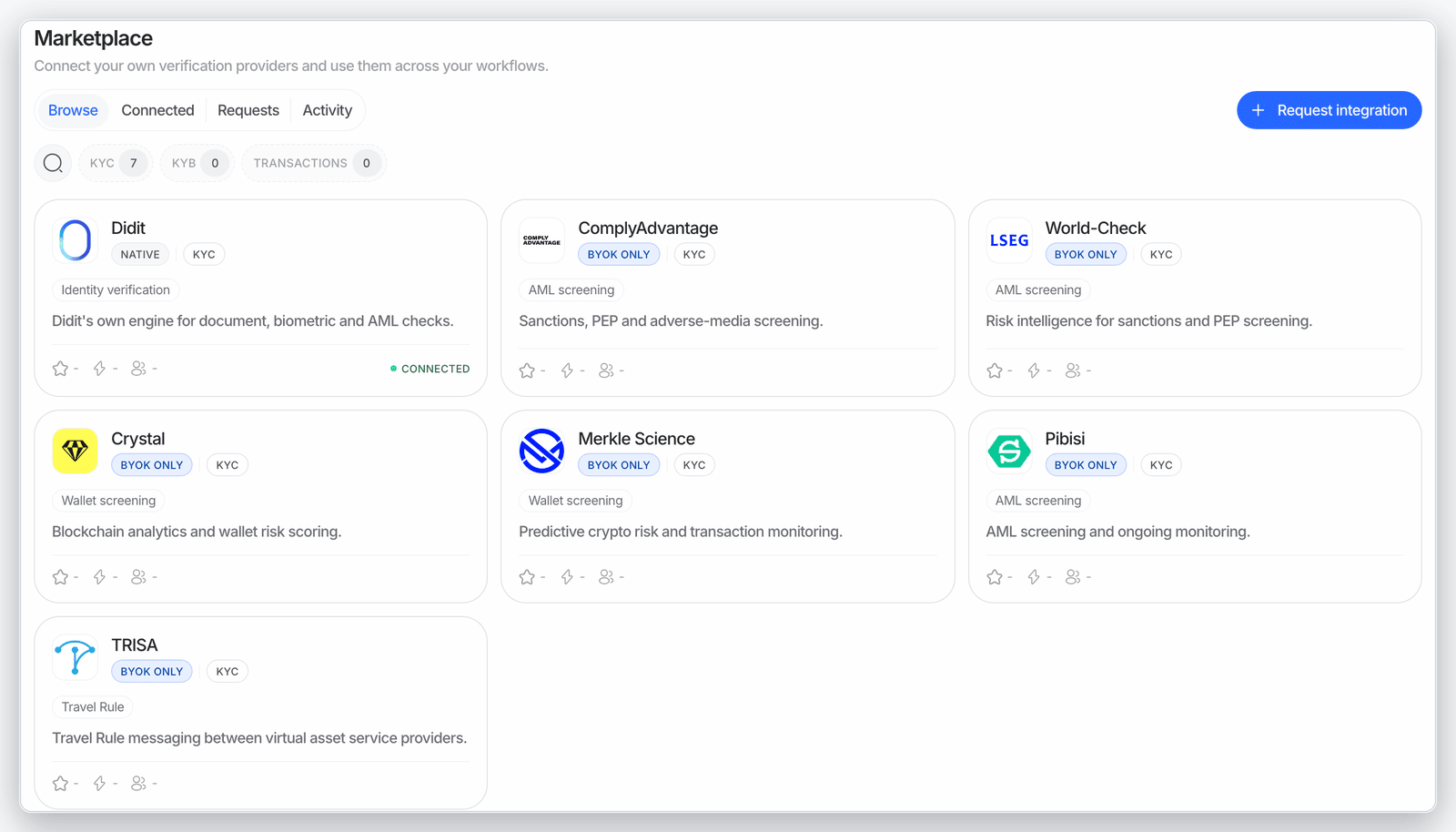
The Marketplace is now available in the Business Console, and you can choose which engine runs each individual check.- Browse and enable partner modules from the Marketplace section. See Marketplace
- Pick an engine per feature — a full-width engine selector sits in the first tab of a feature, in both the graph and simple workflow editors
- Your choice persists on simple workflows as well as graph workflows
Transaction Monitoring
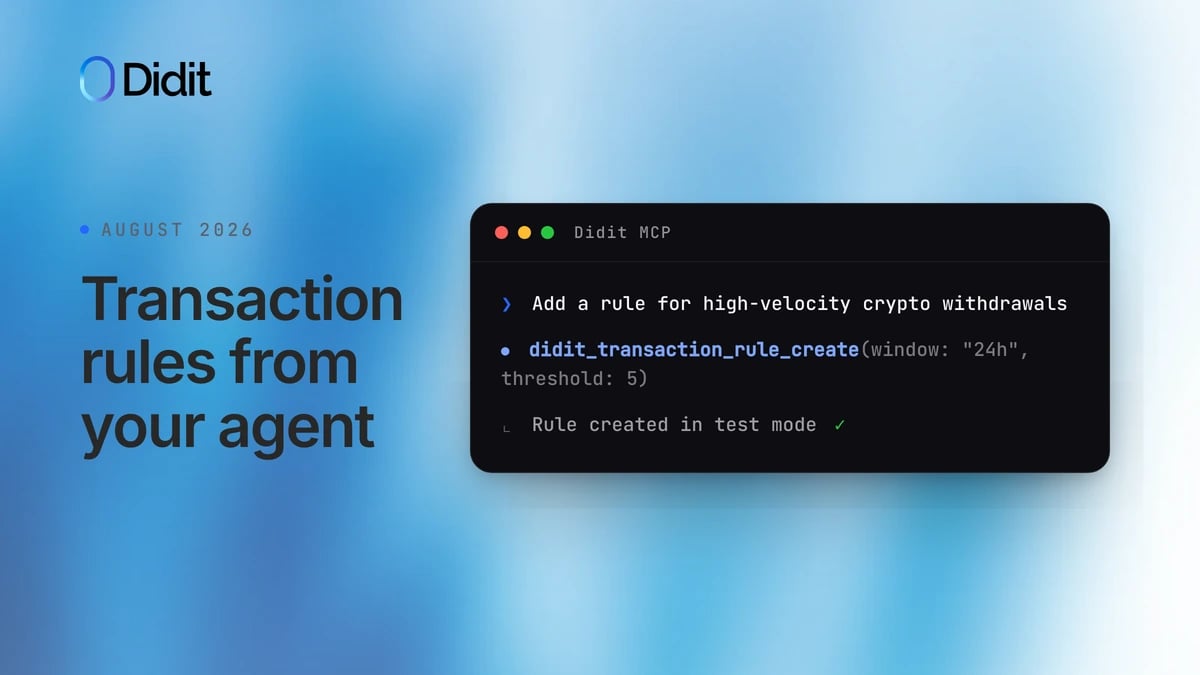
Monitoring rules are now fully programmable, from the API and from an AI agent.- Manage rules through the API — create, update, delete, and backtest transaction-monitoring rules with the
/v3/transactions/rules/Management API endpoints, in addition to the Business Console. Browse, install, and remove preset rules from the library with the matchinglibraryandinstallendpoints - Manage rules from the Didit MCP — nine
didit_transaction_rule_*MCP tools bring the same list, create, update, delete, backtest, and library workflows to any MCP-connected AI agent - AI-assisted rule migration — ask the Didit assistant (or any MCP-connected agent) to map a rule set exported from another provider (CSV or Excel) onto Didit’s rule schema, backtest it against your own transaction history, and create the rules in test mode for you to review before activating
- Every manual status change is attributed — a transaction moved by hand records the console user who moved it
Biometric templates and data retention
Applications can keep one image-free face template after a session is deleted, so duplicate detection keeps working once session data is purged.- Biometric-template retention after session deletion (opt-in) — keep one image-free face biometric template anchored to the User when a session is deleted, so duplicate detection, Face Search, and biometric authentication keep working after you purge session data. Enable it in App Settings → Data (Retain biometric template, with a required finite retention period) or with
face_retention_policyandface_retention_daysonPATCH /v3/webhook/. Override it per call withretain_face_embeddingsonDELETE /v3/session/{sessionId}/delete/andPOST /v3/sessions/delete/. Retained templates never contain images, session data, or identity fields, carry a finiteexpires_at, and are purged on User deletion, privacy erasure, expiry, or explicit purge. See Biometric templates - Privacy-erasure instructions — send
deletion_instruction: "privacy_erasure"(and your owninstruction_id) on session deletion to purge every retained template for that person regardless of the application policy - New Biometric Templates API —
GET /v3/biometric-templates/,GET /v3/biometric-templates/count/,GET/DELETE /v3/biometric-templates/{template_uuid}/, andPOST /v3/biometric-templates/delete/list, count, inspect, and purge retained templates. Every retain and purge is audited - Face Search matches now report
source: "retained_template"withvendor_user_idandbiometric_template_idfor hits on retained templates, andvendor_user_idon session and imported matches - Breaking: session deletion responses —
DELETE /v3/session/{sessionId}/delete/andPOST /v3/sessions/delete/now return200 OKwith a JSON body (face_retention_outcome,biometric_template_uuid; per-sessionresults[]for batch) instead of204 No Content. Update clients that assert on204. Default deletion behavior is unchanged: existing applications stay ondelete_with_sessionuntil you explicitly enable retention POST /v3/users/delete/purges the user’s retained biometric templates before deleting the user, and returns503(retryable, nothing deleted) if a template cannot be purged- A retention policy you can see — set the policy in settings and review stored templates in Lists → Biometric templates

Session API
Retrieve-session responses carry more of the signals your integration needs, so you can decide without extra calls.- Barcode data in responses — retrieve-session responses include
id_verifications[].barcodes. Each barcode entry preservestype,position,data,data_raw, andside; documents without barcode output return an empty array - Explicit liveness method — face-step payloads always include
face_liveness_method. When a workflow does not set it explicitly, the API returnsPASSIVE - Marital status in rules — use
kyc.marital_statusin workflow branches and custom status rules - Order by last update — list sessions by
updated_at, and see at a glance which sessions were imported

New documents and countries
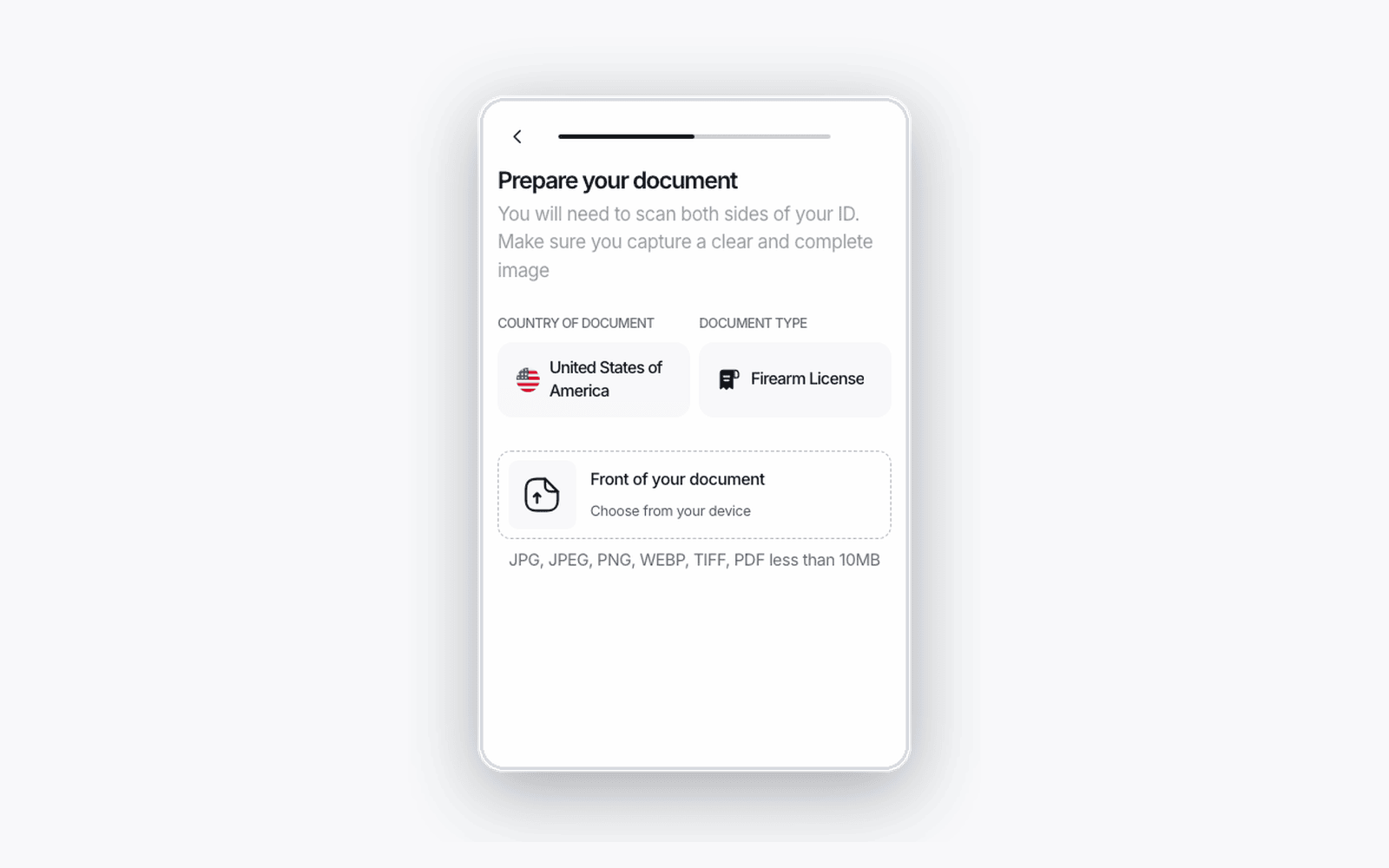
New document types across ten countries, and firearm licenses as a new document category.- New identity documents — Moldova ID card (2025), Pakistan ID card (2025), Uruguay ID card (2026), Greece asylum seeker card (2025), and a third Belgium driving license variant
- Digital driving licenses — Argentina (Mi Argentina and Jujuy) and Australia (New South Wales including provisional, South Australia including learner, and Victoria including heavy vehicle)
- Firearm licenses are a new category — Victoria firearms license in Australia, and Illinois, Massachusetts, and two New Jersey permits in the United States, selectable as their own document type
- Mexico City driving license (2025), including the permanent-license catalog, and Paraguay driving license (2026). Separately, Malaysia MyKad is now selectable as its own subtype rather than a generic ID card
- Extraction upgraded for ten more countries — Belgium, Germany, India, Israel, Madagascar, New Zealand, Norway, Sierra Leone, South Africa, and the United States
- French 2D-Doc validation — French 2021 ID cards read and validate the ANTS 2D-Doc Data Matrix on the back of the document
- See exactly which fields a barcode signs — the barcode on North American driving licenses reports its signed fields, and each signature is validated against its certificate’s validity window
Chip reading
The ePassport trust store was refreshed, so more chips authenticate cleanly and an unreadable chip explains itself.- 136 issuing countries in the ePassport trust store, with new signing-certificate generations imported for 32 of them
- A missing trust anchor is named — when the trust anchor for a chip is missing, the result says so directly
- Branch on why a chip was skipped — workflows can route on the specific NFC skip reason
- Wider chip compatibility — passports whose signatures use a non-standard encoding now read successfully, and chip portraits in every color mode convert correctly

Database Validation
A new authoritative source, and Database Validation now runs on its own inputs.- Nigeria Bank Verification Number — a direct BVN lookup, gated on a selfie face match so the number is only resolved for the person actually present. Names are optional inputs
- No document step required — each field can draw from its own input source, so a workflow can run Database Validation from a selfie and a national ID number with no document capture at all
- Explicit approval semantics — an approval means the source positively confirmed the data, and billing follows a successful source call
- Clearer outcomes — when Database Validation does not run, the response says why
Business verification
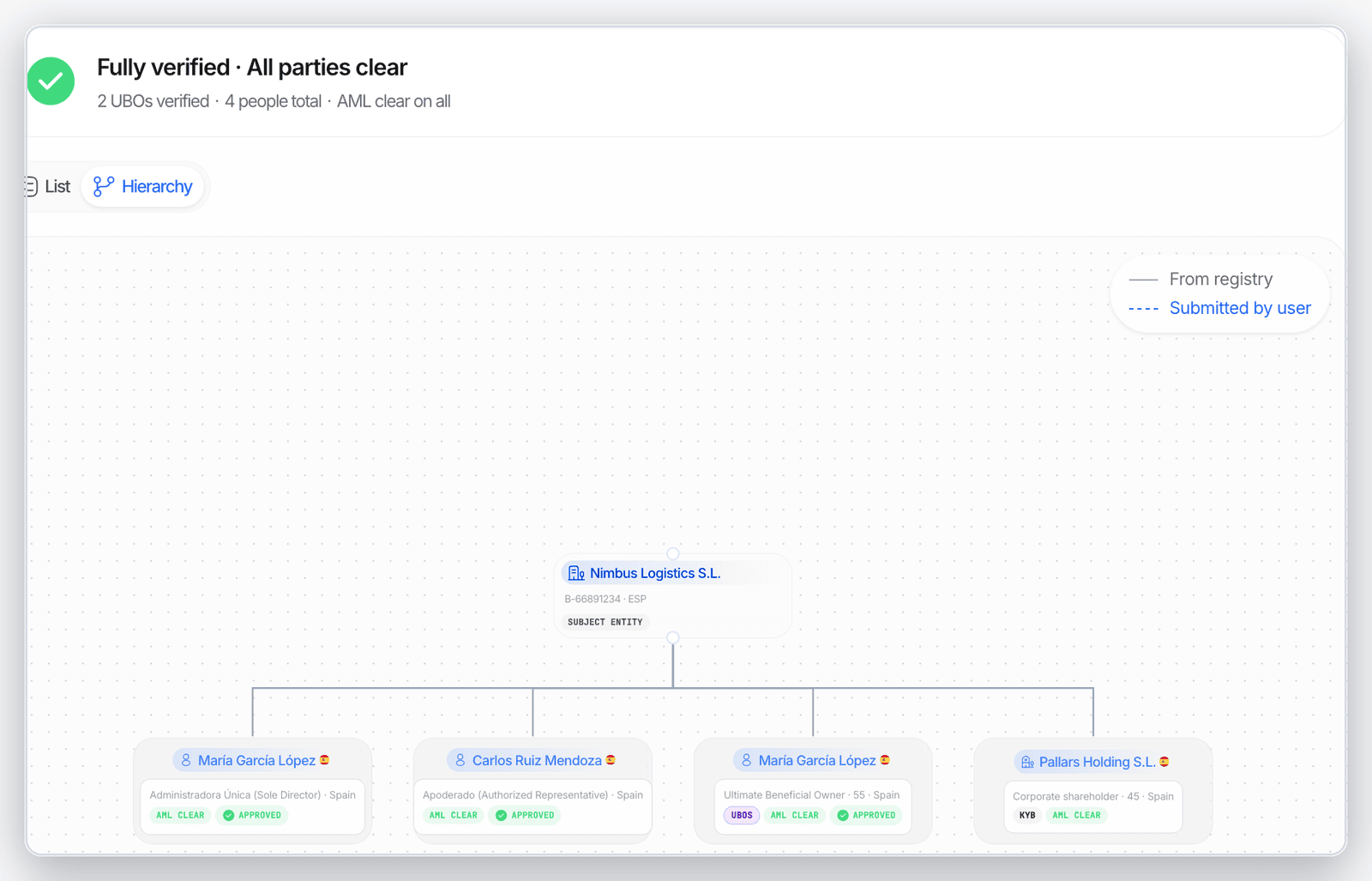
Declared owners and officers are checked against the documents you upload, and a registry outage keeps the flow moving.- Key people are confirmed against corporate documents — a declared party is matched on document evidence, and a shareholder named in a document must carry an owner role
- Registry roles are preserved — UBO roles come from registry ownership data, and officer roles from the full registry designation
- Registry outages return a clear code — registry-search outages return
502withcode: "kyb_registry_provider_unavailable", so your integration can react instead of guessing - Manual company entry — web, iOS, and Android verification flows let the applicant enter company details by hand when the registry provider is unavailable
- French overseas departments are now searchable in the French company registry
- Registry coverage analytics — see registry search coverage and success by country and workflow version in Reports
- Per-group document progress on the documents step, with documents awaiting replacement counted separately
AML screening and Wallet Screening
Reviewers get the reasoning behind a score, and wallet screening gains a shareable report.- The risk score is explained — the result shows the factors behind the score, with readable hit tooltips and spelled-out dataset names
- Signed PDF report for wallet screening — a standalone report endpoint whose results are signed, so the PDF cannot be altered after the fact
- Idempotency keys on the AML API, so a retried screening request is never charged or screened twice
- Sharper matching — nationality is normalized to exact country codes before search, and re-screening survives a manual country correction
Verification flow
Capture is where users most often fail, so most of this month went into finishing the first attempt.- The alignment frame stays on screen through a retake, and sits correctly above the camera preview on the newest mobile browsers
- Camera recovery — the flow detects a camera that has stopped producing images and restarts it, so capture continues
- Photo fallback for capture — web and Android capture flows continue with a photo when video recording is unavailable, and Android retries a failed document-detection model download
- Honest liveness messaging — timeout-specific wording, stronger guidance after a second consecutive timeout, and a device with no camera is told so rather than asked for permission
- Larger uploads — documents up to 50 MB on Proof of Address, business documents, and Document AI, with automatic compression
- Vatican City and Saint Vincent and the Grenadines added to the country list
- Phone provider outages return a clear code —
502withcode: "phone_provider_unavailable" - Retry and rescan stay available after a document or face upload error on Android (SDK 4.7.3)
- A clear message when credits run out, so the user knows exactly what happened
Branding and copy
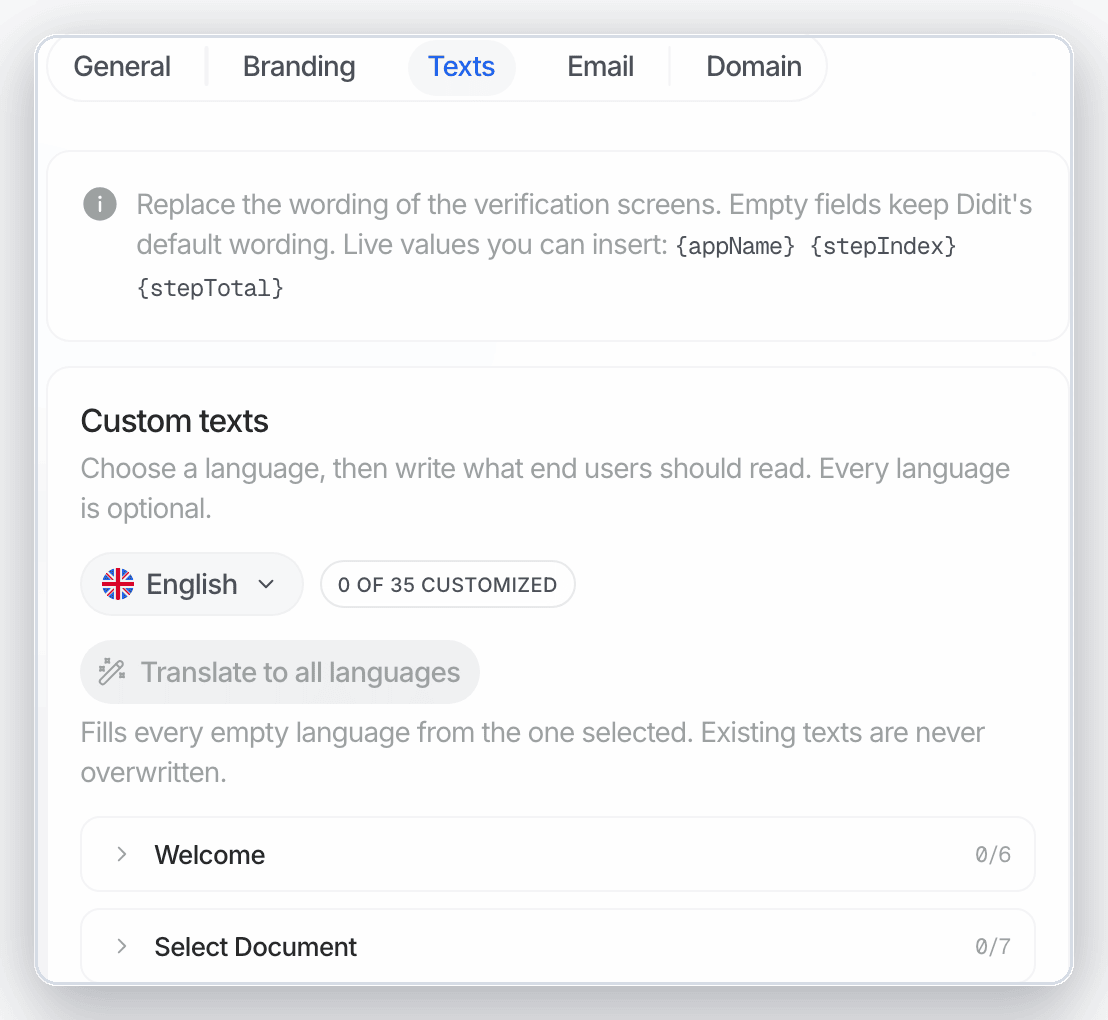
You can now rewrite the words your users read and match the flow to your palette.- A Texts tab in Customization — override the wording of each step and the completion screen, with a preview showing the real default text
- Per-application copy overrides — the same override can differ between two applications in one organization, and applies per step rather than only to the first
- The “Secured by” footer takes your configured support-text color
Billing and usage
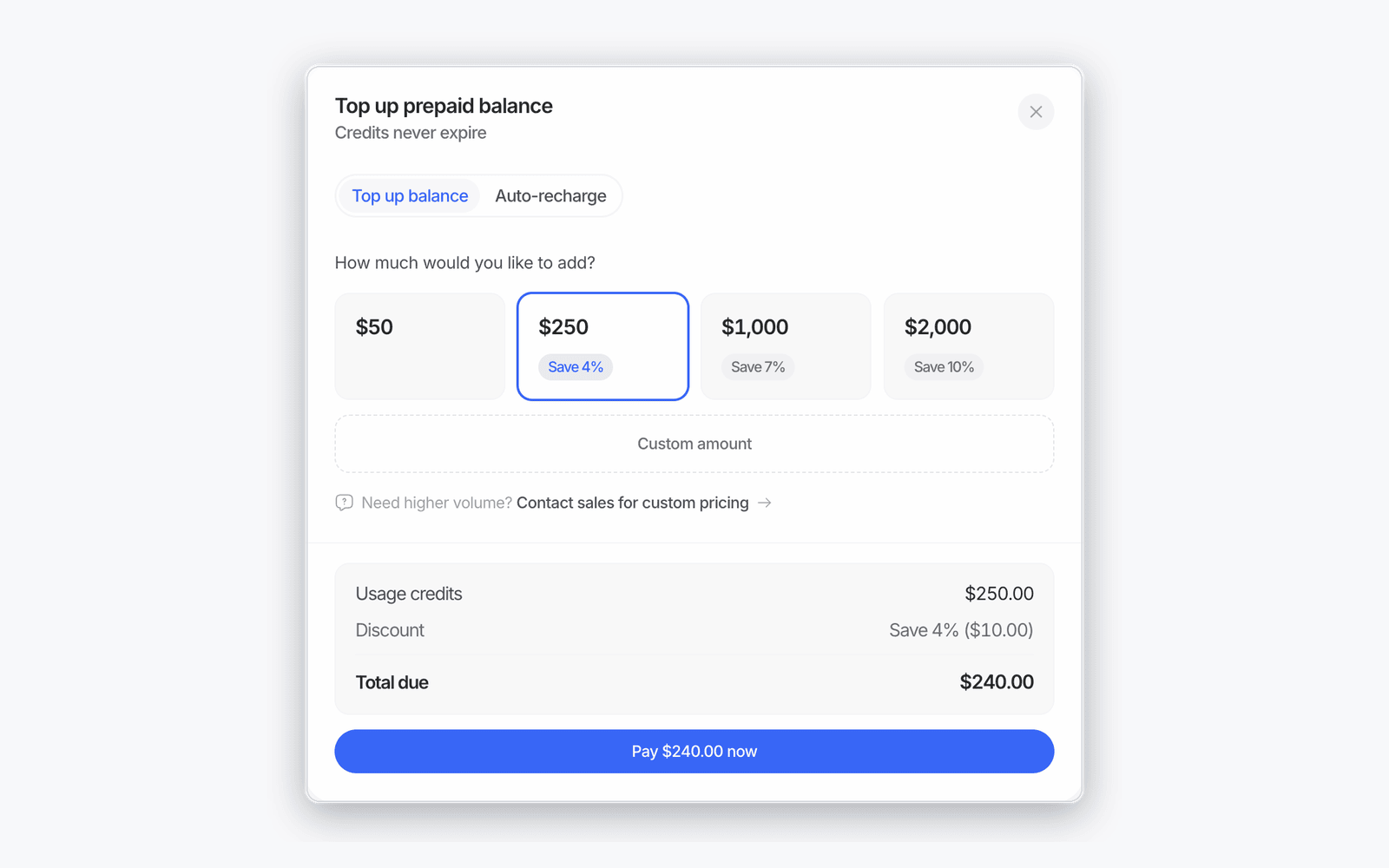
Spend is easier to read, and a failed payment explains itself.- Prepaid volume discounts — prepaid credits use charge discounts instead of bonus credits: save 4% at 1,000, and 10% at $2,000
- Pay once per document step, not once per upload — a step with ten business documents costs the same as one with two
- Monthly invoices for contract billing — contract-billed organizations receive a monthly usage invoice settled in the payer’s currency
- Auto-recharge explains itself — a failed attempt records and shows the decline reason, and auto-recharge resumes automatically once the payment method is replaced
- A rebuilt Usage page — sortable tables, search inside the breakdown dialog, a promoted total-cost figure, and a free-tier counter
- A machine-readable code on insufficient credits, so your integration can react to it programmatically
Native SDKs
Native SDKs shipped steadily all month, landing every platform on 4.7.x with materially smaller binaries.- React Native 4.5.4 to 4.7.5, Android 4.5.4 to 4.7.4, iOS 4.5.4 to 4.7.2, Flutter 4.6.0 to 4.7.2
- Smaller apps — iOS variants are materially smaller, and a lighter on-device engine now powers auto-capture on both platforms
- Wallet support is optional on Android — wallet connection ships as a separate dependency, so your app carries it only when you use it
- Per-step welcome copy — welcome text resolves against its own workflow step, and title overrides apply on fully white-labeled apps
- Framework support — the React Native TurboModule specification supports React Native 0.77 code generation, Kotlin 2.2 is supported, and Flutter passes the device locale into the session so the flow opens in the user’s language
- Android 16 — Active Liveness camera previews render correctly on Android 16 devices; React Native 4.7.5 carries the Android 4.7.4 build that fixes it
- iOS still-photo capture — the iOS SDK falls back to still-photo capture on iOS 15 when the live video frame is unavailable
- Crash symbolication — the React Native SDK publishes iOS dSYM artifacts from 4.5.4, and Expo Android dependency collisions are resolved across all variants
Didit Academy
Ten video lessons take you from your first workflow to reading a verification result, each with a full timestamped transcript in these docs.- Ten lessons on YouTube — platform tour, what your users see, build a KYC workflow with no code, connect Didit to Claude with MCP, read a verification result, KYB from registry to UBO, real-time transaction monitoring rules, integrate the API, SDKs, and webhooks, analytics, teams, and roles, and pricing explained
- Watch the full course in the Didit Academy playlist
- Searchable transcripts — every lesson has a timestamped transcript in the docs, and each paragraph deep-links to that exact moment in the video. Start at Didit Academy
Trust and compliance
Where the age-assurance work above sits in Didit’s credentials.- Age verification is certified in Germany — FSM, Germany’s youth-protection self-regulator, certified that Didit’s age-verification system reliably establishes a closed user group under Section 4(2) JMStV. See Certifications
- Biometric anti-spoofing — iBeta Level 1 presentation-attack detection under ISO/IEC 30107-3, tested by a NIST-accredited laboratory
- FIDO Alliance — Didit joined the FIDO Alliance as an Associate Member on August 13, 2026
Improvements
Smaller changes across the Business Console, the API, and the verification flow.- Download a user’s PDF report directly from user details, and get one report covering every session a returning user has completed
- Start a workflow with a branch, and route branches on the session metadata you set at session creation
- Workflows keep running unchanged as new document subtypes are added or renamed
- A resubmission replays the full workflow graph, including webhooks
- Proof of Address keeps the address exactly as printed on the document, and reads a utility bill’s payment deadline as a payment date
- Compliance country questions group countries by continent, with select-or-clear for a whole continent
- Merchants using the Shopify app can see their verification results in the Shopify admin
- Pending invitations are listed before accepted members, and your organization ID is shown in Organization Settings