

 Get Started
 Integrate / SDKs
 User Verification
 Business Verification
 Transaction Monitoring
 Changelog
Three ways to verify an identity
ID Verification is still one configurable feature, with billing determined by the method used, but a document photograph is no longer the only way through it. You now choose, country by country, which methods a person may use.- Document capture, unchanged — every document type, capture rule and threshold you already configure keeps working exactly as before, and a workflow that says nothing about methods stays document capture only
- Non-document lookup — the user types their national ID number plus a few personal details and we check them against the authoritative source for that country. No document photograph or document upload. That source is a government register in most countries and a credit-bureau, financial-services, utility or residential-records file in some, so the coverage table names the exact source per country
- Digital ID wallets, live for five schemes — MitID (Denmark), Finnish Trust Network (Finland), Smart-ID (Estonia, Latvia, Lithuania and Belgium), Mobile-ID (Estonia and Lithuania) and BankID Sweden now verify people in production. The user signs in with an identity they already hold, and the wallet shares a signed set of attributes
- Your brand on the sign-in pages — wallet sign-in pages carry your white-label colors, and Smart-ID and Mobile-ID run inside the same verification design as the rest of the flow
- The roadmap stays visible — every other wallet in the catalog, including iDIN, Vipps, BankID Norway, itsme, Freja eID, Personalausweis, UAE PASS, gov.br, OneID and the EUDI Wallet, shows as Coming soon and can’t be enabled yet. See the wallet page for coverage and prices
- Choose per country — the Countries tab on the ID Verification step turns each method and each wallet on or off for each country, and the same settings are available through the API
Sources that return a photograph match the selfie too
Where a government register returns the person’s portrait — South Africa, Nigeria, Argentina and Panama — the lookup also takes a selfie and compares it with that portrait, included in the lookup price. A per-country switch,skip_liveness_and_face_match (on by default), lets the workflow skip its own Liveness and Face Match steps after a match. Turn it off to run them anyway. In Argentina you can also choose a lookup without a selfie, described in Pick the lookup source per country.
You decide what happens when a method does not land
Lookups have separate switches for a partial match, no match and no response from the source. Wallets have one switch for a sign-in that failed, was cancelled or timed out. Each switch either sends the user to document capture or declines the session.- Retries are yours to set — one to five attempts, one by default, and only lookups the source actually answered are counted
- A typo costs nothing — a number that fails the format check never reaches the source, so it is neither counted nor billed
- The console shows the bill before you save — each lookup switch spells out what that configuration costs
Every result says how it was verified
Sessions, the decision API and thestatus.updated webhook now carry the method that produced each ID Verification and the assurance tier that goes with it — Documentary for a document, Data match for a lookup, Cryptographic for a wallet. The tiers describe different evidence; they are not a ranking.
- Registry comparison — every compared field with what the user provided, what the source held, and whether it matched, plus separate source-error details when a source did not answer
- Credential details — the wallet, its issuing authority, the level of assurance it asserted, and whether the signature checked out
- Existing integrations are untouched — a document session reports
documentanddocumentaryand leaves the new fields empty
Pricing
Document capture is unchanged: $0.15 per check with the first 500 checks each month free. Lookup prices are published in the country and identifier table, in USD per answered attempt, and wallet prices are on the wallet page. A source that queries more than one service bills each service that answered, and retries can add charges.- Answered means billed — a source that answered bills the lookup, whether it matched or not
- No answer, no charge — a source that never answered is not billed
- Fallback is billed separately — a user who falls back to document capture pays for that capture on top
Pick the lookup source per country
Where a country has more than one source for a non-document lookup, you now choose which one runs.- One source per country, your choice — the Countries tab lets you pick the source for each country that offers more than one
- Argentina without a selfie — Argentina’s national register can be checked without a selfie at the same price. Your Liveness and Face Match steps still run afterwards, because no portrait comes back
- Brazil with a verified selfie — Brazil can use a source that confirms the selfie belongs to the CPF holder, and a later Face Match step uses that selfie
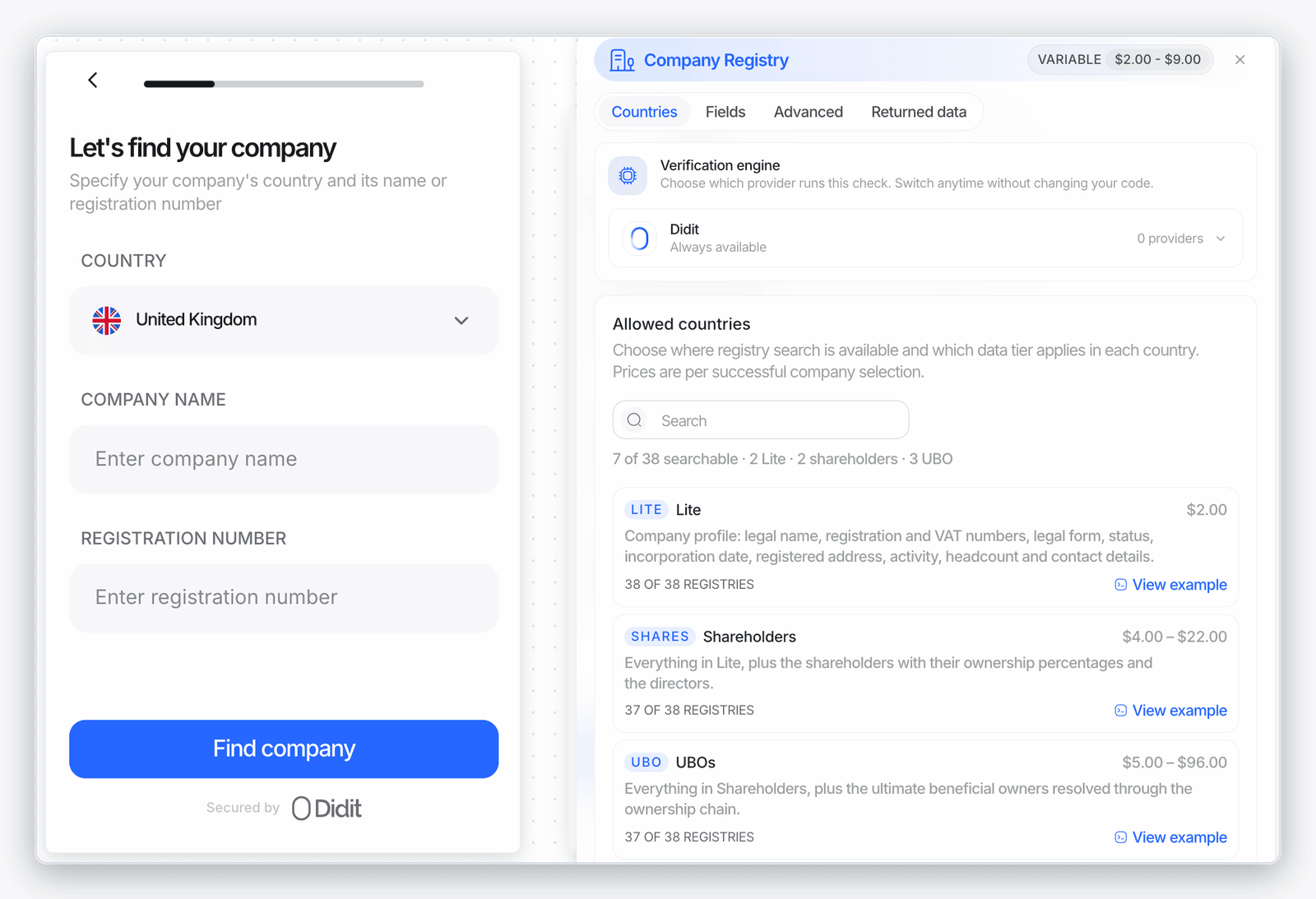
Business verification: choose how much registry data you buy
Each country’s registry check now comes in three data tiers, with the price shown before you choose.- Lite, Shareholders or UBOs — pick the tier per country in the KYB Registry Check step and in a one-off check. The console shows that country’s price for each tier
- New standalone endpoints —
POST /v3/kyb/shareholders/andPOST /v3/kyb/ubo/. The response names the tier you requested and the tier delivered, and a country or company without ownership data is delivered and billed as Lite. See Shareholders and UBOs - Applicants don’t wait for the registry — the applicant confirms the company and continues while ownership data is still being retrieved, and the business record says so instead of showing no ownership data
- Manual company entry has a clear price — a company the applicant types in by hand is billed a flat $0.75, and the Countries tab shows that fee
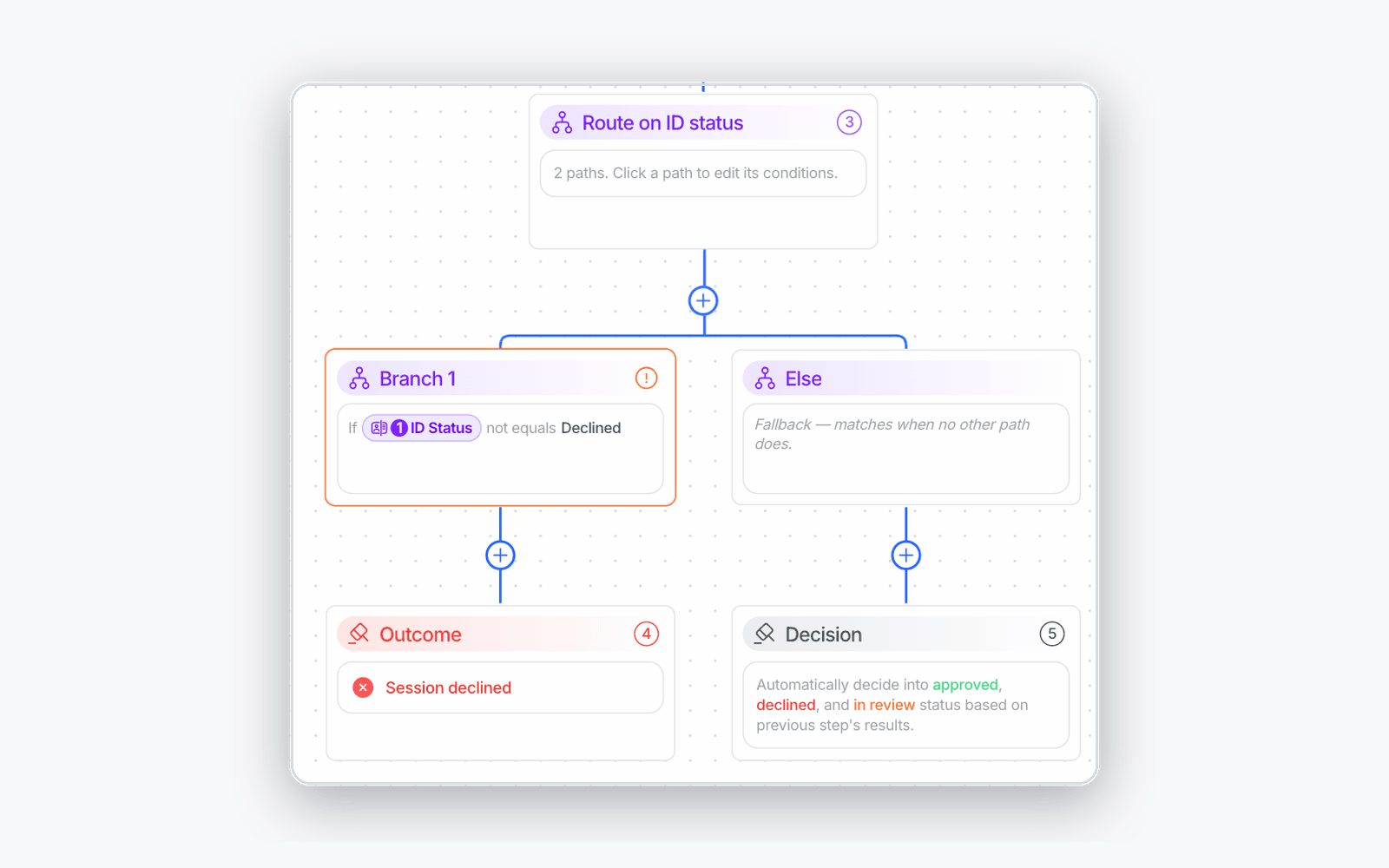
Workflow editor catches mistakes before you publish
The editor now flags workflows that would quietly do the opposite of what you drew.- Contradicting branches are flagged — a branch whose condition contradicts the outcome it routes to, such as “ID status is not Declined” leading to Session declined, gets a warning badge on the canvas. The graph-validation API returns the same warning
- Branch on document subtype — route a session on the exact document subtype, such as a national ID card versus a residence permit
- See why a session took its path — the session timeline shows each branch decision and the status node that ended the session, also available as
workflow_terminal_node_idon the decision API withinclude=events - Forgery thresholds explained — the ID Verification step explains what each forgery threshold does
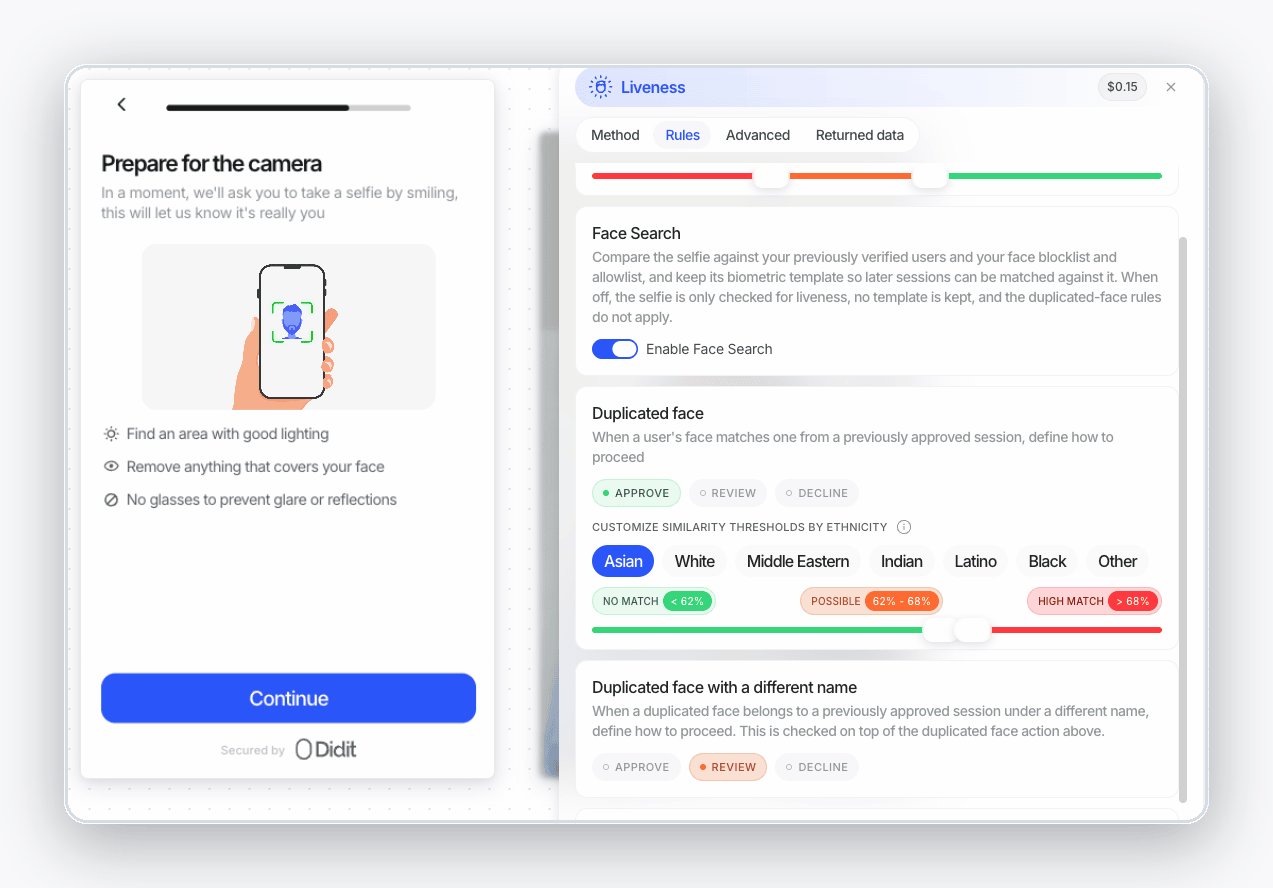
More control over face checks
You decide when Face Search runs, and a face that comes back on a different document can now decline a session.- Turn Face Search off per workflow — a switch on the Rules tabs for Liveness and Age Estimation (
face_search_enabled). It is on by default, so existing workflows are unchanged. See Face Search - Same face, different document — choose what happens when a face already approved on another identity document comes back, and see the verdict on the session
- Decline captures that aren’t live recordings — liveness video analysis can now decline a session, not only report
- Emulated cameras are caught — a liveness capture from an emulated or virtualized device raises a risk you can act on
- Document liveness scores on every result — the decision API carries
document_livenessscores for portrait replacement, printed copy and screen replay, even when no warning fired - Covered critical fields — a document whose number or another critical field is covered raises a configurable warning, including on the standalone ID Verification API
AML screening
You can manage ongoing monitoring from the API, and an AML step can screen anyone a document names.- Ongoing monitoring by API —
POST /v3/users/aml-monitoring/andPOST /v3/businesses/aml-monitoring/turn monitoring on or off for up to 1,000 profiles at a time, with an estimate-only dry run, and large batches run as a job. See AML monitoring - Proof that monitoring ran — each AML result shows its ongoing-monitoring evidence
- Screen anyone a document names — an AML step can take a person found by an earlier Document AI step, such as a tax certificate or articles of incorporation, and you choose which entity each AML step screens
- Wallet screening as a single check — run an on-demand wallet screening from the console without a session. The line item is now called Wallet Verification & Screening
- Rehearse AML in sandbox —
sandbox_scenarioonPOST /v3/aml/simulates a hit without an end-user session
Transaction Monitoring
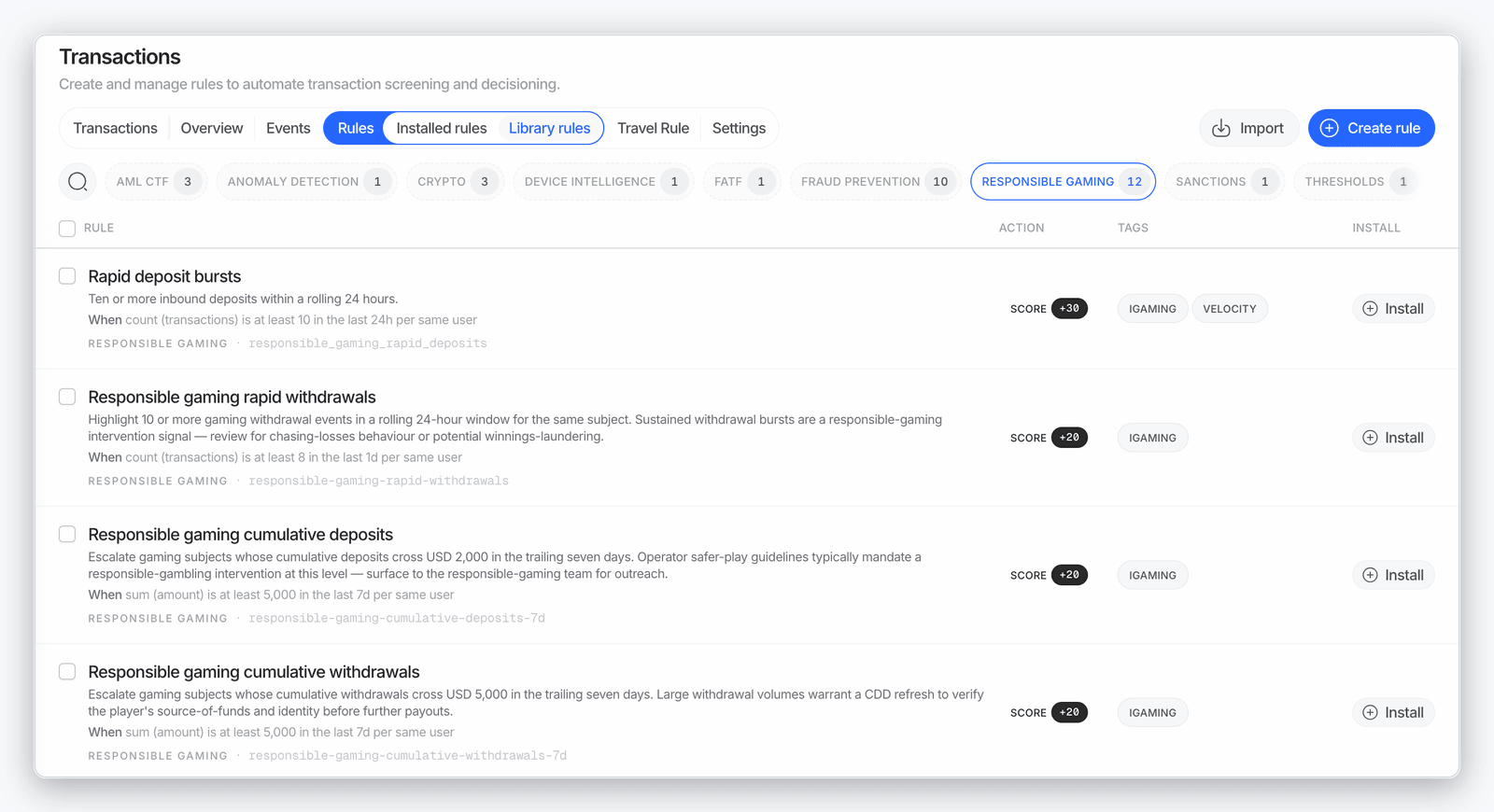
Start from ready-made iGaming presets and refine rules with current-value filters and a wider currency list.- iGaming rule presets — ready-made event rules for gaming platforms, such as bonus abuse and chip dumping, in the rules library
- Current-value velocity filters — velocity conditions can filter on the current transaction’s value
- More currencies — the currency picker lists every circulating currency, and transaction PDFs show each amount with its currency’s own decimal places
- Sandbox transactions say so — a transaction evaluated on a sandbox application states its environment, so an empty rule run isn’t mistaken for a broken rule
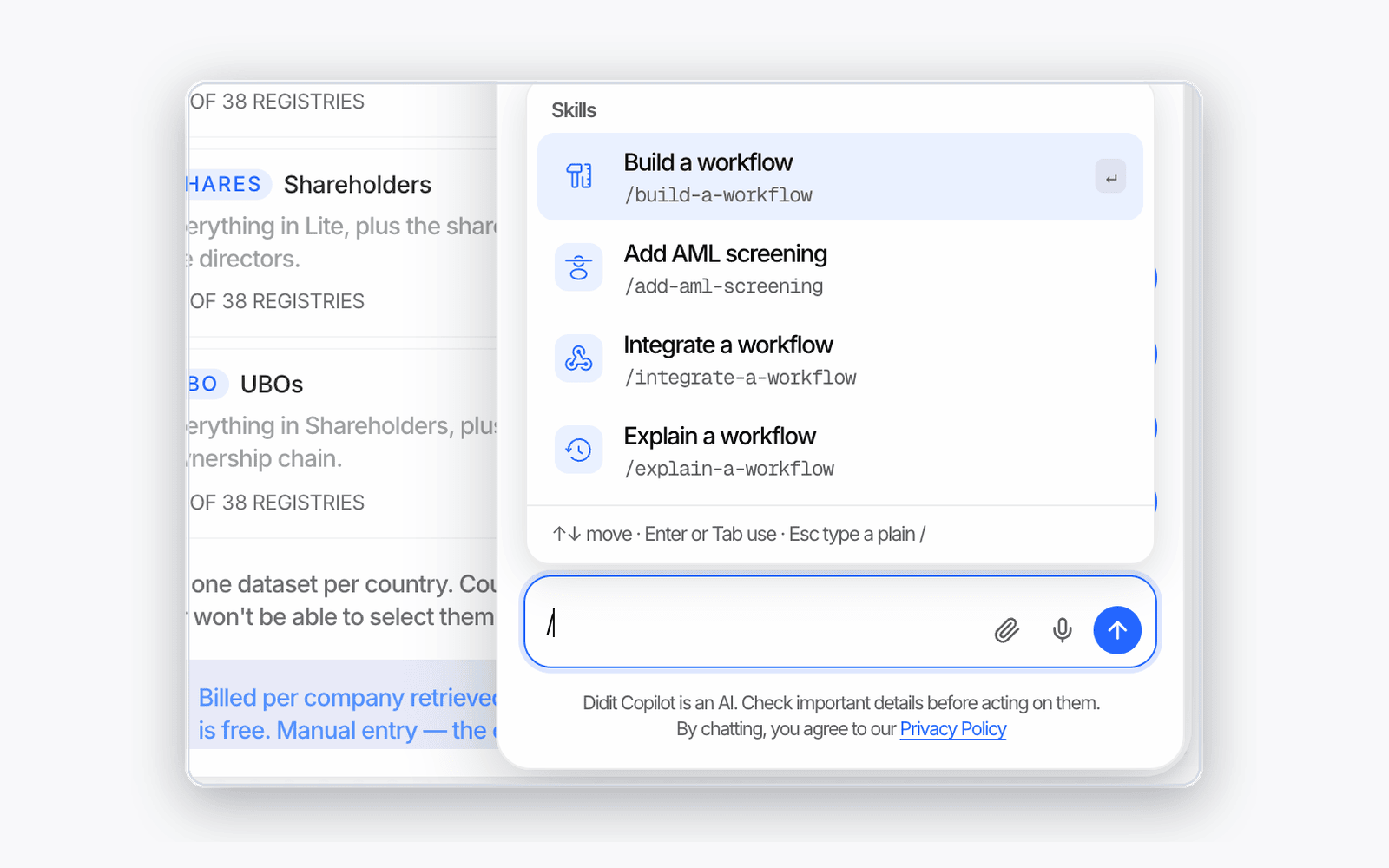
Didit Copilot
The Copilot shows what it changed, lets you undo it, and can act across more of the console.- See and undo changes — after a turn that edits a workflow, a change card lists what changed, and Undo reverts it
- Slash skills — type ”/” in the composer to list the templates for the page you are on
- Acts on more of the console — switch organization or application, rename applications, duplicate, rename, archive or link workflows, open member, role, webhook and list dialogs, and block a user or download a PDF from a session
- More control over the conversation — choose its reply language from the header, attach Word and plain-text files, and delete all conversations from history
- AI disclosure — replies are marked as AI-generated under the composer
- Copilot actions in the Help Center — the list of what the Copilot can do is documented in every language
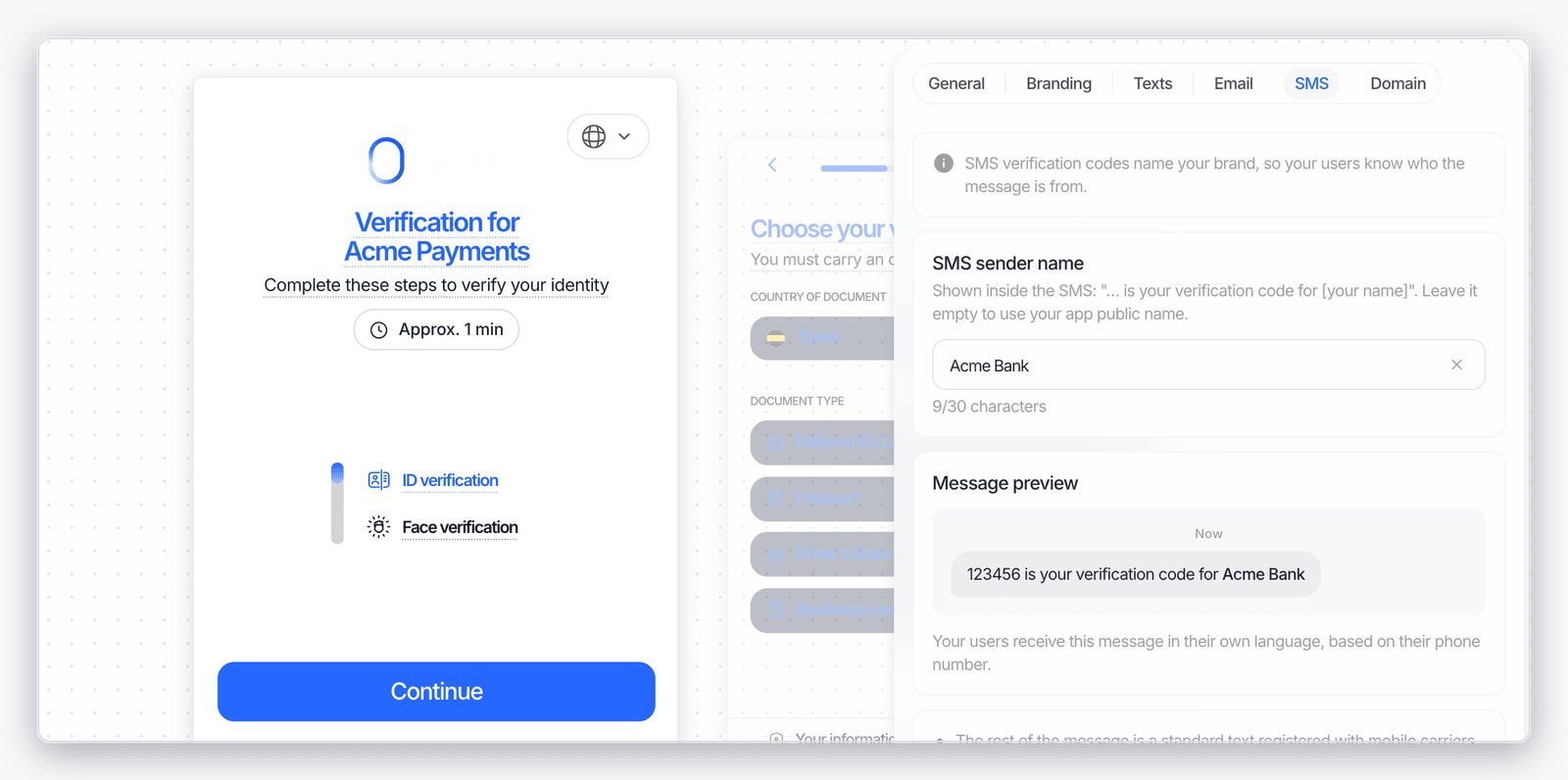
Branding: your name in SMS codes and expired-document emails
- Your brand in SMS codes — the new SMS tab in Customization sets the SMS sender name, the brand shown inside verification-code messages, with a live preview. Leave it empty to use your application’s public name
- Expired-document resubmission emails — a resubmission email for an expired document says the document expired, and you can word that email in the Texts tab
Support
- Drag-and-drop ticket attachments — drop a file on the ticket or use the paperclip
- Close your own ticket — mark a ticket resolved from the console or the Copilot, and reply to reopen it
Session API and webhooks
- User history PDF by API —
GET /v3/users/{vendor_data}/generate-pdf/returns one branded PDF of the user’s 20 most recent completed sessions, the same report as Download PDF in the console. See Generate PDF - Codes on Proof of Address and Document AI — QR codes and barcodes found on the document come back as
detected_codesand show in session review - Back side not available warning — an ID Verification result carries the informational
DOCUMENT_BACK_SIDE_NOT_AVAILABLEwarning when your workflow asks for both sides but Didit’s document catalog has no registered back side for the recognized document, so only the front could be collected X-Signature-Simpleis deprecated — verify webhooks withX-Signature-V2instead. See Webhooks- Webhook deliveries from the MCP — list and resend a session’s webhooks from the Didit MCP, described below
Didit MCP
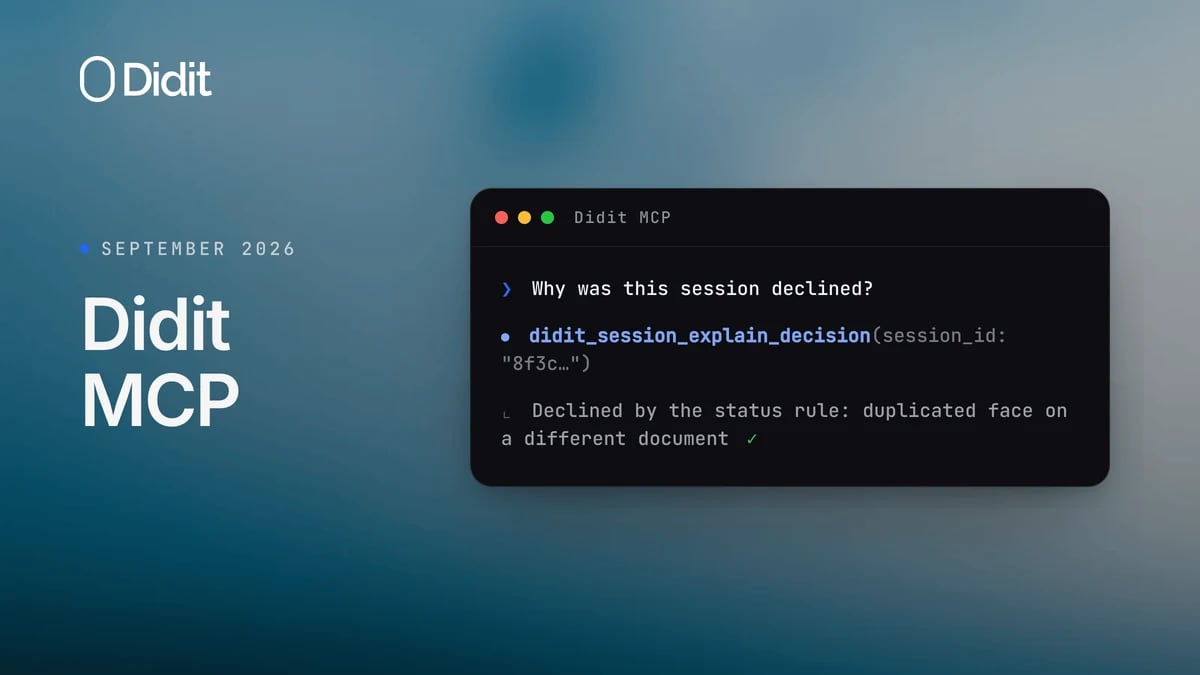
Your connected AI agent can now explain session decisions, troubleshoot webhook delivery and build validated workflows.- Explain a decision —
didit_session_explain_decisiontraces why a session ended Approved, Declined or In Review: the warning, the status rule or the reviewer override - Check and resend webhooks —
didit_session_webhookslists a session’s webhook deliveries and can wait for the first one, anddidit_session_webhook_resendresends one - Build a workflow from a plain spec —
didit_workflow_build_graphturns a feature list, with countries exactly as you named them, into a complete, validated graph - Know what each country offers —
didit_workflow_get_kyb_registry_catalogreturns registry tiers and prices, and the ID Verification methods catalog tool returns the lookups and wallets per country
New documents
- Police ID cards — now accepted in Argentina, Brunei, Colombia and the Philippines
- New Canadian, Moldovan and US cards — the Alberta driving licence and ID card (2026) with barcode validation, the Moldova driving licence (2026) and the NYC Identification Card (2019)
- Back side captured — Brazilian state driving licences, Thai driving licences and the Canadian passport’s Page B can be captured on both sides
- ePassport trust store refreshed — with the latest country signing certificates
Web SDK 0.3.0 to 0.4.0
@didit-protocol/sdk-web went from 0.3.0 to 0.4.0 this month. Upgrade with npm install @didit-protocol/sdk-web@latest; everything you already call keeps working.
- Submit transactions from the browser —
submitTransaction()sends a transaction for monitoring with a scoped transaction token, and device intelligence is collected automatically. See SDK transaction submission - Wallet-ownership checks — when a transaction asks for a wallet-ownership check, the SDK runs it and reports completion through a callback
- Four more modal languages — Bosnian, Kazakh, Kyrgyz and Albanian
- The native SDKs’ camera options, on the web —
defaultDocumentCamera,defaultLivenessCamera,showDocumentCameraSwitchButtonandshowLivenessCameraSwitchButtonlet you open face capture on the rear camera, for a kiosk or an operator pointing the device at the person, and hide the in-capture switcher. Devices without the requested camera keep the one they have. If you open the verification URL directly, set the matching query parameters (liveness_camera=back,liveness_camera_switch=false, …) yourself
Native SDKs 4.9.0
iOS SDK, Android SDK, React Native SDK and Flutter SDK all reached 4.9.0, and React Native and Flutter include the same native release. No integration API changes are required.- Let users pick their language — set
showLanguageSelectorand the welcome screen shows the same compact, searchable language picker the web flow uses. It stays hidden by default (4.9.0) - ID Verification methods in the apps — a country configured with a national ID-number lookup, a digital ID wallet sign-in, or both offers them next to document capture on one entry screen, the same flow the web runs. The lookup collects the fields that country asks for, checks them on the device before sending, and falls back to document capture when your configuration allows it (4.8.0)
- Document artwork on the entry screen — each document type on the iOS method chooser shows its own illustration (4.8.0)
- Clearer questionnaire errors — when a questionnaire submission is rejected, the user sees the reason the server gave (4.8.0)
Didit Academy: 28 new lessons
28 new short console walkthroughs, 2 to 7 minutes each, recorded in the real console, each with a written summary at didit.me/academy.- Didit Copilot — 5 min
- Government Database Checks — 5 min
- Conditional Workflows — 4 min
- API Keys & Webhooks — 3 min
- Pick the Right SDK — 3 min
- AML Screening: Sanctions, PEPs & Adverse Media — 7 min
- Document & Country Rules — 6 min
- NFC Passport Verification — 5 min
- Reusable KYC — 2 min
- Phone Verification — 6 min
- Document Coverage by Country — 4 min
- Passive Liveness — 2 min
- Proof of Address — 5 min
- Custom Questionnaires — 6 min
- Email Verification — 6 min
- User Data Review — 4 min
- Age Estimation — 4 min
- Liveness, Face Match & Face Search — 5 min
- Device & IP Fraud Signals — 6 min
- What Each Check Costs — 4 min
- The Session Audit Log — 4 min
- Reviewing Cases as a Team — 3 min
- How Didit Billing Works — 4 min
- Create a Verification Link — 5 min
- Blocklists & Allowlists — 5 min
- Data Retention — 2 min
- Ongoing AML Monitoring — 2 min
- How to Get Support — 3 min
Improvements
- Opt out of model training — an organization setting in Settings controls whether your verification data may be used to improve Didit’s models
- Clearer low-balance alerts — the alert names the organization and the threshold you set
- Invoices include your contact details — your organization’s contact details appear on every invoice
- Sandbox runs the real active-liveness capture — test the same active-liveness flow your users see
- Manual uploads on the user profile — documents and faces you upload by hand show on the user’s profile
- Custom domains are for live applications — the Domain tab on a sandbox application explains that custom domains apply to live applications only