

 Get Started
 Integrate / SDKs
 User Verification
 Business Verification
 Transaction Monitoring
 Changelog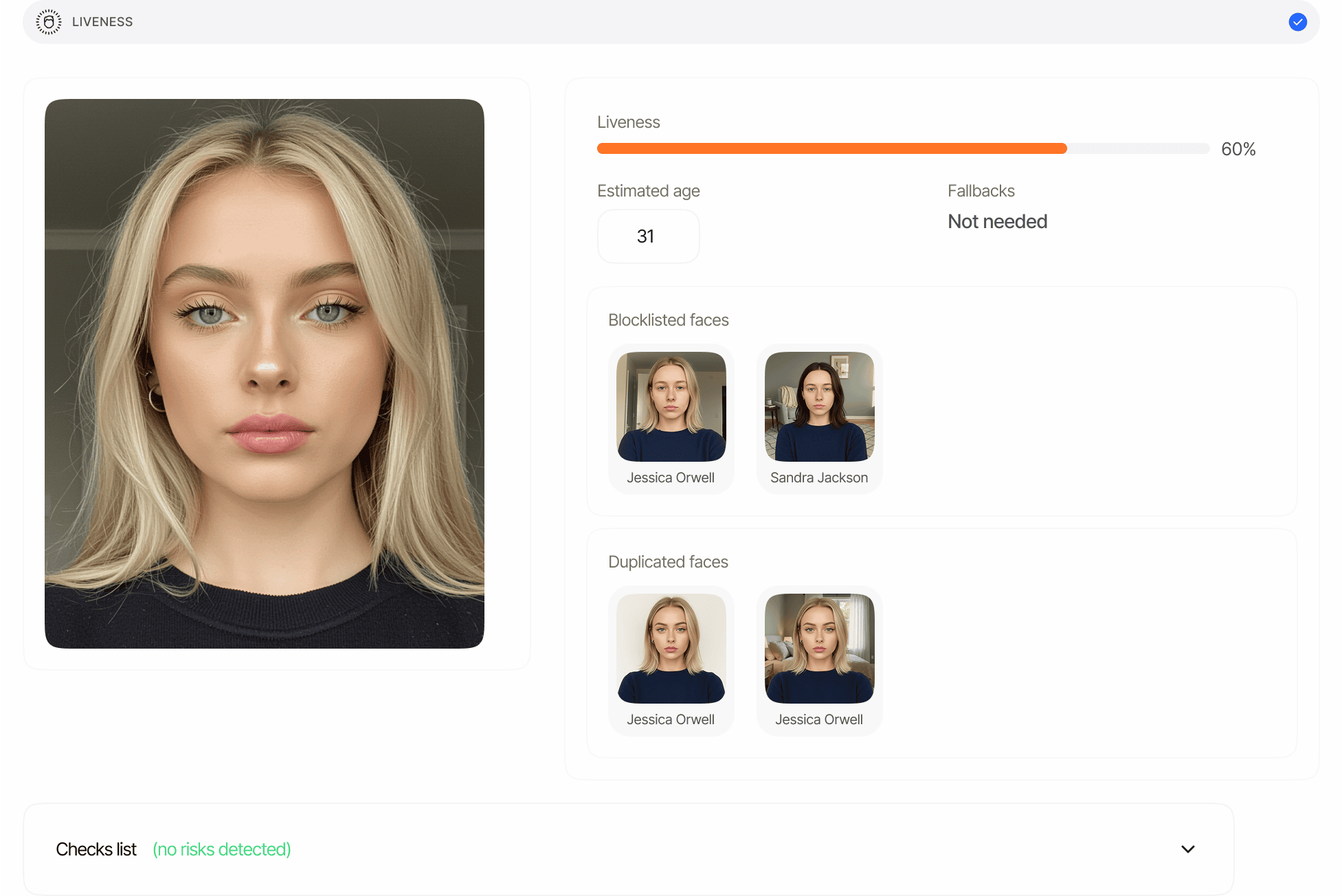
Automatic Face Search Integration
Face Search is automatically performed during liveness checks in verification sessions to detect duplicate users and check against blocklisted faces.
Automatic Duplicate Detection
When a user completes a liveness check during identity verification:- Their facial biometrics are automatically compared against all previously verified users
- The system identifies potential duplicate accounts based on facial similarity
- Matches are flagged according to your configured similarity thresholds
- You can review and take action on potential duplicate users
Blocklist Integration
Face Search seamlessly integrates with the blocklist feature:- During verification, faces are automatically checked against your blocklist
- If a match to a blocklisted face is found, the verification is automatically declined
- This prevents previously identified problematic users from creating new accounts
- Helps maintain the integrity of your verification process
Turning automatic Face Search off
Automatic Face Search is on by default for every Liveness step. If your privacy posture calls for it, you can switch it off per workflow from the Liveness step’s Rules tab in the Business Console (Simple and Advanced Mode), or withface_search_enabled: false on the LIVENESS or AGE_ESTIMATION node in the workflow feature config.
With the switch off, the liveness selfie is still scored for liveness and compared 1:1 against the document portrait in Face Match, but it never reaches the face index:
- No search runs, so the session gets no duplicate, blocklist or allowlist verdict and its
liveness_checks[].matchesstays empty. The Duplicated face, name mismatch, document mismatch and cross-organization face rules have nothing to act on and are hidden in the Console. - No biometric template is stored for the selfie, so later sessions cannot be matched against this one and there is nothing for biometric-template retention to keep after the session is deleted.
- The selfie is not used to resolve a shared biometric person for cross-organization checks.
API Access
Face Search functionality is also available through our API, allowing you to:- Programmatically submit face searches
- Integrate face matching capabilities into your own applications
- Build custom fraud detection workflows
- Create automated systems for duplicate detection
Key Features
- High Accuracy: Advanced biometric algorithms provide reliable match results
- Configurable Thresholds: Customize match sensitivity based on your risk tolerance
- Comprehensive Scanning: Search across all your verified users
- Rapid Results: Process searches quickly even with large user databases
- Privacy-Focused: Matching uses numeric face templates scoped to your application; the index never leaves your tenant
Configurable Thresholds
You can customize search sensitivity by setting different thresholds for similarity scores:These thresholds can be adjusted based on your risk tolerance and security requirements.
How It Works
Face Extraction
When a search is initiated, the system processes the reference image:
Comparison Algorithm
The system searches across your entire database of verified sessions:
- Compares the reference facial vector against every face enrolled in your application: session faces, faces uploaded to User profiles, your face lists, and any retained biometric templates
- Employs advanced neural network architecture optimized for speed and accuracy
- Supports two search modes: most similar (ranked list) and blocklisted or approved (status-filtered)
- Processes large databases rapidly using optimized indexing
Similarity Scoring
For each comparison, a similarity percentage is generated:
Your configured match thresholds determine which results are flagged.
Results Delivery
The system returns a comprehensive result set:
- Ranked list of potential matches sorted by similarity score
- Match details including session ID, verification date, and vendor data
- Similarity percentage for each match
- Match images available for visual review
- Blocklist status indicating if the matched face is blocklisted
Deleted sessions and retained biometric templates
Deleting a session deletes its face embedding by default, so the person drops out of the index and can verify again without a duplicate flag. Applications that delete sessions soon after approval but still need to catch repeat sign-ups can enable biometric-template retention. Didit then keeps one image-free biometric template anchored to the User after the session is deleted, and that template takes part in Face Search and automatic duplicate detection exactly like a live session face. A hit on a retained template is reported withsource: "retained_template", the owning User’s vendor_user_id and vendor_data, and a biometric_template_id. It carries no session id, match image, identity details, or session status, because the session that produced the face no longer exists. Retained templates are never blocklisted; face blocklist entries keep their own independent biometric entry.
The template stays until its scheduled expiry, User deletion, a privacy-erasure request, or an explicit purge through the Biometric Templates API or Lists → Biometric templates in the Console.
Similarity Percentage
The similarity percentage is the core metric used to determine potential matches:- High percentage (typically 90% and above): Indicates a strong likelihood that the faces belong to the same person.
- Medium percentage (70-89%): Suggests possible matches that may require further review.
- Low percentage (below 70%): Likely indicates different individuals.
Use Cases
- Fraud Prevention: Identify users attempting to create multiple accounts
- Enhanced KYC: Add an additional layer of verification to your KYC process
- Regulatory Compliance: Meet requirements for detecting duplicate accounts
- Access Control: Verify user authenticity for high-security areas
- Law Enforcement: Assist authorized agencies in identifying persons of interest