

 Get Started
 Integrate / SDKs
 User Verification
 Business Verification
 Transaction Monitoring
 Changelog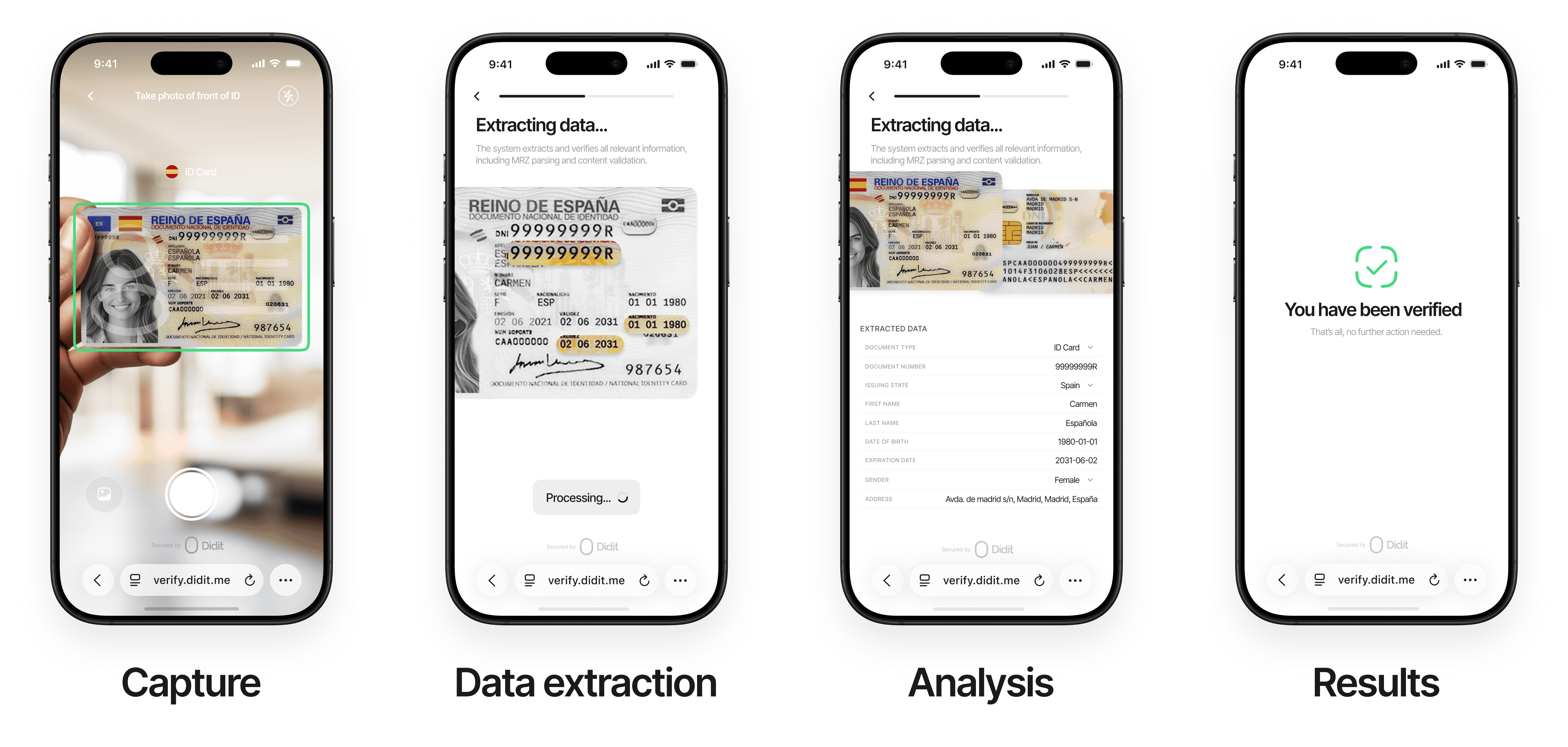
Intelligent Capture
Effortlessly begin the verification process with our intuitive, AI-driven capture system. Users upload or photograph their ID documents with real-time assistance:
- Auto-detection of document type and issuing country
- Real-time visual cues for optimal positioning, lighting, and focus
- Automatic capture when conditions are ideal — no manual retries needed
- Supports passports, driver’s licenses, national ID cards, and residence permits
Why it matters: Our intelligent capture reduces user friction and ensures high-quality submissions on the first attempt, boosting conversion rates and trust.
Advanced Data Processing
Extract and validate identity data with unmatched precision.Data Extraction — State-of-the-art technology processes all key fields:
Data Validation:
- Cross-references data between visual zones, MRZ, and barcodes for consistency
- Cryptographic verification of issuer-signed barcodes, where the issuing authority publishes the certificates needed to check them. French national ID cards are covered today: their ANTS 2D-Doc barcode is verified against a signer certificate that chains to the ANTS trust list, so a barcode the authority did not sign is caught even when its contents look consistent
- Format and pattern matching to detect anomalies
- Real-time queries against government databases (where permitted) for authoritative verification
Why it matters: Comprehensive data processing ensures accuracy and eliminates errors, giving you confidence in every verification.
Advanced Analysis
Our AI-powered system performs comprehensive checks to ensure document integrity and authenticity:
- Document authenticity verification
- Tamper detection and image integrity analysis
- Document liveness detection to prevent fraud from:
- Screen captures of digital documents
- Photos of documents displayed on screens
- Printed document copies
- Manipulated documents with altered portraits
- Security feature validation (holograms, watermarks, etc.)
- Template matching against certified database
Seamless Results & Integration
Get actionable insights instantly with flexible delivery options.Real-Time Results:
- Immediate updates via an intuitive dashboard
- Instant webhook notifications for automated workflows
- RESTful API for seamless integration into your existing systems
- Detailed PDF reports with verification outcomes and evidence
- Audit trails for compliance and record-keeping
- Customizable options to align with your operational needs
Why it matters: Fast, accessible results empower your team to act quickly while maintaining a secure, auditable process.
Three ways to verify
A photographed document is one of three ID Verification methods. Per country you can also let people prove who they are without a document at all:- Non-document lookup — the user types their national ID number plus a few personal details and we check them against a government register or another authoritative source, named per country. Where that source returns a portrait, a selfie, passive liveness and a face match are included.
- Digital ID wallets — the user signs in with a government or bank digital identity such as MitID, BankID or itsme, and the wallet shares a signed set of attributes.
Document Requirements
For optimal verification success, documents must meet these standards:General Requirements
- Government-issued and valid within its configured validity period
- Physically intact (no damage, scratches, or stains obscuring details)
- All critical information (full name, date of birth, MRZ, etc.) clearly legible
- Consistent data across all submitted documents
Image Requirements
- Original, real-time photo (no screenshots, scans, or digital copies)
- Supported formats: JPG, JPEG, PNG, PDF
- Maximum file size: 5MB
- Full-color image with all document corners visible
- Free from glare, shadows, digital editing, or manipulation
- Physical documents required (digital IDs supported only in select regions where officially recognized)
Additional Settings by Country & Document Type
Configure fine-grained rules per country and document type directly from the console. These controls let you tailor acceptance criteria and transcription preferences to your compliance needs.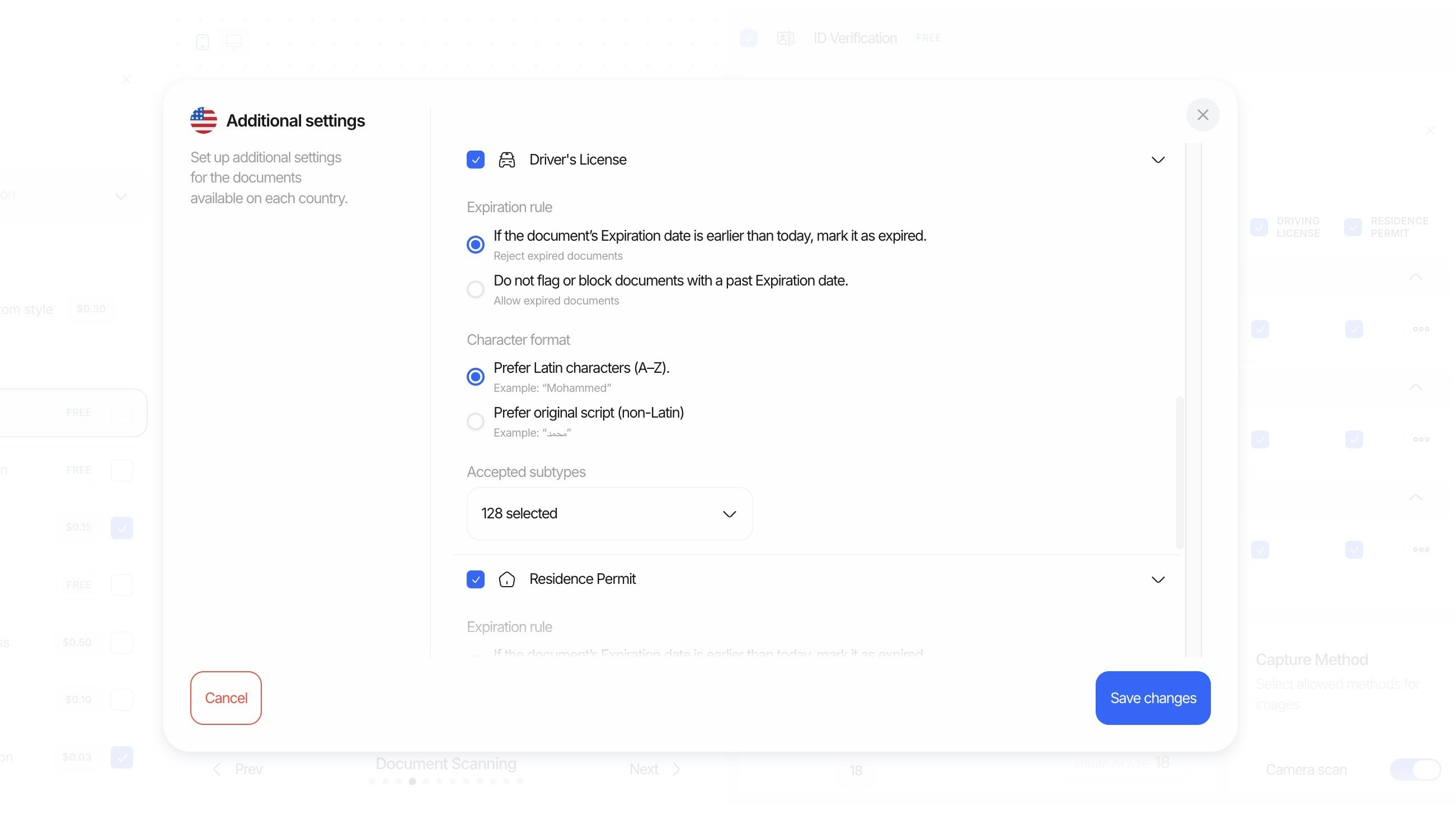
- Expiration mode: Choose how to handle documents with past expiration dates.
- Reject expired: If the document’s expiration date is earlier than today, mark it as expired and reject.
- Allow expired: Do not flag or block documents with a past expiration date.
- Preferred character format: Select how extracted names and fields should be normalized.
- Prefer Latin characters (A–Z): Example: “Mohammed”
- Prefer original script (non‑Latin): Example: “محمد”
- Regional support & subtypes: Enable documents by region and specify acceptable subtypes when a document type contains many variations.
- Example: For United States driver’s licenses, select the exact subtypes you accept (e.g., Arizona Commercial Driver License, Indiana Operator License (REAL ID), New York Enhanced Driver License, etc.).
- Use the “Accepted subtypes” control to quickly include/exclude many variants (e.g., “128 selected”).
Tip: These settings apply per country and document type, so you can be strict in some markets while more permissive in others.
Per-Country Age Restrictions
Enforce minimum and maximum age requirements on a per-country basis during ID verification. The system extracts the user’s date of birth from the submitted document and checks it against the age limits configured for the document’s issuing country.Configuration
Age restrictions are configured as a per-country table directly from the console:Age of Majority Defaults
The console includes an “Apply age of majority” button that auto-fills each country’s minimum age with the known legal age of majority (18 in most countries, with exceptions such as 19 in South Korea, 21 in the UAE, 20 in New Zealand, etc.). You can then adjust individual countries or add state-level overrides as needed.State/Region Overrides
Some countries have different legal age thresholds depending on the state or region. When a document is scanned, the OCR system extracts the region (e.g., “Mississippi”, “Alabama”, “Jalisco”) from the document. If a state override is configured for that region, it takes precedence over the country-level age setting. For example, if the United States has a minimum age of 18, but Mississippi has a state override of 21, a user presenting a Mississippi driver’s license will be checked against the minimum age of 21.Configurable Actions
When a user’s age falls outside the configured range for their document’s country (or state), you can choose the action:- Decline: The session is automatically declined.
- Review: The session is flagged for manual review.
Per-country age restrictions also work with Adaptive Age Verification workflows. When a borderline case triggers ID verification fallback, the age check uses these per-country settings to make the final decision based on the document’s issuing country and region.