

 Get Started
 Integrate / SDKs
 User Verification
 Business Verification
 Transaction Monitoring
 Changelog
How it works
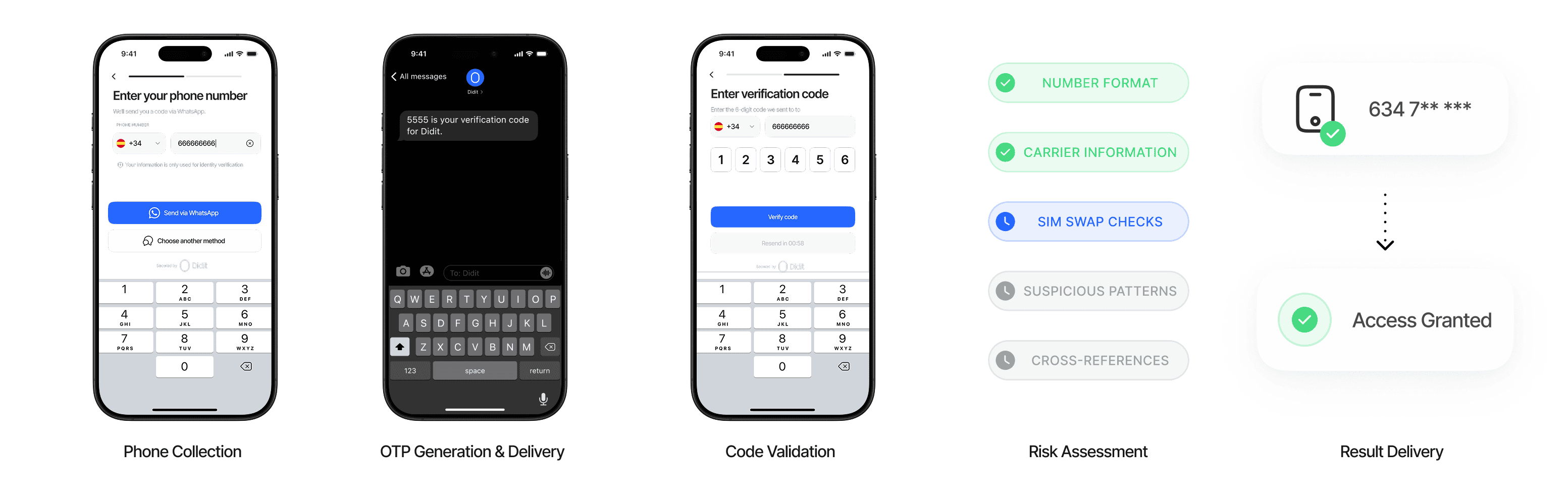
Our Phone Verification solution delivers comprehensive phone number validation through a simple, user-friendly process. The system combines OTP verification with advanced risk assessment to provide reliable phone verification at scale.Phone Collection
The system securely collects the following information:
OTP Generation & Delivery
Our verification system:
- Generates a secure, time-limited one-time passcode
- Delivers the code via SMS to the provided number
- Ensures optimized delivery through multiple carrier integrations
- Provides fallback options for delivery challenges
Code Validation
The user completes verification by:
- Entering the received code into the verification interface
- Submitting within the configured timeframe (typically 5–10 minutes)
- Requesting a new code if needed (with appropriate rate limiting)
Risk Assessment
Our system performs advanced checks:
Result Delivery
Access verification results through multiple channels:
Verification Features
Our Phone Verification service offers several key features to enhance your verification process:OTP Verification
- Secure Code Generation: Randomly generated one-time passcodes
- SMS Delivery: Fast and reliable delivery to mobile devices
- Configurable Timeouts: Set expiration times based on your security requirements
- Retry Options: Allow users to request new codes with appropriate rate limiting
- Branded codes: SMS codes name your brand instead of sending a generic message, at no extra cost. See Branded verification messages.
- Your own WhatsApp number: WhatsApp codes can come from your own WhatsApp Business number. See Send WhatsApp codes from your own number.
- Voice codes: the code can arrive as a phone call that reads it aloud, twice, in the user’s language, and an unanswered call falls back to SMS. A workflow enables voice per country in its Phone Verification → Settings, and the API keeps the same list in
phone_verification_countries: a country offers voice only where the workflow turns it on, and a workflow keeps the channels it already has. A call costs one minute at the carrier’s voice rate for that country plus the $0.02 fee, so it usually costs more than an SMS. See Phone Verification Pricing.
Branded verification messages
SMS verification codes can name your brand, so your users recognize the message as yours:123456 is your verification code for Acme BankOnly the name is customizable. The rest of the wording is a standard text registered with mobile carriers in every country, which keeps codes from being filtered as spam, and it is translated into the recipient’s language. Branding is free: a branded code costs the same as an unbranded one. Set your SMS sender name in the Business Console, in a workflow’s Phone Verification → Settings or under White Label → SMS. It belongs to your application, not to one workflow: it signs every SMS code the application sends, in every workflow and through the standalone API, with or without white-label customization. Which name a code carries, first match wins:
options.sms_sender_nameonPOST /v3/phone/send/, for that one code.- Your application’s SMS sender name.
- On white-label sends only (a workflow with white-label customization, or
options.use_white_label_customization: trueon the API), your white-label public name. - Otherwise the code is sent without a name.
400 before any code is sent.
- Channels: the name is added to SMS messages, including an SMS sent as a fallback from another channel. WhatsApp codes are sent with a fixed message and do not carry it; to have your business name on them, send them from your own number.
- Changes per day: each application can start using up to two new names per day (UTC), counting both new sender names and new
sms_sender_namevalues. After that, codes keep the application’s current name until the next day, and a new per-request name is sent with the application’s name. A name you used before does not count again. - Delivery first: a branding problem never stops a code. If a name cannot be applied, the code is sent with the application’s name, or without one.
Write your own SMS text and sender ID
You can replace the text of your SMS codes and the sender your users see. Set both in the Business Console under White Label → SMS. They belong to your application, like the SMS sender name, and apply to every SMS code it sends, in every workflow and through the standalone API. Your own text is written per language. A code is sent in your text when you wrote one for the language the code is sent in; every other language keeps Didit’s translated text. Use{code} for the code and, optionally, {brand} for your SMS sender name, for example Acme: {code} is your login code for {brand}.
A text must:
- contain
{code}exactly once, and no placeholder other than{code}and{brand}; - contain no links: carriers block verification codes that carry them;
- fit in one SMS with an 8-digit code and a 30-character name: up to 160 characters, or 70 when it uses characters outside the basic Latin alphabet (for example Cyrillic, Arabic or emoji).
AcmeBank.
It is used in the countries where Didit enables custom sender IDs, which are the countries whose carriers accept a sender name without registering it first; everywhere else your codes go out under Didit’s sender.
Contact support to request a country that needs its sender registered.
- Delivery first: when a code is resent on a route that cannot carry your text or your sender ID, it is sent with Didit’s text, signed with your SMS sender name, and Didit’s sender, so the code always arrives.
Send WhatsApp codes from your own number
By default, WhatsApp codes come from Didit’s WhatsApp Business number. You can connect your own WhatsApp Business number instead, so your users receive their codes from your business name and number. Connect a number in the Business Console, in a workflow’s Phone Verification → Settings → WhatsApp number, and select Connect WhatsApp number. A sign-in window opens: sign in to the business account that manages your WhatsApp Business number, then choose the WhatsApp Business account and the number to send from. Didit then registers the number for sending and creates its verification message. Editing it needs permission to edit customization, like the SMS sender name. The number belongs to your application, not to one workflow: once connected, it sends every WhatsApp code the application sends, in every workflow and through the standalone API.- Approval: the new verification message needs approval before the number can send codes, usually within a few minutes. The card shows the number as waiting for approval until then, and codes keep going out from Didit’s number in the meantime.
- Message text: verification messages on WhatsApp use a standard text in your user’s language: the code, a security note and a copy button. The text cannot be edited, but the sender is your business.
- Delivery: if a code cannot be delivered on WhatsApp, it is sent by SMS, signed with your SMS sender name.
- Billing: the messages your number sends are billed to your WhatsApp Business account, so Didit charges only its verification fee ($0.02) for those codes. Codes sent by SMS are billed as usual.
- Needs attention: if the number can no longer send (for example, its access was removed from your business account), codes go out from Didit’s number again and the card asks you to connect the number again.
- Disconnect at any time from the same card. Codes go out from Didit’s number again; the number and its verification message stay in your WhatsApp Business account.
Phone Number Analysis
- Format Validation: Ensure the phone number follows the correct international format
- Carrier Detection: Identify the telecommunications provider associated with the number
- Number Type: Distinguish between mobile, landline, and VoIP numbers
- Country Validation: Verify phone number matches expected country format
Risk Assessment
- Disposable Number Detection: Identify temporary numbers used to avoid traceability
- Virtual Number Identification: Flag numbers that may be virtual or VoIP-based
- Activity Monitoring: Track suspicious patterns across verification attempts
- Blocklist Checking: Check against internal lists of previously misused numbers
Pricing
Phone verification is charged per code sent with transparent, pay-as-you-go pricing:
Your plan discount applies to the $0.02 Didit fee only; the carrier fee is passed on at cost and never discounted. See Discounts.
We support multiple delivery channels with different pricing (availability varies by country):
A voice code is billed as one minute of call at the carrier’s voice rate for that country, passed on at cost, plus the same $0.02 Didit fee, so it usually costs more than an SMS. See Phone Verification Pricing for how channel prices are built.
You only pay when a code is sent. If the user abandons before OTP delivery, you are not charged.