

 Get Started
 Integrate / SDKs
 User Verification
 Business Verification
 Transaction Monitoring
 Changelog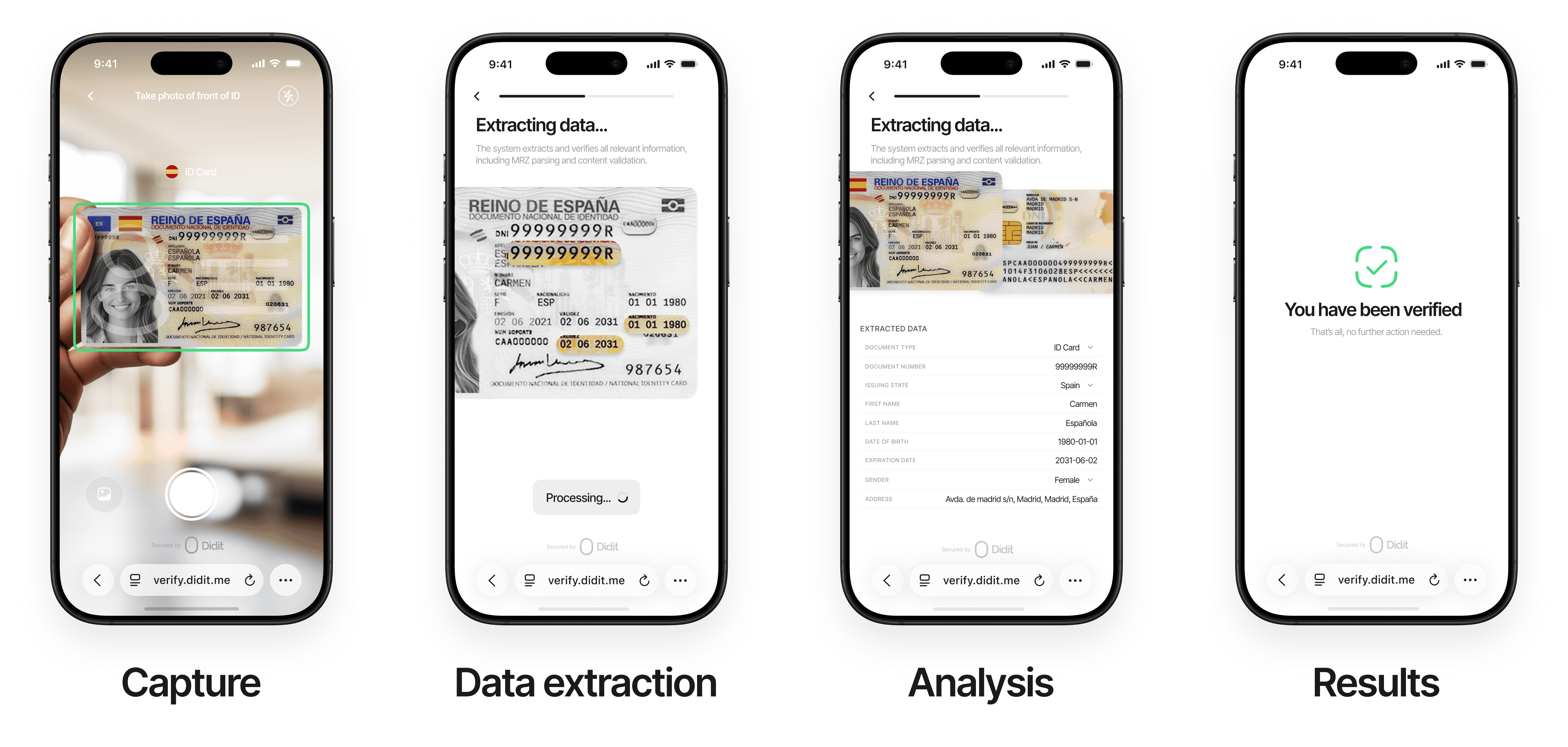
Retries & actionable feedback
In a Didit session, a face match that fails for a fixable capture reason (the selfie is too dark, blurry, off-center, or the similarity is borderline) does not immediately decline. The user is asked to retry with guidance, up to a configurable number of attempts — the same model used for Liveness.-
Attempt budget —
face_match_max_attemptscontrols the total number of face-match submissions per session. Default 3 (one initial attempt plus two retries), configurable per workflow node (range 1–3). -
Retry feedback — while attempts remain, a retryable failure keeps the user on the step and returns
feedback_codes(the Web and Mobile SDKs surface these as coaching messages automatically): -
Exhaustion — once the budget is exhausted the computed status is applied (
DeclinedorIn Review).
Retries apply to the session flow only. The standalone
POST /v3/face-match/ endpoint is stateless and single-shot — it returns the similarity score directly with no retry budget.How It Works
Intelligent Capture
Effortlessly begin the verification process with our intuitive, AI-driven capture system.Users upload or photograph their ID documents with real-time assistance:
Why it matters: Our intelligent capture reduces user friction and ensures high-quality submissions on the first attempt, boosting conversion rates and trust.
Advanced Data Processing
Extract and validate identity data with unmatched precision.Data Extraction — State-of-the-art technology processes all key fields:
Data Validation:
- Cross-references data between visual zones, MRZ, and barcodes for consistency
- Format and pattern matching to detect anomalies
- Real-time queries against government databases (where permitted) for authoritative verification
Why it matters: Comprehensive data processing ensures accuracy and eliminates errors, giving you confidence in every verification.
Advanced Analysis
Our AI-powered system performs comprehensive checks:
- Document authenticity verification
- Tamper detection and image integrity analysis
- Security feature validation (holograms, watermarks, etc.)
- Template matching against certified database
Seamless Results & Integration
Get actionable insights instantly with flexible delivery options.Real-Time Results:
Comprehensive Reporting:
- Detailed PDF reports with verification outcomes and evidence
- Audit trails for compliance and record-keeping
- Customizable options to align with your operational needs
Why it matters: Fast, accessible results empower your team to act quickly while maintaining a secure, auditable process.
Document Requirements
For optimal verification success, documents must meet these standards:General Requirements
- Government-issued and valid within its configured validity period
- Physically intact (no damage, scratches, or stains obscuring details)
- All critical information (full name, date of birth, MRZ, etc.) clearly legible
- Consistent data across all submitted documents
Image Requirements
- Original, real-time photo (no screenshots, scans, or digital copies)
- Supported formats: JPG, JPEG, PNG, PDF
- Maximum file size: 5MB
- Full-color image with all document corners visible
- Free from glare, shadows, digital editing, or manipulation
- Physical documents required (digital IDs supported only in select regions where officially recognized)
Additional Settings by Country & Document Type
Configure fine-grained rules per country and document type directly from the console. These controls let you tailor acceptance criteria and transcription preferences to your compliance needs.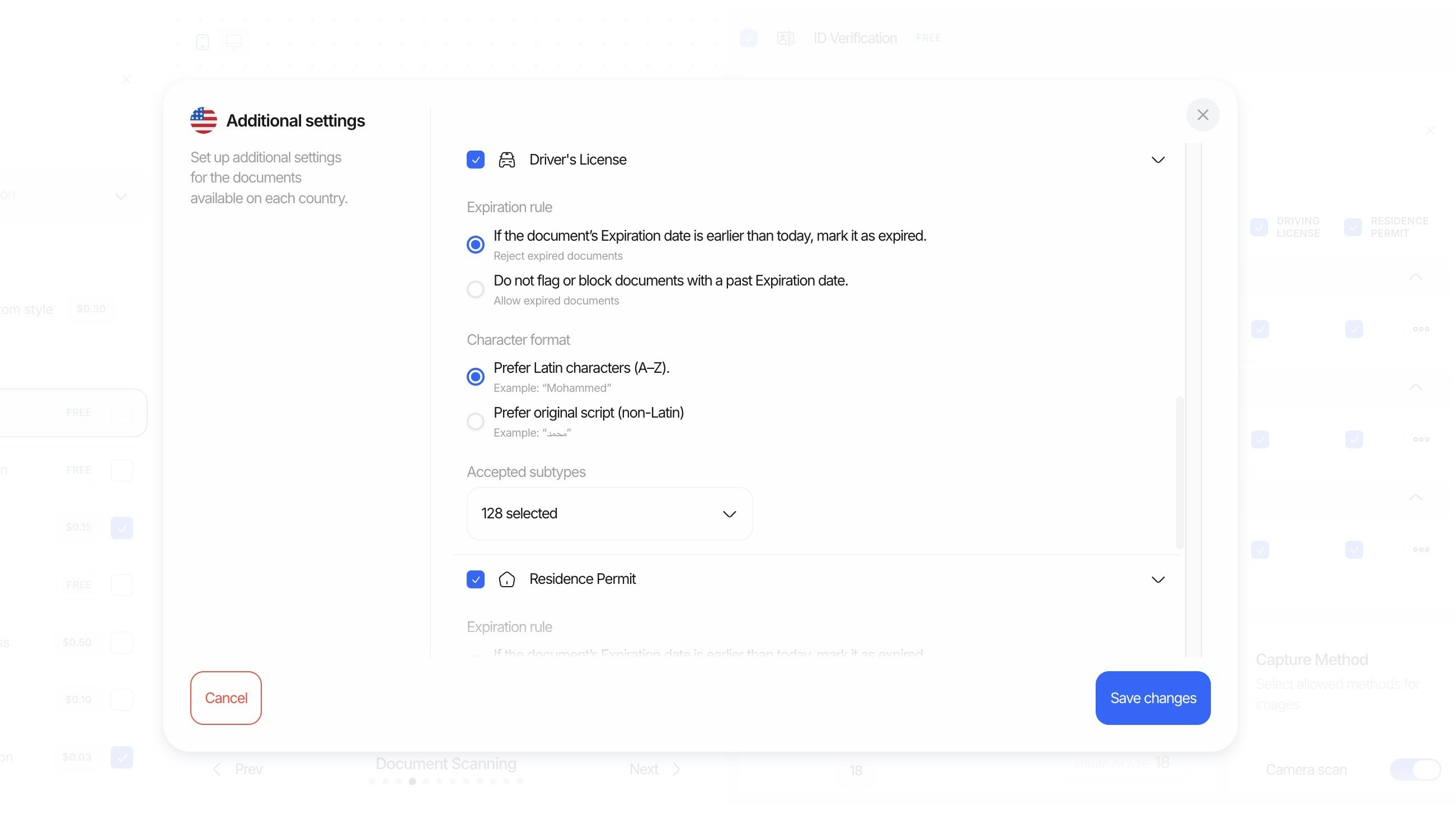
- Expiration mode: Choose how to handle documents with past expiration dates.
- Reject expired: If the document’s expiration date is earlier than today, mark it as expired and reject.
- Allow expired: Do not flag or block documents with a past expiration date.
- Preferred character format: Select how extracted names and fields should be normalized.
- Prefer Latin characters (A–Z): Example: “Mohammed”
- Prefer original script (non‑Latin): Example: “محمد”
- Regional support & subtypes: Enable documents by region and specify acceptable subtypes when a document type contains many variations.
- Example: For United States driver’s licenses, select the exact subtypes you accept (e.g., Arizona Commercial Driver License, Indiana Operator License (REAL ID), New York Enhanced Driver License, etc.).
- Use the “Accepted subtypes” control to quickly include/exclude many variants (e.g., “128 selected”).
Tip: These settings apply per country and document type, so you can be strict in some markets while more permissive in others.