

 Get Started
 Integrate / SDKs
 User Verification
 Business Verification
 Transaction Monitoring
 Changelog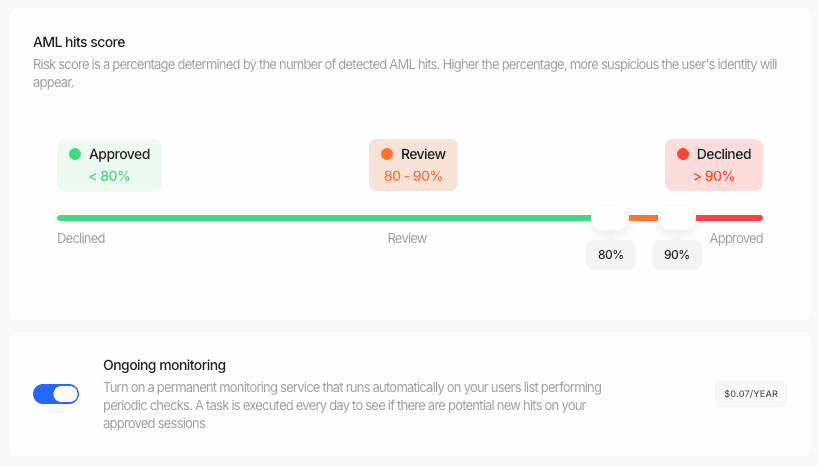
How It Works
Our ongoing monitoring system continuously checks your verified users against various watchlists, sanctions lists, and adverse media sources. Here’s a detailed overview of the process:-
Daily Automated Checks:
- Our system runs daily automated checks for all sessions that have previously been approved
- Each check rescreens the user against our comprehensive database of watchlists and sanctions lists
- The system compares any new findings against your configured AML thresholds
-
Threshold-Based Updates:
- If new hits are found that exceed your configured review threshold, the session status changes to “In Review”
- If new hits exceed your decline threshold, the session status automatically changes to “Declined”
- These thresholds are the same ones you’ve configured in your Workflows
-
Real-time Notifications:
- When a status change occurs, your application receives a webhook notification
- The webhook payload includes the updated status and detailed information about the new AML hits
- These notifications follow the same format as our standard webhook system
-
Business Console Updates:
- All changes are immediately reflected in your Business Console
- Your compliance team can inspect new AML hits, review detailed findings, and take appropriate actions
- The console maintains a complete audit trail of all monitoring activities and status changes
Enabling monitoring for users and businesses
You can turn ongoing monitoring on or off for whole users and businesses directly from the console — including users that never went through an AML check, such as imported users.- Open Users (or Businesses) in your Business Console, select the profiles you want to monitor, and click AML Ongoing monitoring.
- The dialog shows a cost estimate before anything runs: how many profiles are selected, how many need a new AML screening, the one-time screening cost, and the yearly monitoring cost.
- Click Enable monitoring. Small selections complete immediately; larger ones run in the background while the dialog shows live progress.
- When the run finishes, the dialog breaks down the result per profile: enabled, screened and enabled, already enabled, or skipped with the reason (for example, a profile without the full name, date of birth, and country needed to screen).
- Profiles without an AML screening are screened first. Didit creates a new AML verification for them (visible in the profile’s Verifications tab), billed as a regular AML screening. Monitoring is then enabled on that screening.
- One monitored screening per profile. Enabling keeps exactly one monitored AML screening per user or business, so a person who verified multiple times is only monitored — and billed — once. Disabling turns monitoring off across all of the profile’s screenings.
- The lists show monitoring at a glance. Both the Users and Businesses lists include an Ongoing monitoring column; hover over it to see the next yearly billing date.
- Select all works with your filters. With every row selected, the action applies to your current filtered view, not just the loaded page.
Enabling monitoring through the API
The same operation is available to your backend with your API key, so you never have to re-screen a profile or open the console to change its monitoring:POST /v3/users/aml-monitoring/for usersPOST /v3/businesses/aml-monitoring/for businessesGET /v3/aml-monitoring/jobs/{job_id}/to poll a job
vendor_data_list) and/or Didit ids (didit_internal_id_list), up to 1000 per call, and follow the console’s rules exactly: one monitored screening per profile, profiles without a screening are screened first, and disabling turns monitoring off across all of the profile’s screenings.
results entry per profile with its outcome: enabled, screened_and_enabled, already_enabled, disabled, or a skip reason such as skipped_no_identity_data. Identifiers that match nothing come back under unmatched. Toggling monitoring emits no webhook of its own; once monitoring is on, re-screens fire the usual status.updated and data.updated events.
Proving that monitoring ran
The alerts, activity entries and webhooks above all fire on change. A subject screened daily for a year with no new hits produces none of them, so “no news” and “nothing ever ran” look identical — which is not an answer that survives an audit. Three surfaces record the runs themselves. 1. The last screening date, on the AML report.last_ongoing_screening_at moves on every completed run, changed or not, on /v2/ and /v3/ session decisions and the standalone AML report. last_ongoing_screening_datasets_updated_at alongside it is the most recent AML dataset update the provider reported for that run. Neither is ever estimated: null means “never re-screened” and “no dataset date reported” respectively, not “unknown so here is a plausible one”. Do not read next_ongoing_monitoring_bill_date as a screening date — it is a billing date.
2. The screening history, per subject. GET /v1/session/{session_id}/aml-screening-history/ returns every completed run for that session’s AML check, newest first, including the runs whose outcome was NO_CHANGE. Add ?node_id= when a graph workflow has more than one AML node.
3. The exportable evidence.
GET /v1/session/{session_id}/aml-screening-history/export/ streams the same history as a CSV file — one row per completed screening, with the dataset update date per source family where the provider reported one and an empty cell where it did not. That file is what a compliance team hands to an auditor. The Business Console exposes the same list and the same export next to the AML result, so reviewers do not need API access to produce it.
Availability limits, stated plainly. History is recorded from the moment this feature shipped forward; earlier screenings are not reconstructed and are simply absent. Runs are kept for the configured retention window (two years by default). Dataset freshness depends on the provider publishing dataset dates for the environment you are on — where it does not, every dataset field reads
null and GET /v1/aml/dataset-freshness/ reports availability: "not_configured". An absent date is never replaced by a substitute.Benefits of Ongoing Monitoring
- Continuous Compliance: Ensure ongoing adherence to AML/KYC regulations with zero additional setup.
- Risk Mitigation: Quickly identify and address emerging risks through automatic monitoring.
- Operational Efficiency: Automate time-consuming manual rescreening processes with no extra integration work.
- Enhanced Due Diligence: Maintain up-to-date customer profiles automatically.
- Regulatory Support: Easily demonstrate ongoing compliance efforts to regulators.
- Zero-Touch Integration: Benefit from continuous monitoring without any additional development work.