

 Get Started
 Integrate / SDKs
 User Verification
 Business Verification
 Transaction Monitoring
 Changelog
Overview
Webhooks are how Didit pushes real-time updates to your backend whenever a verification session, business session, vendor user, vendor business, or transaction changes state. Subscribing one or more destinations to the events you care about lets you react the moment a result is ready — usually within seconds of the verifying user finishing their flow. Webhooks are the recommended integration pattern. PollingGET /v3/session/{id}/decision/ is supported as a fallback, but it is slower, costs more requests, and skips events like data.updated, transaction.status.updated, and entity-level changes that are only emitted through webhooks. Treat webhook delivery as the source of truth and only poll on cold start or for reconciliation.
This chapter of the Didit Academy integration lesson picks up at the webhooks overview.
The integration Academy lesson covers webhooks from 3:12: adding a destination, picking events, and the signing secret you will verify below.
Cloudflare / WAF users. Didit delivers webhooks from the static IP
18.203.201.92 with User-Agent: DiditWebhook/2.0 +https://didit.me. If your edge blocks unknown clients, allow this IP in Security > WAF > Tools > IP Access Rules and choose Allow for the receiving hostname.Event types
Use the exact value in a destination’ssubscribed_events array. There is no wildcard — list every family you want to receive — and you can spread events across multiple destinations.
These ten values are the complete set of subscribable events - there is no
session.status.updated, kyc.completed, or similar. The only other delivery Didit makes is the unsigned kyb.registry_search.resolved callback, which goes to the per-request webhook_url you pass to POST /v3/kyb/search/, never to a destination.
Payload shape
Envelope
Every webhook shares the same envelope. Fields are always serialised withsort_keys=True and compact separators (, / :) so the same payload reproduces the same signature on both sides.
For session events (
status.updated, data.updated on regular and business sessions) the envelope additionally carries:
Session envelope example
V3 plural arrays (important)
Insidedecision, every per-feature result is a plural array so a single workflow can include several instances of the same feature (for example, multiple ID checks across documents):
node_id matching the workflow graph plus a per-feature status. Do not read the legacy V2 singular fields (id_verification, nfc, liveness, face_match, phone, email, poa, aml, ip_analysis, database_validation); they only appear if a destination is explicitly pinned to webhook_version: "v2".
Document-collection features — KYB documents and Document AI — do not have a dedicated plural array; they appear in the decision features[] list as { "feature": "DOCUMENT_AI", "node_id": "…" } (one entry per node). See Document AI.
ID Verification method keys
Everyid_verifications[] item says which ID Verification method produced it, so a handler can branch on the evidence it actually got:
Existing handlers keep working untouched: a document session sets
verification_method to document and leaves the rest null. Field-by-field types are in Data models.
Approved wallet session (status.updated)
Entity event payloads
ACTIVE, FLAGGED, or BLOCKED. user.data.updated and business.data.updated keep the status field and add a changed_fields array plus a changes map of { field: { previous, current } }. business.* events use vendor_business_id instead of vendor_user_id.
Transaction event payloads
Transaction webhooks ride on the same fan-out infrastructure and use the same envelope, but identify the transaction instead of a session:APPROVED. If a rule, blocklist, or workflow changes the status during creation, the initial transaction.created payload reflects that final status. transaction.status.updated carries the same shape with the updated status. Transaction statuses are APPROVED, IN_REVIEW, DECLINED, or AWAITING_USER; severity is UNKNOWN / LOW / MEDIUM / HIGH / CRITICAL and direction is INBOUND / OUTBOUND. Transaction webhooks are only delivered for live applications — sandbox transactions never fan out.
KYB registry search callback
The asynchronousPOST /v3/kyb/search/ flow delivers one extra payload that is not a destination event: when you pass a webhook_url to the search request, Didit POSTs a kyb.registry_search.resolved callback to that URL once the registry resolves. It differs from destination webhooks in three ways:
- It is unsigned — no
X-Signature*headers. Didit marks it withX-Didit-Unsigned-Callback: trueinstead; validate it by matchingrequest_idagainst the id returned by the search request. - The event name lives in
event_type(notwebhook_type), and there is noapplication_idorenvironment. timestampandcreated_atare epoch integers, like other webhooks but unlike the search endpoint’s ISOcreated_at.
timestamp and stay unsigned). See the KYB Registry API for the full candidate-list schema.
Signature verification
Every webhook is signed with HMAC-SHA256 using the destination’ssecret_shared_key. Three signature headers are sent so you can pick the one that survives your stack:
Headers Didit always sends:
X-Signature-Simple is deprecated
This is a compatibility constraint, not something we can patch in place. The four-field canonical string is a wire contract: every receiver that verifies X-Signature-Simple recomputes exactly those four fields, so changing what the header signs would silently break all of them on the signature path. Covering the body also requires a specified canonical form of the JSON that both sides reproduce byte for byte, and Didit already ships one as X-Signature-V2. Rather than add a second body-covering variant with its own canonicalization rules, the header stays exactly as it is and is deprecated in favour of the existing full-payload variants.
What that means for you:
- Nothing changes on the wire.
X-Signature-Simplekeeps being sent on every delivery, computed the same way. Existing verifiers keep working, and we will announce any removal well in advance. - New integrations must use
X-Signature-V2. It is middleware-safe and covers the whole payload. - If you cannot move off
X-Signature-Simple, verify it, then fetch the record from the API rather than reading it out of the webhook body.
Why three variants?
Some web frameworks (Express body parsers, Django middleware, API gateways) silently re-encode JSON before your handler reads it. If the original body contained"José" and your middleware rewrites it to "José", the bytes change even though the data is identical. X-Signature then fails. X-Signature-V2 is computed from a canonical JSON form (sort keys, compact separators, unescaped Unicode) that almost every middleware reproduces deterministically — and the deprecated X-Signature-Simple falls back to signing only a small, parser-independent string when even that fails. Because it signs only that short string and never the body, it cannot vouch for the body.
Recommended verification order
- Try
X-Signature-V2first. Re-encodeJSON.parse(body)with sorted keys and Unicode preserved, thenHMAC-SHA256(secret, canonical)andtimingSafeEqualagainst the header. - If V2 fails and you can read raw bytes, try
X-SignatureagainstHMAC-SHA256(secret, rawBody). - Only if both fail, fall back to the deprecated
X-Signature-SimpleagainstHMAC-SHA256(secret, "{timestamp}:{session_id}:{status}:{webhook_type}"). This authenticates the envelope alone: treat thedecisionin the body as untrusted and re-fetch it fromGET /v3/session/{session_id}/decision/before you act on it.
abs(now - X-Timestamp) > 300) to defend against replays.
Retry policy
If your endpoint responds with a5xx or 404, Didit retries up to 2 times with exponential backoff:
- 1st retry — about 1 minute after the initial failure.
- 2nd retry — about 4 minutes after the 1st retry.
- The outbound HTTP request times out after 5 seconds.
- Didit blocks deliveries to private / localhost URLs as an SSRF guard and never follows redirects. Use a public HTTPS endpoint that answers directly.
- A destination
urlcontaining a raw backslash, a control character, or more than one@in the authority is rejected as malformed - such a URL cannot be created and an existing one cannot be redelivered or replayed. Use a plainhttps://host/pathURL with at most one userinfo section (for basic-auth style webhook URLs). 2xxis treated as success. Timeouts and connection failures count as retryable (they surface as504/503in the delivery log);3xxand4xxresponses other than404are not retried.- On retry Didit recomputes signatures with a fresh
X-Timestamp, so the timestamp/signature pair always lines up.
Setting up a destination
You can manage destinations from the Business Console > API & Webhooks or via the Management API.1
Create the destination
Call
POST /v3/webhook/destinations/ (or click Add destination in the console) with a label, public url, webhook_version ("v3"), and a subscribed_events array containing every event family this endpoint should receive. At least one event is required and no wildcard exists.2
Store the secret_shared_key
The create response returns the destination’s
secret_shared_key. Store it now — it is the only secret you will ever see for this destination, scoped to this destination, and is the input to all three HMAC-SHA256 signature variants.3
Implement the endpoint
Expose a public HTTPS
POST route, read the raw body, verify the signature (preferring X-Signature-V2), check the timestamp window, then dispatch on webhook_type. Return 2xx as soon as you have queued the work — do heavy processing asynchronously.4
Confirm receipts
Watch the Deliveries tab on the destination. Healthy webhooks return
200 within a second or two. 5xx/404 triggers Didit’s retry policy; persistent failures are dropped after the second retry.5
Iterate with Try Webhook
Use the Try Webhook console scenarios to drive your endpoint through approved, declined, in-review, KYB, entity, activity, and transaction payloads before flipping production traffic on.
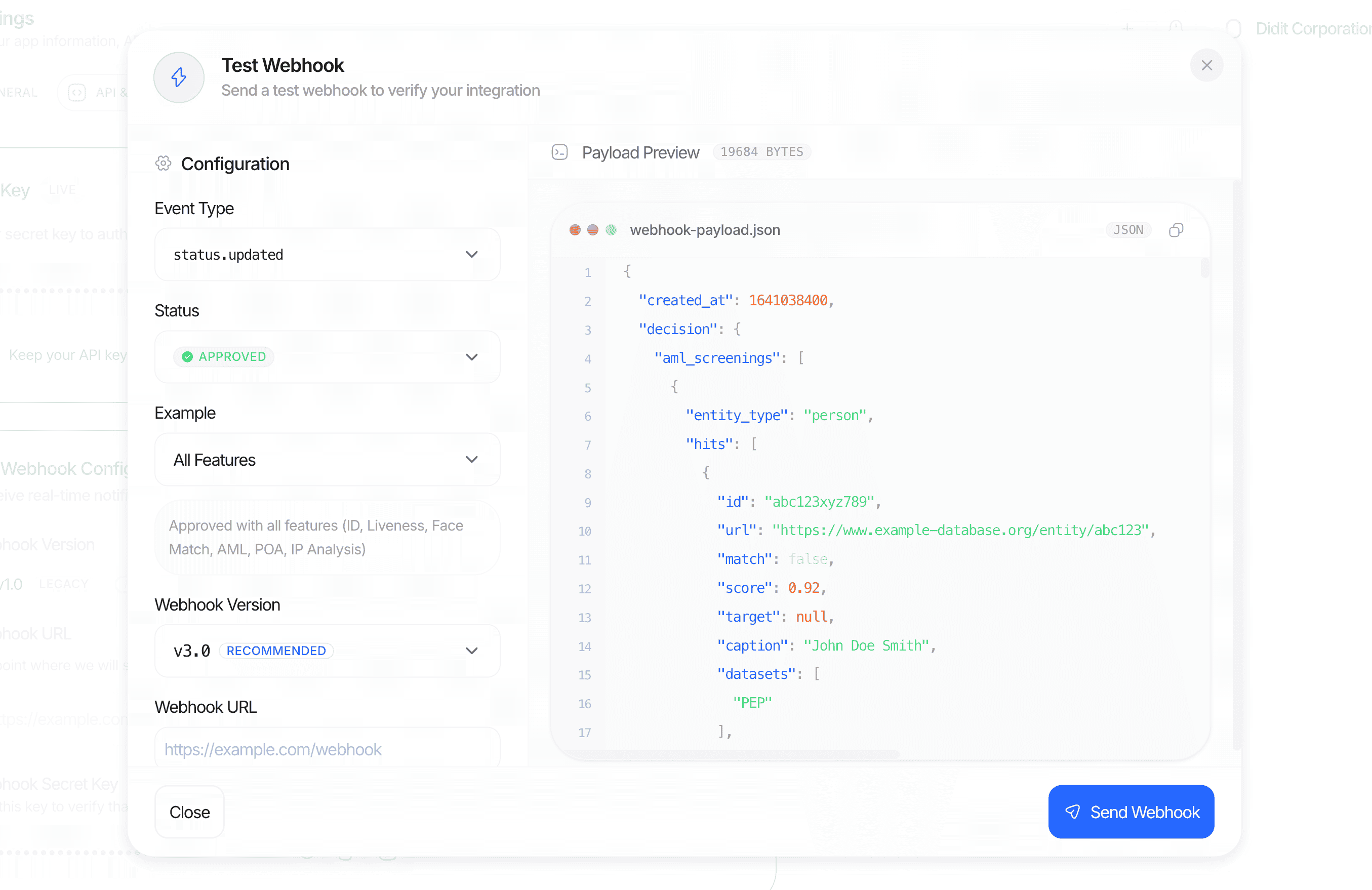
Send test webhooks directly from the Business Console to validate your endpoint before going live.
Code samples
To ensure the security of your webhook endpoint, verify the authenticity of incoming requests using the destination’ssecret_shared_key.
Node.js / Express (recommended: X-Signature-V2)
X-Signature variant works the same way but signs the raw body. We keep it in the legacy section below for completeness.
Python / FastAPI (recommended: X-Signature-V2)
PHP / Laravel (recommended: X-Signature-V2)
PHP’s JSON defaults do not reproduce the canonical form. Four of them have to be overridden, and missing any single one changes the signed bytes so the digest never matches:
The empty-object trap is the one that bites hardest. Didit payloads routinely carry empty maps such as
risk_view.countries.risk_scores, risk_view.crimes.risk_scores, and risk_view.custom_list, so an associative round-trip breaks the signature on ordinary approved sessions rather than on some rare edge case.
- Whole-valued floats need no special handling in PHP. Didit serialises them as integers (
100.0→100), and PHP’sjson_encodewrites a whole float the same way, so noshortenFloatsstep is required, unlike the Node.js sample above. - Keep
serialize_precisionat-1(the default since PHP 7.1). If your host overrides it to17,json_encodewrites87.42as87.420000000000002and everyX-Signature-V2check fails.
verifySignatureRaw above is the simpler fallback: Laravel’s $request->getContent() returns the untouched bytes, so X-Signature works as long as nothing in front of PHP re-encodes the body. That is exactly the case X-Signature-V2 is designed to survive, which is why V2 is tried first.
Testing
You do not need to run a full verification to exercise your endpoint.- From Business Console > API & Webhooks > Try Webhook, pick a scenario (e.g.
approved_full_features,declined_face_mismatch,in_review_aml_hit,business_session_approved,transaction_created,activity_created,user_status_updated) and send a fully-formed webhook to your destination URL. - Every scenario is signed with the same three signature headers and canonical encoding as production traffic, including unicode test data (
approved_kyc_with_unicode) so you can confirmX-Signature-V2works through your middleware. Test deliveries carry sample data and are marked with an extraX-Didit-Test-Webhook: trueheader (and a(Test)suffix on theUser-Agent) so you can keep them out of production state. - Replay any historic delivery from a destination’s Deliveries tab if you need to debug a regression.
Examples
Approved KYC session (status.updated)
Declined session with warnings (status.updated)
Business session approved (status.updated, KYB)
Transaction created (transaction.created)
Travel Rule exchange status changed (travel_rule.status.updated)
travel_rule_status carries one of the 13 exchange statuses documented in Travel Rule.
rail is INTERNAL, TRP, or EMAIL (empty string if no rail could be resolved), and direction is INBOUND or OUTBOUND.
An after-deposit sunrise registration that mints a new inbound transaction also emits a transaction.created event for that transaction, before the travel_rule.status.updated transitions.
User entity status changed (user.status.updated)
Resubmitted session
Legacy: X-Signature with raw body
X-Signature is still sent on every delivery; it is HMAC-SHA256 over the exact bytes Didit transmits (json.dumps(..., sort_keys=True, separators=(",", ":"))). Use it only when you can read the raw body before any middleware modifies it.
- Node.js
- Python
Legacy: V2 webhook format
The per-feature objects themselves are the same in both versions: a V2 destination receives exactly the per-hit
match_score, risk_score, score_breakdown, risk_view and review_status and the aggregate score that V3 does (see AML report). Pinning to V2 changes where the AML report sits in decision, not what it contains.
If a downstream consumer still needs V2 shapes, create a separate destination pinned to webhook_version: "v2" and keep your new consumers on V3.
Related
- Webhook destinations API — list, create, update, delete destinations and inspect delivery logs.
- Create webhook destination — request/response schema including the once-returned
secret_shared_key. - Data models — canonical schema for every per-feature object embedded in
decision. - Decision schema — full field list for the
decisionobject embedded in session webhooks. - Verification statuses — exact
statusvalues and transitions referenced above. - Rate limiting — limits that apply when polling
GET /v3/session/{id}/decision/as a fallback.