

 Get Started
 Integrate / SDKs
 User Verification
 Business Verification
 Transaction Monitoring
 Changelog
Country identity methods
In ID Verification, open Countries and allowed ID methods to configure document capture, non-doc lookup, and digital identity wallets for each country. Additional settings contains document subtypes, lookup attempts, and fallback rules. Non-doc lookup uses your organization’s Database Validation service pricing. Each completed attempt is charged separately, including partial matches and no matches: two completed attempts mean two charges. Format errors and provider failures that return no answer are not charged. If several database services answer one attempt, their applicable service prices are added together. The default is one attempt before fallback, configurable from one to five. Document capture is charged additionally when a completed lookup falls back to documents. Live applications can enable only wallets available for production. Wallets awaiting launch stay disabled. Sandbox applications can test every wallet in the catalog with simulated results; sandbox availability does not indicate production availability. See Sandbox testing for lookup and wallet failure scenarios.Workflow Versioning
Workflows support draft/publish versioning. This means you can safely iterate on your workflow without affecting live sessions:- Draft versions are fully editable — add, remove, or restructure nodes freely
- Publishing a draft creates an immutable version that new sessions will use
- Previous versions are preserved, so you can inspect the exact configuration used for any past session
- Sessions always reference the specific version they were created with, ensuring consistency even after you publish updates
Two Ways to Build Workflows
Didit offers two distinct approaches to creating verification workflows, allowing you to choose the right level of complexity for your needs: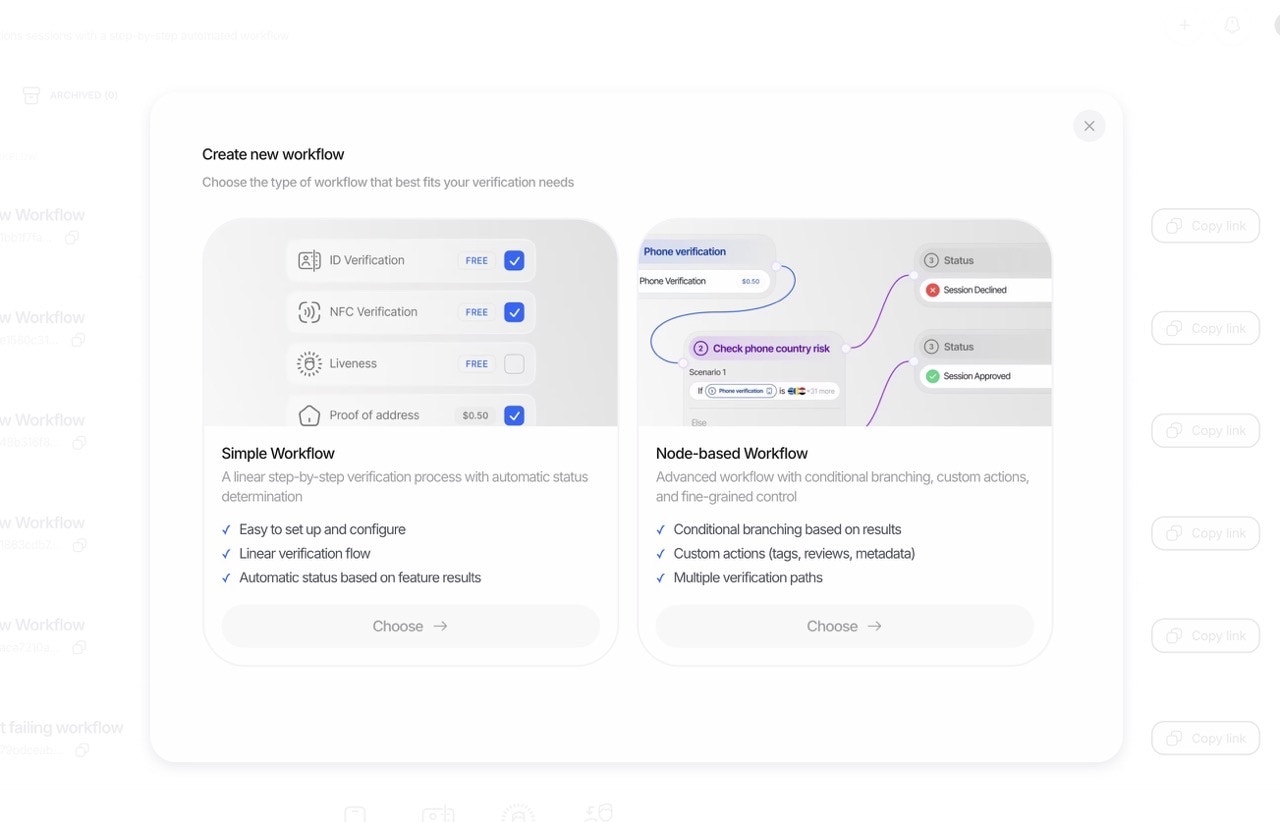
1. Simple Mode: Template-Based Builder
The Simple Mode is perfect for getting started quickly. Select a pre-built template, toggle the features you need on or off, and you’re ready to go.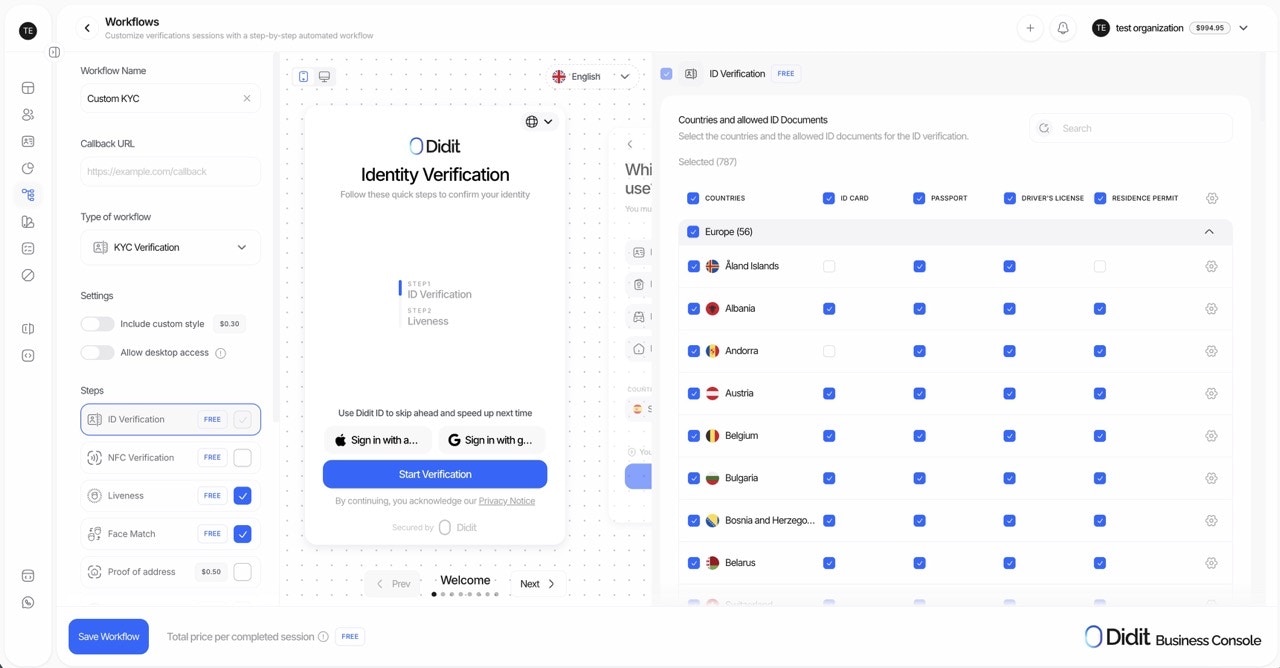
- Quick setup and deployment
- Standard verification flows
- Teams new to identity verification
- Use cases that fit common patterns
- Choose a workflow template (KYC, Age Verification, etc.)
- Toggle features on/off (Liveness, Face Match, AML, etc.)
- Configure basic settings for each feature
- Publish and start verifying
2. Advanced Mode: Visual Graph Builder
The Advanced Mode unlocks the full power of Didit’s orchestration engine. Build complex, conditional verification flows using our visual graph editor with drag-and-drop nodes, branches, and custom logic.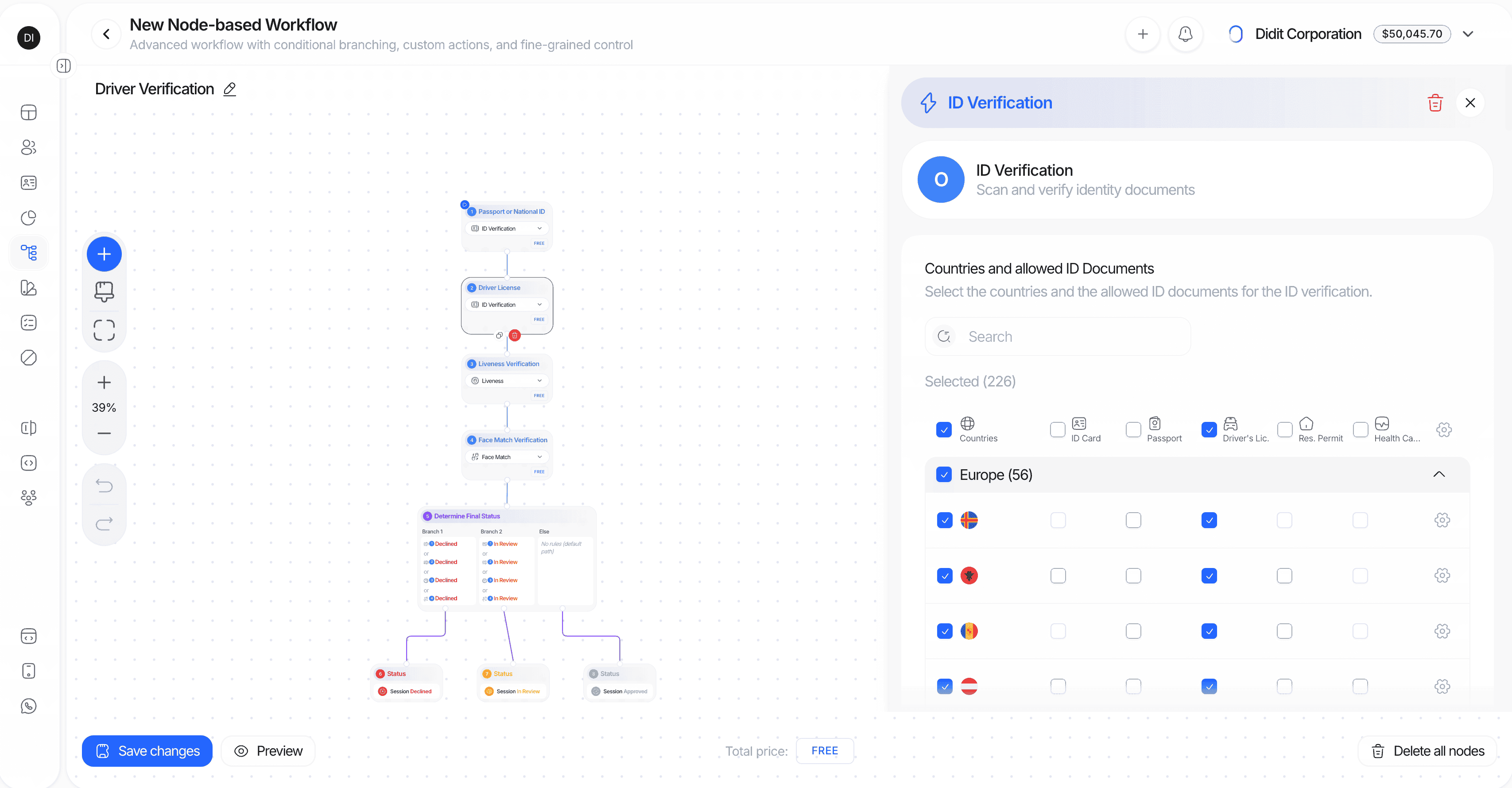
- Complex, multi-path verification journeys
- Conditional logic based on user data or verification results
- Custom business rules and branching
- Enterprise-grade compliance requirements
- Visual node editor: Drag, drop, and connect nodes on an infinite canvas
- Smart connections: Drag from a node handle to empty space to instantly create and connect a new node
- Conditional branches: Route users based on extracted data, verification status, country, document type, document subtype, date of issue, age, webhook JSON response paths, or custom rules
- Action automation: Add tags, set metadata, or route to manual review based on flow outcomes
- Keyboard shortcuts: Undo (Ctrl/Cmd+Z), Redo (Ctrl/Cmd+Shift+Z), Delete (Delete/Backspace)
- Zoom and pan: Navigate complex flows with scroll-to-zoom and drag-to-pan
Graph Builder Node Types
Feature Node Categories
User-Interactive Features (can start a workflow):- ID Verification (OCR)
- Liveness Detection
- Face Match
- Age Estimation
- Phone Verification
- Email Verification
- Questionnaire
- Proof of Address
- Document AI
- NFC / ePassport
- AML Screening (needs an ID Verification, KYB Registry, or Document AI step before it - see Screened entity)
- Database Validation (requires OCR first)
- Device & IP Analysis
Note: Backend-only features are marked with a special indicator in the builder and execute automatically without user interaction once their dependencies are met.Each feature node’s first configuration tab starts with a Verification engine control: run the check with Didit’s own engine, or switch it to a third-party provider you connect from the Marketplace, with automatic fallback to Didit if that provider is unavailable.
Screened entity
AML Screening normally learns who it screens from the step in front of it: the person an ID Verification step read off a document, or the company a KYB Registry step returned. Some flows have neither. A flow built entirely on Document AI - non-standardised documents such as a tax certificate or a notarised incorporation deed - already holds the name, date of birth, document number and country, just under your own field keys. The AML node’s Advanced tab is where you point those keys at the screening:- Entity type - screen a person, or the company named in an uploaded document. A company node searches company records rather than people.
- Field sources - map each of the four screening inputs (name, date of birth, country, document number) onto a Document AI field, a questionnaire answer, or a value you send at session creation (
expected_details/metadata). A Document AI field you already namedfull_nameis picked up automatically. - Incomplete screening data - what happens when the screening runs on less than a full identity. Review is the default; choose No action only when the flow knowingly holds nothing but a name.
How Branch Conditions Read Session Data
Which record a condition reads. A branch condition is bound to the feature node it was built from, and it reads that node’s result. When a single node produced more than one record, the condition reads the most recent one. This matters most for Device & IP Analysis: Didit records one observation per device and IP address a session is opened from, so a user who switches phone or network mid-session leaves several records on the same node. A rule such asIP COUNTRY is in [...] is then evaluated against the latest observation - the same record shown first in the session’s Device & IP Analysis panel and in the ip_analyses array of the decision payload. Sessions with more than one observation also carry the MULTIPLE_DEVICES_IN_SESSION warning, which is the signal to review the full list rather than the branch outcome alone.
Country values. Country conditions are matched on the country itself, not on the notation. Pick countries from the field picker and Didit normalizes both sides of the comparison, so a rule written in ISO 3166-1 alpha-3 (UKR) still matches a value captured as alpha-2 (UA).
Missing values, empty values and negative comparisons. A field with no value at all (the document does not carry it, the metadata key was not sent, the feature did not run) matches only is empty and equals not_defined; every other comparison - equals, contains, greater than, and also not equals and not in - does not match, and the branching node moves on to its next branch. A field that holds an empty string is a value, not a missing field: a session created with "metadata": {"credential_state": ""} fails metadata.credential_state equals IL, but it passes not equals IL, not in [IL, MA, NJ] and equals "" (is empty matches both cases). A branch that approves on a negative comparison therefore approves a session whose state was sent empty, while the same session with the key omitted takes the fallback. When you route on not equals or not in, add metadata.<key> is not empty to the same branch (AND logic) so both cases end where an absent value should end. Branches are evaluated in order and the first match wins; the fallback branch (the branch with no conditions) is taken only when no other branch matched, so give every branching node a fallback that ends where you want an unexpected value to end. A session that reaches In Review with no warning on any feature was routed there by a status node in the graph, not by a check; the fallback branch of a branching node is the usual cause.
Session metadata. Values you send in metadata at session creation are available to every branch as metadata.<key> and can be compared against a fixed value or against another session field (for example metadata.min_age <= Age). Numbers are compared as numbers, so 18 and "18" behave the same.
Sandbox / test mode. Branch conditions, metadata and status nodes run in sandbox exactly as they do live, and sandbox never places a session into review by itself. The difference is the document: a sandbox session carries a fabricated document with no US state / region, so Region conditions cannot match there. See what the fabricated document does not carry for how to test state-dependent flows.
Resubmissions. Branch nodes are evaluated on every attempt, including a resubmission. When you send a session back for specific steps, the branches and actions placed between those steps run again as the user re-completes them, against the data of the new attempt. A user who moves to a restricted jurisdiction between attempts is therefore routed by the branch that covers it, and a branch that ends on a Declined outcome ends the resubmitted session there.
Seeing which branch a session took. Every branch decision the workflow makes while a session runs, and every outcome node it reaches, is recorded on the session’s event timeline (Console session detail > Events, and GET /v3/session/{id}/decision/?include=events). A Workflow routing row names the branching node, the condition that matched, and the node the session continued to - or says that no condition matched and the node’s fallback edge was taken. A Workflow outcome row names the status node that set the session status. When a workflow sends a session to In Review without any feature flagging it, those rows show the path it took, including any fallback edge and the outcome node it led to. Later manual decisions do not rewrite those workflow events. Missing input is one possible cause: conditions that require a present metadata.* value do not match when the key was omitted at session creation. Conditions that explicitly test for missing input, such as is_empty or equals with not_defined, can match that same absent key. The fallback edge is taken only when no branch matches, including any else branch, and leads to the node wired to the default output. See session events for the event payloads.
Workflow Templates: Your Starting Point
Think of templates not as rigid types, but as smart, pre-configured starting points designed for common use cases. In Simple Mode, these are ready to use. In Advanced Mode, they provide a foundation you can customize extensively.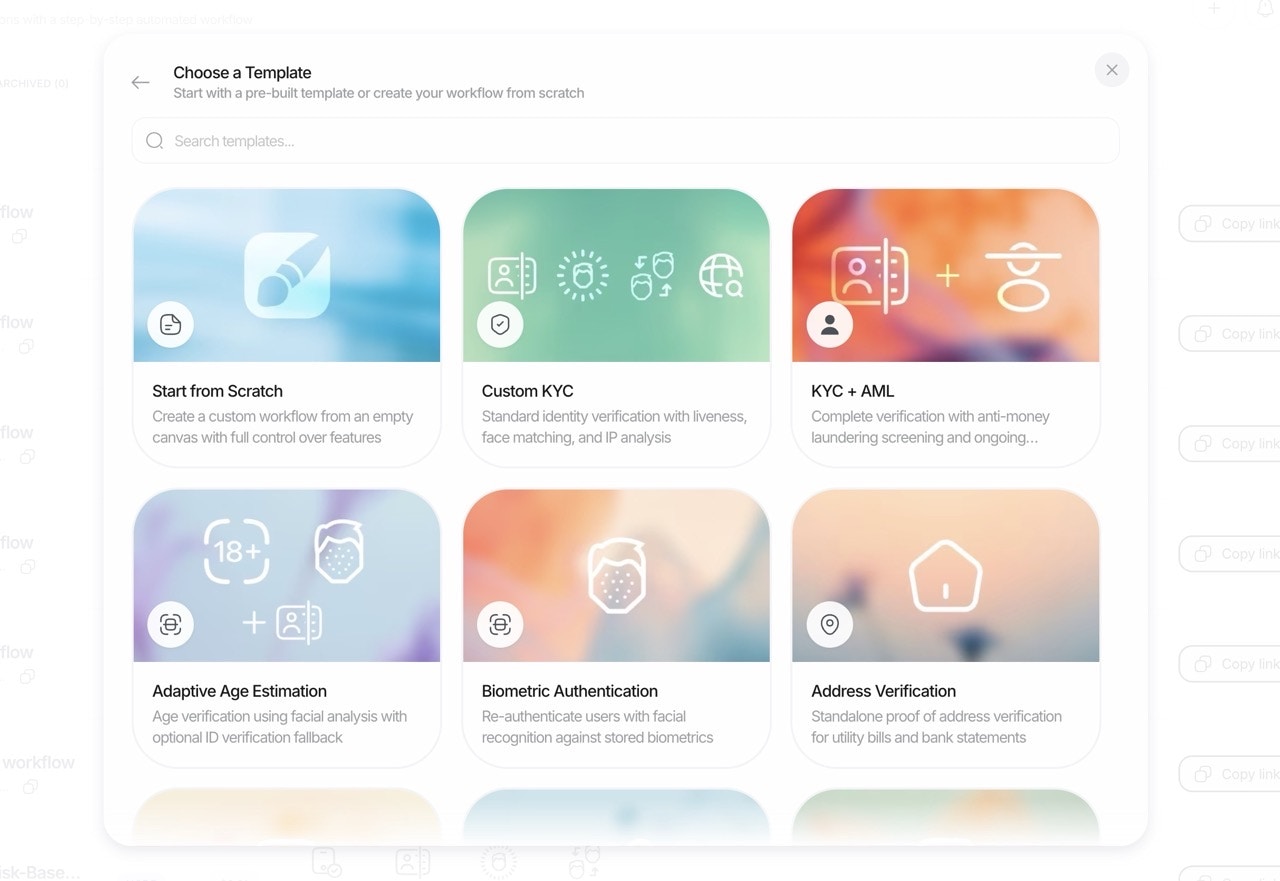
Available Templates
1. KYC Workflow
The comprehensive solution for onboarding new users and meeting full Know Your Customer (KYC) compliance.- Starts with: Core ID Document Verification.
- Commonly Added Features:
[+]Liveness Detection: Ensure the user is physically present and prevent spoofing.[+]Face Match 1:1: Biometrically match the user’s selfie to their ID photo.[+]AML Screening: Check users against global sanctions, PEP, and adverse media lists.[+]NFC Verification: Add a layer of government-grade security by reading e-passport/e-ID chips.[+]Proof of Address (PoA): Verify the user’s residential address.[+]Phone Verification: Validate phone number ownership as an additional factor.[+]Email Verification: Validate email address ownership as an additional factor.[+]Database Validation: Validate against official government and credit databases.[+]Questionnaire: Collect structured attestations and supporting documents via customizable forms.[+]Device & IP Analysis: Analyze location and connection risk.
2. Adaptive Age Verification Workflow
A low-friction, privacy-preserving flow for age-gated services.- Starts with: Selfie-based Age Estimation.
- Key Logic:
- If the estimated age is clearly above your threshold (e.g., estimated 25+ for an 18+ service), the user passes instantly.
- If the estimate is below or within a “buffer zone” (e.g., estimated 16-20), you can configure the workflow to automatically trigger a fallback to full ID Verification to confirm the exact date of birth.
- Commonly Added Features:
[+]Device & IP Analysis: Restrict access based on geographic location.
3. Biometric Authentication Workflow
A fast and secure way to re-verify returning users without asking for their documents again.- Starts with: A Liveness Detection check to confirm the user is present.
- Core Logic:
- The system performs a Face Match between the new live selfie and the trusted biometric template from the user’s initial, approved KYC verification.
- If the user already has a stored face under the same
vendor_data(approved liveness face, ePassport photo, ID document portrait, or an enrolled profile face), you can omitportrait_imagewhen creating the session and Didit reuses the stored face automatically. Otherwise passportrait_image(Base64-encoded image, max 2MB); without either, session creation fails with400.
- Commonly Added Features:
[+]Phone Verification: Link the address to a verified phone number.[+]Email Verification: Validate email address ownership as an additional factor.[+]Device & IP Analysis: Flag suspicious login attempts from new locations.
4. Address Verification Workflow
A dedicated flow for when Proof of Address (PoA) is the primary requirement.- Starts with: The user submitting a Proof of Address document (e.g., utility bill, bank statement).
- Core Logic: Our AI extracts and validates the name and address from the document.
- Commonly Added Features:
[+]Phone Verification: Link the address to a verified phone number.[+]Email Verification: Validate email address ownership as an additional factor.[+]Device & IP Analysis: Compare the document address to the user’s current geo-location for added assurance.
5. Questionnaire Verification Workflow
A focused flow when your primary goal is to collect structured attestations and supporting documents via customizable forms.- Starts with: Questionnaire.
- Core Logic: The system presents your configured questionnaire (sections, translated content, required fields, uploads).
- Commonly Added Features:
[+]Device & IP Analysis: Add location and connection context to your questionnaire submissions.
Full Customization Each feature within a workflow can be further customized with specific parameters to meet your exact requirements. Explore the settings for each check in the builder.
Build rules from marital status
In Advanced Mode, you can use the OCR fieldkyc.marital_status in conditional branches and custom status rules. Choose the value from the field picker so the rule uses the supported enum rather than free-form text. If the document does not provide marital status, the value is empty and your fallback branch applies.
The workflow copilot can also create and configure Database Validation steps in one action. When you ask it to add this check, specify the countries you need; the console resolves the supported service for each country and shows the saved configuration on the canvas.
Simple vs Advanced Mode Comparison
Integration Flow
Integrating an Orchestrated Workflow is straightforward. Your server creates a session with Didit, receives a unique URL, and redirects your user to that URL. Didit handles the rest and notifies your server of the results via webhooks.Common Use Cases
| Use Case | Recommended Template | Recommended Mode | Suggested Features |
|---|---|---|---|
| Basic identity verification | KYC | Simple | Liveness, Face Match |
| High-security onboarding | KYC | Advanced | NFC, Liveness, Face Match, AML, Phone Verification |
| Age-gated content/services | Adaptive Age Verification | Simple | ID Verification fallback |
| Returning user authentication | Biometric Authentication | Simple | Device & IP Analysis |
| Address verification | Proof of Address | Simple | Phone Verification |
| Financial services onboarding | KYC | Advanced | Liveness, Face Match, Proof of Address, AML, Database Validation |
| Region-specific compliance | KYC | Advanced | Conditional routing by country, different checks per region |
| Risk-based verification | KYC | Advanced | Conditional branches based on risk scores, escalation paths |
Getting Started
- New to Didit? Start with Simple Mode and a pre-built template
- Need customization? Switch to Advanced Mode to add conditional logic
Contact our sales team to discuss custom workflow configurations or to get guidance on the best setup for your specific requirements.