

 Get Started
 Integrate / SDKs
 User Verification
 Business Verification
 Transaction Monitoring
 Changelog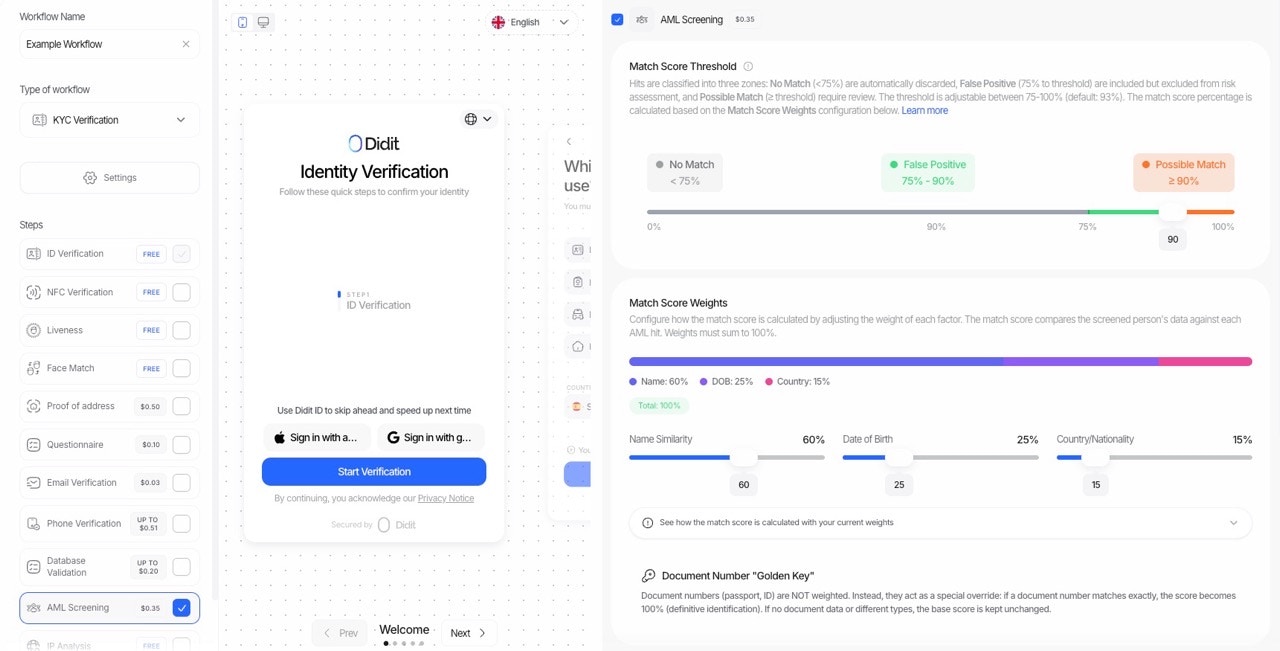
⚠️ Important: The Match Score determines individual match classification, NOT the final AML status. The final AML status (Approved/In Review/Declined) is determined by the Risk Score of non-false-positive matches.
Overview
When screening a person against AML watchlists, each potential match receives a match score from 0-100. This score answers the question: “Is this match actually the same person we’re screening?”Match Score vs Risk Score
How Match Score Determines Review Status
Each match is classified based on its match score:Default threshold: 93%Example: With a threshold of 93:
- Match with score 85 → False Positive (auto-dismissed)
- Match with score 95 → Unreviewed (needs review, risk score determines urgency)
Review Statuses Explained
All AML matches start with one of two initial statuses based on their match score:
After manual review, compliance officers can update the status to:
Tip: You can change a match’s review status in the Console by viewing the AML overview or clicking on a specific match to see its details.
How the Match Score is Calculated
Step 1: Base Score Calculation
The base score is calculated using three components with configurable weights:Note: Weights must always sum to 100%.
Step 2: Document Number “Golden Key” Logic
After calculating the base score, the document number is evaluated separately using special override logic:
This approach recognizes that a matching document number is definitive proof of identity (the “Golden Key”), while mismatched document types shouldn’t penalize the score.
Component Scoring Details
Name Similarity (0-100)
Name matching uses the WRatio algorithm from RapidFuzz, which is robust to:- Typos and misspellings
- Word order differences (“John Smith” vs “Smith, John”)
- Middle name variations (“Robert J. Smith” vs “Robert James Smith”)
- Length differences
Date of Birth Scoring
Important: When the match only provides a year (e.g., “1974”), matching that year counts as a full match because that’s all the information available to verify.
Country/Nationality Scoring
The system automatically converts between:
- ISO alpha-2 codes (ES)
- ISO alpha-3 codes (ESP)
- Full country names (Spain)
citizenship field in addition to countries.
Score Normalization (Re-weighting)
When data is missing from either the screened person or the match, the system uses score normalization to avoid penalizing for unavailable information.Example: Name-Only Screening
If you screen with only a name (no DOB or country):
Result: The name score becomes the entire match score.
Example: Missing Country on Match
If the match doesn’t have country data but has DOB:
This ensures fair scoring regardless of data availability.
Configuration Options
You can customize the match score calculation via the API or workflow settings:Match Score Threshold
Weights (must sum to 100)
API Request Example
Response: Score Breakdown
Each match in the response includes:match_score— The calculated match score (0-100)risk_score— The calculated risk score (0-100) - see Risk Scorereview_status— “False Positive” or “Unreviewed” based on match score thresholdscore_breakdown— Detailed breakdown of the match score calculation
Complete Flow: From Match Score to Final AML Status
Calculation Examples
Example 1: Strong Match → Unreviewed
Screened Data:- Name: “Robert J. Smith”
- DOB: “1985-03-15”
- Country: “US”
- Name: “Robert James Smith”
- DOB: “1985”
- Country: “United States”
- Name Score: 90% (fuzzy match)
- DOB Score: 100% (match only has year, year matches)
- Country Score: 100% (exact match)
Example 2: Weak Match → False Positive
Screened Data:- Name: “John Smith”
- DOB: “1990-05-20”
- Country: “US”
- Name: “Johnny Smithson”
- DOB: “1975”
- Country: “Canada”
- Name Score: 72% (weak fuzzy match)
- DOB Score: -100% (year mismatch penalty)
- Country Score: -50% (country mismatch penalty)
Example 3: Golden Key Override
Screened Data:- Name: “John D. Smith”
- Document Number: “A12345678”
- Name: “Jonathan David Smith”
- Document Number: “A12345678”
- Base Score: ~70 (name fuzzy match)
- Document Number: MATCH (exact match)
Managing Review Status
After the initial classification, you can manually update each match’s review status:In the Console
- Navigate to the session’s AML overview
- Click on a specific match to view details
- Use the status dropdown to change the review status:
- Confirmed Match — Verify the match is the same person
- False Positive — Mark the match as not matching
- Inconclusive — Unable to determine
Best Practices
- Start with default threshold (93) — This provides a good balance between catching true matches and filtering false positives.
- Lower threshold for high-risk scenarios — If you need to be more cautious, lower the Match Score Threshold to catch more potential matches.
- Use document numbers when available — They provide the strongest identity confirmation and can override low match scores.
- Review normalized weights — Check the normalized weight fields in the score breakdown to understand how missing data affected the score.
- Monitor false positive rates — If too many legitimate matches are being marked as false positives, lower the threshold.