

 Get Started
 Integrate / SDKs
 User Verification
 Business Verification
 Transaction Monitoring
 Changelog
identification_number, first_name, last_name, date_of_birth, and address fields when the service uses them) plus an aggregated outcome and the underlying record details when available.
It is the strongest defence against synthetic-identity fraud: a stolen real DNI or CPF will fail the registry lookup, and a fabricated number won’t be in the official database at all. Database Validation pairs with our biometric face-match in countries where the registry holds an official photo (Argentina via RENAPER, Panama via Tribunal Electoral SIB / SIB Plus) so you can confirm not just that a number is real, but that the person standing in front of the camera owns it.
Why Didit
- Cheapest pay-per-call pricing. From $0.05 per check (Dominican Republic) up to $7.00 for the most expensive specialist sources. The price is set per service, not per country — a registry that charges a high wholesale rate is priced accordingly (Kenya National ID is $3.15). Always read the rate for the exact service you plan to call from the per-service pricing table. No monthly minimums, no platform fees, no per-seat billing — only successful queries are charged.
- Fastest to integrate. Sign up, grab an API key from the console, and you can call
POST /v3/database-validation/within minutes. No sales call, no procurement cycle, no proof-of-concept paperwork — Didit is fully self-service. - Direct hits to the authoritative source. RENAPER, Receita Federal (SERPRO), Tribunal Electoral, RENAPO, RENAP, RNP, RNPN, Junta Central Electoral, Registraduría Nacional, SEGIP, Servicio de Registro Civil, Tribunal Supremo de Elecciones, Dirección General de la Policía — not aggregator scrapes.
- Biometric face-match where the registry has an official photo on file. Higher-than-OCR confidence with no extra integration work.
- Production-ready latency. p95 typically under 1.5 s end-to-end, 99.9% quarterly availability.
Global coverage
Hover any highlighted country to see every Database Validation service we run there, the data domain (Identity, Financial, Biometric, Address, Telecom, …) and the per-call price. Live countries are production-ready today; the rest are wired in on demand once a customer asks.How a Database Validation runs
A Database Validation never fires speculatively. It only runs when all of the following are true:- The session resolved a country to query — from the
issuing_stateof an ID Verification, or, when the workflow has no ID Verification step, from the single country the Database Validation step is configured for. - That country has at least one Database Validation service enabled in the workflow.
- The steps in front of the Database Validation step supplied every required field the chosen service needs.
DATABASE_VALIDATION_NOT_APPLICABLE when the document simply does not carry the identifier that service queries by, COULD_NOT_PERFORM_DATABASE_VALIDATION when it should have been available and was not. Both are listed in the warnings catalogue.
Someone on your team with review access to the session can then fill the missing field by hand from the session detail page in the Console, and saving it re-triggers the check automatically. That is a reviewer action, not something the end user can do — to let the user supply a field their document does not carry, ask for it in a Questionnaire (or a Document AI extraction, or a value you send when you create the session) and map it on the Database Validation step, as described below.
Database Validation does not require ID Verification
A Database Validation step used to imply an ID Verification step in front of it, because an ID document’s OCR was the only wired way to obtain the end user’s data. That is no longer the case: each required field declares which steps can supply it, and a service becomes available as soon as your workflow contains a step that supplies every field it needs.
This means a facial-biometric service can run from a Liveness step alone, with no ID document anywhere in the workflow, and a service keyed on a tax number, phone number or email can be satisfied from a questionnaire answer, a Phone/Email Verification step, or a Document AI extraction.
Two rules keep this safe:
- A workflow with no ID Verification must configure exactly one country on the Database Validation step. Without an
issuing_statefrom a document, that is the only unambiguous signal for which national registry to query, so a multi-country configuration with no ID Verification runs nothing rather than guessing. - The required-field check is unchanged. A service whose fields are not all present at run time is skipped before any provider is queried, so you are never billed for a database that was never asked.
Mapping Document AI and questionnaire fields
Document AI extraction fields and questionnaire questions use your key names, not Didit’s. A key that exactly matches a Database Validation input name (tax_number, date_of_birth, phone, …) is mapped automatically and needs no configuration. For anything else, the workflow editor shows a picker on the Database Validation step for the fields that are still unfilled, where you point each one at the Document AI field key or questionnaire answer that supplies it.
In the Console, a service your workflow cannot yet run is shown disabled with the reason — which fields are missing and which step would provide them — and the editor offers to add that step for you. Adding it lights up every service it unblocks immediately.
For address-based services, Didit splits the ID document’s single address into structured address elements automatically:
When calling the standalone API, you can send either a single
address or these structured fields directly. Structured fields win when both are present. Services that require address search need address_element_1 plus at least one other address element; if Didit cannot derive those from the ID document or Proof of Address in the workflow, the service is skipped and not billed.
If the resolved country is not enabled at all, the step is skipped silently with no warning and no charge.

The match outcome
Each enabled service returns a per-field validation:
The aggregated
match_type rolls up to:
full_match— every requested field agrees with at least one source.partial_match— some agreement; route to a review queue per your workflow rules.no_match— no source confirmed the data; usually decline.
How matching is derived (1×1 / 2×2)
We do not ask you to pre-pick “1×1” or “2×2” anymore — those are derived from how many distinct services full-matched the input data:- 1×1 outcome — one service returned a full match (a single authoritative source confirmed the data).
- 2×2 outcome — two or more services returned a full match (independent corroboration; the highest confidence we can express).
partialMatchAction / noMatchAction.
Biometric Database Validation
Some countries’ civil registries publish a biometric template (a portrait or a fingerprint). When that’s available, we pair the registry lookup with a biometric face-match against the user’s selfie:- Argentina (
arg_renaper) — biometric face-match against the official RENAPER photo on file. 100% population coverage; every Argentine citizen with a DNI is in the database. - Panama (
pan_cedula_sib,pan_cedula_sib_plus) — biometric face-match against the Tribunal Electoral SIB service. SIB Plus is the elevated-tier variant with stronger biometric thresholds and richer match metadata.
selfie field is required. Inside a session flow we re-use the liveness selfie (highest quality) and fall back to the document portrait. Outside a session, when calling the standalone API (POST /v3/database-validation/, Mode B above), you supply the JPEG/PNG yourself.
Global identity enrichment
glb_identity_enrichment is a global, standalone-only Database Validation service. From an email and/or phone number it resolves associated persons (names, dates of birth, addresses, phones, emails and national IDs) and returns a name-match score, mapped to the standard outcome codes MATCH / PARTIAL_MATCH / NO_MATCH / DOCUMENT_NOT_FOUND (with the corresponding match_type of full_match / partial_match / no_match).
Because it is a global (GLB) service keyed on email/phone rather than a document’s issuing country, it is not available in the workflow builder. Call it directly through the standalone API with issuing_state set to GLB:
Configuration
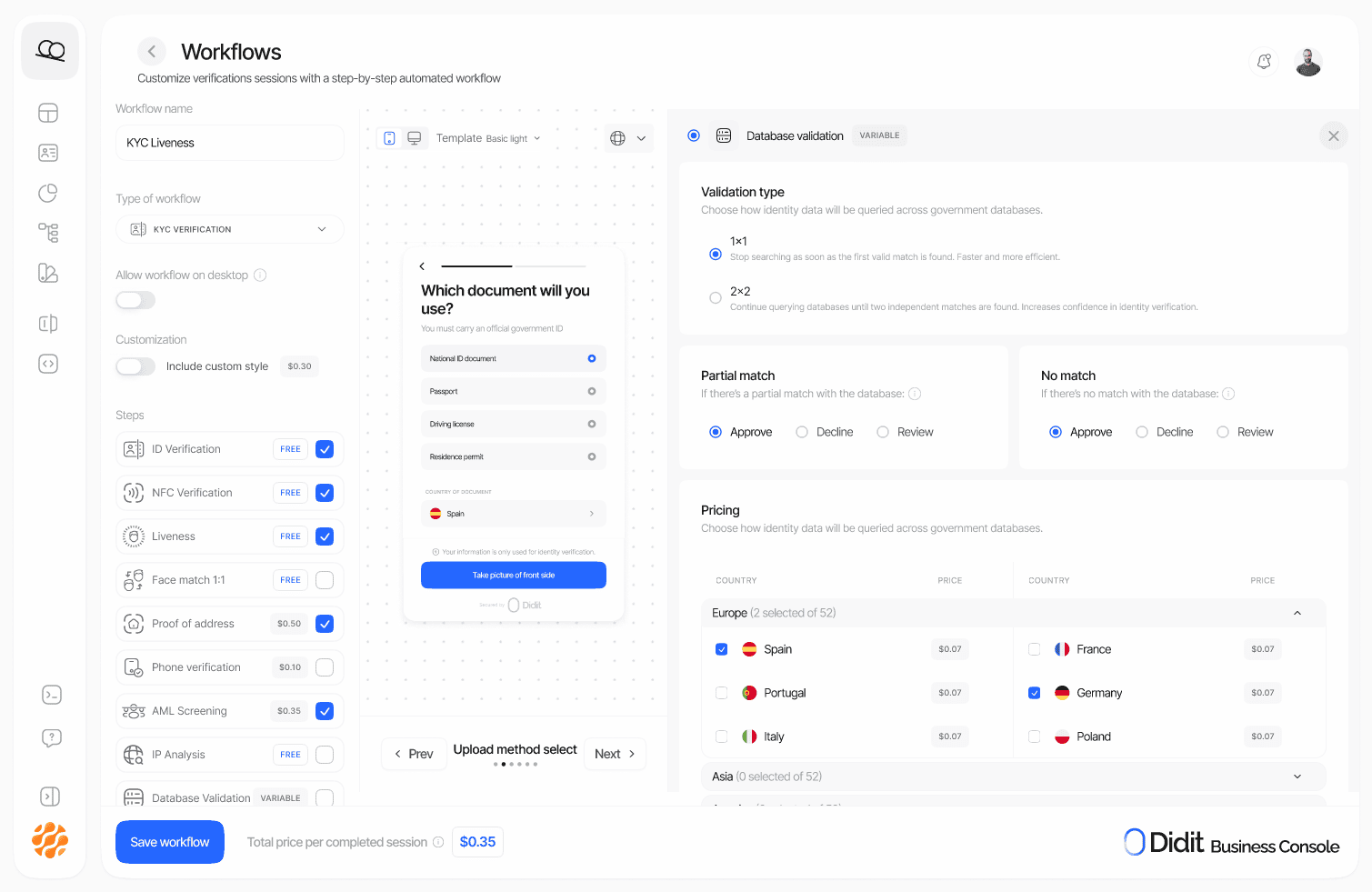
Database Validation is configured per-workflow from the Console. For each country you select the specific services you want to run; required and optional input fields are derived from the union of those services. The action taken onpartial_match and no_match outcomes is configured separately and can be approve, review, or decline.
Availability notifications
Government registries and other sources go down from time to time. While a database is unreachable, checks against it return no answer and are not billed. Inside a workflow the service resolves toREGISTRY_UNAVAILABLE. On the standalone API the same outage arrives in one of three shapes, so read the per-service outcomes and database_validation.errors[], never the HTTP status on its own:
200withoutcome_code: "REGISTRY_UNAVAILABLE"on that service invalidations, when Didit kept a result to report for it.200with that service indatabase_validation.errors[]ascode: "empty_provider_response",retryable: true, when it produced no usable answer at all and another selected service did. The failed service is then absent fromvalidationsand fromservices_used, soerrors[]is the only place it appears.502withvalidation_errors[].code: "empty_provider_response"andretryable: true, when no selected service returned a usable result (see rejected input and unavailable results).
status follows the services that did answer, so it is not a reliable outage signal on its own. A request left with nothing to compare goes to In Review, but a request that selected several services can come back Approved on another service’s match while one of its sources was unavailable. Retry the failed service from errors[] rather than the whole request.
None of these shapes says anything about the person being verified.
Didit watches the live results of real checks, database by database, and emails your organization when an interruption is sustained rather than a single failed request:
The notices go to the members and billing contacts of every organization that ran a check against that exact database in the previous 48 hours. Nothing needs to be configured and there is no opt-in. Sandbox traffic never triggers them, and neither do failures caused by the data you sent (rejected or malformed input) or by services that run on credentials your own organization connects. A check that was answered through a fallback source counts as available, and so does a conclusive no-match.
Pricing — pay only for what you use
Database Validation is billed per successful query, per service, at the rate published for that service. Rates run from $0.05 per check (Dominican Republic via Junta Central Electoral) up to $7.00 for the most expensive specialist sources. Many government registry lookups sit in the USD 0.20 to USD 0.30 band, but a good number cost considerably more because the source itself charges more — Kenya National ID (ken_national_id) is $3.15 per successful query. Price a country from its own row in the pricing table, never from a range. There are no monthly minimums, commitments, or platform fees.
You only pay when a service returns a result. Services that skip because of missing input data are not billed, and neither is a service whose source call itself fails - a registry error or an unreachable registry (REGISTRY_ERROR / REGISTRY_UNAVAILABLE) means the query was never answered, so it’s not a chargeable result.
➡️ Database Validation Pricing · Sign up and get an API key
All services
Continue reading
- Matching Methods — how 1×1 / 2×2 outcomes are derived and how to react to them.
- Outcome Codes — the full list of provider response codes (deceased, minor, document not found, biometric mismatch, …) and how they map to session decisions.
- Warnings — what we surface when a service can’t run due to missing data.
- Reports — monthly per-service billing exports with country, service ID, usage, unit price and total cost.
- Supported Countries — a static table view of every country we cover today.