

 Get Started
 Integrate / SDKs
 User Verification
 Business Verification
 Transaction Monitoring
 Changelog
@email, and receive real-time notifications — all within the Didit Console.
This feature transforms the manual review process from an isolated task into a collaborative workflow, ensuring your team can efficiently discuss edge cases, escalate concerns, and document decisions without leaving the platform.
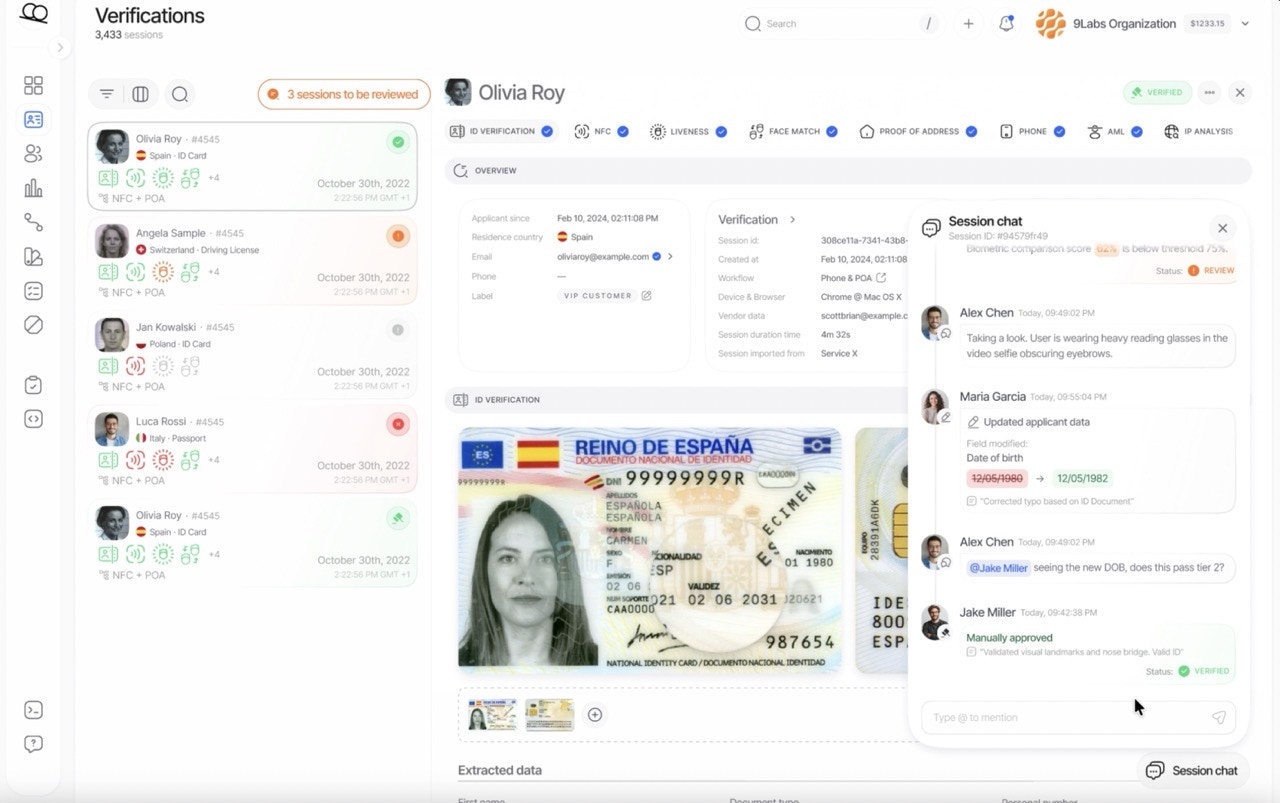
Why session chats?
Core features
Conversation count
The number beside the chat button counts comments and activity entries in the conversation, including older entries loaded as you scroll. Opening the session details does not increase this number.Comments and mentions
Add comments to any verification session to discuss findings, request clarifications, or document decisions. Use@email syntax to mention specific team members.
- They receive an instant notification in the Console
- The notification includes a direct link to the session
Notification types
Best practices
Use mentions for escalations
When you need a specific person’s attention, use
@email to ensure they’re notified immediately.Document decisions
Create an audit trail by explaining why you approved, rejected, or escalated a session.
Combine tags and comments
Add a tag like
needs-review and leave a comment explaining what needs attention.