One plan for every product
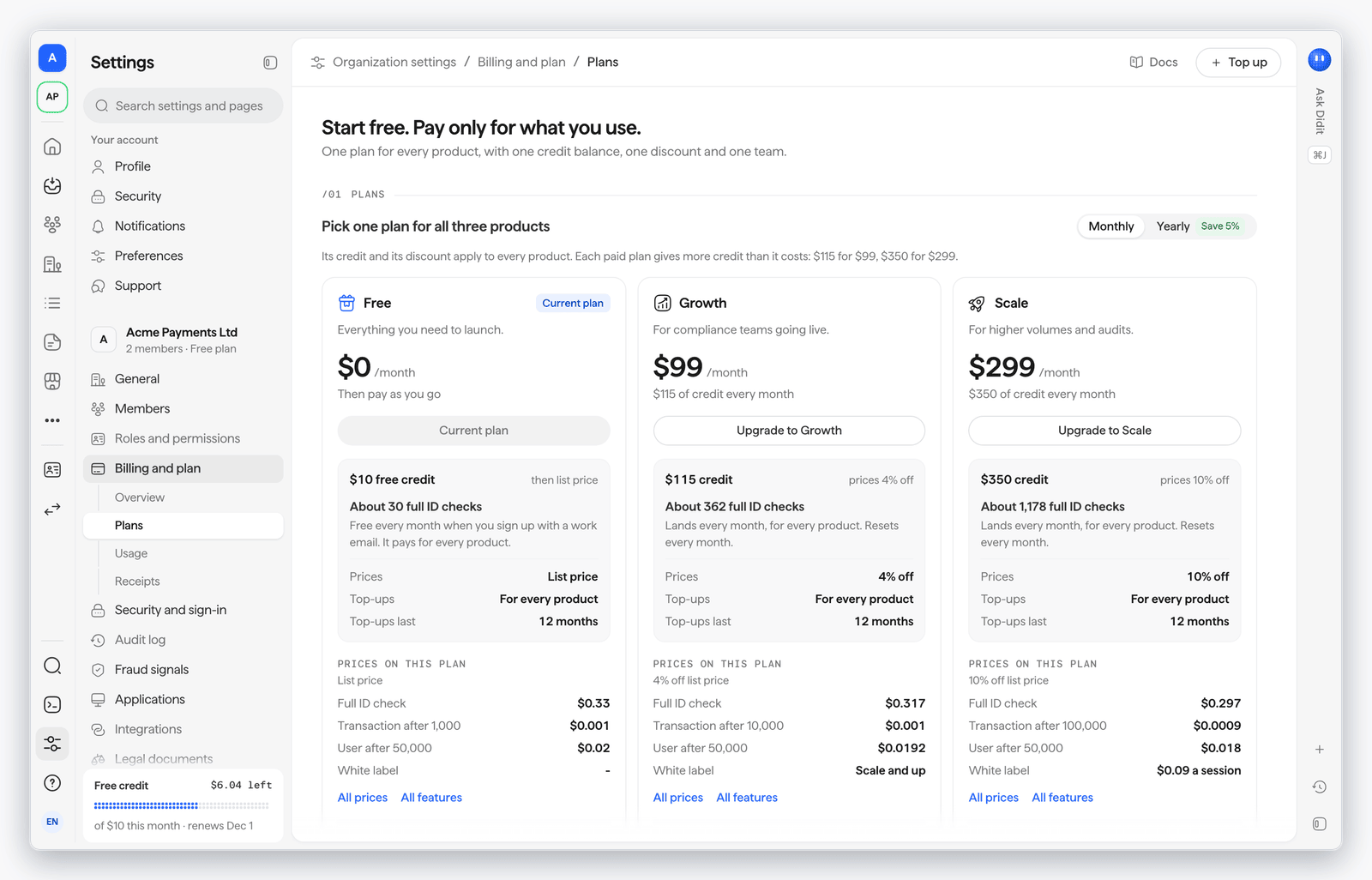
From November 1, 2026 your organization has one plan, and it covers Identity Verification, Authentication, and Transaction Monitoring & Travel Rule. One credit balance pays for all of them, and on Growth and Scale one discount applies to every price.
- Free: $0 a month at list prices. Organizations that signed up with a work email get $10 of credit a month for every check except phone verification, which top-ups pay for
- Growth: $99 a month, $115 of credit a month and 4% off every price, with the Investigator and Support Drop-off agents, case management with one blueprint and the Didit fraud network
- Scale: $299 a month, $350 of credit a month and 10% off every price, with white label on your own domain, full case management with routing, network investigation and priority support. New organizations get a 14-day Scale trial
- Enterprise: a custom annual contract where your annual commitment is your credit for the year, with company single sign-on and SCIM, cross-organization fraud signals and a named team
- Yearly billing: Growth and Scale can be paid once a year, $1,128 and $3,408
- Top-ups: on Free, Growth and Scale, a top-up is added at face value, pays for every product and lasts 12 months. Each check uses this month’s credit first, then your oldest top-up
- Monitored transactions included: 1,000 a month on Free, 10,000 on Growth and 100,000 on Scale. Each one beyond the allowance costs $0.001 at list price, less your plan’s discount on Growth and Scale
- Lower prices for everyone: white label went from $0.20 to $0.10 per finished session, the Didit fee on phone verification codes from $0.04 to $0.02, and email verification from $0.03 to $0.02 per check
- Messages you send to your users: emails cost $0.02 each, SMS cost the carrier's price per segment plus a $0.02 Didit fee, and WhatsApp messages cost WhatsApp’s price plus a $0.02 Didit fee, or the fee only from your own WhatsApp Business account. Your plan discount applies to Didit’s fee only
- Status emails stay free: the codes, links and results Didit emails during a verification are not charged
- Nothing you bought is lost: balance bought before November 1, 2026 never expires, a custom domain connected before that date keeps working on any plan, and signed contracts keep their terms until renewal
- Billing and plan in the console: see your plan, credit, balance, usage per check and receipts, change plan, top up, and set auto top-up with a monthly limit
See Pricing and Billing and plan.
Authentication for your own users
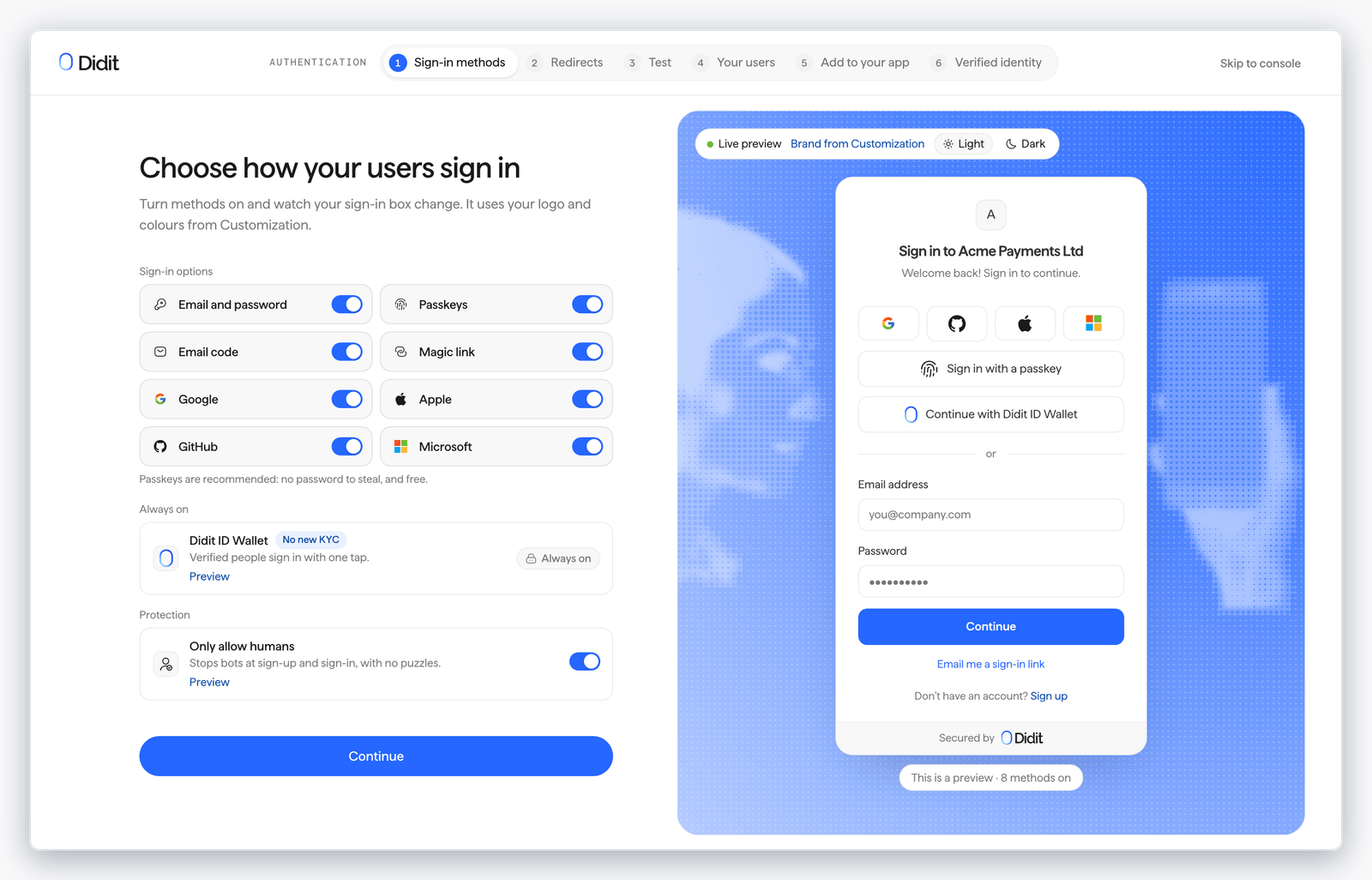
Authentication signs your customers into your application, with hosted sign-in pages on your own origin and an OAuth 2.0 flow with PKCE. Use it on its own or next to Identity Verification and Transaction Monitoring.
- Every common sign-in method: passwords, email codes, magic links, phone codes, passkeys, social sign-in, organization SSO and multi-factor authentication, each turned on per application
- Hosted pages: sign-in, magic link, invitation and password reset pages on
https://<slug>.auth.didit.me, or on your verified custom domain
- Tokens you can verify: an access token, an ID token and a refresh token from
POST {origin}/token/, with discovery and JWKS on the same origin
- Protection against attacks: brute-force lockout, challenges, breached-password checks, an attack mode and rate limits
- Bring your existing users: import accounts from a JSON or CSV file, check a dry run first, then start the import
- Sandbox first: sandbox applications have their own origin and accept
http://localhost redirect URLs for local development. Live applications accept only https:// URLs registered exactly
- Pricing: the first 50,000 active users of each month are free on every plan, then from $0.02 per active user. People who sign up and never come back are not charged
Didit turns Authentication on per application, so ask us to enable it and test in a sandbox application first. The server SDKs below verify its tokens. See Authentication, Sign-in methods, Bot protection and Migration.
The Investigator agent reviews your queues
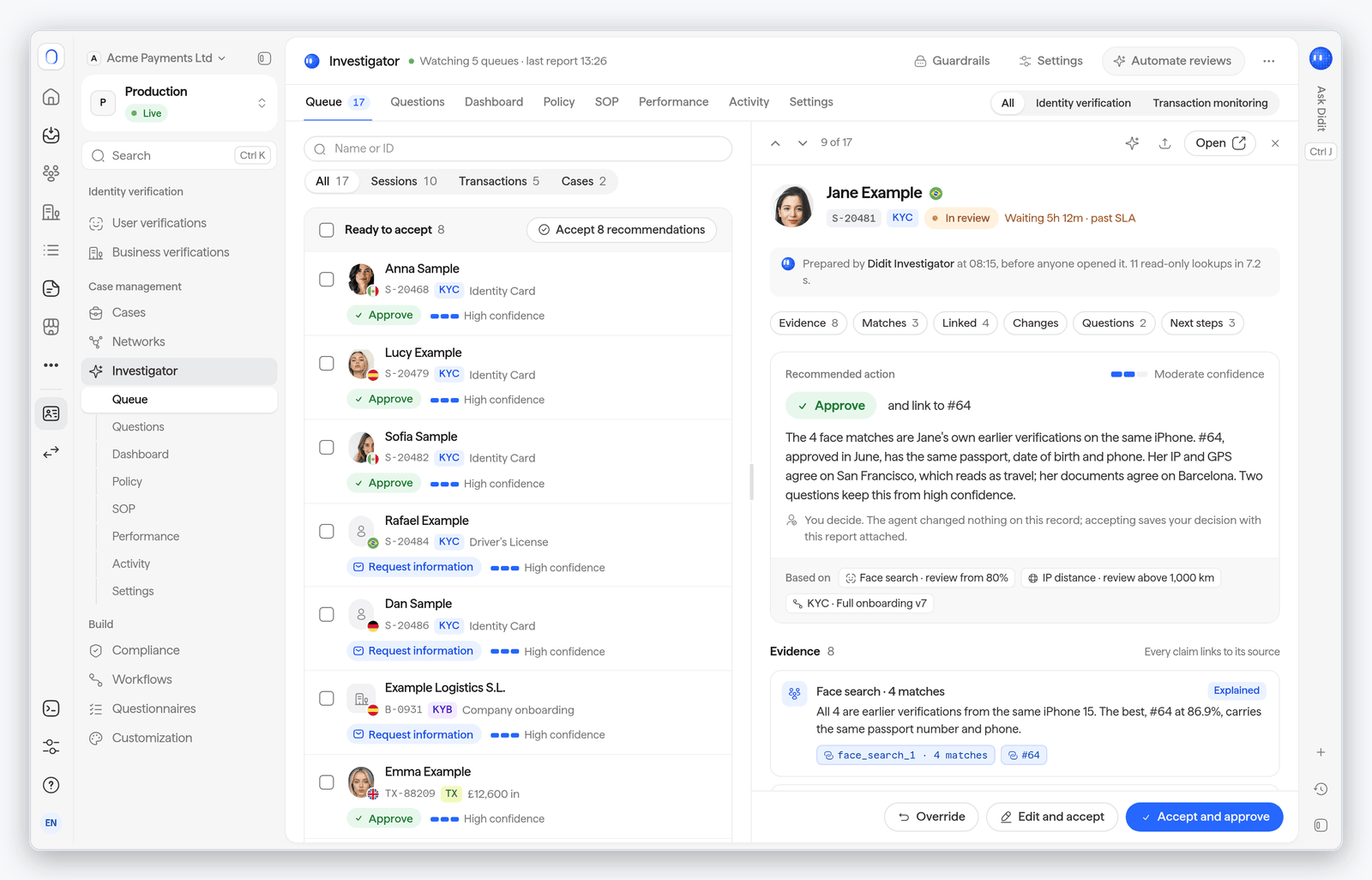
The Investigator prepares a report for each item waiting for a person: verification sessions and business verifications in review, ongoing AML monitoring hits, transaction alerts and cases.
- A report you can check: a recommendation (approve, decline, request more information or escalate), a confidence level, the reasoning, and evidence points that each cite the part of the record they come from
- Screening hits sorted out: for each screening hit it says whether it is the same person, not the same person, or unclear
- Shadow mode first: it writes reports and scores itself against your team’s decisions for 7, 14 (the default) or 30 days before you go live. Setup, shadow mode and backtests are never charged
- You choose the autonomy, per queue: Off, Suggest (the default: a person decides every item), Auto (it decides high-confidence items your policy covers) or Full auto, with an agreement threshold, a quality sample, a daily limit and an amount cap for transactions
- Fixed guardrails: sanctions matches always go to a person, fraud and AML reasons never reach end users, no decision uses protected characteristics, it never files a regulatory report, and every decision is logged and can be overridden
- In your audit log: the Investigator’s own decisions are recorded next to your team’s
- Pricing: $0.20 per finished review on Growth, Scale and Enterprise
The Investigator never runs on sandbox applications, and it is being turned on organization by organization, so ask us to enable it. See Investigator agent.
A new Business Console and Ask Didit
The Business Console has a new design across every page, from Home and Getting started to sessions, workflows, transactions, cases and settings, and Ask Didit works inside it.
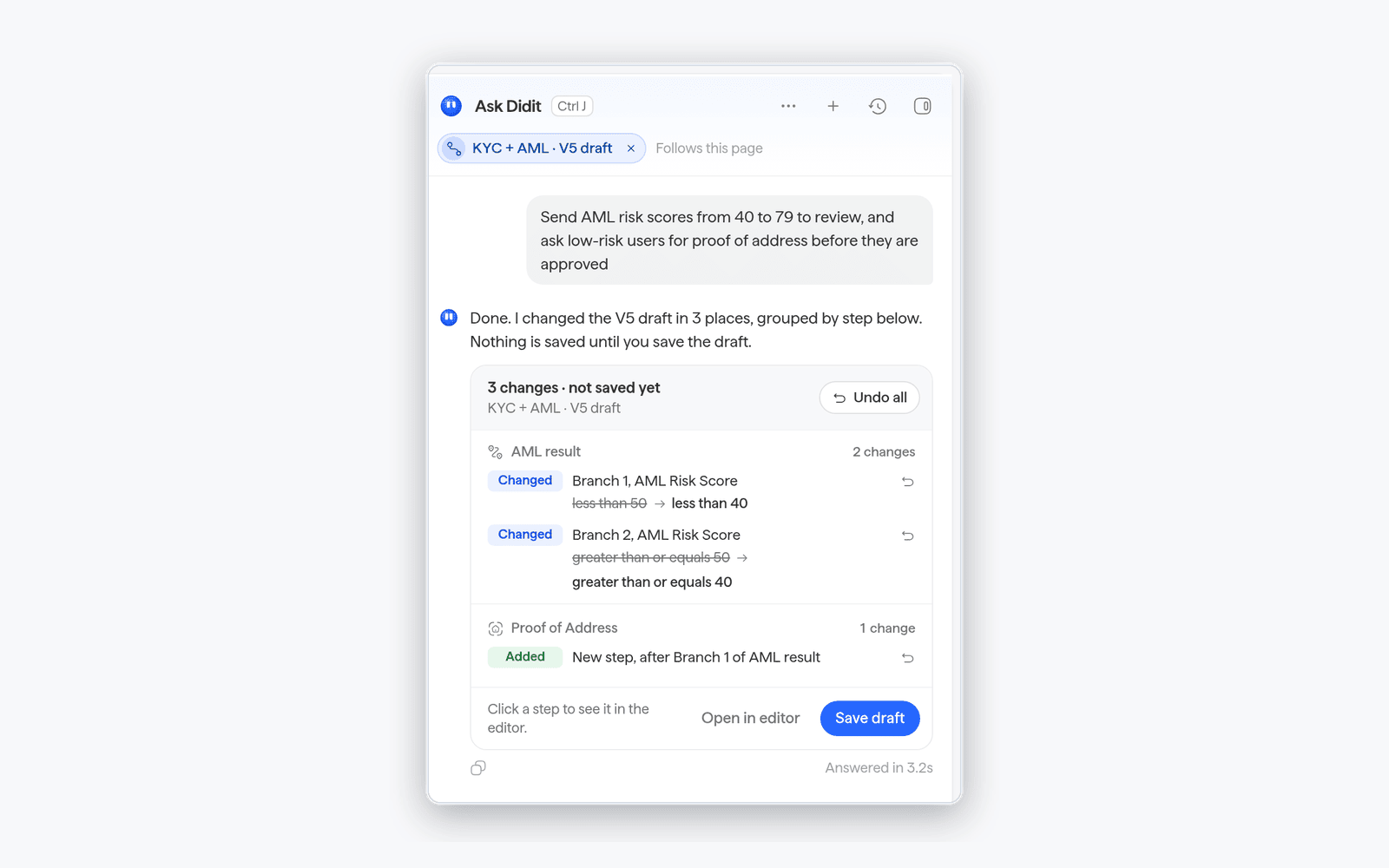
- Ask in plain language: Ask Didit finds sessions, answers questions about your activity and approval rates, and builds or changes workflows and transaction rules
- You approve every change: when Ask Didit wants to write data, it shows Confirm this action first. Workflow edits are grouped into a summary with Undo, Redo, Open in editor and Save draft
- Attach files and dictate: attach up to four files of up to 10 MB each, including JPEG, PNG or WebP images, PDF, Word, plain-text, CSV and Excel files, or use the microphone
See Ask Didit.
Stronger fraud signals
Catch captures that were injected instead of taken by the camera, and faces that come back from earlier attacks.
- Injection attacks detected:
INJECTION_ATTACK_DETECTED flags a document capture or selfie that was injected rather than captured by the device’s own camera, such as a virtual camera, a camera feed generated by the page or by browser automation, or a hooked camera. Its action in the ID Verification step defaults to Decline, and you can set it to Review or No action
- Faces from earlier attacks:
FACE_MATCHES_LIVENESS_ATTACK flags a face that matches another user’s earlier capture judged an attack with high confidence. Set it to No action (the default) or Review in the Liveness and Age Estimation steps
- Document-capture selfie in Face Search: the selfie taken while the user photographs their document goes through the same Face Search as the liveness selfie, against your face blocklist and your approved users, with its own switch in the ID Verification step’s Rules tab. Its matches are listed in the session
See ID Verification warnings, Liveness warnings and Face Search.
Biometric consent
Biometric privacy laws in Illinois (BIPA), Texas (CUBI) and Colorado require a notice and an explicit release before a business collects face geometry. Didit can now show a consent step before the first face capture to the people those laws cover, and keeps their answer on the session.
- Choose the mode: Auto, the default, shows the step only when a trigger applies, such as the person’s state; Always asks in every session that captures a face; Never leaves consent collection to you
- Tell us what you know: send
user_state when you create a session, or biometric_consent with the consent you already collected so the flow does not ask again
- Hosted flow and native SDK 4.10.0 or later can show the step
Didit shows the step and records the answer; you decide whether your user journey meets the laws that apply to your business. See Biometric consent.
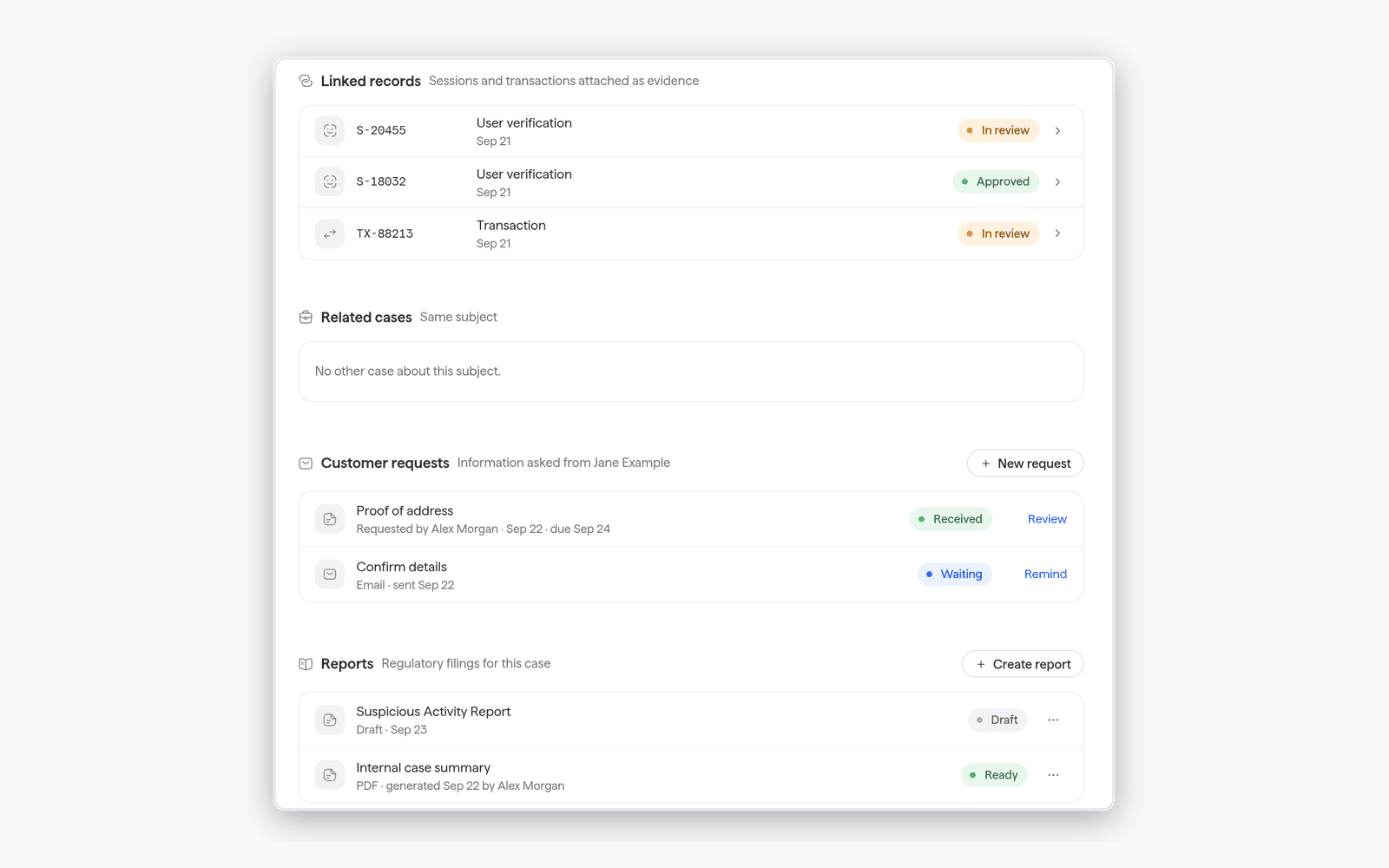
Case management
Regulatory reports now have a full lifecycle inside case management, next to the verifications, transactions and customer requests of the investigation.
- Regulatory reports you can manage: create a report from a case or from the Reports page, follow its lifecycle, and delete a report you no longer need. See FIU reports
Location verification
A new workflow step confirms where a person is while they verify, from one device position read in the browser or native SDK, or from the connection’s IP location.
- Allowed and blocked areas: prove the person was inside a jurisdiction you are licensed for, or keep them out of places you do not serve
- Distance checks: compare the device position with the IP location and with the address on their document
- Spoofing signals: mocked positions, VPN, proxy, Tor and emulators raise their own warnings. Each warning’s action (
NO_ACTION, REVIEW or DECLINE) sets the step status, and the strongest action wins
- One reading, with consent: the person sees why their location is needed, the notice they accepted is recorded in the result, and each attempt can be submitted only once
- Pricing: $0.05 per check
See Location verification.
Address validation
Confirm that a postal address exists and get it back normalised, with its delivery lines, components and coordinates.
- A new API:
POST /v3/address-validation/ takes the address on one line or as structured fields, with the country always required. It costs $0.10 per address
- Inside your workflows: turn on address validation in the ID Verification and Proof of Address steps, and choose what happens when an address is not verified
- The address only: a
verified result means the place exists, not that anyone lives there
See Address Validation.
E-signature levels
E-signature lets the verified person, or a company’s legal representatives and key people, sign your PDF and Word documents inside the verification flow.
- Simple, the default: needs no ID verification, email or phone
- Advanced (AES): needs an approved ID verification and a verified email or phone, and the signer confirms with a one-time code sent to that contact
- Qualified (QES): shown as Coming soon. Saving it through the API returns
400 with qes_not_available, and it is never replaced silently by Advanced (AES)
- Pricing: $0.10 per signed session, Simple or Advanced, whatever the number of documents. A signature that is declined, fails or expires is not charged
See E-signature.
Travel Rule
Crypto transfers reach their counterparty more often, and you can see every message they owe.
- Counterparty discovery: a transfer that carries only a wallet address reaches its counterparty more often. Before it is declared unroutable, Didit tries, in order: (1) a wallet another Didit customer proved it controls, (2) the wallet’s attribution, (3) a network lookup where a Travel Rule network you use offers one, and (4) the counterparty you named. Only then does it ask the end user. A VASP you or the end user picked always comes first
- Delivery you can follow: Didit sends every message a transfer owes and retries it until the other side takes it. The transfer’s
delivery field shows the latest message, its status and its rail
- Test without network credentials: in sandbox, the Didit Test VASP answers your outbound transfers with the scenario you pick, and can send you inbound transfers to test your side
- More chain shapes: UTXO transfers, and networks that need a memo or a tag
See Travel Rule and Test Travel Rule in sandbox.
Wallet screening
Screen wallets on more networks, with less to send.
- Four more networks: managed wallet and transaction-hash screening now covers Avalanche C-Chain (
AVAX), Cardano (ADA), Stellar (XLM) and Hedera (HBAR), for 17 networks in total
- Less to send: leave the network out for a Bitcoin, Tron or Solana address and Didit reads it from the address format, or send a common network name such as
POLYGON or BSC. A 0x address still needs its network: without one, the request answers 422 (wallet_screening_chain_undetermined) with the candidate networks, and nothing is screened or billed
- Tokens on the right network: a
0x transaction hash for USDT, USDC or ETH is looked up on Ethereum, BNB Chain, Polygon, Base, Arbitrum and Optimism and screened on the network where it is found
See Wallet screening.
Business verification
Build your own company onboarding screens on the API, and check tax numbers against more official sources.
- Lite from the national register in ten Asia-Pacific markets: in Australia, China, Hong Kong, Japan, New Zealand, Singapore, South Korea, Taiwan, Thailand and Vietnam, a Lite check also searches the national company register, so newly incorporated companies are found as soon as the register lists them. Lite there costs $3.00, and stays $2.00 everywhere else. See KYB registry pricing
- Headless KYB: new endpoints upload company documents, return the parties extracted from them, let you create, update and delete party drafts, and submit the parties. See the integration guide
- Tax ID and VAT checks against official sources: VAT and tax numbers are checked against official registers, such as the EU’s VAT register and the national tax registers of Norway, Switzerland, Brazil, Colombia, Costa Rica, Ecuador and Paraguay. In dozens of other countries they are checked against the official format and check-digit rules. A French SIREN or SIRET, a Dutch RSIN or a full Hungarian tax number is converted to the matching VAT number first. See Company data
Phone verification
Your brand, end to end, in every verification code.
- Write your own SMS text and sender ID: September brought your name inside SMS codes; now, under White Label → SMS, you can write the whole text of your SMS codes per language with
{code} and {brand}, and use your own sender ID where carriers accept it. When a code is resent on a route that cannot carry them, it still arrives with Didit’s text, signed with your SMS sender name, from Didit’s sender
- WhatsApp codes from your own number: connect your own WhatsApp Business number so your users receive codes from your business name and number
See Phone verification.
Session API and webhooks
Delete, export and measure sessions at any scale.
- Delete thousands of sessions in one call: large deletions run as a job. When more than 20 sessions match a Batch Delete Sessions request, the API answers
202 with a deletion job. Poll Get Session Deletion Job until it reports COMPLETED or FAILED. Up to 20 sessions are still deleted in the request, with one result per session
- Delete exactly the sessions you filtered: with
delete_all: true you can narrow a deletion with the filters of List Sessions, each prefixed with filter_, for example filter_status or filter_date_from. An unknown filter or a value that cannot be read is refused before anything is deleted
- Child verifications counted: when a business verification is deleted, the key-person and company verifications it created are deleted with it, and
deleted_child_verifications reports how many. Batch Delete Sessions deletes KYC sessions only, so there it is always 0
- Queued webhooks dropped with a deleted session: webhook deliveries still queued for a deleted session, and their retries, are dropped. Webhooks already delivered are not affected
- Every file of a session in one ZIP: Export files prepares one ZIP with the document sides, selfies, liveness videos and uploaded documents of a KYC or KYB session, in original quality
- Today by the hour: a new analytics endpoint returns today’s verifications per local hour, the same weekday last week and today’s outcomes
Server SDKs
Version 1.0 of the official, typed server SDKs for Python, Node.js, Go, Java, PHP, Ruby and .NET calls the server endpoints, verify the webhooks Didit sends you, and check Authentication tokens. API reference pages show each SDK’s code sample next to the cURL request once its latest release covers that endpoint. See Server SDKs.
Native SDKs: the right country first
React Native and Flutter 4.9.1 pin the iOS and Android SDKs to 4.9.1.
- The right country first: when the IP lookup finished after the screen appeared, the document and proof of address country pickers stayed on the first country in the list. They now switch to the detected country, without overriding a country set in the session or picked by the user
- Android fixes: questionnaire headers follow the SDK language, and NFC passport scanning no longer crashes in the full package
- Better copy: the iOS and Android 4.9.1 SDKs improve the Russian and Kyrgyz verification copy
Documentation and AI agents
The docs speak more languages, and agents can read exactly the part they need.
- Spanish, Brazilian Portuguese and Japanese: a first set of 40 pages is translated into each language
- One page for every API error: API errors lists every status, body shape and stable error code, with what is safe to retry
- A page map per product:
/llms/<product>.md, for example /llms/user-verification.md, so an agent can load one product’s documentation instead of the full index
- A changelog hub at All updates with product filters and one RSS feed
Coming next
These are documented and not enabled in production yet.
- Japan’s My Number Card: the NFC step will read the My Number Card through JPKI in the native SDKs, with the person entering the card PIN. Until then, a My Number Card in a native SDK on an NFC phone skips the NFC step. See NFC verification
- Bank Verification: it will confirm that a bank account belongs to the person or company an earlier step verified, by bank sign-in or by an account check from the details the person types, with statement upload and micro-deposits as fallbacks and Continue without your bank always available. See Bank verification methods
Improvements
- Unknown document designs flagged: the document-type warning also covers a document front that matches no official design
- Longest retention by default: a new application starts at its plan’s longest data retention window
Fixes
One error that now explains itself.
- Fixed the Import Shared Session errors: an invalid, expired or foreign share token, or one for a session that was deleted, returns
400 with the reason under share_token
Last modified on November 1, 2026


 Get Started
 Integrate / SDKs
 User Verification
 Business Verification
 Transaction Monitoring
 Changelog